
7 Best Which Student Laptops should I buy in 2026: Tested & Rank…
Compare the best student laptops for 2026 and match battery life, keyboard comfort, weight, and price to your major and budget.
Our Top Pick
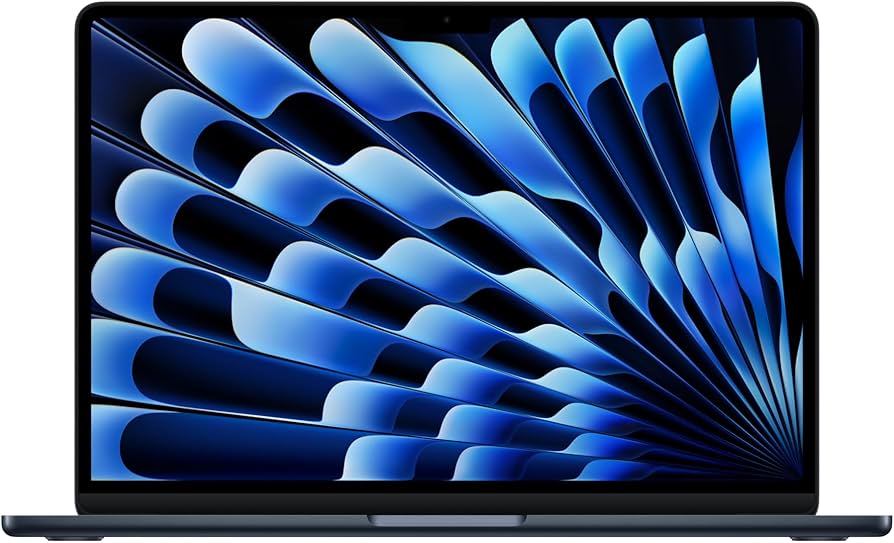
Apple MacBook Air 13-inch (M4, 2025)
Best OverallStudents in non-specialist majors who want the simplest, lightest, longest-lasting laptop for writing, research, and daily carry.
View on Amazon →Key Factors to Consider
- 1.Battery life for real class days: Manufacturer claims of 15 to 20 hours usually translate to 8 to 12 hours of mixed real-world use. Prioritize a machine that genuinely clears a full day of classes, note-taking, and browsing so you are not competing for outlets in the library.
- 2.Weight and size for daily carry: Anything under 3 pounds disappears into a backpack; a 4-pound 15-inch laptop quickly becomes a stay-in-the-dorm computer. Consider your actual commute, campus size, and whether you bike or walk between buildings.
- 3.Keyboard and trackpad quality: You will type more than you ever have. Key travel, key spacing, and a reliable palm-rejection trackpad matter more to daily satisfaction than a slightly faster processor.
- 4.RAM: 16GB is the new baseline: 16GB handles dozens of browser tabs, Zoom, Spotify, and Office simultaneously without stutter. 8GB machines feel fine in year one and strained by year three, and RAM is often soldered and non-upgradable.
- 5.Storage: 256GB minimum, 512GB comfortable: Course files are small, but video projects, photo libraries, game installs, and downloaded datasets are not. If the SSD is soldered, buy more than you think you need up front.
- 6.Processor class and platform: Apple silicon, Intel Core Ultra, AMD Ryzen, and Snapdragon X all handle coursework comfortably. The differentiation is software compatibility, efficiency, and whether your major's required applications run natively.
- 7.Operating system and major-specific software: Windows-only lab tools, engineering suites, and certain accounting packages make macOS a hassle. Conversely, macOS offers better battery and resale if nothing in your program requires Windows.
- 8.Display quality and brightness: Aim for at least 300 nits and a 16:10 or 3:2 aspect ratio for reading documents. OLED panels look stunning for media but are glossier and more reflective in bright lecture halls.
- 9.Ports and connectivity: Two USB-C ports alone mean carrying a dongle. HDMI, USB-A, and a headphone jack still matter for projectors, thumb drives, and older peripherals in classrooms and labs.
- 10.Durability, warranty, and total cost: Factor in accidental damage protection, a sleeve, a hub, and student discounts. A slightly more expensive machine with better support and resale value can cost less over four years than a cheap one you replace in year three.
The Products
Apple MacBook Air 13-inch (M4, 2025)
✓ Pros
- •Best-in-class battery life that realistically covers a full day of classes on one charge
- •Fanless, completely silent design that is ideal for libraries and quiet seminar rooms
- •Excellent keyboard and a large, accurate trackpad that makes long writing sessions comfortable
- •16GB of unified memory standard, which is enough for heavy multitasking through four years
- •Bright 13.6-inch Liquid Retina display with a tall 16:10 aspect ratio for documents
- •Strong resale value and long software support lower the effective cost of ownership
✗ Cons
- •Only two Thunderbolt ports, so most students will need a USB-C hub for HDMI or USB-A
- •No touchscreen or stylus support, which rules it out for handwritten digital note-taking
- •Windows-only lab and engineering software will not run natively
- •Storage upgrades are expensive and the SSD is not user-replaceable
- •Premium price means it consumes most of a mid-range budget in one purchase
Best For:
Students in non-specialist majors who want the simplest, lightest, longest-lasting laptop for writing, research, and daily carry.
Not Recommended For:
Engineering or business students who need Windows-only software, and anyone who wants a touchscreen for handwritten notes.
Key Features:
Standout Feature:
A genuinely silent fanless chassis that still delivers full-day battery life, which is the combination students feel every single day.
VS Others:
It costs more than the ThinkPad E14 and the Pavilion Aero 13, but it beats both on battery life, weight, and resale value. The Zenbook 14 OLED has a superior display for media work, and the ThinkPad wins clearly on ports and repairability. Choose the MacBook Air when simplicity and endurance matter more than connectivity or Windows compatibility.
Why This One:
It is the safest default in this guide because it removes friction rather than adding features you have to manage. If nothing in your major requires Windows, this is the laptop you will think about the least over four years.
Lenovo ThinkPad E14 Gen 6 Business Laptop
✓ Pros
- •The most comfortable keyboard in this price range for long essays and coding sessions
- •Full port selection including USB-A, HDMI, Ethernet, and USB-C with no dongle required
- •Business-grade durability testing and a reputation for surviving years of daily abuse
- •16GB RAM and 512GB SSD at a price well below premium ultraportables
- •Replaceable storage and serviceable design extend usable life beyond four years
- •Excellent value when paired with frequent Lenovo student and business discounts
✗ Cons
- •Display is dimmer and less color-accurate than OLED or premium IPS competitors
- •At roughly 3.1 pounds it is heavier than the MacBook Air or Pavilion Aero 13
- •Speakers are weak and fine only for casual listening
- •Plastic-heavy build feels less premium than the XPS 13 or Surface Laptop 7
- •Battery life is solid but does not match the ARM-based Surface or the MacBook Air
Best For:
Windows-dependent students in engineering, business, or computer science who type heavily and want ports and durability over polish.
Not Recommended For:
Students who prioritize a stunning display, minimal weight, or all-day battery life above keyboard feel and connectivity.
Key Features:
Standout Feature:
A full-size Ethernet port and dual USB-A on a modern 14-inch laptop, which is rare and genuinely useful on campus networks and in labs.
VS Others:
It undercuts the MacBook Air and XPS 13 by hundreds of dollars while offering better ports and a better keyboard than either. It cannot match the Zenbook's OLED panel or the Surface's battery life, and it is heavier than the Pavilion Aero 13. If you need Windows and value function over finish, it beats everything here on dollars per useful feature.
Why This One:
It is the laptop that keeps working when you spill coffee on it, plug into an ancient projector, and write a 20-page paper in one sitting. Few machines at this price are this easy to live with and this easy to repair.
ASUS Zenbook 14 OLED Laptop
✓ Pros
- •Outstanding 3K 120Hz OLED display with excellent color coverage for design and media work
- •Lightweight chassis at roughly 2.7 pounds that is easy to carry all day
- •Generous 1TB SSD and 16GB of fast memory at a mid-range price
- •Strong port selection with USB4, USB-A, and HDMI 2.1 built in
- •High-capacity battery paired with an efficient Ryzen processor
- •Smooth 120Hz refresh rate makes scrolling documents and web pages feel fluid
✗ Cons
- •Glossy OLED panel reflects glare in bright rooms and lecture halls
- •Memory is soldered and cannot be upgraded later
- •Fans become audible during sustained heavy workloads
- •Brightness at high settings drains battery faster than an equivalent IPS laptop
- •Long-term static-image burn-in remains a consideration for taskbar-heavy use
Best For:
Design, media, and marketing students who spend hours reading and editing on screen and want the best display available in this price range.
Not Recommended For:
Students who mostly work outdoors or in bright glare-prone spaces, and anyone who expects to upgrade memory later.
Key Features:
Standout Feature:
A 3K 120Hz OLED panel at a mid-range price, which is the single biggest day-to-day quality-of-life upgrade for anyone who reads or edits on screen.
VS Others:
It has a clearly better display than the ThinkPad E14, Pavilion Aero 13, and MacBook Air, and it is lighter than the ThinkPad while costing far less than the XPS 13. It cannot match the Surface Laptop 7 or MacBook Air on battery endurance, and it lacks the ThinkPad's repairability. Choose it when screen quality drives your work.
Why This One:
You will stare at this screen for thousands of hours over four years, and this is the best one you can buy without crossing $1,000. It handles media coursework, split-screen research, and long reading sessions with equal ease.
Microsoft Surface Laptop 7 13.8-inch Touchscreen Laptop
✓ Pros
- •Exceptional battery life that easily covers back-to-back class and lab days
- •Bright 120Hz touchscreen with a tall 3:2 ratio that is ideal for reading documents
- •Premium aluminum build, comfortable keyboard, and precise haptic trackpad
- •Runs quietly and coolly thanks to the efficient Arm-based processor
- •Stylus support makes handwritten notes and PDF annotation practical
- •Includes USB-A, USB-C, Surface Connect, and a headphone jack
✗ Cons
- •Arm processor compatibility gaps with some specialized or older software
- •Gaming performance is limited compared with x86 laptops at the same price
- •Storage and memory are soldered and not upgradeable
- •Higher storage tiers get expensive quickly
- •Stylus is sold separately, adding to the total cost for note-takers
Best For:
Science and pre-professional students who prefer handwritten digital notes, need a touchscreen, and want the longest possible battery life in Windows.
Not Recommended For:
Engineering students with specialized x86-only software and anyone who wants to game between classes.
Key Features:
Standout Feature:
A tall 3:2 120Hz touchscreen combined with class-leading battery life, a combination almost no other Windows laptop offers at this price.
VS Others:
It beats the ThinkPad E14 and Zenbook 14 OLED decisively on battery life and offers a touchscreen neither of them has. It costs about the same as the Zenbook but trades display punch for endurance and stylus support, and it cannot match the MacBook Air's app compatibility breadth. Pick it if touch and battery matter more than raw compatibility.
Why This One:
It is the best Windows laptop here for students who learn by hand and hate charging. If you annotate slides, diagram in class, and want to leave the charger in your dorm, this is the one.
HP Pavilion Aero 13 Laptop
✓ Pros
- •Lightest laptop in this guide at just over 2 pounds, ideal for daily commuting
- •16GB RAM and 512GB SSD at a price well under $700
- •Bright 13.3-inch 16:10 display that works for outdoor reading
- •Keeps USB-A and HDMI alongside USB-C without needing a dongle
- •Comfortable keyboard and decent trackpad for the size
- •Strong price-to-portability ratio compared with premium ultraportables
✗ Cons
- •Some chassis flex in the lid and base compared with magnesium premium models
- •Speakers are thin and quiet for anything beyond casual listening
- •Fan noise is audible during sustained video calls or heavy multitasking
- •Display color accuracy is not sufficient for serious photo or video editing
- •Battery life is good but trails the MacBook Air and Surface Laptop 7
Best For:
Commuters and students who carry a laptop all day and want the lightest possible Windows machine without blowing their budget.
Not Recommended For:
Creative students who need color-accurate displays and anyone who wants premium build quality or top-tier speakers.
Key Features:
Standout Feature:
Just over 2 pounds of weight, which makes it the least burdensome laptop to carry across a large campus every day.
VS Others:
It is lighter and cheaper than the Zenbook 14 OLED and MacBook Air, though it loses on display quality and build refinement. It undercuts the ThinkPad E14 slightly while being far easier to carry, but it gives up the ThinkPad's keyboard and ports. Pick it when weight is the deciding factor.
Why This One:
If you have ever skipped bringing your laptop to a study session because it felt heavy, this solves that permanently. It is the most carry-friendly machine here that still runs full Windows coursework.
Dell XPS 13 (9350) Premium Laptop
✓ Pros
- •Premium machined aluminum build that feels far more expensive than mid-range rivals
- •Compact footprint at around 2.6 pounds with very thin bezels
- •Efficient Intel Core Ultra processor with strong everyday responsiveness
- •Excellent keyboard and a seamless glass haptic trackpad
- •Bright display options including a 3K OLED touchscreen on higher configurations
- •Good webcam and Windows Hello support for remote classes and meetings
✗ Cons
- •Only two Thunderbolt ports and no headphone jack, so a hub is essentially mandatory
- •Costs significantly more than the ThinkPad E14 or Zenbook 14 OLED
- •The invisible trackpad design takes some adjustment and can confuse first-time users
- •Limited repairability compared with business-class laptops
- •You pay a design premium that does not translate into faster coursework performance
Best For:
Students who want a premium, compact Windows laptop and are willing to pay more for design, materials, and portability.
Not Recommended For:
Budget-conscious students and anyone who needs built-in HDMI, USB-A, or a headphone jack without carrying a dongle.
Key Features:
Standout Feature:
The most premium-feeling chassis in this guide, with a seamless glass touchpad and build quality that holds up after years of daily handling.
VS Others:
It is better built than the ThinkPad E14 and Pavilion Aero 13, but it costs far more and offers fewer ports. The Zenbook 14 OLED matches or beats its display for less money, and the MacBook Air beats it on battery life and resale. Choose the XPS 13 when you want the best-looking, best-feeling Windows ultraportable and can absorb the price.
Why This One:
It is the Windows laptop you buy when you want to enjoy using your computer, not just tolerate it. If design and materials matter to you and your budget allows it, it is a pleasure to own.
Acer Aspire 5 A515-58M 15.6-inch FHD Laptop
✓ Pros
- •One of the cheapest laptops available with 16GB RAM and a 512GB SSD
- •Large 15.6-inch full-HD screen that is comfortable for split-screen work
- •Keyboard includes a number pad, which suits accounting and spreadsheet work
- •Good port selection with USB-A, USB-C, HDMI, and Ethernet on many models
- •M.2 SSD is replaceable on most configurations for cheap future storage upgrades
- •Leaves hundreds of dollars in the budget for a monitor, warranty, or textbooks
✗ Cons
- •At nearly 4 pounds it is heavy for daily carrying across campus
- •Display is dim and lacks color accuracy for creative work
- •Battery life realistically runs 6 to 8 hours, so bring the charger
- •Plastic chassis feels less durable than the business and premium options
- •Speakers and webcam are basic and best suited to casual use
Best For:
Budget-constrained students who mostly work at a desk and need maximum usable specs for the lowest possible price.
Not Recommended For:
Commuters who carry a laptop all day, creative students who need color accuracy, and anyone who needs all-day battery life.
Key Features:
Standout Feature:
16GB of RAM and a 512GB SSD at a price where most rivals still ship 8GB and 256GB, which is the difference between lasting four years and lasting two.
VS Others:
It is the cheapest way to get a genuinely usable specification in this guide, undercutting the Pavilion Aero 13 and ThinkPad E14 by $100 to $170. It loses badly on weight, battery life, and display quality against every other pick. Choose it only when the budget is hard-capped and the laptop will mostly stay on a desk.
Why This One:
It gets you 16GB of RAM, a 512GB SSD, and a big screen for about $530, which is remarkable. If your ceiling is firm and you need a capable machine today, this is the pragmatic answer.
Who Should Get What?
The Budget-First Freshman
An incoming first-year student paying their own way, targeting a $500 to $600 ceiling before accessories. They need a reliable machine for essays, lecture slides, Zoom, and streaming, and they would rather put the savings toward textbooks and a decent backpack.
Recommended:
Acer Aspire 5 A515-58M 15.6-inch FHD Laptop
The Aspire 5 is one of the few sub-$550 laptops that ships with 16GB of RAM and a 512GB SSD, which is exactly the combination that keeps a machine usable through senior year. The 15.6-inch screen is comfortable for split-screen research, and the full keyboard with number pad helps for spreadsheets. Accept the dimmer display and average battery life, and it does everything a non-specialist major needs.
View on Amazon →The Humanities and Note-Taking Major
A sophomore majoring in English or political science who reads hundreds of PDFs, writes long papers, and attends four back-to-back seminars across campus. They want something light, silent, and dependable that never forces them to hunt for an outlet, and they have around $1,000 to spend.
Recommended:
Apple MacBook Air 13-inch (M4, 2025)
The fanless design means zero noise in quiet seminar rooms, and the 13.6-inch Liquid Retina display is bright and sharp for hours of reading. Battery life comfortably covers a full class day, and at roughly 2.7 pounds it never becomes a burden in a backpack. Strong resale value also means the effective cost of ownership is lower than the sticker price suggests.
View on Amazon →The Engineering or Computer Science Student
A current student entering a program that requires Windows-only lab software, IDEs, virtualization, and the occasional legacy peripheral. They need real ports, a keyboard built for long coding sessions, and hardware they can service or upgrade rather than replace.
Recommended:
Lenovo ThinkPad E14 Gen 6 Business Laptop
The ThinkPad E14 runs Windows natively, so nothing in a lab syllabus gets blocked, and its keyboard is the most comfortable in this price bracket for long coding sessions. USB-A, HDMI, USB-C, and Ethernet are all built in, which matters when you need to plug into projectors, boards, or campus networks. Business-grade durability and replaceable storage make it a machine you can keep and service for four years.
View on Amazon →The Design and Media Student
A student doing graphic design, media studies, or marketing coursework who edits photos, cuts short videos, and works in split-screen layouts for hours. Color accuracy and screen quality directly affect their grades and portfolio, and their budget tops out around $850.
Recommended:
ASUS Zenbook 14 OLED Laptop
The 3K 120Hz OLED panel covers a wide color gamut and gets bright enough for detailed editing work, which is the single biggest upgrade you can buy in this price range for design coursework. The Ryzen processor and 16GB of RAM keep Photoshop, Illustrator, and a dozen browser tabs responsive. It stays under 2.7 pounds, so carrying it to studio or critique sessions is effortless.
View on Amazon →The Commuter Who Lives Out of a Backpack
A student who commutes by train or bike, spends 10 to 12 hours a day on campus, and carries everything with them. Weight and size are their top priority, and they want a Windows machine around $650 that does not feel like a compromise.
Recommended:
HP Pavilion Aero 13 Laptop
At just over 2 pounds, the Pavilion Aero 13 is the lightest laptop in this guide by a clear margin, which matters when you are carrying it every single day. The 13.3-inch 16:10 display is bright enough for outdoor reading between classes, and the Ryzen processor with 16GB of RAM handles coursework without complaint. It keeps USB-A and HDMI ports that most thin laptops drop.
View on Amazon →The Touchscreen Note-Taker and Battery Chaser
A pre-med or science student who prefers handwriting digital notes with a stylus over typing, takes back-to-back labs and lectures, and wants to leave the charger at home. They have around $900 and are comfortable with mainstream apps.
Recommended:
Microsoft Surface Laptop 7 13.8-inch Touchscreen Laptop
The 120Hz touchscreen makes handwriting diagrams and annotating slides genuinely practical, and the Snapdragon X chip delivers outstanding battery life for long lab days. The keyboard and haptic trackpad are among the most comfortable on any Windows laptop, and the aluminum build feels far more premium than the price suggests. Just confirm any specialized software your program requires runs on Arm before ordering.
View on Amazon →Buying Guide: How to Choose
Bottom Line
Frequently Asked Questions
Which student laptop is best for everyday coursework, note-taking, and portability?▼
Which student laptop should I buy as an incoming college freshman?▼
Is the MacBook Air M4 worth the extra money over a $650 Windows laptop?▼
Which is better, the Lenovo ThinkPad E14 or the ASUS Zenbook 14 OLED?▼
Is 16GB of RAM really necessary for a college laptop?▼
What is the best budget student laptop under $600?▼
Do I need an OLED screen for college?▼
Can I use a MacBook Air for an engineering or computer science degree?▼
Is the Surface Laptop 7 a safe choice given its Arm processor?▼
How much should I spend on a student laptop?▼
Should I buy a 13-inch or 15-inch laptop for college?▼
What accessories should I budget for alongside a student laptop?▼
Need More Help Deciding?
Explore more buying guides to find the perfect product for your needs.
View All Buying Guides