
Is Which Laptops should I buy Worth It? Honest Review (2026)
Compare 8 real college laptops from $479 to $999 and find the one that actually fits your major, budget, and backpack.
Our Top Pick
Apple MacBook Air 13-inch (M4, 16GB RAM, 256GB SSD)
Best OverallStudents who want the most hassle-free, longest-lasting laptop in this budget and whose coursework does not require Windows-only software.
Key Factors to Consider
- 1.RAM (aim for 16GB): The single biggest determinant of how your laptop feels in year three. 8GB is workable on a Mac for light use but is a genuine bottleneck on Windows, especially with modern browsers and video calls running together.
- 2.Battery life: You will not always find an outlet. Aim for at least 8 hours of real-world use; 10+ hours is ideal for students who spend full days on campus. Gaming laptops with dedicated GPUs typically deliver 4-6 hours.
- 3.Weight and size: A 13-14 inch laptop at 2.5-3 pounds gets carried daily without complaint. A 15-16 inch machine at 4.5+ pounds starts to feel like a chore by October. Screen size versus portability is a genuine trade-off.
- 4.Processor class: Modern mid-range chips (Intel Core Ultra 5, AMD Ryzen 5, Apple M-series) are more than enough for coursework. You do not need a top-tier processor for essays, spreadsheets, or lecture slides.
- 5.Display quality: Resolution, brightness, and panel type matter more than most students expect. An OLED or high-brightness IPS panel makes long reading sessions and any creative work noticeably better.
- 6.Storage: 256GB is the practical minimum and 512GB is the comfortable target. Filling a laptop's drive is a slow, annoying problem that a modest upgrade at purchase avoids entirely.
- 7.Operating system and software requirements: Check your department's required software first. Some engineering, CAD, and statistics packages are Windows-only, and some run better on Apple silicon than others.
- 8.Keyboard and trackpad quality: You will type more words than you can imagine. A comfortable keyboard and a reliable trackpad matter more to daily satisfaction than a slightly faster processor.
- 9.Ports and connectivity: Count your real needs — USB-A for a mouse or flash drive, HDMI for a presentation, a headphone jack for lectures. Dongles work but get lost, and a laptop with too few ports gets irritating fast.
- 10.Durability, warranty, and support: Four years of dorm life, backpack transport, and coffee shops is hard on hardware. Check the warranty length and whether on-campus or mail-in service is practical for your school.
The Products
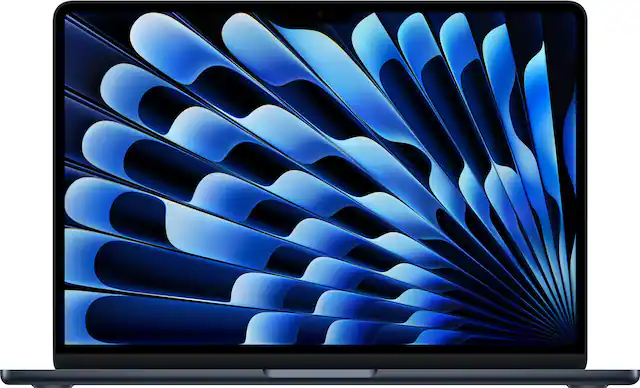
Apple MacBook Air 13-inch (M4, 16GB RAM, 256GB SSD)
✓ Pros
- •Outstanding all-day battery life that makes carrying a charger optional
- •Completely silent fanless design with no vents to clog with dust
- •16GB of unified memory as the base configuration removes the biggest long-term bottleneck
- •Excellent keyboard, large trackpad, and a bright, color-accurate display
- •Holds resale value better than almost any Windows laptop, softening the real four-year cost
- •Seamless integration with iPhone, iPad, and AirPods for students already in Apple's ecosystem
✗ Cons
- •At the very top of this budget range, leaving little room for accessories or software
- •256GB of storage is the minimum tolerable and fills quickly with photos, video projects, or game installs
- •Only two Thunderbolt ports plus MagSafe, so a dongle is often required for USB-A devices or HDMI presentations
- •Windows-only engineering and CAD software cannot run natively, and virtual machines are a clunky workaround
- •Very limited upgrade path after purchase — memory and storage are fixed at the time of sale
Best For:
Students who want the most hassle-free, longest-lasting laptop in this budget and whose coursework does not require Windows-only software.
Not Recommended For:
Engineering or architecture students whose departments mandate Windows-only CAD and simulation tools.
Key Features:
Standout Feature:
A fanless design combined with all-day battery life, so it stays silent and never needs a charger on a normal class day.
VS Others:
Compared with the MacBook Air M2, the M4 costs more but brings 16GB of memory as standard and a faster chip, making it the better four-year investment. Against the ASUS Zenbook 14 OLED, the Zenbook wins on display quality and screen size, while the Air wins on battery life, silence, and resale value. Choose the Air if you want the easiest ownership experience; choose the Zenbook if you need Windows or an OLED screen.
Why This One:
It is the most balanced laptop in this budget: fast enough for anything short of Windows-only engineering software, light enough to carry every day, and quiet enough for a library. For a student who wants to buy once and stop thinking about it, this is the pick.
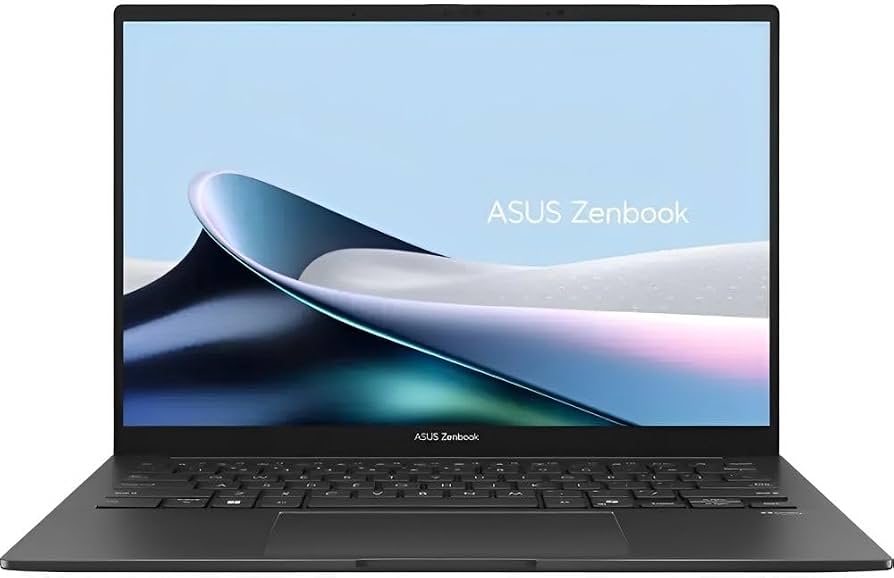
ASUS Zenbook 14 OLED (Intel Core Ultra 5, 16GB RAM, 512GB SSD)
✓ Pros
- •Outstanding 3K OLED display with excellent contrast and color coverage
- •16GB of RAM and a 512GB SSD — the right configuration for four years of use
- •Light aluminum chassis at roughly 2.8 pounds despite the large screen
- •Fast Intel Core Ultra 5 processor handles heavy multitasking and light creative work
- •Comfortable backlit keyboard and a responsive, large trackpad
- •Runs full Windows, so all department-mandated software installs natively
✗ Cons
- •Battery life is good but noticeably shorter than the MacBook Air's, partially due to the OLED panel
- •Costs more than several competent Windows alternatives without a dramatically faster processor
- •OLED panels carry a long-term burn-in risk with static content like taskbars over many years
- •Port selection is limited enough that many students will want a small USB hub
- •Runs warmer under sustained load than a fanless ultrabook
Best For:
Windows users who want the best display in this price range, especially design, media, and photo-editing students.
Not Recommended For:
Students whose top priority is maximum battery life or the lowest possible price.
Key Features:
Standout Feature:
A 3K OLED display at a price where most competitors still use basic FHD IPS panels.
VS Others:
Against the MacBook Air M4, the Zenbook offers a better screen and native Windows software support but gives up battery life and resale value. Compared with the HP Pavilion Aero 13, it is heavier but has a far superior display and a faster processor. If you need Windows and you look at images or video all day, this is the one; if you just need Windows for essays, the Aero will save you money.
Why This One:
It is the most complete Windows laptop under $900, combining the correct 16GB/512GB configuration with a display that genuinely improves daily work. Creative students get the most value, but any Windows-bound student who wants a machine that feels premium will be happy.
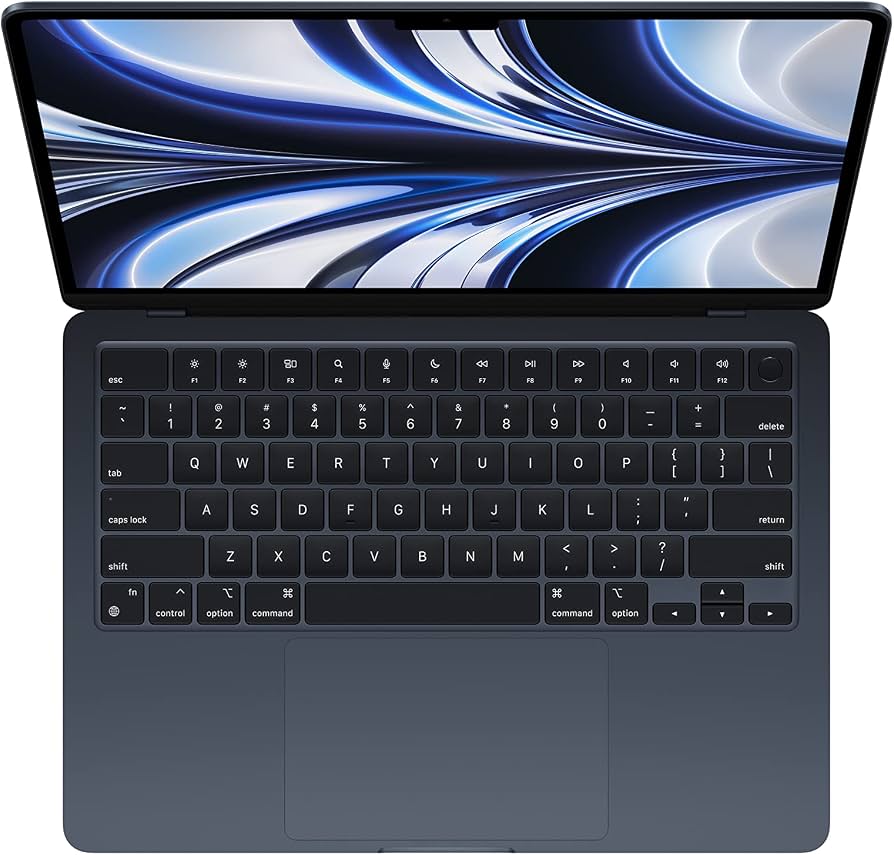
Apple MacBook Air 13-inch (M2, 8GB RAM, 256GB SSD)
✓ Pros
- •Excellent value on the previous-generation Apple design, often hundreds below the current model
- •Long battery life and silent fanless operation
- •Bright, sharp 13.6-inch Liquid Retina display
- •Same excellent keyboard and trackpad as the current model
- •MagSafe charging frees up both Thunderbolt ports
- •Strong resale value even as an older model
✗ Cons
- •8GB of memory in the commonly discounted configuration is a real long-term limitation
- •256GB of storage fills quickly
- •Older chip delivers less headroom for heavy creative or multitasking workloads
- •Availability and pricing swing widely as retailers clear remaining stock
- •Only two Thunderbolt ports, so dongles are often necessary
Best For:
Budget-conscious Apple buyers who want the Mac experience and mostly do writing, research, and light creative work.
Not Recommended For:
Students who routinely run dozens of browser tabs, virtual machines, or heavy video editing, for whom 8GB will feel tight.
Key Features:
Standout Feature:
The modern MacBook Air design and battery life for several hundred dollars below the current-generation price.
VS Others:
Compared with the MacBook Air M4, it saves meaningful money but gives up 8GB of memory and a generation of chip performance — a trade worth making only if you keep your workload light. Against the Acer Aspire 5, it costs more but delivers dramatically better battery life, build quality, and resale value. It sits in the sweet spot between budget Windows machines and the top-of-budget Apple pick.
Why This One:
It offers the core MacBook Air advantages — silence, battery life, build quality, resale value — at a price that leaves room in your budget for accessories or software. For light-to-moderate users, it is the best value in this guide.
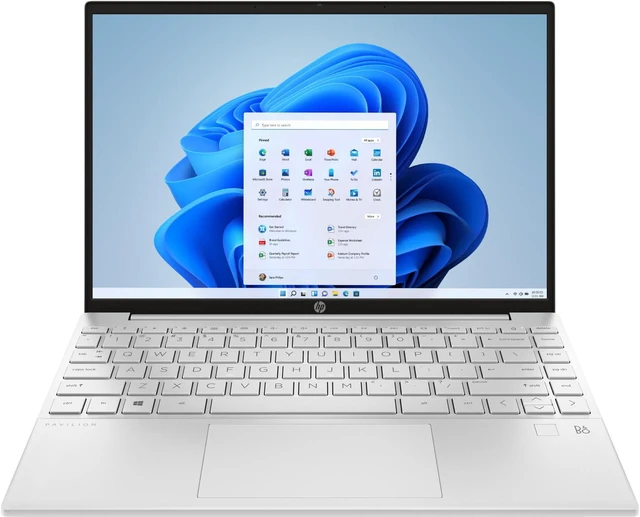
HP Pavilion Aero 13 (Ryzen 5 7535U, 16GB RAM, 512GB SSD)
✓ Pros
- •Exceptionally light at roughly 2.2 pounds, ideal for commuters and daily backpack carry
- •16GB of RAM and a 512GB SSD at a price where many rivals offer only 8GB/256GB
- •Tall 13.3-inch WUXGA display shows more vertical content, great for reading and writing
- •Battery life easily covers a full day of classes
- •Solid magnesium alloy build that does not feel cheap despite the low weight
- •Efficient AMD processor runs cool and quiet under normal workloads
✗ Cons
- •Display is good but noticeably behind the OLED panels on premium picks
- •Efficient processor is not suited to heavy video editing, 3D work, or gaming
- •Somewhat generic design that lacks the premium feel of an XPS or MacBook
- •Speakers are modest and fine for lectures but underwhelming for music
- •Limited port selection for students who need to connect multiple peripherals
Best For:
Commuters and students who carry a laptop all day and want maximum portability without dropping to 8GB of RAM.
Not Recommended For:
Students whose coursework involves significant video editing, 3D rendering, or gaming.
Key Features:
Standout Feature:
Ultra-light 2.2-pound weight combined with 16GB of RAM — a combination almost nothing else at this price offers.
VS Others:
Against the ASUS Zenbook 14 OLED, the Pavilion Aero is lighter and cheaper but loses badly on display quality and processor speed. Compared with the Acer Aspire 5, it costs more but is dramatically more portable and better built. It is the right answer when weight matters more than anything else.
Why This One:
It solves the commuter student's specific problem better than anything else here: it is light, it lasts all day, and it still has the 16GB of memory that keeps a laptop usable for four years. If you walk or ride to campus every day, this is the one to beat.
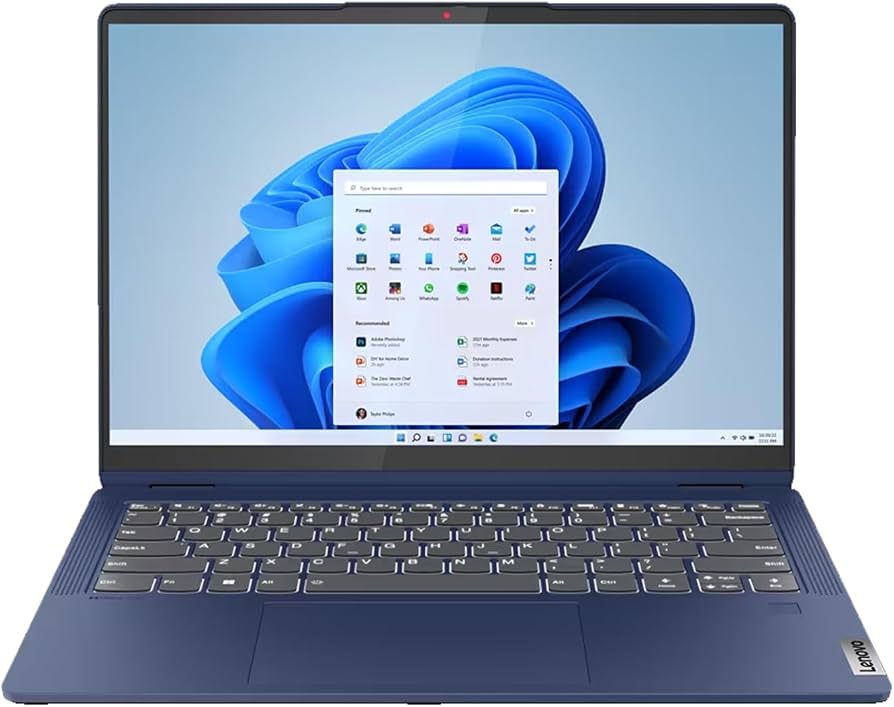
Lenovo IdeaPad Flex 5 14 (Ryzen 5 7530U, 16GB RAM, 512GB SSD, Touch)
✓ Pros
- •360-degree hinge converts it into a tablet for handwritten notes and diagrams
- •Supports an active stylus, ideal for math, science, and lab work
- •Full 16GB RAM and 512GB SSD rather than the cut-down specs typical of budget convertibles
- •Comfortable keyboard for long typing sessions
- •Solid battery life for a convertible thanks to the efficient AMD processor
- •Touchscreen makes everyday navigation and annotation convenient
✗ Cons
- •Plastic chassis does not feel as premium as metal-bodied alternatives
- •Noticeably heavier and thicker than dedicated ultrabooks, especially in tablet mode
- •Standard FHD display cannot match OLED panels for contrast or color
- •Pen is typically sold separately, adding to the total cost
- •Performance is adequate rather than strong for heavy creative or engineering work
Best For:
Students who take handwritten notes for math, science, or diagrams and want one device that replaces both a notebook and a laptop.
Not Recommended For:
Students who want the lightest possible laptop or the best possible display quality.
Key Features:
Standout Feature:
A genuine 360-degree convertible with a stylus-friendly screen that still includes 16GB of RAM at a mid-range price.
VS Others:
Compared with the HP Pavilion Aero 13, the Flex 5 is heavier and less premium but adds touch, pen support, and convertible flexibility. Against the Acer Aspire 5, it costs more and has a smaller screen, but the convertible design is a genuine capability the Aspire simply does not have. Pick the Flex 5 only if handwriting is a real part of your workflow — otherwise the Aero or Aspire is a better use of money.
Why This One:
If your notes include equations, structures, or diagrams, a pen-capable convertible changes how you study. The Flex 5 delivers that at a price that still leaves room for a stylus and does not compromise on RAM or storage.
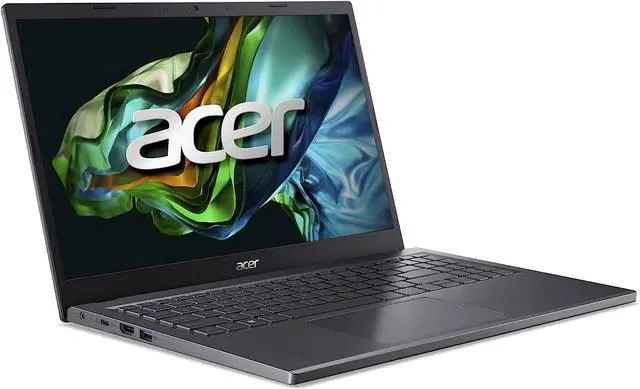
Acer Aspire 5 15 (Ryzen 5 7530U, 16GB RAM, 512GB SSD)
✓ Pros
- •16GB of RAM and a 512GB SSD at a price where most rivals offer 8GB and 256GB
- •Large 15.6-inch FHD screen is genuinely useful for split-screen work
- •Comfortable keyboard with a full number pad
- •Efficient Ryzen 5 processor handles everyday multitasking without stutter
- •Leaves budget left over for a backpack, mouse, or software licence
- •Easy to find and widely stocked, so sales and configuration options are plentiful
✗ Cons
- •Heaviest laptop in this guide at roughly 3.9 pounds
- •Plastic chassis feels less durable and premium than metal-bodied alternatives
- •Display is dim with mediocre color accuracy compared with every other pick here
- •Battery life is adequate but not all-day
- •Integrated graphics rule out serious gaming, video editing, or 3D work
Best For:
Budget-conscious students who want the right specifications — 16GB RAM and 512GB storage — for the lowest possible price.
Not Recommended For:
Students who carry a laptop all day, care about screen quality, or need graphics performance.
Key Features:
Standout Feature:
The lowest price on this list for a machine that still includes 16GB of RAM and a 512GB SSD.
VS Others:
Against the Lenovo IdeaPad Flex 5, the Aspire 5 is cheaper and has a larger screen but loses the convertible design and touch. Compared with the HP Pavilion Aero 13, it saves money but is far heavier and has a much worse display. It is the right choice only when price is the deciding factor — and in that case it is a very good one.
Why This One:
It gets the two specifications that matter most right at a price nothing else here matches, which makes it the smarter budget buy than cheaper laptops with 8GB of memory. If you need to spend as little as possible without buying something you will regret, this is it.
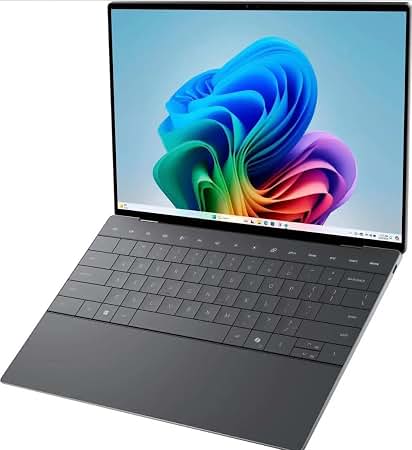
Dell XPS 13 9315 (Intel Core i5, 16GB RAM, 512GB SSD)
✓ Pros
- •Premium machined aluminum and carbon-fiber build that outclasses most rivals at this price
- •Excellent keyboard and a large, comfortable trackpad for long writing sessions
- •Nearly borderless 13.4-inch display in a very compact footprint
- •Runs Windows natively with full compatibility for academic software
- •Light at roughly 2.6 pounds and easy to carry daily
- •Frequently discounted as an older model, putting flagship build quality in reach of a mid-range budget
✗ Cons
- •Older 12th-generation processor trails current chips in both speed and efficiency
- •Battery life is good but well behind the MacBook Air and newest ultrabooks
- •Only two Thunderbolt ports and no USB-A, so a dongle is effectively mandatory
- •Runs warm under sustained load and fan noise becomes audible
- •Limited availability as retailers clear stock, and prices vary widely by configuration
Best For:
Windows users who prioritize build quality, keyboard comfort, and a premium feel over raw performance or maximum battery life.
Not Recommended For:
Students who need the longest possible battery life or who want to avoid carrying dongles.
Key Features:
Standout Feature:
Flagship-grade build quality and keyboard at a price most competitors reserve for mid-tier plastic machines.
VS Others:
Against the ASUS Zenbook 14 OLED, the XPS 13 wins on build quality and keyboard but loses decisively on display and processor generation. Compared with the HP Pavilion Aero 13, it feels more premium and types better but is heavier with worse battery life. It is the pick for a student who values how a laptop feels in the hand over how it scores on a benchmark.
Why This One:
If you want a Windows laptop that feels genuinely premium — metal, tight tolerances, a superb keyboard — and you can accept an older processor in exchange for a lower price, the XPS 13 delivers an experience that budget Windows machines simply do not.
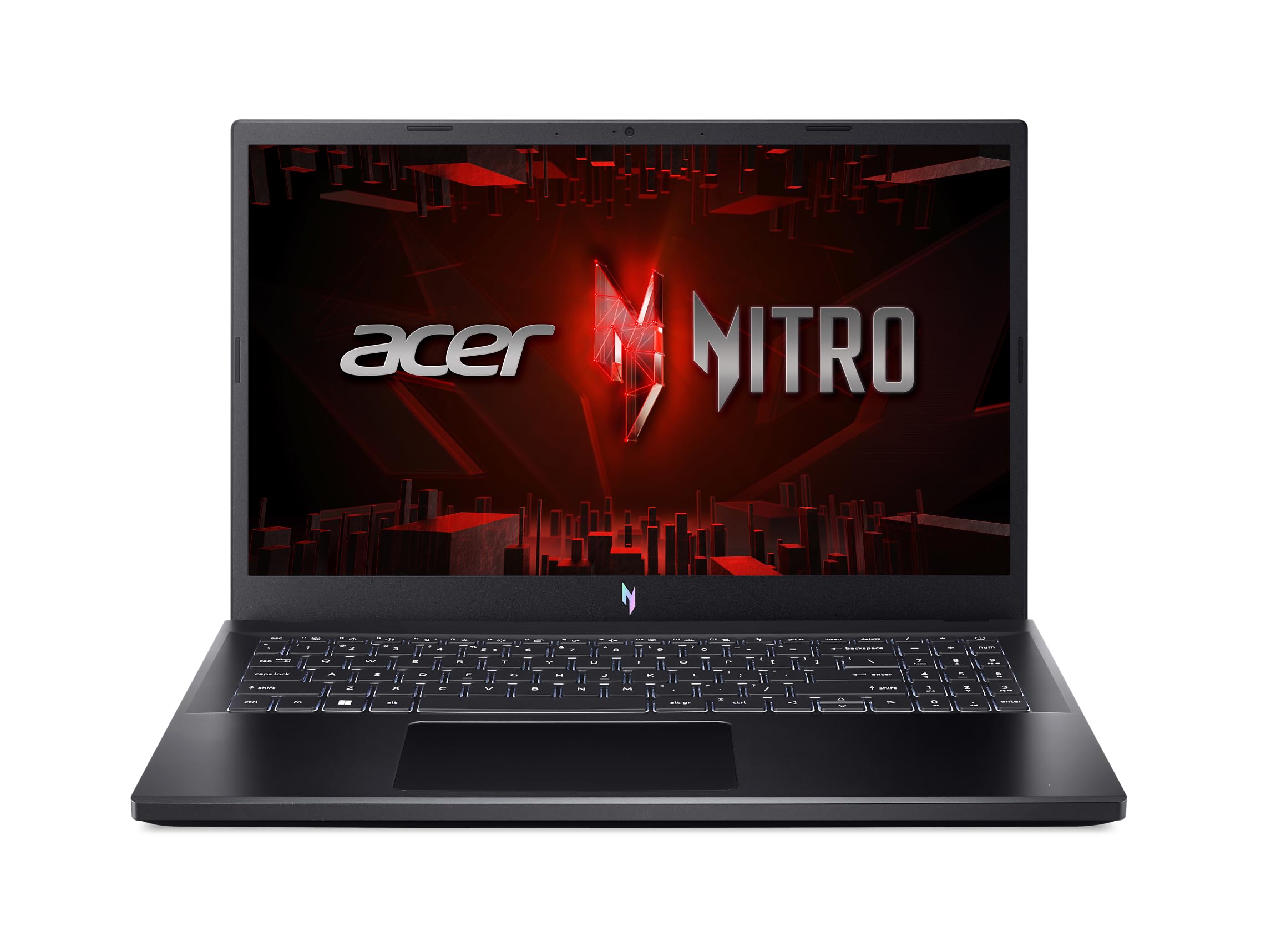
Acer Nitro V 15 (Intel Core i5-13420H, RTX 4050, 16GB RAM, 512GB SSD)
✓ Pros
- •Dedicated NVIDIA RTX 4050 GPU enables CAD, rendering, and GPU-accelerated coursework
- •16GB of RAM and a 512GB SSD as standard
- •144Hz FHD display makes scrolling and gaming noticeably smoother
- •Handles modern games comfortably — a real benefit if gaming matters to you
- •Strong multi-core performance for coding, compilation, and simulation work
- •The most graphics performance available anywhere under $1000
✗ Cons
- •Heavy at well over four pounds and bulky to carry around campus all day
- •Battery life is roughly half that of an ultrabook — the charger comes with you
- •Fans get loud and the chassis runs warm under sustained load
- •Plastic build and display quality are clearly below the premium picks
- •Overkill, and a poor value, for students who do not need graphics performance
Best For:
Engineering, architecture, computer science, and game development students whose coursework or hobbies genuinely require a dedicated GPU.
Not Recommended For:
Students in writing-heavy or general majors who carry a laptop all day and will never use the graphics card.
Key Features:
Standout Feature:
An RTX 4050 dedicated GPU under $1000 — the only laptop here that can accelerate 3D, CAD, and rendering workloads.
VS Others:
Compared with every other laptop here, the Nitro V 15 trades portability, battery life, and build quality for graphics power nothing else offers. Against the MacBook Air M4 or ASUS Zenbook 14 OLED, it is a completely different tool for a completely different student. If your software needs a GPU, none of the ultrabooks are real alternatives; if it does not, this laptop is the wrong choice.
Why This One:
It is the only way to get genuine graphics performance inside this budget, and for students whose coursework demands it, that settles the question immediately. Everyone else should look at the ultrabooks — but for engineering and game development students, this is the pick.
Who Should Get What?
Budget-Focused Freshman (Paying Their Own Way)
A first-year student working part-time who needs a laptop that covers essays, research, lecture slides, video calls, and streaming without breaking $550. They are not a power user and mostly work in a browser and Microsoft 365. They want something that will not feel obsolete in two years.
Recommended:
Acer Aspire 5 15 (Ryzen 5 7530U, 16GB RAM, 512GB SSD)
The Aspire 5 is the rare budget laptop that gets the important specs right: 16GB of RAM and a 512GB SSD mean it will not feel sluggish in junior year the way an 8GB budget machine will. It gives up polish, display quality, and battery life compared with the premium picks, but for a student whose workload lives in a browser, those are the right things to sacrifice. The 15.6-inch screen is a real advantage for split-screen research at this price.
Humanities or Social Sciences Major Who Writes Constantly
An English, history, or political science student who spends most of the day reading, annotating, and writing, moves between buildings all day, and rarely needs heavy processing power. They want long battery life, a light bag, and a laptop that stays quiet and cool during long library sessions.
Recommended:
Apple MacBook Air 13-inch (M4)
The MacBook Air M4 is the best tool on this list for a writing-heavy degree: silent fanless operation, excellent battery life, an outstanding keyboard, and enough performance headroom for four years of documents and research. Because it holds resale value unusually well and the base configuration now starts at 16GB of memory, it is the easiest long-term recommendation at the top of this budget.
Engineering or Computer Science Student Who Needs Real Power
A sophomore in mechanical engineering or computer science who runs CAD, simulation, or machine-learning coursework, and wants to game occasionally. Windows is required by their department, and they have already accepted that they will carry a charger.
Recommended:
Acer Nitro V 15 (Intel Core i5-13420H, RTX 4050, 16GB RAM, 512GB SSD)
A dedicated RTX 4050 GPU is the only way to get real acceleration for CAD, rendering, and GPU-accelerated coursework under $1000, and the Nitro V 15 is the most affordable way to get there with 16GB of RAM and a 144Hz display. The trade-off is real: it is heavier, runs warm, and battery life is roughly half that of an ultrabook. For a student who genuinely needs the graphics performance, that is a fair deal; for everyone else, it is wasted money.
Student Who Takes Handwritten Notes
A biology or chemistry student who prefers writing by hand for diagrams, equations, and lab notes, and wants a single device that replaces both a laptop and a paper notebook. They need a stylus-capable screen that folds flat and still works as a normal laptop for papers.
Recommended:
Lenovo IdeaPad Flex 5 14 (Ryzen 5 7530U, 16GB RAM, 512GB SSD)
The Flex 5's 360-degree hinge and touchscreen make it a genuine two-in-one at a price where most convertibles cut corners on RAM and storage. With 16GB of memory and a 512GB SSD it doubles as a fully capable everyday laptop, so you are not sacrificing performance for the pen. It is the most practical pick on this list for anyone whose notes are handwritten.
Commuter Student Who Lives Out of a Backpack
A student who commutes by bus or train, spends ten hours a day on campus, and already carries books, gym clothes, and a water bottle. Every pound matters, and so does battery life, because finding an outlet between classes is unreliable.
Recommended:
HP Pavilion Aero 13 (Ryzen 5 7535U, 16GB RAM, 512GB SSD)
At roughly 2.2 pounds with a 13.3-inch display, the Pavilion Aero 13 is one of the lightest laptops you can buy in this price range, and it still includes 16GB of RAM and a 512GB SSD rather than cutting them to hit the price. Long battery life means you can leave the charger at home, which matters more than raw speed when you are on the move all day.
Design, Photo, or Video Student Who Cares About Color
A graphic design, photography, or film student who edits images and video and needs a screen accurate enough to trust for color work, without stepping into the $1,500+ workstation market. They want strong multi-core performance and a display that does not need calibration out of the box.
Recommended:
ASUS Zenbook 14 OLED (Intel Core Ultra 5, 16GB RAM, 512GB SSD)
The Zenbook 14 OLED's 3K OLED panel is the best display on this list by a clear margin, with the contrast and color coverage that creative coursework actually benefits from. It pairs that screen with 16GB of RAM, a fast Core Ultra 5 processor, and a chassis that is still light enough to carry to studio sessions — the most balanced premium pick inside this budget.
Buying Guide: How to Choose
Bottom Line
Frequently Asked Questions
Which laptop is best for college students in 2026?▼
Is 8GB of RAM enough for a college laptop?▼
MacBook Air M2 or MacBook Air M4 — which should I buy?▼
Is the MacBook Air M4 worth the extra money over a cheaper Windows laptop?▼
What is the best budget laptop for college under $550?▼
Do I need a dedicated graphics card for college?▼
Is an OLED display worth paying more for on a college laptop?▼
How much storage do I actually need for college?▼
HP Pavilion Aero 13 or Acer Aspire 5 — which is better for college?▼
Should I buy a 2-in-1 convertible or a regular laptop?▼
How long should a college laptop last?▼
Where should I buy a college laptop to get the best price?▼
Need More Help Deciding?
Explore more buying guides to find the perfect product for your needs.
View All Buying Guides