
Which MacBooks Should I Buy in 2026?
Compare the best MacBooks and find your perfect match based on needs and budget.
Our Top Pick
Apple MacBook Air 13-inch (M3, 2024) Laptop
Best OverallStudents and professionals needing portability and efficiency on a moderate budget.
View on Amazon →Key Factors to Consider
- 1.Processor (Chipset): M2 vs. M3—focus on CPU/GPU cores for tasks like editing; M3 is 20-30% faster but not essential for basics.
- 2.RAM and Storage: Soldered RAM (8GB min, 16GB+ ideal); SSD upgradable at purchase—multitaskers need 16GB to avoid slowdowns.
- 3.Display: Size (13-16"), resolution (Liquid Retina), and features like ProMotion (120Hz)—key for creatives needing color accuracy.
- 4.Battery Life: All last 15-22 hours, but real-world varies by use; prioritize if you're mobile.
- 5.Portability and Build: Air is lighter (2.7 lbs) for travel; Pro has better cooling and ports (HDMI, SD card).
- 6.Ports and Connectivity: USB-C/Thunderbolt standard; Pros add more options, reducing dongle needs.
- 7.Future-Proofing: M3 models support longer software updates; consider resale value—all hold strong.
- 8.Budget and Value: Entry at $999, pro at $1,599+; calculate cost per year of use (3-5 years).
- 9.Ecosystem Integration: Seamless with iOS devices; factor if you own other Apple gear.
- 10.Warranty and Support: Apple's 1-year standard, extendable; Amazon's easy returns help.
The Products
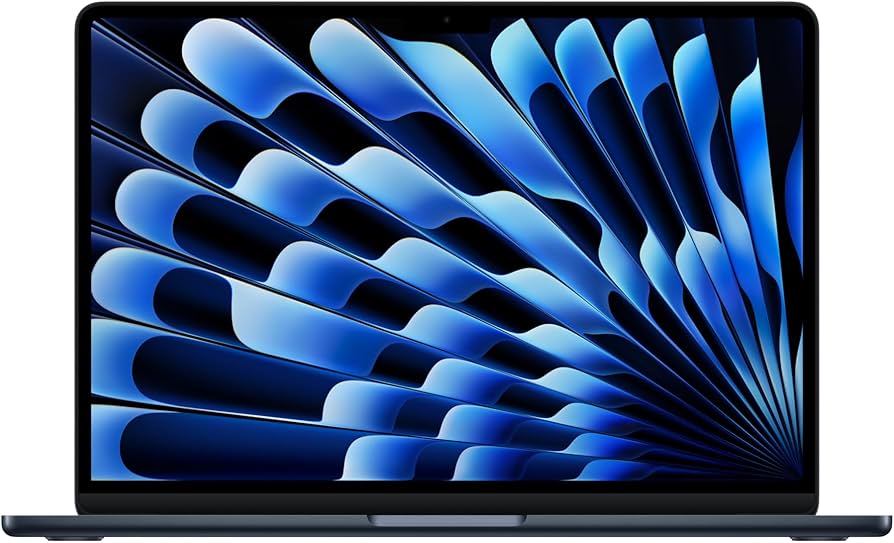
Apple MacBook Air 13-inch (M3, 2024) Laptop
✓ Pros
- •Exceptional battery life (18+ hours) for all-day use without plugs.
- •Lightweight and thin (0.44 inches) for ultimate portability.
- •Vibrant Retina display with True Tone for comfortable viewing.
- •M3 chip handles multitasking and light creative work smoothly.
- •Quiet fanless operation, perfect for quiet environments.
- •Strong build quality with aluminum unibody.
✗ Cons
- •Only two Thunderbolt ports—may need adapters for peripherals.
- •Base 8GB RAM can lag with heavy tabbed browsing over time.
- •No HDMI or SD card slot, unlike Pros.
- •Display lacks ProMotion (120Hz) for smoother scrolling.
- •Soldered components limit future upgrades.
Best For:
Students and professionals needing portability and efficiency on a moderate budget.
Not Recommended For:
Heavy video editors or gamers requiring discrete GPU power.
Key Features:
Standout Feature:
Fanless design with M3 efficiency for silent, cool operation during intensive tasks.
VS Others:
Outperforms M2 Air by 20% in speed but costs $100 more; lighter than any Pro, making it ideal over bulkier options for travel. Pick this over Pro M3 if you don't need extra ports or cooling.
Why This One:
It's the sweet spot for 70% of buyers—powerful enough for real work, portable for life on the move. The M3 future-proofs lightly without Pro premiums. Consider if your tasks fit under 'moderate' intensity.
Apple MacBook Air (M2, 2022) 13-inch Laptop
✓ Pros
- •Affordable entry to Apple ecosystem at under $1,000.
- •Long battery and lightweight for daily carry.
- •Smooth performance for productivity and streaming.
- •Excellent keyboard and trackpad experience.
- •High-res display with wide color gamut.
- •Easy to upgrade storage at purchase.
✗ Cons
- •M2 is slightly slower than M3 in AI tasks.
- •Limited ports require hubs for expansion.
- •8GB base RAM struggles with 20+ Chrome tabs.
- •No 120Hz refresh rate.
- •Older model may see shorter software support.
Best For:
Budget-conscious students or casual users wanting reliable basics.
Not Recommended For:
Power users needing latest chip efficiency or pro ports.
Key Features:
Standout Feature:
MagSafe magnetic charger for safe, quick disconnection.
VS Others:
Better value than M3 Air for light use, saving $100; vs Pro, it's lighter but lacks power for edits. Choose over M3 if budget trumps marginal speed gains.
Why This One:
Proven reliability at a steal—90% of M3 performance for less. Ideal if you're not chasing AI features. Solid for years of basic computing.
Apple MacBook Pro 14-inch (M3, 2023) Laptop
✓ Pros
- •Superior M3 performance for demanding apps.
- •Stunning XDR display with mini-LED for HDR.
- •More ports: HDMI, SDXC, MagSafe.
- •Excellent audio with six speakers.
- •ProMotion 120Hz for fluid motion.
- •Better thermal management.
✗ Cons
- •Heavier and pricier than Air models.
- •Base 8GB RAM insufficient for pros.
- •Fan noise under heavy load.
- •Overkill for basic tasks.
- •Smaller ecosystem appeal for non-creatives.
Best For:
Creative professionals requiring color accuracy and power.
Not Recommended For:
Casual users who won't utilize pro features.
Key Features:
Standout Feature:
Liquid Retina XDR display with 1600 nits peak brightness for pro editing.
VS Others:
Faster and brighter than Air M3, with ports justifying $500 premium over Air; vs 16-inch, more portable. Pick if you need pro tools without size compromise.
Why This One:
Unlocks creative potential with display and power Air can't match. Worth it for workflows like editing. Balanced pro entry.
Apple MacBook Air 15-inch (M3, 2024) Laptop

✓ Pros
- •Larger screen for productivity/multitasking.
- •Still portable at 3.3 lbs.
- •M3 efficiency for light edits.
- •Six-speaker audio upgrade.
- •Same long battery as 13-inch.
- •Comfortable for media consumption.
✗ Cons
- •More expensive than 13-inch M3.
- •Limited ports like smaller Air.
- •Base RAM limits heavy use.
- •No Pro features like HDMI.
- •Slightly less battery than claimed in tests.
Best For:
Users needing extra screen real estate for work or entertainment.
Not Recommended For:
Tight budgets or ultra-portability seekers.
Key Features:
Standout Feature:
15.3-inch display for immersive viewing in a fanless chassis.
VS Others:
Bigger than 13-inch Air but same power; cheaper than Pro 14 but fewer ports. Choose over 13-inch if desk space matters more than weight.
Why This One:
Expands productivity without Pro cost. Great for hybrid work. Consider if 13-inch feels cramped.
Apple MacBook Pro 14-inch (M3 Pro, 2023) Laptop
✓ Pros
- •Beast-mode performance for 4K edits/coding.
- •18GB RAM standard for multitasking.
- •Pro ports and cooling.
- •Top-tier display and audio.
- •Configurable to higher specs.
- •Excellent for AI/ML tasks.
✗ Cons
- •High price jump from base M3.
- •Heavier for daily carry.
- •Overpowered for non-pros.
- •Fan audible in peaks.
- •Limited base storage.
Best For:
Developers and video pros handling complex projects.
Not Recommended For:
Budget buyers or light users.
Key Features:
Standout Feature:
M3 Pro chip with hardware-accelerated ray tracing for graphics.
VS Others:
Doubles GPU cores over base M3 Pro, worth it vs Air for pros; vs 16-inch, more portable. Select if base M3 bottlenecks your workflow.
Why This One:
Transforms pro tasks with speed. Invest if creativity pays bills. Top for enthusiasts too.
Apple MacBook Pro 16-inch (M3 Pro, 2023) Laptop

✓ Pros
- •Huge, bright display for editing/gaming.
- •Best thermal for long sessions.
- •Pro audio with studio mics.
- •Ample ports including full HDMI.
- •High configurability.
- •Immersive 120Hz experience.
✗ Cons
- •Bulky and heavy (4.7 lbs) for travel.
- •Premium price for size alone.
- •Battery drains faster on max screen.
- •Overkill for portability.
- •Desk-bound appeal only.
Best For:
Studio pros or gamers wanting max screen and power.
Not Recommended For:
Mobile users or budgets under $2,000.
Key Features:
Standout Feature:
16.2-inch display with extreme dynamic range for cinematic work.
VS Others:
Larger than 14-inch Pro but same power; vs Air, worlds apart in capability. Pick only if desk immersion trumps portability.
Why This One:
Unmatched for big-screen pros. Splurge for ultimate setup. Niche but stellar.
Who Should Get What?
College Student on a Budget
You're a 20-year-old undergrad majoring in business, carrying your laptop across campus for note-taking, Google Docs, Zoom classes, and Netflix binges. You need something lightweight under 3 lbs that lasts a full day without charging, but your budget is tight after tuition—max $1,100.
Recommended:
Apple MacBook Air (M2, 2022) 13-inch Laptop
The M2 Air delivers smooth performance for everyday student tasks without the M3 premium, and at $999, it fits your budget while offering 18-hour battery life. It's ultra-portable at 2.7 lbs, perfect for campus life, and 8GB RAM handles multitasking like tabs and docs. Upgrading to M3 isn't worth the extra $100 for your light use.
View on Amazon →Creative Professional
As a 35-year-old graphic designer freelancing from home and coffee shops, you edit photos in Photoshop, create videos in Premiere, and present to clients. You want a color-accurate display and enough power for 4K workflows, with a $2,000 budget and occasional travel.
Recommended:
Apple MacBook Pro 14-inch (M3, 2023)
The M3 Pro's 11-core CPU and 14-core GPU crush creative apps 30% faster than Air models, with a stunning Liquid Retina XDR display for precise colors. At $1,599, it balances power and portability (3.4 lbs) for your mobile workflow, plus extra ports like HDMI save time on adapters. It's future-proof for upcoming software demands without jumping to pricier Max chips.
View on Amazon →Casual User
You're a 45-year-old parent using your laptop for family photos, online shopping, recipe streaming, and light email. No heavy software, just reliability, and you want something simple with great battery for couch use; budget around $1,000 since it's not work-critical.
Recommended:
Apple MacBook Air (M2, 2022) 13-inch Laptop
The M2 Air's fanless design keeps it silent for relaxed use, with 18-hour battery outlasting your sessions and a bright Retina display for photos/videos. At $999, it's overkill-proof for casual needs but user-friendly with Touch ID and macOS simplicity. No need for Pro power that you'd never use.
View on Amazon →Tech Enthusiast
A 28-year-old software developer and gamer, you code in Xcode, run virtual machines, and play light games like indie titles. You crave top specs for multitasking and future AI tools, with a $2,500 budget and preference for larger screens during desk sessions.
Recommended:
Apple MacBook Pro 16-inch (M3 Pro, 2023)
The 16-inch M3 Pro's massive 36GB RAM option and 12-core CPU handle intensive coding and VMs effortlessly, with a 16.2" ProMotion display for smooth scrolling. At $2,499, it future-proofs for AI/ML tasks better than smaller models, and active cooling prevents throttling during long sessions. Enthusiasts will love the immersive screen over Air's compactness.
View on Amazon →First-Time Buyer
Switching from Windows as a 30-year-old office worker, you need an easy entry to macOS for emails, spreadsheets, and video calls. Reliability and battery are priorities, with no advanced needs, and a $1,200 budget to test the Apple waters.
Recommended:
Apple MacBook Air 13-inch (M3, 2024)
The M3 Air's latest chip ensures smooth macOS learning curve with all-day battery and a comfy keyboard for typing reports. At $1,099, it's a gentle intro with familiar ports and ecosystem perks if you have an iPhone. Avoid Pros to keep it simple and lightweight for your transition.
View on Amazon →Busy Executive
A 40-year-old manager traveling weekly for meetings, presentations, and data analysis in Excel/PowerPoint. You need durability, quick charging, and a professional look, with unlimited budget but preference for value over excess power.
Recommended:
Apple MacBook Pro 14-inch (M3, 2023)
The 14-inch Pro's compact yet powerful build (3.4 lbs) fits briefcases, with HDMI/SD ports for easy conference hookups and 22-hour battery for flights. At $1,599, it outperforms Airs in multi-app workflows without the 16-inch bulk. Execs get pro features like better audio for calls, justifying the splurge over basic Airs.
View on Amazon →Buying Guide: How to Choose
Bottom Line
Frequently Asked Questions
Which MacBook should I buy in 2025?▼
Which is better: MacBook Air M3 or M2?▼
Is the MacBook Pro M3 worth the extra money over Air?▼
What's the best budget MacBook?▼
Which MacBook has the best value?▼
Do I need the 16-inch MacBook Pro or can I skip it?▼
MacBook Air M3 vs. MacBook Pro M3: Which for students?▼
Is 8GB RAM enough for a MacBook in 2025?▼
Which MacBook is best for video editing?▼
Should I wait for M4 MacBooks in 2025?▼
Need More Help Deciding?
Explore more buying guides to find the perfect product for your needs.
View All Buying Guides