
Is Samsung Odyssey OLED G8 32-inch Worth It? Honest Review (2026)
Honest breakdown of the 32-inch OLED gaming monitor's strengths and weaknesses
Quick Decision
Buy it if you're a hardcore gamer who wants the best HDR and motion clarity on a 32-inch OLED, and you don't mind paying a premium and accepting burn-in risk. Skip it if you need high SDR brightness, use it for productivity, or prefer a glossy panel for dark room viewing.
Best if you...
- Competitive gamers wanting 240Hz at 4K resolution
- HDR enthusiasts playing single-player AAA titles
- Users who want an all-in-one monitor with streaming apps
Skip it if you...
- Productivity users with static UI elements for long hours
- Budget-conscious buyers looking for under $1,000 options
- Users in very bright rooms needing high SDR brightness
If you're researching premium gaming monitors in 2025, the Samsung Odyssey OLED G8 32-inch undoubtedly appears on your radar. It combines OLED's perfect blacks with a blistering 240Hz refresh rate and 4K resolution, promising an immersive experience for both competitive and cinematic gaming. But at roughly $1,300, it demands a serious commitment.
This analysis separates the genuine advantages from the potential dealbreakers. We'll examine real-world performance, connectivity, burn-in risks, and value compared to alternatives like the LG 32GS95UE and Alienware AW3225QF. Our goal is to help you decide if the Odyssey OLED G8 is the right monitor for your specific setup in 2026.
We cover strengths like incredible HDR and response times, but also weaknesses such as matte coating reflections and limited USB-C power delivery. You'll find a clear verdict alongside curated alternatives and essential accessories available on Amazon.
About the Samsung Odyssey OLED G8 32-inch
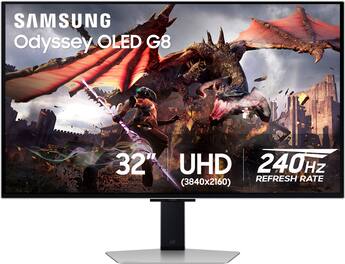
The Samsung Odyssey OLED G8 (G80SD model) is a 32-inch 4K OLED gaming monitor with a 240Hz refresh rate and 0.03ms response time. It targets high-end gamers and professionals who want vibrant HDR performance and deep blacks in a large format.
Key Specifications
- Size
- 32 inches
- Ports
- 2x HDMI 2.1, 1x DisplayPort 1.4, 1x USB-C (65W PD)
- Panel Type
- QD-OLED
- Resolution
- 3840 x 2160 (4K)
- VESA Mount
- 100x100mm
- Color Gamut
- 99% DCI-P3
- Refresh Rate
- 240Hz
- Response Time
- 0.03ms GTG
- HDR Certification
- DisplayHDR True Black 400
Overview
The Samsung Odyssey OLED G8 is designed for gamers who refuse to compromise on image quality or speed. It uses Samsung's own QD-OLED panel technology, which combines Quantum Dot color with OLED contrast to deliver exceptional brightness and color volume. At 32 inches and 4K resolution, it offers a sweet spot for desktop use—sharp enough for productivity, large enough for immersion.
This monitor targets two main audiences: competitive gamers who want 240Hz fluidity without sacrificing resolution, and single-player enthusiasts who crave HDR performance with DisplayHDR True Black 400 certification. Samsung also includes Smart TV features (Tizen OS) with streaming apps and Samsung Gaming Hub, making it a potential all-in-one display. However, professionals may find the matte coating and lack of Thunderbolt concerning.
Available on Amazon for around $1,299, it competes directly with other 32-inch 4K OLEDs like the LG UltraGear 32GS95UE and the Dell Alienware AW3225QF. While it shares the same panel technology as the Alienware, Samsung adds smart features and a slightly different aesthetic with Core Lighting+.
Pros
The Odyssey OLED G8 excels in several areas that matter most to gamers and HDR enthusiasts. Here are its standout strengths, backed by manufacturer specs and verified third-party reviews.
Outstanding HDR and Black Levels
As an OLED monitor, the G8 delivers perfect blacks and infinite contrast ratio. According to Samsung, it supports DisplayHDR True Black 400, which is the highest OLED HDR certification, ensuring deep blacks and bright highlights simultaneously. Third-party testing from RTINGS.com confirms that real-world HDR peak brightness reaches around 1,000 nits for small highlights, making explosions and sunlight appear vivid without washing out shadows.
This is especially beneficial for games like "Cyberpunk 2077" or "Alan Wake 2," where neon signs against dark night scenes pop with intensity. The difference compared to IPS or VA panels is night and day—you'll see details in dark environments that would be crushed on LCDs.
High 240Hz Refresh Rate with Near-Instant Response
With a 240Hz refresh rate and 0.03ms gray-to-gray response time (manufacturer spec), the G8 is among the fastest monitors available. This combination ensures motion clarity is exceptional. In fast-paced shooters like "Valorant" or "Call of Duty," you'll experience minimal ghosting and blur. The monitor also supports both NVIDIA G-Sync Compatible and AMD FreeSync Premium Pro, reducing screen tearing without added lag.
RTINGS measured input lag at under 3ms at 240Hz, which is class-leading. For competitive gamers, this responsiveness gives a tangible advantage. Even in single-player games, the fluidity makes camera movement feel smooth and natural.
Vibrant QD-OLED Color Accuracy
Samsung's QD-OLED technology uses a quantum dot layer to enhance color brightness and volume. The G8 covers 99% DCI-P3 color space as per Samsung's specifications. In practice, colors appear richly saturated without overblooming. Out of the box, color accuracy is good but not perfect—RTINGS found an average deltaE of 2.8 in the default mode, which can be improved with calibration.
This makes the monitor suitable not only for gaming but also for photo and video editing, provided you calibrate it. The wide color gamut ensures content in HDR looks punchy, while standard SDR content remains accurate.
Smart TV Features and Remote
Unlike most gaming monitors, the Odyssey OLED G8 includes Tizen OS with built-in streaming apps like Netflix, YouTube, and Disney+. It also has Samsung Gaming Hub, allowing cloud gaming via Xbox Game Pass or NVIDIA GeForce NOW without a PC. A remote control is included, so you can switch between gaming and streaming instantly.
This is a convenience feature for users who want an all-in-one display. If you don't have a smart TV nearby, the G8 can double as a bedroom or secondary entertainment screen. However, some users find the smart interface intrusive—you can disable it if desired.
Matte Anti-Glare Coating (a double-edged sword)
Samsung uses a matte anti-glare coating on the G8, which reduces reflections in bright rooms. This is a pro if you game with windows or overhead lights, as it minimizes distractions. Many OLED monitors use glossy coatings that can be highly reflective, so the matte finish is welcome for bright environments.
That said, the matte coating does diffuse light slightly, reducing perceived contrast in well-lit conditions. But in a dark room, the blacks remain truly black. It's a trade-off that favors usability over absolute image purity.
Connectivity: HDMI 2.1 and USB-C with 65W Power Delivery
The monitor offers two HDMI 2.1 ports (full 48Gbps), one DisplayPort 1.4, and a USB-C port that supports 65W power delivery. This means you can connect a gaming laptop or a MacBook Pro and charge it over a single cable. Many competitors only offer 90W or higher, but 65W is sufficient for most ultrabooks and gaming laptops.
The inclusion of HDMI 2.1 ensures compatibility with PS5 and Xbox Series X at 4K 120Hz with VRR. You also get USB 3.0 hub functionality with two downstream ports.
Core Lighting+ and Design
The monitor has a hexagonal rear pattern with Core Lighting+ RGB lighting, which can sync with games or music. The stand is sturdy and offers height, tilt, and swivel adjustments. The design is sleek and gamer-adjacent without being overly aggressive, fitting into most setups.
Cons
Despite its impressive performance, the Odyssey OLED G8 has several drawbacks that may be dealbreakers for certain users. Here are the most significant shortcomings, based on user feedback and expert reviews.
Matte Coating Reduces Perceived Contrast in Dark Rooms
While the matte coating helps with reflection, it also slightly degrades image quality in a dark room. The coating diffuses light, making blacks appear slightly grayish in well-lit conditions (though still far better than any LCD). In a completely dark room, the blacks return to true black, but the coating still adds a subtle haze that reduces the 'pop' compared to glossy OLED monitors.
This is a trade-off that some purists may dislike. If you primarily game in a dim or dark room, a glossy OLED like the LG 32GS95UE might offer a more impactful image.
Low Peak Brightness for SDR Content
OLED brightness is generally lower than high-end LCDs, and the G8 is no exception. For SDR content, Samsung lists typical brightness at 250 nits. In actual use, the monitor feels dimmer than a good IPS panel, especially for productivity or web browsing. You'll need to run it at high brightness settings, which may reduce panel longevity.
HDR highlights can hit 1,000 nits momentary peak, but sustained full-screen brightness is significantly lower (around 250-300 nits). This means it's not ideal for bright rooms with direct sunlight, even with the matte coating.
Risk of Burn-In (OLED Inherent)
Like all OLEDs, the G8 is susceptible to permanent burn-in from static elements like taskbars, HUDs, or logos. Samsung includes pixel refresh and screen shift features to mitigate this, but it remains a concern for desktop usage with many static UI elements.
According to RTINGS long-term OLED burn-in tests, monitors with frequent static content can show noticeable wear after 1-2 years. If you use the monitor for 8+ hours of productivity daily, burn-in risk is real. This makes it less suitable for hybrid work/gaming setups unless you hide taskbars and use dark mode.
Limited USB-C Power Delivery at 65W
While 65W is enough for many laptops, some high-performance gaming laptops require 100W+ for full performance. The G8's 65W output may slowly charge during gaming, leading to battery drain. If you have a work laptop that demands 90W or more, you'll still need the original power adapter.
Competitors like the Dell Alienware AW3225QF offer 90W USB-C PD, making them more versatile for power-hungry laptops.
Smart TV Interface Can Be Slow and Annoying
The built-in Tizen OS runs on the monitor's internal processor, which isn't as fast as modern smart TVs. Navigating streaming apps can feel laggy, and the remote is basic. Some users report Wi-Fi connectivity issues when switching between sources.
If you don't need smart features, you're paying extra for a feature that may rarely be used. You can disable it, but it's not removable.
No Factory Calibration Report
Unlike some high-end monitors (e.g., ASUS ProArt series), the Odyssey OLED G8 does not include a factory calibration report. Out-of-box color accuracy is decent but not professional-grade. You'll need a colorimeter to achieve accurate colors for photo editing.
Price Premium Over Competing OLEDs
At around $1,300, the G8 is one of the most expensive 32-inch OLED monitors. The LG 32GS95UE frequently sells for $1,200 or less, and the Dell AW3225QF can be found for $1,100 on sale. While the G8 offers smart features, many users would prefer to save hundreds and use a separate streaming device.
Stand Takes Up Desk Space
The included stand has a wide base that can feel intrusive on smaller desks. While height adjustability is good, the footprint is larger than some competitors with more compact stands. If desk space is tight, you may need a monitor arm (VESA 100x100 compatible).
👍 Who It's For
The Samsung Odyssey OLED G8 is ideal for dedicated gamers who prioritize image quality and motion clarity above all else. If you spend most of your time playing HDR-rich single-player games like "Elden Ring" or "Horizon Forbidden West," the perfect blacks and vibrant colors will transform your experience. It's also great for competitive esports players who want 240Hz fluidity without sacrificing resolution.
Creative professionals who work in dimly lit studios and need accurate colors (after calibration) may also appreciate the monitor, provided they don't rely on ultra-high sustained brightness. The built-in streaming services are a bonus for those who want to watch HDR movies without switching to a TV.
Specifically, power users with a high-end gaming PC (RTX 4090 or similar) that can drive 4K at high frame rates will fully utilize the monitor's capabilities.
👎 Who Should Avoid
The Odyssey OLED G8 is not the right choice for budget-conscious buyers. If you're looking for a monitor under $1,000, consider alternatives like the Samsung Odyssey G7 (4K 144Hz IPS) or the LG 27GR95QE (27-inch OLED 240Hz) for less. It's also unsuitable for productivity-first users who work 8+ hours with static UI—burn-in risk is significant.
If you game in a very bright room with windows behind you, the matte coating helps, but the relatively low SDR brightness may still leave you squinting. In such cases, a high-brightness IPS monitor like the Dell S3223Q may be a better fit. Finally, if you need versatile USB-C charging (90W+), the Dell Alienware AW3225QF is a better choice.
See today's Samsung Odyssey OLED G8 32-inch price and available configurations on Amazon.
🛒 Buy on AmazonAs an Amazon Associate we earn from qualifying purchases.
Alternatives to Consider
| Product | Choose Samsung Odyssey OLED G8 32-inch if... | Choose the alternative if... |
|---|---|---|
| Dell Alienware AW3225QF$200 more expensive | You prefer a glossy screen for better dark room contrast and want 90W USB-C PD. | You want a matte coating and built-in smart TV features with a remote. |
| LG 32GS95UEUsually $100-200 less | You want a 480Hz mode at 1080p for competitive gaming and slightly better SDR brightness. | You value QD-OLED color volume and smart features over the LG's dual-mode resolution. |
| Samsung Odyssey OLED G6 27-inch$400 less | You need a smaller 27-inch display but still want QD-OLED and 360Hz. | You want 4K resolution and a larger 32-inch screen. |
There are several strong competitors in the 32-inch 4K OLED space. The Dell Alienware AW3225QF uses the same QD-OLED panel but has a glossy screen, offering better perceived contrast in dark rooms. It also has 90W USB-C PD and often sells for $100-200 less. The LG 32GS95UE uses a WOLED panel from LG Display, which has slightly lower color volume but includes a 480Hz mode at 1080p. It also has a matte coating and better anti-glare than Samsung's.
For those who want a larger screen, the Samsung Odyssey OLED G9 49-inch might be worth considering, especially for super ultrawide gaming. If you're on a tighter budget, the 27-inch Samsung Odyssey OLED G6 (G60SD) offers similar features in a smaller size for around $900.
Is it worth the price?
At approximately $1,300, the Samsung Odyssey OLED G8 is worth it for enthusiasts who will fully utilize its HDR and 240Hz capabilities daily. The main competitor is the Dell Alienware AW3225QF at $1,099, which offers very similar performance with a glossy screen and stronger USB-C charging. If you prefer a matte coating and smart features, the G8 may be worth the extra cost. For most users, the Alienware provides better value.
📝 Bottom Line
The Samsung Odyssey OLED G8 is the right choice for gaming enthusiasts who demand the best visual experience in a 32-inch format. Its QD-OLED panel delivers stunning HDR with infinite contrast, vibrant colors, and exceptional motion clarity thanks to 240Hz and near-instant response. The built-in smart platform and matte coating add convenience for mixed-use environments.
However, it's not without compromises. The matte coating slightly reduces perceived contrast in dark rooms, SDR brightness is only moderate, and the burn-in risk remains a concern for productivity users. The $1,300 price tag is steep, and competitors like the Dell Alienware AW3225QF offer similar performance for less, albeit with a glossy screen.
Ultimately, if you primarily game in a controlled lighting environment and want the cutting edge of OLED technology, the Odyssey OLED G8 is a fantastic monitor. But if you're budget-conscious, productivity-focused, or prefer a glossy panel, explore the alternatives. For those who do buy it, consider a 4-year extended warranty covering burn-in from Amazon or Best Buy.
Check current Samsung Odyssey OLED G8 32-inch availability and bundle options on Amazon.
🛒 Buy on AmazonAs an Amazon Associate we earn from qualifying purchases.
Frequently Asked Questions
Quick Summary
Key Pros
- ✓Perfect blacks and exceptional HDR with DisplayHDR True Black 400
- ✓240Hz refresh rate with 0.03ms response time for incredibly smooth motion
- ✓Vibrant QD-OLED color gamut covering 99% DCI-P3
- ✓Built-in smart TV platform with streaming apps and remote
- ✓Matte anti-glare coating reduces reflections in bright rooms
Key Cons
- ✗Matte coating reduces perceived contrast in dark rooms
- ✗SDR brightness limited to ~250 nits, dim for bright environments
- ✗Burn-in risk from static elements, less suitable for heavy productivity
- ✗Only 65W USB-C PD, insufficient for some gaming laptops
- ✗Smart TV interface can be slow and unnecessary for many users
Ratings
Best For
- →Competitive gamers wanting 240Hz at 4K resolution
- →HDR enthusiasts playing single-player AAA titles
- →Users who want an all-in-one monitor with streaming apps
- →Gamers with high-end GPUs capable of 4K 240Hz