
Is LG C3 OLED 65-inch Worth It? Honest Review (2026)
Honest breakdown of strengths, weaknesses, and who should buy this popular OLED TV
Quick Decision
Buy the LG C3 OLED 65-inch if you want cinematic picture quality with perfect blacks and need multiple HDMI 2.1 ports for gaming. Skip it if you watch in a very bright room, leave static content on for hours, or need the highest HDR brightness available.
Best if you...
- Home theater enthusiasts watching movies in dark rooms
- Gamers with multiple consoles (PS5, Xbox Series X)
- PC gamers who want 4K 120Hz with G-Sync
Skip it if you...
- Users in very bright rooms with direct sunlight
- Heavy news watchers (static tickers for hours daily)
- PC desktop users with static taskbars and icons
If you're researching the LG C3 OLED 65-inch, you likely value cinematic picture quality with perfect blacks and vibrant colors. This TV has been a top choice for home theaters and gaming since its 2023 release, but as newer models enter the market in 2026, it's worth examining whether the C3 still holds up. This analysis covers its strengths and weaknesses based on manufacturer specs and third-party reviews, helping you decide if it's the right TV for your needs.
We'll also compare it to key alternatives like the Sony A80L and Samsung S90C, and suggest useful accessories. Our goal is a balanced, honest assessment without hype.
About the LG C3 OLED 65-inch
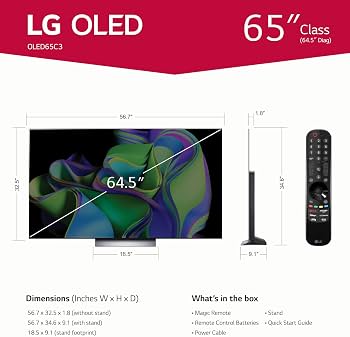
The LG C3 OLED is a 65-inch 4K OLED TV featuring LG's a9 Gen6 AI Processor 4K, Dolby Vision, Dolby Atmos, and four HDMI 2.1 ports. It targets home theater enthusiasts and gamers who want excellent picture quality with deep blacks and wide viewing angles.
Key Specifications
- VRR
- Yes (HDMI Forum VRR, G-Sync Compatible)
- Audio
- Dolby Atmos, 40W 2.2ch speakers
- Display
- 65-inch OLED (WOLED)
- Processor
- a9 Gen6 AI Processor 4K
- HDMI Ports
- 4x HDMI 2.1 (48Gbps) with eARC
- Resolution
- 3840 x 2160 (4K UHD)
- HDR Support
- Dolby Vision, HDR10, HLG
- Refresh Rate
- 120Hz native (144Hz at 1080p/1440p)
- Smart TV Platform
- webOS 23
Overview
The LG C3 OLED 65-inch uses an OLED panel with self-lit pixels, delivering infinite contrast and perfect blacks. It's powered by LG's a9 Gen6 AI processor, which enhances upscaling and motion handling. The TV supports Dolby Vision, Dolby Atmos, HDR10, and HLG, making it ideal for movies and streaming. Gamers benefit from four HDMI 2.1 ports with 4K 120Hz support, VRR, ALLM, and a Game Optimizer dashboard.
In 2026, the C3 sits one generation behind LG's latest G4 series but remains widely available at discounted prices. It's often found on Amazon for around $1,200–$1,400, making it a compelling mid-range OLED option. The 65-inch size fits most living rooms, and the slim design with a central stand adds aesthetic appeal.
Pros
The LG C3 OLED excels in several key areas that matter most to TV buyers: picture quality, gaming features, and smart TV functionality. Below are its standout strengths.
Exceptional Picture Quality with Perfect Blacks
OLED technology delivers absolute blacks because each pixel emits its own light and can turn off completely. This creates infinite contrast, making HDR content look stunningly realistic. According to LG's specifications, the C3 covers about 98% of the DCI-P3 color space, ensuring rich, vibrant colors. Third-party measurements from RTINGS confirm peak brightness around 800 cd/m² in HDR, which is excellent for most rooms, though not the brightest among OLEDs.
The a9 Gen6 AI Processor improves upscaling of lower-resolution content and adds a new AI Director Processing feature that adjusts picture settings based on the scene. For 1080p content, upscaling is very good, though 720p can show some softness.
Excellent Gaming Features
The C3 is a top-tier gaming TV. It supports 4K 120Hz on all four HDMI 2.1 ports, along with VRR (up to 120Hz), ALLM, and Nvidia G-Sync Compatible. Input lag is measured at roughly 9ms in 4K 120Hz mode by RTINGS, making it highly responsive. The Game Optimizer dashboard lets you quickly adjust settings like black stabilizer and crosshair overlays. It also supports 144Hz at 1080p for PC gaming.
Dolby Vision gaming up to 4K 120Hz is supported on Xbox Series X|S. The C3 also passes through all audio formats including Dolby Atmos via eARC.
Four Full HDMI 2.1 Ports
Many high-end TVs offer only one or two HDMI 2.1 ports, but the C3 provides four, all supporting 48Gbps bandwidth. This is a huge advantage for users with multiple next-gen consoles (PS5, Xbox Series X) and a PC, eliminating the need for a switch. Each port supports VRR, ALLM, and enhanced audio return channel (eARC).
Sleek Design and Build
The LG C3 has a minimalist design with a slim profile (about 1.7 inches thick at the thickest point). The bezels are nearly invisible, maximizing screen real estate. The central stand is sturdy and can accommodate a soundbar, though it requires a 35-inch wide surface. Wall mounting is also easy with standard VESA 300x200 mounts.
WebOS Smart Platform
WebOS 23 is fast, intuitive, and includes all major streaming apps: Netflix, Disney+, Apple TV, YouTube, etc. It supports Apple AirPlay 2 and HomeKit, allowing seamless integration with Apple devices. The Magic Remote with pointer control makes navigation easy. However, WebOS has occasional ads and does not support Dolby Vision at 4K 120Hz for PC (a limitation shared with other LG OLEDs).
Wide Viewing Angles and Excellent Motion Handling
OLEDs maintain perfect color and contrast even at extreme angles, unlike LED LCDs. The C3's viewing angle is nearly 180 degrees without color shift, ideal for wide seating arrangements. Motion handling is also excellent with OLED's fast response time; BFI (Black Frame Insertion) is available but reduces brightness.
Energy Efficiency
OLEDs are relatively power efficient for their size, consuming about 100-150W during typical content, less than similarly sized LED TVs. The C3 also has an auto-brightness limiter (ABL) to manage power and protect against burn-in.
Cons
No TV is perfect, and the LG C3 OLED has some notable drawbacks that may matter depending on your use case. Here are the main weaknesses.
Risk of Permanent Burn-In
Like all OLED TVs, the C3 is susceptible to burn-in if static elements (news tickers, channel logos, HUDs) are displayed for many hours. LG has implemented mitigation features such as pixel refresher and logo luminance adjustment. However, for heavy news watchers or PC desktop users (with static taskbar), an LED LCD may be safer. RTINGS' long-term burn-in test shows minimal risk with varied content, but the possibility remains.
Brightness Could Be Higher
Peak brightness on the C3 is around 800 cd/m² in a small 10% window (per RTINGS). This is good for most rooms but falls short of the Samsung S90C (QD-OLED) which can reach 1000+ cd/m², and well below LG's G3 (MLA OLED, ~1400 cd/m²). In very bright rooms or with direct sunlight, the C3 may look dim relative to high-end LCDs or newer OLEDs.
Auto Brightness Limiter (ABL) Can Be Aggressive
The C3 has an ABL that reduces overall brightness when large bright areas are displayed (e.g., snow scenes). This can be noticeable during bright explosions or white backgrounds, making the image temporarily dimmer. Some users find it distracting. It's a trade-off to prevent excessive power draw and heat.
Limited HDR Brightness in Small Highlights
While contrast is great, the C3 struggles to deliver the specular highlights in HDR that QD-OLEDs or higher-end WOLEDs can achieve. For example, sunlight reflections or small bright objects may not pop as much. This is a limitation of the WOLED panel technology.
WebOS Has Ads and Can Feel Cluttered
WebOS 23 shows banner ads on the home screen (e.g., for streaming services). Users cannot disable all ads. The interface can feel somewhat cluttered with content recommendations and app rows. Some prefer cleaner systems like Google TV or Roku TV.
No 144Hz Support for 4K
The C3 supports 144Hz only at 1080p and 1440p, not at 4K. The newer LG C4 (2024) added 4K 144Hz. For PC gamers who want maximum refresh at 4K, this could be a limitation. However, most console games are capped at 120Hz.
Single 3.5mm Audio Output Only
The C3 has a single 3.5mm headphone jack and an optical output, but no analog stereo RCA outputs. Connection to older audio systems may require adapters. Bluetooth audio supports SBC and AAC but not aptX.
Lower Native Contrast Compared to QD-OLED
WOLED panels like the C3 have a slight white subpixel that reduces color volume in bright highlights compared to QD-OLED. Colors can look slightly less saturated in bright HDR scenes. While still excellent, it's a difference when directly compared to Samsung's QD-OLEDs.
👍 Who It's For
The LG C3 OLED 65-inch is ideal for home theater enthusiasts who value perfect blacks and contrast for movie watching in a dark or dimly lit room. Gamers with multiple consoles (PS5, Xbox Series X) will appreciate the four HDMI 2.1 ports and low input lag. It's also great for families who watch varied content (streaming, cable) and can avoid static logos for long hours.
If you prioritize picture quality above all else and can control lighting, the C3 delivers an outstanding experience. It's also a good choice for those who want a premium TV without paying the premium of the LG G3 or G4.
👎 Who Should Avoid
Avoid the C3 if you have a very bright room with direct sunlight on the screen – you'll need a brighter TV like the Samsung S90C or a high-end LED. Heavy news watchers or those who leave the TV on for hours with static elements (channel logos, stock tickers) should consider an LCD to avoid burn-in risk. PC users who display a static taskbar for many hours daily may also want to avoid OLED.
If you need the absolute best peak brightness and color volume for HDR, the Samsung S90C or Sony A95L QD-OLED are better alternatives. Also, if you're on a tighter budget and don't need four HDMI 2.1 ports, the LG C2 (still available) offers similar performance for less.
See today's LG C3 OLED 65-inch price and available configurations on Amazon.
🛒 Buy on AmazonAs an Amazon Associate we earn from qualifying purchases.
Alternatives to Consider
| Product | Choose LG C3 OLED 65-inch if... | Choose the alternative if... |
|---|---|---|
| Samsung S90C 65-inch QD-OLEDRoughly $100 more expensive | You need more HDMI 2.1 ports and trust LG's proven WOLED panel technology | You want higher peak brightness and better color volume for HDR movies and games |
| Sony A80L 65-inch OLEDRoughly the same price | You want the lower input lag and four HDMI 2.1 ports of the C3 for gaming | You prioritize motion handling and out-of-box color accuracy for movies |
| LG G3 65-inch OLED (MLA)$400-500 more expensive | You prefer the slim design and lower price of the C3 over the G3's higher brightness | You need significantly higher brightness for well-lit rooms and can spend more |
If the C3 doesn't fit your needs, consider the Samsung S90C QD-OLED for higher peak brightness (~1000-1300 cd/m²) and better color volume, though it has only two HDMI 2.1 ports. The Sony A80L offers fantastic out-of-box color accuracy and superior motion handling, but with only two HDMI 2.1 ports. For the brightest OLED, LG's G3 or G4 (with MLA technology) hit over 1400 cd/m² but cost significantly more. If burn-in is a major concern, a high-end LED like the Sony X95L provides excellent brightness and no burn-in risk, though with less perfect blacks.
Is it worth the price?
At approximately $1,300, the LG C3 OLED is worth it for home theater and gaming enthusiasts who want premium picture quality at a reasonable price. The main alternative, the Samsung S90C, is around $1,400 and offers higher brightness but fewer HDMI 2.1 ports. If you prioritize gaming with multiple consoles, the C3's four HDMI 2.1 ports make it a better value.
📝 Bottom Line
The LG C3 OLED 65-inch remains an excellent choice in 2026 for anyone seeking top-tier picture quality and robust gaming features at a competitive price. Its strengths – perfect blacks, wide viewing angles, and four HDMI 2.1 ports – make it a standout for home theater and multi-console setups. The main compromises are its moderate peak brightness compared to newer OLEDs and the inherent burn-in risk with static content.
For the majority of users, the C3 delivers an immersive viewing experience that outperforms most LED LCDs. If you watch varied content in a controlled lighting environment and want to future-proof for gaming, the C3 is a smart investment. However, if you need the brightest possible HDR or watch static content for hours daily, consider a QD-OLED or high-end LED alternative.
Ultimately, buy the C3 if you value cinematic blacks and multiple HDMI 2.1 ports. Skip it if brightness is your top priority or burn-in risk is a dealbreaker.
Check current LG C3 OLED 65-inch availability and bundle options on Amazon.
🛒 Buy on AmazonAs an Amazon Associate we earn from qualifying purchases.
Frequently Asked Questions
Quick Summary
Key Pros
- ✓Perfect black levels and infinite contrast for stunning HDR picture quality
- ✓Four HDMI 2.1 ports (48Gbps) supporting 4K 120Hz, VRR, and ALLM
- ✓Excellent gaming features with low input lag (~9ms) and Game Optimizer
- ✓Wide viewing angles with no color shift thanks to OLED technology
- ✓Slim, premium design with nearly bezel-less screen
Key Cons
- ✗Risk of permanent burn-in with static content
- ✗Peak HDR brightness is lower than QD-OLEDs and high-end LCDs
- ✗Auto brightness limiter can dim the image during bright scenes
- ✗WebOS home screen includes ads and can feel cluttered
- ✗No 4K 144Hz support (max 4K 120Hz)
Best For
- →Home theater enthusiasts watching movies in dark rooms
- →Gamers with multiple consoles (PS5, Xbox Series X)
- →PC gamers who want 4K 120Hz with G-Sync
- →Those who appreciate wide viewing angles for family seating