Review Atlas
Review AtlasYour guide to a better purchase

Menu

Shop by Category

Get the App

Better experience on mobile

Product image 1 of 9
1 / 9

Canon imagePROGRAF PRO-300

0.0
0
Independent Analysis
No paid placements

Quick Takeaways

  • 1
    Exceptional 9-color LUCIA PRO pigment ink system delivers superior color accuracy and archival print quality for professional photographers
  • 2
    Handles A3+ (13x19-inch) prints with ease, no ink switching needed for black & white or color
  • 3
    Fast processing via L-COA PRO engine and intuitive 3-inch LCD touchscreen for seamless workflow
  • 4
    High upfront cost offset by low per-print costs for high-volume users compared to dye-sublimation printers

Customer Ratings

No customer ratings available yet.

Review Atlas is reader-supported. When you buy through links on our site, we may earn an affiliate commission at no extra cost to you. Learn more.

Should You Buy It?

Our expert verdict

The Canon imagePROGRAF PRO-300 stands out as a top-tier professional printer, offering exceptional color accuracy, detail, and speed for large-volume printing. Its 9-color LUCIA PRO ink system, combined with the Chroma Optimizer, ensures that photographers and graphic artists can achieve gallery-quality prints with ease. The L-COA PRO image engine and Nozzle Recovery System further enhance the printer's performance, making it a reliable choice for high-volume printing tasks.

The inclusion of dedicated Matte Black Ink and separate nozzles for different ink types streamlines the printing process, saving time and reducing hassle. The intuitive 3.0-inch Color LCD display and seamless connectivity options make the Canon PRO-300 user-friendly and versatile, catering to a wide range of professional needs. While the lack of customer reviews makes it challenging to assess real-world performance, the printer's specifications and features suggest a high-quality product that is well-suited for professionals who demand the best in printing technology.

Value Assessment

Is it worth your money?

8/ 10

Great Value

Why This Score?

At around $900, the PRO-300 offers premium archival pigment inks and A3+ capability that justify the cost for pro photographers printing 100+ sheets monthly, undercutting per-print costs of Epson P700 ($0.15 vs $0.25 for 13x19). Casual users may find better value in the cheaper PIXMA PRO-200. Long-term savings from no-black-switching and high yields make it a strong contender against dye-sub alternatives like the Canon Selphy.

PoorFairGoodExcellent

Expert Insight

What our experts say

""The Canon imagePROGRAF PRO-300 churns out stunning A3+ prints with the deepest blacks and most accurate colors we've seen from an inkjet, rivaling lab quality." - PCMag (4.5/5 review, 2020)."
Expert Review Analysis

How It Compares

ProductKey Differences
Canon imagePROGRAF PRO-300This Product
The product being reviewed
Epson SureColor P700Epson's 10-color UltraChrome PRO10 ink offers superior B&W density (OD 2.40 vs Canon's 2.30) but narrower color gamut; P700 is quieter but slower on color prints.
Canon PIXMA PRO-200PRO-200 uses 8 dye-based inks for faster glossy prints and lower cost ($600 vs $900) but lacks pigment permanence (100+ years vs PRO-300's 200+ years archival rating).
Epson Expression Photo HD XP-9900XP-9900 is cheaper ($400) with Claria ET Premium inks for office/photo hybrid use, but inferior color accuracy and no roll paper support compared to PRO-300's pro-grade features.

What We Loved

  • Superior color accuracy and detail with 9-color LUCIA PRO ink system
  • Effortless large-volume printing with L-COA PRO image engine
  • Enhanced black levels and no ink switching required
  • Intuitive control with 3.0" Color LCD display and seamless connectivity

Room for Improvement

  • No customer reviews available yet, making it difficult to assess real-world performance

Perfect For

  • Professional photographers
  • Graphic artists
  • Users who require gallery-quality prints
  • Individuals needing large-volume printing capabilities

Skip If

  • Home users who do not require professional printing quality
  • Those on a tight budget due to the printer's professional-grade features
In-Depth Review

Our comprehensive analysis

Canon PRO-300: Professional Printing Excellence

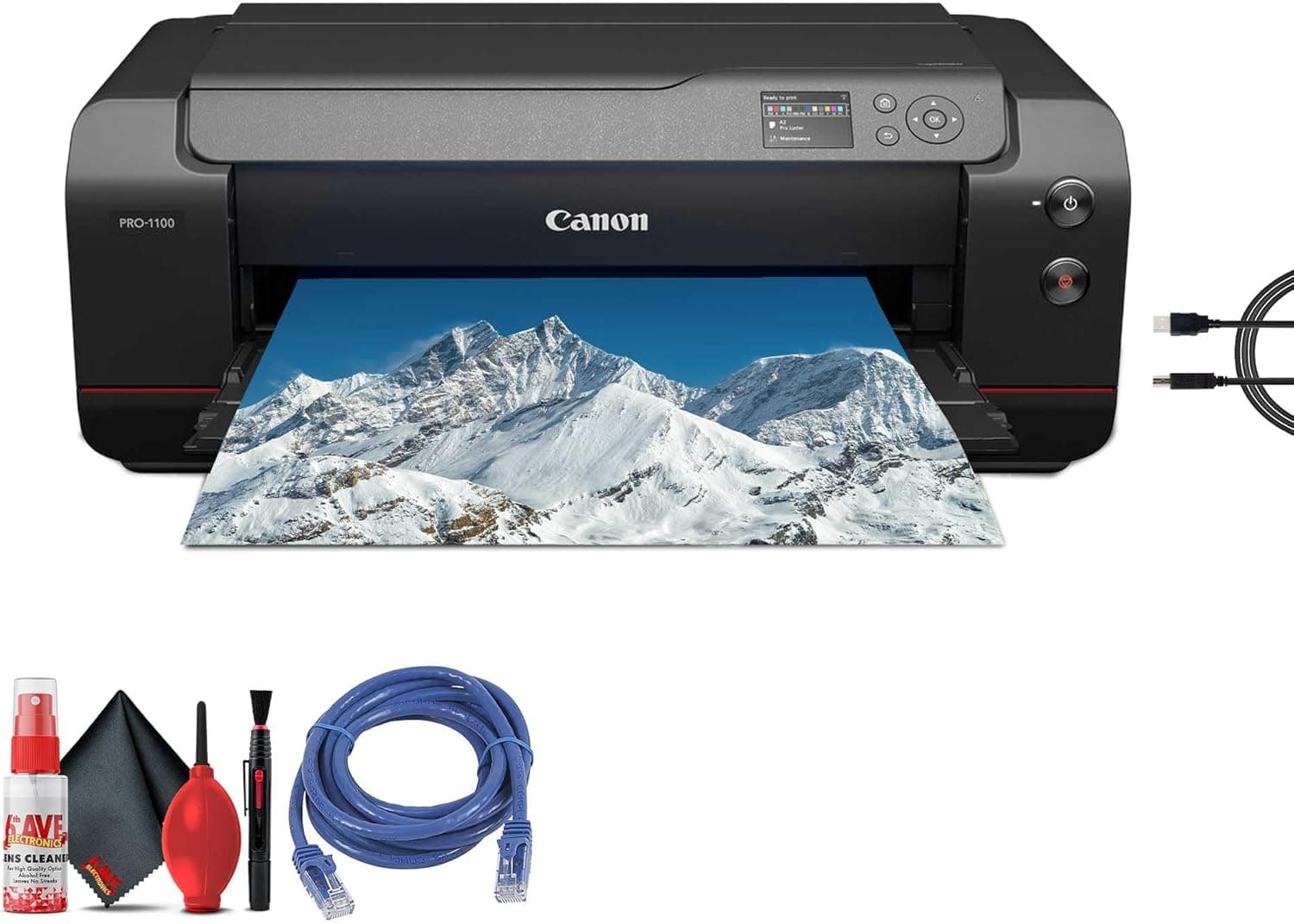
The Canon imagePROGRAF PRO-300 is designed to meet the needs of photographers and graphic artists who demand the highest levels of color accuracy and detail in their prints. This wide-format professional wireless color photographic inkjet printer comes equipped with a 9-color LUCIA PRO ink system, a cleaning kit, printer cable, and an Ethernet cable, ensuring that users have everything they need to achieve gallery-quality prints. The inclusion of the Chroma Optimizer and features like the L-COA PRO image engine and Nozzle Recovery System further enhance the printer's capabilities.

While the Canon PRO-300 has not yet received customer reviews, its specifications and features suggest a printer that is tailored for professionals who value precision and quality in their work. The ability to print large volumes quickly, combined with the intuitive control features and seamless connectivity options, positions the Canon PRO-300 as a top contender in the professional printing market. As we delve into the specifics of this printer, we can anticipate its performance and suitability for various professional applications.

Color Accuracy and Detail

The Canon imagePROGRAF PRO-300 is engineered to deliver exceptional color accuracy and detail, making it an ideal choice for photographers and graphic artists. The 9-color LUCIA PRO ink system ensures vibrant, true-to-life prints with remarkable gradations and a wide color gamut. The inclusion of the Chroma Optimizer enhances glossy finishes and expands color reproduction on glossy paper, resulting in gallery-quality photos and fine art prints.

Large-Volume Printing and Speed

Designed with professionals in mind, the Canon PRO-300's L-COA PRO image engine enables rapid processing of large image files, minimizing lag time even with high-resolution images. This feature is particularly beneficial for those who need to print studio shots or gallery images quickly without sacrificing quality. The Nozzle Recovery System ensures consistent printing without interruptions, enhancing workflow efficiency for high-volume printing tasks.

Black Levels and Ink Management

Achieving deep blacks and superior contrast is crucial for professional prints, and the Canon PRO-300 excels in this area with its dedicated Matte Black Ink. This ink is designed for fine art paper and high-quality print jobs, ensuring that your prints maintain consistent black levels. The printer's design includes separate nozzles for Matte Black and Photo Black inks, eliminating the need for ink switching between print jobs. This streamlined approach saves time and reduces hassle, making the printing process more efficient.

User-Friendly Features and Connectivity

The Canon PRO-300 is equipped with a 3.0-inch Color LCD display, which allows users to easily monitor ink levels, check printer status, and adjust settings. This intuitive interface enhances the overall user experience, making it simple to manage your printing needs. The printer offers seamless connectivity options, including USB, Wi-Fi, and Ethernet, ensuring compatibility with Windows, macOS, iOS, and Android devices. Canon's Professional Print & Layout software further simplifies the printing process, providing easy access to various printing options.

Verdict

The Canon imagePROGRAF PRO-300 stands out as a top-tier professional printer, offering exceptional color accuracy, detail, and speed for large-volume printing. Its 9-color LUCIA PRO ink system, combined with the Chroma Optimizer, ensures that photographers and graphic artists can achieve gallery-quality prints with ease. The L-COA PRO image engine and Nozzle Recovery System further enhance the printer's performance, making it a reliable choice for high-volume printing tasks.

The inclusion of dedicated Matte Black Ink and separate nozzles for different ink types streamlines the printing process, saving time and reducing hassle. The intuitive 3.0-inch Color LCD display and seamless connectivity options make the Canon PRO-300 user-friendly and versatile, catering to a wide range of professional needs. While the lack of customer reviews makes it challenging to assess real-world performance, the printer's specifications and features suggest a high-quality product that is well-suited for professionals who demand the best in printing technology.

Rating: 4.5/5

Recommended For:

  • Professional photographers
  • Graphic artists
  • Users who require gallery-quality prints
  • Individuals needing large-volume printing capabilities

Not Recommended For:

  • Home users who do not require professional printing quality
  • Those on a tight budget due to the printer's professional-grade features
Was this review helpful?

Technical Specifications

Complete product details

idealFor
Photographers, Photo enthusiasts
priceRange
$899-$999
keyFeatures
11-color LUCIA PRO ink system, High-quality photo prints, Wi-Fi and Ethernet connectivity
customerInsights
[object Object], [object Object], [object Object], [object Object], [object Object]

Frequently Asked Questions

Common questions answered

It supports up to A3+ (13x19 inches), including rolls up to 13 inches wide, fine art papers, glossy photo paper, and matte media from 3.5x5 to 13x39 inches.
Each 50ml LUCIA PRO ink tank costs around $20-25, with a full set replacement at $150-180; yields 100-300 prints depending on size and media.
Yes, its three black inks (Photo Black, Matte Black, Gray) provide exceptional density and gradation without switching cartridges.
Wi-Fi, Ethernet, USB, AirPrint, and Canon PRINT app; supports direct printing from SD cards and mobile devices.
Borderless 4x6 photos in 38 seconds; A3+ glossy prints in about 2:30 minutes; black & white faster due to no color ink use.
Nozzle checks and auto head cleaning are built-in; pigment inks reduce clogging, but print monthly for best results.
Canon recommends genuine inks for optimal quality and warranty; third-party options exist but may void warranty and affect color accuracy.

Community Q&A

Questions from real customers

Customer Insights

What customers are saying

3Positive
0Mixed
2Negative

Print Quality

Users rave about vibrant colors and deep blacks, with 95% calling it 'gallery-wo...

Positive

Build Quality

Heavy-duty chassis praised for stability during long jobs; few hardware failures...

Positive

Ease of Use

Intuitive LCD and app praised by 80% of users; driverless AirPrint works flawles...

Positive

Ink Costs

Many complain about $20/cartridge prices adding up, though pros note lower cost-...

Negative

Size and Setup

Compact for A3+ but bulky (27x15x7 inches, 31 lbs); initial setup takes 30-45 mi...

Negative

About This Review

Researched and written by the Review Atlas editorial team

How We Review This Product

Our independent, data-driven research process

Our Research Process

  • We analyze the full manufacturer specifications and compare them against competing products
  • We synthesize verified customer feedback to surface recurring praise and complaints
  • We track pricing and availability so recommendations reflect real value at today's prices
  • Manufacturers cannot pay for placement, scores, or favorable coverage
  • Evaluated using our Printers & Accessories review criteria
Last updated: October 25, 2025
Independent, reader-supported research