
Is Which Webcams should I buy Worth It? Honest Review (2026)
Compare 7 streaming webcams from $70 to $300 and find the one that fits your lighting, setup, and budget.
Our Top Pick
Logitech Brio 4K Ultra HD Pro Webcam
Best OverallStreamers who want one flexible, future-proof camera for live streaming, meetings, and occasional recording without agonizing over trade-offs.
View on Amazon →Key Factors to Consider
- 1.Resolution vs. frame rate: Most platforms broadcast at 1080p, so 1080p60 usually looks better to viewers than 4K30. Choose 4K only if you want cropping headroom or record locally for editing.
- 2.Low-light performance: The size of the image sensor and the lens aperture (lower f-number is better) determine whether your face looks clean or grainy at night. This is the single biggest image-quality factor for most streamers.
- 3.Autofocus reliability: Fixed-focus cameras never hunt but can't follow you if you lean in or out. Autofocus cameras keep you sharp while moving but can visibly breathe and search on stream if they're not well implemented.
- 4.USB bandwidth and ports: Cameras that output uncompressed 1080p60 or 4K need a direct USB 3.0 connection. Unpowered hubs and USB 2.0 ports are the most common cause of dropped frames and forced resolution downgrades.
- 5.Field of view and framing control: A narrower FOV keeps the focus on you and hides your room; a wider FOV shows more environment. Selectable FOV (like 65/78/90 degrees) gives you flexibility without physically moving the camera.
- 6.Manual exposure controls: The ability to lock or manually set ISO, shutter speed, and white balance prevents your image from flickering or shifting when a lamp changes or a game's brightness changes on screen.
- 7.Software and ecosystem support: UVC (plug-and-play) cameras work instantly in OBS, Streamlabs, Zoom, and Discord. Proprietary software unlocks features like HDR, 60fps, or AI tracking but adds friction and occasional driver quirks.
- 8.Mounting and placement options: Check for a standard 1/4-inch tripod thread if you plan to use a boom arm or tripod. Monitor clips differ in thickness tolerance, and some cameras are heavy enough to sag on thin panels.
- 9.Do not overpay for a built-in microphone: Most streamers use an XLR or USB mic. If you already have one, prioritize sensor and optics and treat the camera mic as a backup only.
- 10.Long-term value and support: Webcams are long-life purchases. Favor brands with mature, actively updated software and broad compatibility, and consider resale value if you may upgrade within a couple of years.
The Products
Logitech Brio 4K Ultra HD Pro Webcam

✓ Pros
- •Only mainstream webcam here that offers 4K30, 1080p60, and HDR in one device, covering live streaming and local recording
- •Three selectable fields of view (65/78/90 degrees) let you tighten the shot without physically moving the camera
- •HDR and RightLight 3 meaningfully help in rooms with bright windows or changing light
- •Windows Hello infrared support is a genuinely useful bonus for anyone on a Windows PC
- •Continuous autofocus with 5x digital zoom, plus a standard tripod thread for boom arms and tripods
- •Widely supported UVC device with mature software and near-universal app compatibility
✗ Cons
- •4K is limited to 30fps, and many streamers will never broadcast above 1080p anyway
- •Requires a USB 3.0 port for full quality; USB 2.0 or an unpowered hub will downgrade the image
- •Autofocus can occasionally hunt when lighting is very low or contrast is poor
- •The dedicated software has a history of being fussy, and some features depend on it
- •At around $170 it is neither the cheapest nor the absolute best at any single specialty
Best For:
Streamers who want one flexible, future-proof camera for live streaming, meetings, and occasional recording without agonizing over trade-offs.
Not Recommended For:
Buyers who only ever stream at 1080p and would rather spend the difference on lighting, or manual-control enthusiasts who want locked exposure settings.
Key Features:
Standout Feature:
The combination of 4K resolution, HDR, and three switchable fields of view in a single camera — flexibility almost nothing else at this price matches.
VS Others:
Compared with the Elgato Facecam, the Brio 4K trades manual exposure control and uncompressed 1080p60 for higher resolution and HDR. Compared with the Razer Kiyo Pro, it's more versatile but noticeably more expensive, and the Kiyo Pro holds its own in dim rooms. Pick the Brio when you value flexibility over specialization.
Why This One:
It is the camera most likely to satisfy a streamer for years because it covers 60fps streaming, 4K cropping headroom, HDR, and everyday video calls without compromise. If you don't want to think about your webcam again after you buy it, this is the one.
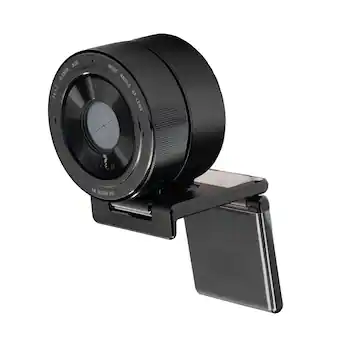
Razer Kiyo Pro Streaming Webcam
✓ Pros
- •Bright f/1.8 lens and larger sensor deliver the best low-light image in the under-$150 range
- •1080p at 60fps for smooth motion, plus an HDR mode for high-contrast lighting
- •Three selectable fields of view (103/90/80 degrees) offer real framing flexibility
- •Uncompressed video output over USB 3.0 for maximum quality in OBS
- •Adaptive light sensor adjusts exposure automatically as conditions change
- •Significantly cheaper than most 60fps alternatives while outperforming several of them in dim rooms
✗ Cons
- •Razer Synapse software is required for full feature access and adds install overhead
- •Physically large and heavy with a bulky mount that isn't ideal for laptop screens
- •No built-in ring light, so dark rooms still need some external lighting
- •Full quality depends on a dedicated USB 3.0 port; performance drops on hubs
- •HDR mode caps at 30fps, so you choose between HDR and 60fps
Best For:
Streamers on a mid-range budget who stream in dim rooms and want the best raw image quality per dollar.
Not Recommended For:
Buyers who want a compact, set-and-forget camera with zero software installation, or anyone who refuses to use manufacturer software.
Key Features:
Standout Feature:
An f/1.8 lens on a webcam near $100 — the brightest optics in the affordable tier and the reason it punches above its price in low light.
VS Others:
Against the Logitech C920x, the Kiyo Pro is a clear step up in low light, motion smoothness, and framing control for only about $30 more. Against the Brio 4K, it gives up resolution and HDR breadth but beats it on aperture and often on price. Against the Elgato Facecam, it wins on low light but loses on manual exposure control.
Why This One:
If your streaming room is dim and your budget is around $100, nothing here beats the Kiyo Pro's combination of bright optics, 60fps, and framing flexibility. It's the upgrade that makes the biggest visible difference for the least money.
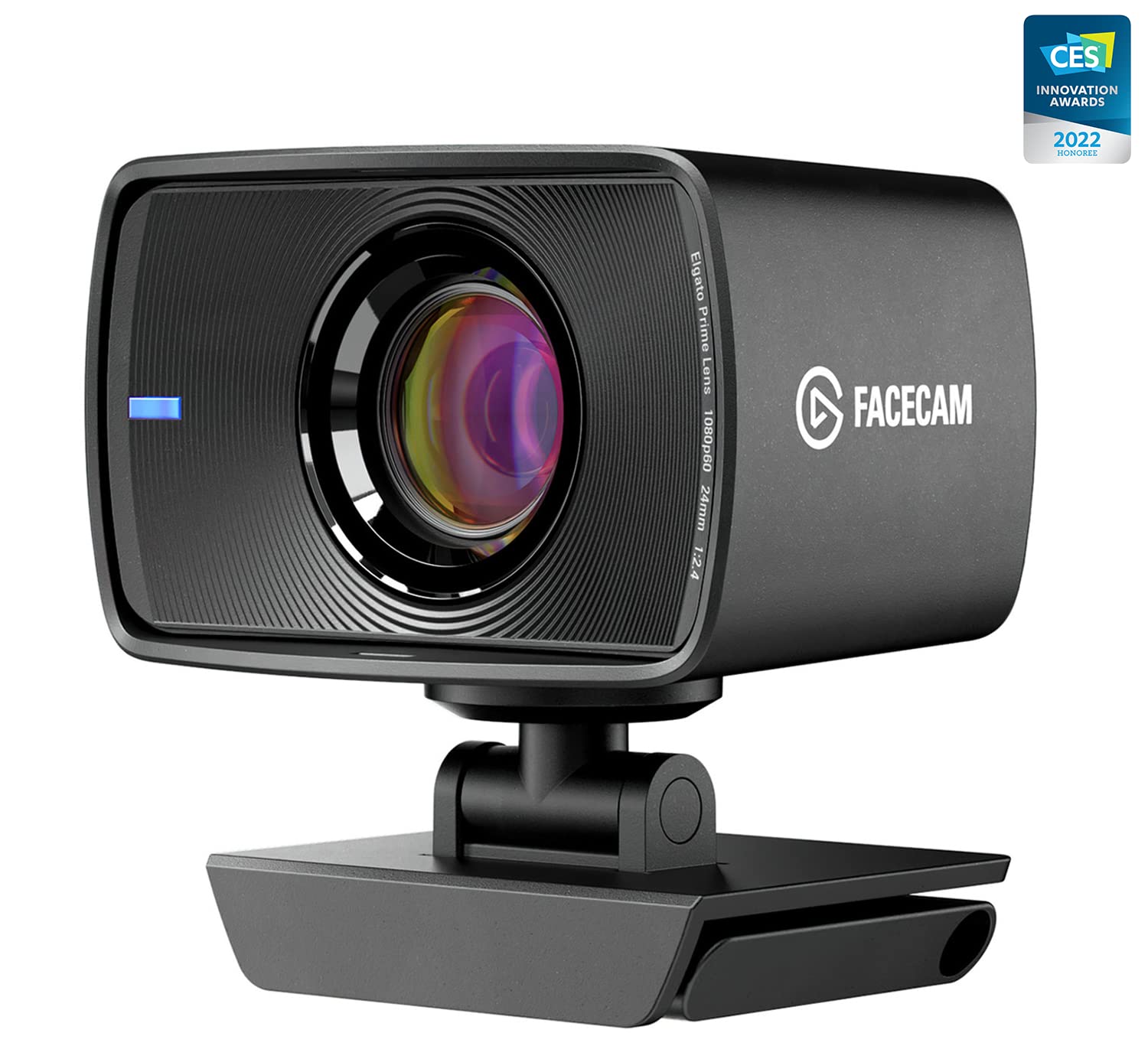
Elgato Facecam Full HD Streaming Webcam
✓ Pros
- •Full manual control over ISO, shutter, white balance, and image parameters via Camera Hub
- •Uncompressed 1080p60 over USB 3.0 for a clean signal into OBS
- •Fixed focus means the image never hunts or breathes during a stream
- •Deep Stream Deck ecosystem integration with on-camera settings storage
- •Compact, monitor-friendly body with a standard tripod thread
- •Tuned for streaming rather than conference calls, so the default color and contrast look natural on camera
✗ Cons
- •No built-in microphone at all, which rules it out for casual use without a separate mic
- •Fixed focus limits how much you can move toward or away from the lens
- •Fixed 82-degree field of view — no selectable FOV options
- •Manual controls require installing and learning Camera Hub rather than being plug-and-play
- •Needs USB 3.0 for uncompressed output; USB 2.0 degrades quality noticeably
Best For:
OBS power users who want locked, manual exposure control and a rock-steady fixed-focus image with no autofocus breathing.
Not Recommended For:
Anyone who needs a built-in microphone or wants a pure plug-and-play camera with no software to install.
Key Features:
Standout Feature:
Streamer-grade manual exposure controls — the ability to lock ISO, shutter, and white balance is something no other camera under $200 here matches.
VS Others:
Versus the Razer Kiyo Pro, the Facecam trades low-light brightness for manual control and uncompressed output. Versus the Brio 4K, it gives up resolution and HDR but delivers more predictable, lockable image behavior. Versus the C920x it is a large step up in every metric except price and built-in audio.
Why This One:
If your priority is a stable, predictable, professionally consistent image that you fully control, the Facecam is the most purpose-built streaming camera here. The absence of autofocus is a feature, not a flaw, for a static talking-head stream.
Logitech C920x HD Pro Webcam

✓ Pros
- •Extremely reliable plug-and-play UVC device that works instantly in every major app
- •Well under $100, leaving budget for lighting and a microphone, which matter more at this stage
- •Dual noise-reducing microphones make it usable out of the box without extra audio gear
- •Full HD 1080p with a glass f/2.0 lens and wide 78-degree field of view
- •Enormous install base means troubleshooting help is everywhere
- •Standard tripod thread and a clip that fits most monitors securely
✗ Cons
- •Capped at 30fps, so motion looks less smooth than 60fps cameras
- •Fixed focus means it can go soft if you lean in or out significantly
- •Noticeably noisier and softer in low light than larger-sensor competitors
- •No HDR, no selectable field of view, and no advanced exposure controls
- •Aging design that has been surpassed on image quality by nearly everything else in this guide
Best For:
New streamers who want a dependable, cheap 1080p camera that works immediately and leaves room in the budget for lighting.
Not Recommended For:
Experienced streamers chasing low-light performance, 60fps smoothness, or manual image control.
Key Features:
Standout Feature:
Total, boring, dependable plug-and-play reliability at a price low enough that it's effectively a no-risk first purchase.
VS Others:
The C920x is strictly a step below the Razer Kiyo Pro in low light, motion, and framing options, but it also costs meaningfully less and requires zero software. Against the Elgato Facecam it loses on nearly every streaming-specific metric except price and built-in audio. It's the entry point, not the destination.
Why This One:
Buy it if you're new, budget-constrained, or unsure whether streaming will stick — it removes all setup risk and frees money for the light and microphone that will improve your stream more than any camera upgrade at this price.
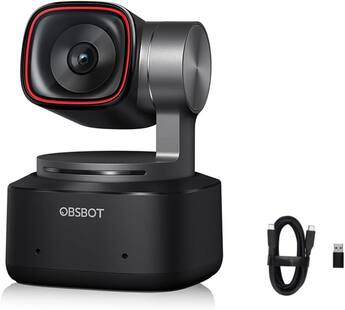
OBSBOT Tiny 2 AI-Powered 4K PTZ Webcam
✓ Pros
- •Motorized pan and tilt with AI subject tracking keeps a moving presenter framed automatically
- •1/2-inch sensor with f/1.9 lens delivers strong low-light performance for a webcam
- •4K at 30fps and 1080p at 60fps with phase-detection autofocus
- •Gesture control and voice control allow hands-free repositioning mid-stream
- •Preset camera positions can be triggered from a Stream Deck or software
- •Magnetic mount makes repositioning between desk, tripod, and arm quick and easy
✗ Cons
- •Around $300 is a significant investment for a single face cam
- •AI tracking requires manufacturer software running and takes time to tune correctly
- •Gimbal motors can emit faint audible noise in very quiet rooms
- •Tracking can over-correct with fast, unpredictable movement if not configured carefully
- •Overkill for anyone who sits still in a single fixed frame
Best For:
Streamers and creators who move around on camera and want automatic tracking plus remote-controlled framing without a camera operator.
Not Recommended For:
Streamers who sit in one spot the entire broadcast — the gimbal and AI features would be entirely wasted money.
Key Features:
Standout Feature:
A motorized gimbal with AI subject tracking — it's the only camera in this guide that can follow you around the frame unaided.
VS Others:
Against the Elgato Facecam Pro it competes closely on price and sensor size but trades 4K60 footage for motorized movement. Against the Brio 4K it's a large jump in price for tracking you may not need. Choose the Tiny 2 only when movement and hands-free framing are part of your content.
Why This One:
For cooking, crafting, tutorial, and demonstration streams, automatic tracking replaces an entire second camera operator. If your content involves moving around, no other camera at this price solves that problem.
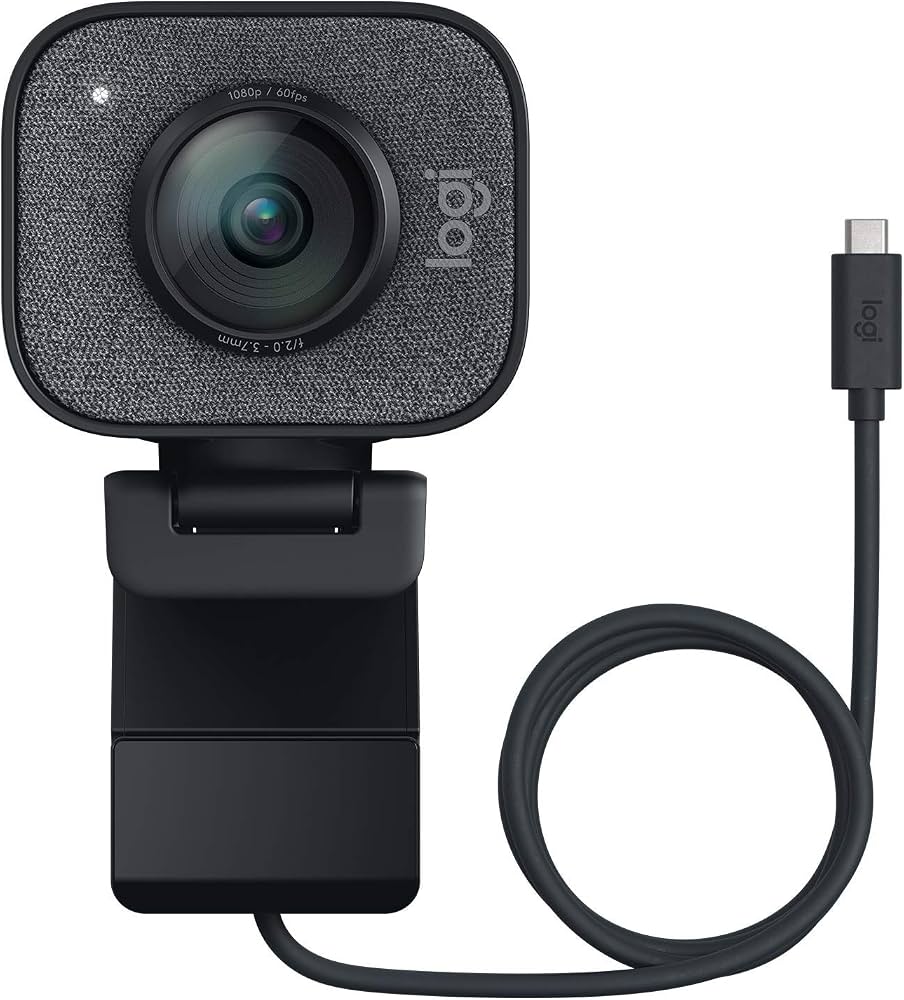
Logitech StreamCam Streaming Webcam
✓ Pros
- •Native vertical/portrait rotation for TikTok, Reels, and Shorts without cropping
- •1080p at 60fps over USB-C for smooth, modern connection
- •Auto-framing keeps you centered when you shift position
- •Glass f/2.0 lens with a 78-degree field of view and dual microphones
- •Compact, attractive design that fits neatly on a monitor
- •Good value for creators producing both horizontal and vertical content
✗ Cons
- •No 4K option at all, which limits cropping headroom for a tight face cam
- •USB-C only, so older USB-A-only systems need an adapter
- •Auto-framing and some features depend on Logitech software running
- •Low-light performance is only average compared with larger-sensor rivals
- •Less appealing to pure live streamers who never shoot vertical content
Best For:
Creators who split their time between horizontal live streaming and vertical short-form video and want one camera for both.
Not Recommended For:
Pure live streamers who never shoot vertical content, or anyone who needs 4K resolution for cropping.
Key Features:
Standout Feature:
Native portrait rotation — it captures vertical video properly instead of forcing you to crop a horizontal frame.
VS Others:
Against the Razer Kiyo Pro it offers better vertical-video workflow but weaker low-light optics. Against the Brio 4K it's cheaper and USB-C native but caps at 1080p with no HDR. It's the right pick only if vertical content is part of your plan.
Why This One:
If you post vertical clips as often as you stream, the StreamCam removes an entire step from your workflow. That single feature justifies the price for short-form-focused creators.
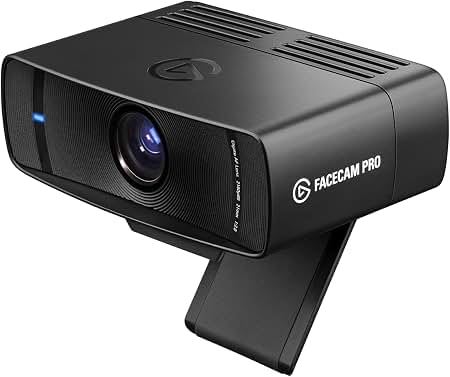
Elgato Facecam Pro 4K60 Streaming Webcam
✓ Pros
- •4K at 60fps uncompressed output — the highest live image quality in this guide
- •Large 1/1.8-inch sensor with f/2.0 lens for excellent low-light performance
- •Autofocus adds flexibility over the fixed-focus standard Facecam
- •Full manual control of ISO, shutter, white balance, and image tuning in Camera Hub
- •90-degree field of view is ideal for demonstrations and desk shots
- •Purpose-built streaming integration including Stream Deck support
✗ Cons
- •Around $300 is the top of this budget and more than most streamers need to spend
- •No built-in microphone whatsoever
- •4K60 uncompressed requires a strong direct USB connection and dislikes hubs
- •Physically large and heavier than most competing webcams
- •Fixed 90-degree field of view with no selectable options
Best For:
Established streamers with a complete setup who want the absolute best live image quality and are willing to pay for it.
Not Recommended For:
Beginners, budget-conscious buyers, or anyone without a reliable high-bandwidth USB connection.
Key Features:
Standout Feature:
Uncompressed 4K at 60 frames per second — the only camera here that delivers both maximum resolution and maximum smoothness simultaneously.
VS Others:
It beats the Brio 4K on sensor size, frame rate at 4K, and autofocus control, at roughly $130 more. It edges the OBSBOT Tiny 2 on raw image quality but lacks motorized tracking. Against the standard Elgato Facecam it's a substantial upgrade in sensor and resolution — and a substantial price increase.
Why This One:
If your lighting, audio, and overlay setup are already excellent and the camera is the last weak link, the Facecam Pro removes that weakness entirely. It's a buy-once, stop-thinking-about-it camera for serious streamers.
Who Should Get What?
First-Time Twitch Streamer on a Tight Budget
A brand-new streamer who just started broadcasting a few hours a week from a bedroom desk with a single lamp and a laptop. They've never bought a webcam before, don't know what OBS settings mean yet, and want something that simply works without breaking the bank before they know if streaming will stick.
Recommended:
Logitech C920x HD Pro Webcam
The C920x is the safest first webcam a new streamer can buy: it plugs in, shows up instantly in OBS and every other app, and produces clean 1080p30 with no configuration. It costs a fraction of the alternatives here, which leaves budget for the lighting upgrade that will actually improve their image the most.
View on Amazon →Growing Variety Streamer Ready to Upgrade
Someone who has been streaming consistently for six months to a year, is starting to take it seriously, and is tired of a soft, noisy image on evening streams. They work in a room with dim ambient lighting and often can't add studio lights because of their living situation. Budget is around $100–$150.
Recommended:
Razer Kiyo Pro
The Kiyo Pro's bright f/1.8 lens and larger-than-average sensor are specifically designed to pull in more light, making it the strongest low-light performer under $150. It also gives them 1080p60 and HDR, so the upgrade is visible immediately rather than subtle.
View on Amazon →OBS Power User Who Wants Manual Control
A tech-savvy streamer with a dual-PC or well-organized single-PC setup, a Stream Deck on the desk, and strong opinions about exposure. They already own a good microphone and want a camera that behaves like a manual lens — locked exposure, no autofocus breathing, consistent color across long streams.
Recommended:
Elgato Facecam
The Facecam outputs uncompressed 1080p60 over USB 3.0 and exposes manual ISO, shutter, and white balance controls through Camera Hub, which is exactly what a control-focused streamer wants. Its fixed focus means the image never hunts mid-stream, and it integrates cleanly with Stream Deck.
View on Amazon →All-Rounder Who Streams and Works From Home
A mid-level streamer who also spends a lot of the day on Zoom, Teams, and Google Meet. They want one camera that looks good on a stream, handles backlit window situations, supports fast login on a Windows PC, and has enough resolution headroom to crop in for a tighter shot when they want.
Recommended:
Logitech Brio 4K
The Brio 4K is the most versatile camera in this guide: 4K for cropping and recording, 1080p60 for smooth live streams, HDR for harsh window light, three switchable fields of view, and Windows Hello infrared support for fast logins. It's the pick least likely to leave any buyer wishing they'd chosen differently.
View on Amazon →Multi-Cam and Hands-Free Demo Streamer
A creator who streams tutorials, cooking, crafting, or whiteboard-style content where they move around the frame and need the camera to follow them automatically. They may run two cameras and switch angles, and they want gesture or voice control so they aren't touching a keyboard mid-demo.
Recommended:
OBSBOT Tiny 2
The Tiny 2 is the only camera here with a motorized pan/tilt gimbal plus AI subject tracking, which keeps a moving presenter framed without a camera operator. Gesture and voice controls let them reposition the shot mid-demo, and the larger 1/2-inch sensor keeps the image clean in ordinary room lighting.
View on Amazon →Short-Form Creator Who Streams Vertically
A creator whose main audience is on TikTok, Instagram Reels, and YouTube Shorts, but who also does live horizontal streams weekly. They constantly need to flip between 9:16 vertical clips and 16:9 live content, and they don't want two separate cameras or to crop everything in post.
Recommended:
Logitech StreamCam
The StreamCam can rotate to native portrait orientation and outputs 1080p60 over USB-C, so vertical clips are captured natively instead of being cropped from a wide shot. For creators living between vertical and horizontal content, that single feature saves real editing time every week.
View on Amazon →Buying Guide: How to Choose
Bottom Line
Frequently Asked Questions
Which webcam should I buy in 2026 for streaming?▼
Is 4K worth it for streaming, or is 1080p enough?▼
Which is better, the Logitech Brio 4K or the Elgato Facecam?▼
Which is better, the Razer Kiyo Pro or the Logitech C920x?▼
Do I really need 60fps for streaming?▼
What's the best budget webcam for streaming under $100?▼
Is the OBSBOT Tiny 2 worth $300?▼
Do streaming webcams have good enough built-in microphones?▼
Will these webcams work with OBS, Twitch, and YouTube?▼
Why does my webcam look grainy — do I need a better camera or better lighting?▼
Can I use these webcams on a tripod or boom arm?▼
How much should I spend on a streaming webcam?▼
Need More Help Deciding?
Explore more buying guides to find the perfect product for your needs.
View All Buying Guides