
Is MacBook Air M4 Worth It? Honest Review (2026)
Balanced look at the MacBook Air M4's strengths, weaknesses, and who it's right for in 2026.
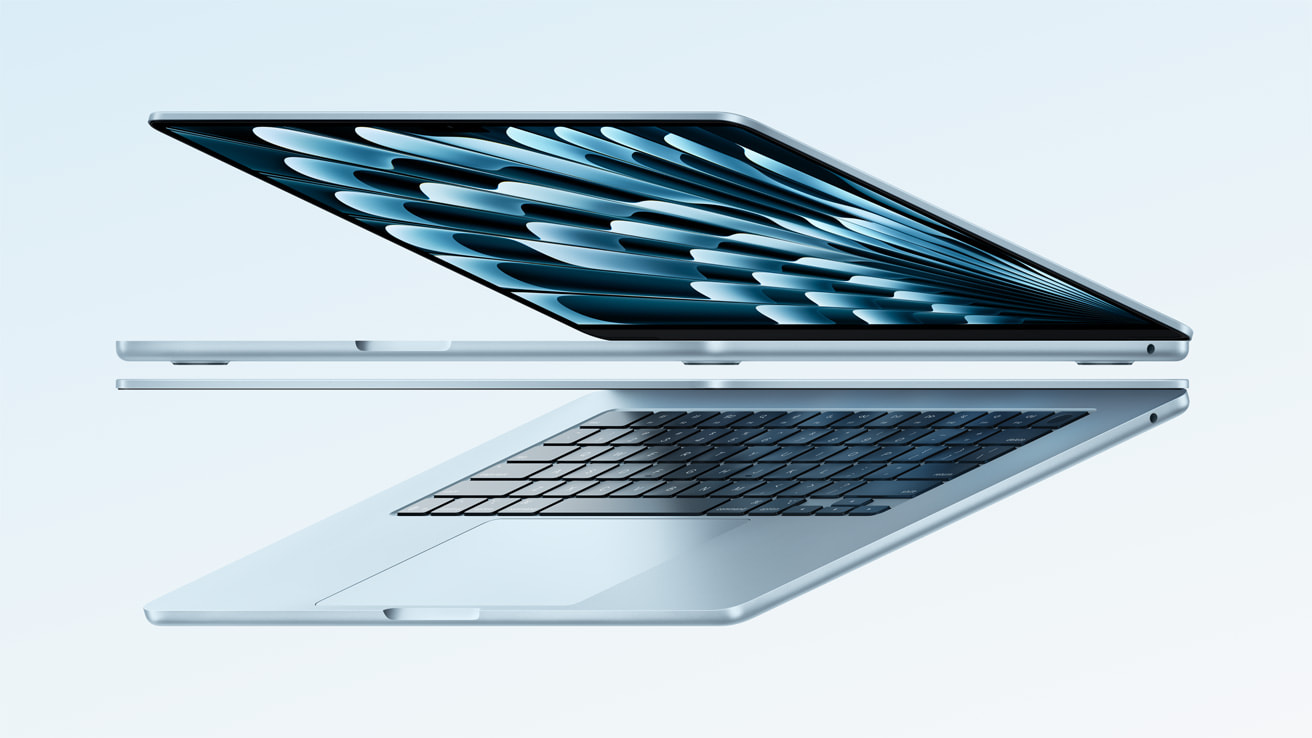
Quick Decision
Buy the MacBook Air M4 if you want a lightweight, all-day laptop for everyday work, school, and light creative projects—its $999 starting price now includes 16GB RAM. Skip it if you need sustained heavy performance, more than two Thunderbolt ports, or serious gaming; a MacBook Pro or Windows laptop will serve you better. The M4 Air gives most buyers 90% of the experience of a Pro for roughly $600 less.
Best if you...
- Students
- Office professionals
- Travelers and commuters
Skip it if you...
- Video editors doing long renders
- Hardcore gamers
- Users who need more than 32GB RAM
Apple's MacBook Air has been the default laptop recommendation for students and travelers for years, and the M4 generation raises the bar. Starting at $999, it gives you a 10-core CPU, 16GB of unified memory, and claimed all-day battery life in a shell that weighs just 2.7 pounds. If you're deciding between this and a MacBook Pro or a Windows ultrabook in 2026, the choice isn't as simple as 'pick the Air.'
This guide breaks down what the MacBook Air M4 does well and where it stumbles, based on Apple's official specifications, widely cited third-party reviews, and consistent buyer feedback. You'll see exactly where the M4 Air's value lies, which limitations might bother you, and who should avoid it entirely. We also cover the best alternatives and the accessories that solve its most common complaints.
You can check the latest price for the MacBook Air M4 on Amazon if retail prices have shifted since this was written.
About the MacBook Air M4
The MacBook Air M4 is Apple's mainstream ultraportable laptop, powered by the fourth-generation M-series chip with a 10-core CPU, 8-core GPU, and 16GB of unified memory. It comes in 13-inch and 15-inch sizes and offers a fanless design, all-day battery life, and the macOS ecosystem in a thin aluminum body. It's aimed at students, professionals, and everyday users who want powerful everyday computing without the weight or cost of a MacBook Pro.
Key Specifications
- Chip
- Apple M4 (10-core CPU, 8-core GPU, 16-core Neural Engine)
- Ports
- 2x Thunderbolt 4, MagSafe 3, 3.5mm headphone jack
- Camera
- 1080p FaceTime HD
- Memory
- 16GB unified memory, up to 32GB
- Weight
- 2.7 pounds (13-inch)
- Battery
- Up to 15 hours wireless web
- Display
- 13.6-inch Liquid Retina, 2560x1664, 500 nits
- Storage
- 256GB SSD, up to 2TB
- Connectivity
- Wi-Fi 6E, Bluetooth 5.3
Overview
The MacBook Air M4 is Apple's mainstream ultraportable, released in March 2025. It comes in 13-inch and 15-inch sizes, with the same M4 processor, 16GB base RAM, and fanless design. For most people, this is the performance sweet spot: fast enough for everyday productivity, photo editing, and light video work, with none of the noise or weight of a Pro machine.
The Air is built around a unibody aluminum chassis that is only 0.44 inches thick. The M4 chip includes a 10-core CPU, 8-core GPU, and 16-core Neural Engine, and Apple claims it is up to 2x faster than the M1 MacBook Air. The base model's 16GB unified memory is a major upgrade from the previous 8GB standard and makes the Air a more serious tool for multitasking.
Both screen sizes share the same technology: a Liquid Retina display with 500 nits brightness, P3 wide color, and True Tone. The 13-inch model weighs 2.7 pounds, while the 15-inch adds about half a pound. The M4 Air also supports two external displays when the lid is closed, a feature that professionals have been asking for since the M2 generation.
Pros
The M4 MacBook Air gets the fundamentals right. Performance, battery, build quality, and quiet operation are all above average for the price. Here are the strengths that make it a top pick in 2026.
M4 Chip and 16GB Base Memory Deliver Pro-Level Performance
The M4 puts the MacBook Air in a different performance class than previous entry-level Airs. Apple's 10-core CPU and 8-core GPU handle web browsing, coding, 4K video editing in Final Cut, and even modest 3D work without breaking a sweat. The 16-core Neural Engine also accelerates AI tasks like background removal and real-time language translation, and the 16GB of unified memory means you can keep 30+ browser tabs open alongside heavy apps.
According to Apple, the M4 is up to 2x faster than the M1 MacBook Air. Intel alternatives in the same price range simply can't keep up in single-core tasks, which are what most daily work relies on. This performance headroom also means the 2026 MacBook Air will stay responsive for years.
Genuinely All-Day Battery Life
Battery life is one of the strongest reasons to buy the M4 Air. Apple quotes up to 15 hours for wireless web browsing on the 13-inch model, and the M4's efficiency means most users can comfortably work through a full day. Streaming video often uses even less power.
Few Windows ultrabooks match the Air's efficiency in independent testing; many 13-inch laptops need a charge by mid-afternoon. The included USB-C charger is fairly compact, but you can also use a power bank with USB-C PD in a pinch.
Featherweight Aluminum Build
The 13-inch M4 Air weighs just 2.7 pounds and is only 0.44 inches thick, making it one of the easiest full laptops to carry. The unibody aluminum body feels significantly more premium than plastic or softer metal chassis found on many $1,000 Windows laptops.
The 15-inch model is still slim at 0.45 inches and 3.3 pounds, which beats most 15-inch PCs by a wide margin. For commuters, students, and consultants who live in backpacks, the weight and size are a major advantage.
Sharp, Color-Accurate Liquid Retina Display
The display is far from cutting-edge, but it's very good at this price. It's sharp, bright at 500 nits, and covers the P3 wide color gamut, so photos and video look vivid and accurate. True Tone auto-adjusts white balance based on ambient lighting, and the anti-reflective coating helps outdoors.
The 60Hz refresh rate is a trade-off, but for most productivity tasks it won't matter. If color accuracy matters for photo or design work, the Air's panel is calibrated well enough for most creators, though professionals may still prefer the MacBook Pro's mini-LED.
Silent, Fanless Operation
Because there is no fan, the MacBook Air M4 makes zero noise under normal use. That's a huge plus for libraries, meetings, or recording a quiet voiceover. The passive cooling means the laptop never has moving parts to fail or collect dust.
The flipside is that sustained high loads will cause some thermal throttling. However, for short bursts of heavy work, the M4 maintains impressive speed; it's only during long 4K exports or extended gaming sessions that you'd notice the compromise.
Two External Displays When Lid Is Closed
The M4 Air supports two external displays with the lid closed, a first for the MacBook Air line. A single external display works while the internal display stays on, but two requires closing the laptop. It's an excellent setup for a desk.
According to Apple, each external display can run at up to 5K resolution at 60Hz over Thunderbolt 4. For professionals who need multiple monitors but don't want a MacBook Pro's weight, the Air is now a viable choice.
Ports That Cover the Essentials
The Air has two Thunderbolt 4 ports, a MagSafe 3 charging port, and a 3.5mm headphone jack. MagSafe avoids accidental cable yanks and leaves a Thunderbolt port free while charging. Thunderbolt 4 supports fast external storage, 10GbE adapters, and charging up to 100W.
The lack of HDMI and SD card means you'll need a hub for those, but for everyday work, the connection options included are sufficient. Most users will only need a hub when traveling or doing photography.
Cons
No laptop is perfect, and the M4 Air makes clear compromises to hit its price and size. The limitations below won't matter to everyone, but they might be deal-breakers for some.
Base Storage Is 256GB and Upgrade Costs $200
Apple's base MacBook Air M4 includes 256GB of SSD, which is tight for 2026. After macOS, system data, and basic apps, you'll have roughly 200GB free. A few video projects or a large game install can eat that quickly.
Upgrading to 512GB costs about $200 more, which effectively raises the 13-inch price from $999 to $1,199. That's not bad compared to Apple's old upgrade prices, but it makes the Air less of a bargain. If you plan to edit photos or video, buy the 512GB version or plan to carry an external SSD.
60Hz Display Feels Dated Against 120Hz Competitors
The Liquid Retina screen is sharp and bright, but it runs at a fixed 60Hz refresh rate. Scrolling and motion can look slightly less fluid than on the iPad Pro, MacBook Pro, or many Windows laptops with 120Hz OLED panels.
It also lacks the deep blacks of OLED. For media consumption and office work, most users won't mind, but if you've used a ProMotion display, the difference is noticeable.
Only Two Thunderbolt Ports and No SD/HDMI
Two USB-C ports is tight for a laptop that is also a desktop machine. You'll need a hub to connect an external monitor, SD card, or legacy USB-A peripherals. The MagSafe port helps by reserving one USB-C for data, but you'll still want a compact USB-C hub.
This affects photographers, audio interface users, and anyone with multiple USB devices. It's the standard compromise on thin-and-light laptops, but Apple could have added an HDMI port given the M4 Air's focus on productivity.
Fanless Design Can Throttle Under Sustained Loads
The silent cooling is great, but it has a ceiling. In long rendering sessions or 30-minute gaming sessions, the chip will reduce clocks to safely manage heat. That means a MacBook Pro M4 will finish a long export faster.
For typical office work, this won't matter. But if you know your workflow involves continuous heavy CPU or GPU load, the Air isn't the right tool.
RAM and Storage Are Soldered and Can't Be Upgraded Later
All MacBook Airs have memory and storage permanently attached. You can't add more RAM or swap the SSD after purchase, so you need to decide upfront. If you outgrow 16GB of RAM in five years, you'll need to sell and upgrade.
The 16GB base is more future-proof than earlier 8GB models, but heavy users should still move to 24GB or 32GB before buying.
Price Quickly Rises When You Add Storage or RAM
The $999 starting price is compelling, but the upgrades add up. Moving from 256GB to 512GB adds $200, and going from 16GB to 32GB also adds $400. A well-configured 13-inch with 512GB and 32GB runs around $1,599.
At that point, a MacBook Pro M4 starts to look like better value for people who want the extra performance and build. The Air's value case is strongest with modest configurations.
Limited Game Support and Only Integrated Graphics
The M4's 8-core GPU is capable, but macOS still has a small game library. Many new releases are Windows-only or require cloud streaming. If you expect to play AAA games, a gaming laptop with discrete graphics is a better fit.
That said, older games, indie titles, and Apple Arcade games run well. The Air is not a gaming computer; it's a productivity machine.
👍 Who It's For
The MacBook Air M4 is the right choice for students and professionals who need a reliable, light laptop for writing, coding, research, spreadsheets, presentations, and light creative work. It's also ideal for anyone already using an iPhone or iPad, because features like Handoff, AirDrop, Universal Clipboard, and iCloud sync make the workflow seamless.
Frequent travelers will appreciate the 13-inch's 2.7-pound weight, MagSafe charging, and long battery. Photographers, podcasters, and non-video creators will find the display and connectivity sufficient, especially with a small USB-C hub.
Buyers who want a laptop that lasts more than a few years should choose the 512GB/16GB configuration; that build will handle daily tasks well into the 2030s.
👎 Who Should Avoid
The MacBook Air M4 is not a good fit for video professionals who render long projects. You'd see performance spikes followed by thermal throttling; a MacBook Pro M4 or a Windows workstation is better. Hardcore gamers should also avoid it, because macOS's game library is limited and the integrated GPU won't run modern titles at high settings.
Power users who need more than 32GB RAM or want to upgrade later should skip. The Air is also not the best for people who need Windows-only software, full-size SD card readers, or built-in HDMI. For those, a Windows ultrabook could offer more convenient I/O at the same price.
See today's MacBook Air M4 price and available configurations on Amazon.
🛒 Buy on AmazonAs an Amazon Associate we earn from qualifying purchases.
Alternatives to Consider
| Product | Choose MacBook Air M4 if... | Choose the alternative if... |
|---|---|---|
| MacBook Pro M4 14-inch$600 more for the entry-level 14-inch | You want a light, silent, all-day ultrabook and don't need sustained GPU performance. | You edit video, use SD cards, or want a faster ProMotion display and active cooling. |
| Dell XPS 13Similar starting price, though street prices vary | You prefer macOS, Apple ecosystem, and fanless reliability. | You want a Windows laptop with OLED touchscreen and more flexible ports. |
| iPad Pro M4 11-inchComparable starting price, but the keyboard costs extra | You need a real laptop with macOS, multitasking, and a physical keyboard. | Your priority is drawing and note-taking with an Apple Pencil in a touch-first form. |
The most direct alternative is the MacBook Pro M4 14-inch, which starts at about $1,599. It's heavier and costs more, but you get active cooling, a 120Hz ProMotion display, three Thunderbolt 4 ports, HDMI, an SD card slot, and a better GPU for sustained tasks. Choose it if the Air's limitations are real annoyances and your workflow involves continuous rendering or video production.
On the Windows side, the Dell XPS 13 is a close rival at around $1,000. It offers a more modern OLED display and touchscreen, plus Windows app compatibility. However, it rarely matches the Air's battery life and build reliability. The iPad Pro M4 is a different class but worth considering for artists and note-takers, though it can't replace a full laptop for most people.
Is it worth the price?
At approximately $999, the MacBook Air M4 is worth it for students, business professionals, and casual creators who value portability and macOS. For $1,599, the MacBook Pro M4 adds active cooling, a faster 120Hz display, HDMI, and an SD card slot, but most users won't need those for everyday tasks. If you plan to keep a laptop for five years, the Air with 512GB and 16GB RAM is a sensible investment.
📝 Bottom Line
The MacBook Air M4 is the right choice for most students, office workers, and light creators because it delivers pro-level performance, excellent battery life, and a portable chassis at a reasonable starting price. The 16GB base RAM makes it far more future-proof than the M2 or M3 Air, and the M4 chip is quick enough for everything except sustained heavy workloads. If your daily software is a browser, a word processor, Slack, and a photo editor, this laptop will feel fast for years.
It is not the right choice for people who export long videos, run heavy simulations, or want to play current AAA games. The lack of fans and the 60Hz display are the two biggest technical compromises; the limited port selection is a practical annoyance. The MacBook Pro M4 solves those issues, but it costs $600 more and weighs more. You can avoid most storage problems by choosing the 512GB version for an additional $200.
For most buyers in 2026, the MacBook Air M4 remains a top all-around ultrabook, especially if you're already in the Apple ecosystem. Check current pricing on Amazon before deciding, and keep in mind that the 13-inch and 15-inch variants both offer the same performance and trade-offs. Buy it if you want a fanless, all-day laptop for real work. Skip it if you know your work needs sustained power, more ports, or a high-refresh display.
Check current MacBook Air M4 availability and bundle options on Amazon.
🛒 Buy on AmazonAs an Amazon Associate we earn from qualifying purchases.
Frequently Asked Questions
Quick Summary
Key Pros
- ✓M4 chip with 16GB base memory offers excellent performance for everyday tasks and light creative work
- ✓Up to 15 hours of battery life per Apple's wireless web testing
- ✓Featherlight 2.7-pound build and premium aluminum chassis
- ✓Sharp 500-nit Liquid Retina display with wide P3 color support
- ✓Silent fanless operation with no moving parts
Key Cons
- ✗Only 256GB of storage in the base model; 512GB costs $200 extra
- ✗60Hz display, no ProMotion or OLED option
- ✗Just two Thunderbolt ports and no HDMI/SD card slot
- ✗Fanless design can throttle during sustained heavy loads
- ✗RAM and SSD are soldered; no user upgrades after purchase
Ratings
Best For
- →Students
- →Office professionals
- →Travelers and commuters
- →Writers and coders