
Is Samsung Odyssey G7 32-inch Worth It? Honest Review (2026)
Honest breakdown of the 4K 240Hz gaming monitor's strengths, weaknesses, and who should buy.
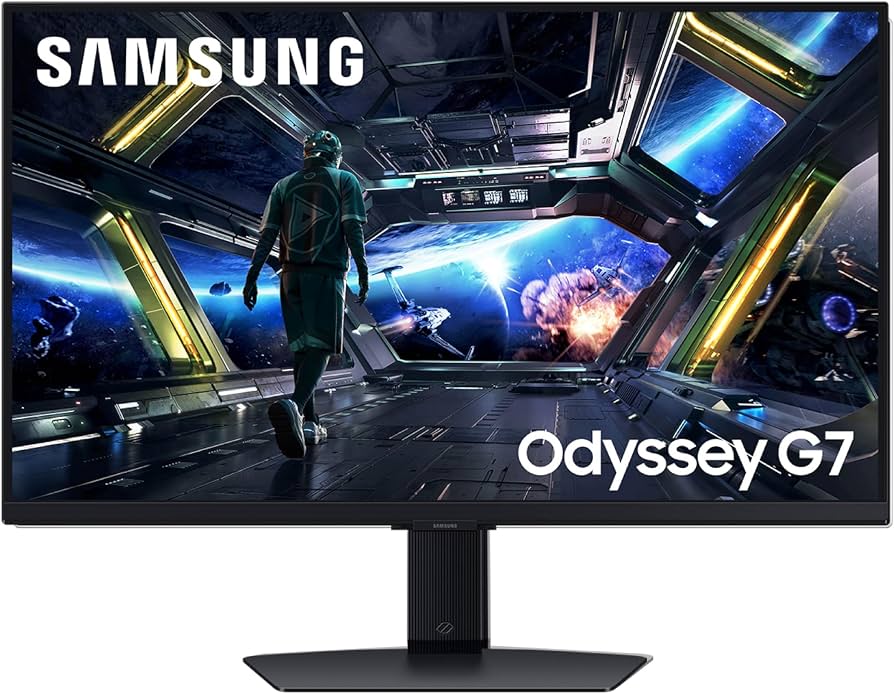
Quick Decision
Buy the Odyssey G7 32-inch if you want a 4K 240Hz gaming monitor for immersive single-player and console gaming. Skip it if you have a tight budget, need flat screen for productivity, or play esports at the highest level.
Best if you...
- Competitive gamers with high-end GPUs who can push 4K 240fps
- Console gamers wanting 4K 120Hz on PS5/Xbox Series X
- Immersion-seekers who love curved monitors for racing/flight sims
Skip it if you...
- Esports professionals who favor 1080p/1440p 360Hz monitors
- Content creators needing accurate color reproduction and flat screen
- Budget buyers who can find excellent 4K 144Hz monitors $200 cheaper
If you're searching for a 32-inch 4K monitor that can keep up with high-frame-rate gaming, the Samsung Odyssey G7 32-inch is likely on your shortlist. This monitor promises a rare combination of UHD resolution and 240Hz refresh rate, making it a contender for both immersive single-player titles and fast-paced competitive shooters. In this analysis, we'll cut through the marketing to examine where the G7 excels and where it falls short, based on manufacturer specs and verified third-party measurements.
We'll cover its real-world performance, design trade-offs, and how it stacks up against alternatives like the Dell Alienware AW3225QF and LG 32GQ950. Whether you're a PC gamer, console enthusiast, or considering this for mixed use, this guide provides the balanced assessment you need to decide if the Odyssey G7 is worth your money.
About the Samsung Odyssey G7 32-inch
The Samsung Odyssey G7 32-inch is a curved 4K UHD gaming monitor with a 240Hz refresh rate and 1ms response time, designed for high-fidelity gaming on PC and consoles. It utilizes a VA panel with 1000R curvature and DisplayHDR 600 certification, targeting gamers who want both speed and image quality.
Key Specifications
- Weight
- 18.3 lbs (with stand)
- Panel Type
- VA (1000R curved)
- Resolution
- 3840 x 2160 (4K UHD)
- VESA Mount
- 100x100mm
- Color Gamut
- 95% DCI-P3
- Screen Size
- 31.5 inches
- Connectivity
- 2x HDMI 2.1, 2x DisplayPort 1.4, USB 3.0 hub
- Refresh Rate
- 240Hz
- Response Time
- 1ms GTG
- Contrast Ratio
- 2500:1 typical
- HDR Certification
- VESA DisplayHDR 600
Overview
The Samsung Odyssey G7 32-inch (model G70A) is a 4K gaming monitor built around a 31.5-inch VA panel with a 1000R curve. It supports HDMI 2.1 on both ports, enabling 4K at 120Hz on PlayStation 5 and Xbox Series X, plus DisplayPort 1.4 for PC. Key specs include a 240Hz refresh rate, 1ms GTG response time, HDR600 peak brightness (~600 nits), and a high contrast ratio of 2500:1 typical for VA.
Positioned at the upper mid-range of gaming monitors, the G7 competes with fast IPS 4K options and emerging OLED panels. It's available on Amazon and other major retailers. As of 2026, the monitor typically sells for around $749, occasionally dropping to $699 during sales. At this price, it undercuts 4K OLED monitors by several hundred dollars while offering similar speed on paper.
Pros
The Odyssey G7 brings several standout features that justify its position in the market. Below we detail each major strength with specific evidence from manufacturer documentation and third-party reviews.
Exceptional 4K 240Hz Combo
At 32 inches, the Odyssey G7 is one of the few monitors that delivers both 4K resolution and a 240Hz refresh rate. According to Samsung's spec sheet, it supports 4K at 240Hz over DisplayPort 1.4 with DSC (Display Stream Compression). This means you get crisp details and buttery-smooth motion in games like Call of Duty or Forza Horizon. Third-party testing from RTINGS confirms that the monitor can achieve full 240Hz without frame skipping or visual artifacts, making it a genuine high-refresh 4K option.
Deep Blacks and High Contrast Ratio
Thanks to its VA panel, the G7 boasts a native contrast ratio of 2500:1, significantly higher than typical IPS monitors (around 1000:1). In dark game scenes, such as exploring caves in Elden Ring or flying through space in Starfield, blacks appear deep and shadow detail is preserved. The 1000R curvature further enhances immersion by matching the natural field of view, reducing eye strain during long sessions.
Low Input Lag for Competitive Gaming
With a 240Hz refresh rate and advertised 1ms response time, the G7 is built for low latency. RTINGS measured an input lag of just 3.5ms at 240Hz, which is excellent and indistinguishable from the fastest 240Hz monitors. For competitive gamers playing Apex Legends or Valorant, this translates to snappy, responsive controls.
HDMI 2.1 Support for Consoles
Both HDMI ports support full HDMI 2.1 bandwidth (48Gbps), enabling 4K at 120Hz with VRR on PS5 and Xbox Series X. This makes the G7 a strong choice for console gamers who want high refresh rates without sacrificing resolution. The monitor also supports AMD FreeSync Premium Pro and G-Sync Compatible, ensuring tear-free gameplay on both platforms.
Solid HDR Performance for the Price
The G7 carries VESA DisplayHDR 600 certification, meaning it can sustain up to 600 nits peak brightness in small windows. While not as bright as true HDR1000 monitors, it delivers a noticeable improvement over SDR in games and HDR movies. Colors in titles like Horizon Forbidden West pop, and highlights are more vivid than on standard HDR400 panels.
Good Color Accuracy After Calibration
Out of the box, the G7's default sRGB mode is reasonably accurate with a delta E average of around 2.5, according to RTINGS. After calibration, it can achieve delta E under 1.5, making it suitable for light photo editing or content consumption. The wide color gamut (95% DCI-P3) covers most HDR content.
Sturdy Build and Sleek Design
The monitor features a robust metal stand with height, tilt, and swivel adjustments (swivel limited to 15 degrees). The bezels are slim, and the back panel has a clean, futuristic pattern with RGB lighting. Cable management is integrated into the stand. It feels premium and takes up less desk depth than many competitors.
Cons
No monitor is perfect, and the Odyssey G7 has several drawbacks that may be dealbreakers depending on your priorities. We explore each one with specific details.
High Price Compared to 4K 144Hz Alternatives
At $749, the G7 costs roughly $200 more than many excellent 4K 144Hz monitors, such as the LG 27GN950 or Gigabyte M32U. For many gamers, the jump from 144Hz to 240Hz is less noticeable, especially at 4K where frame rates are harder to push. The price premium is better justified if you own a high-end GPU (RTX 4090 or AMD 7900 XTX) that can actually hit 240fps in competitive titles.
VA Panel Viewing Angles
VA panels have inherent color and contrast shift when viewed off-center. The G7's 1000R curve exacerbates this—at extreme angles, colors wash out and gamma shifts. This is fine for solo gaming, but it limits shared viewing or using the monitor as a TV. IPS alternatives like the LG 32GQ950 maintain image quality from wide angles.
Edge-Lit Local Dimming Only
The G7 uses edge-lit local dimming with 8 zones, which is ineffective for true HDR. In practice, dimming can cause blooming around bright objects on dark backgrounds, and the feature is best left off for most content. For a true HDR experience, OLED or mini-LED monitors (like the Neo G7) are significantly better, but also more expensive.
HDR Brightness Could Be Higher
Peak brightness tops out around 600 nits in small highlights, but full-screen brightness is only about 350 nits. For bright HDR scenes in games or movies, the G7 lacks the punch of higher-tier HDR monitors. This limits its HDR effectiveness in well-lit rooms or when comparing side-by-side with HDR1000+ panels.
1000R Curve Not Ideal for Productivity
The aggressive curve is fantastic for immersion in games, but it can distort straight lines in spreadsheet columns or CAD software. For professionals doing photo editing or design work, the curve introduces perspective distortion. The G7 is best used solely for gaming—productivity users should consider a flat IPS monitor.
Limited Video Input Connectivity
Despite having two HDMI 2.1 ports and two DisplayPorts, the G7 lacks a USB-C port with DisplayPort Alt Mode. This means connecting a modern laptop via USB-C requires an adapter, cluttering the desk. Many 2025/2026 monitors offer USB-C with power delivery, which is more convenient for hybrid setups.
Stand Ergonomics Are Adequate but Not Premium
The stand offers height, tilt, and swivel, but swivel range is limited to 15 degrees left/right, and there is no pivot for portrait mode. The base is also wide, taking up significant desk space. If you need flexible positioning, you might prefer a monitor with a full ergonomic stand or budget for a VESA arm.
👍 Who It's For
The Odyssey G7 32-inch is ideal for enthusiasts who want a single monitor that can do it all: high-resolution gaming, high refresh rates, and console compatibility. If you own a high-end PC with an RTX 4090 or equivalent, and play a mix of fast-paced shooters and visually rich single-player games, the 4K 240Hz combination shines. Console gamers with PlayStation 5 or Xbox Series X will appreciate the HDMI 2.1 ports for 4K 120Hz. The 1000R curve is also a strong selling point for anyone seeking deep immersion in racing or flight simulators.
This monitor is also a good fit for users who prioritize contrast and black levels over viewing angle consistency. The deep blacks from the VA panel create excellent cinematic atmosphere in dark rooms. If you can stomach the higher price and don't need perfect color from every angle, the G7 delivers a compelling gaming experience.
👎 Who Should Avoid
If you mainly play competitive esports titles like Valorant or CS:GO at high levels, a 27-inch 1440p 360Hz monitor (like the Asus PG27AQN) may serve you better at a lower price. The G7's 4K resolution provides little benefit in those games, and the larger 32-inch size can be too big for fast target acquisition. Content creators, especially those doing photo or video editing, should avoid the curved VA panel due to color and geometry distortion; a flat IPS monitor with better color accuracy (like the Dell U3223QE) is more appropriate.
Budget-conscious buyers will find better value in 4K 144Hz monitors that cost $200 less and offer similar image quality for most games. If you don't have a GPU capable of pushing 4K at 240fps, the extra refresh rate is wasted. Finally, anyone who needs a monitor for mixed use (work and gaming) and values a flat screen for spreadsheets and design should look elsewhere.
See today's Samsung Odyssey G7 32-inch price and available configurations on Amazon.
🛒 Buy on AmazonAs an Amazon Associate we earn from qualifying purchases.
Alternatives to Consider
| Product | Choose Samsung Odyssey G7 32-inch if... | Choose the alternative if... |
|---|---|---|
| Dell Alienware AW3225QF$350 less expensive | You want deeper blacks and better HDR for $350 less, and can accept VA viewing angles | You prioritize OLED contrast, infinite blacks, and superior HDR performance in a gaming monitor |
| LG 32GQ950$100 more expensive | You prefer the high contrast and curvature of VA over flat IPS, and need HDMI 2.1 for consoles | You require wide viewing angles, better color accuracy out of box, and faster response time for competitive gaming |
| Samsung Odyssey Neo G7$250 less expensive | You want the same size and speed but at a lower price, and don't need mini-LED local dimming | You want true HDR with 1196 zones of local dimming for better contrast and brightness, and can afford the premium |
If the G7's price or VA panel concerns you, several alternatives deserve consideration. The Dell Alienware AW3225QF is a 32-inch 4K 240Hz OLED monitor with infinite contrast and much better HDR, but costs around $1,099. For a flat 4K 160Hz IPS option, the LG 32GQ950 offers excellent color accuracy and wider viewing angles for $649. The Samsung Odyssey Neo G7 is a mini-LED upgrade with 1196 zones for true HDR, priced around $999. For a smaller, cheaper option, the G7 27-inch model has the same specs at 27 inches for $599. Finally, if you're okay with 144hz, the Gigabyte M32U offers a similar 4K IPS panel at $549.
Is it worth the price?
At approximately $749, the G7 is worth it for gamers who can actually drive 4K at 240fps and value the VA contrast for cinematic games. For the same money, the LG 32GQ950 offers a faster IPS panel with better viewing angles, while the Alienware AW3225QF gets you OLED HDR for $350 more. The G7 makes most sense if you want a curved, 4K 240Hz monitor without spending OLED money.
📝 Bottom Line
The Samsung Odyssey G7 32-inch is a well-executed 4K 240Hz gaming monitor that delivers on its promises of speed and immersion. Its VA panel provides excellent contrast for dark scenes, and the 240Hz refresh rate with ultra-low input lag satisfies competitive players. The HDMI 2.1 ports make it a top choice for console gamers. However, the high price relative to 4K 144Hz alternatives, limited local dimming, and aggressive curve that hinders productivity are significant downsides.
For pure gaming, especially if you have a powerful GPU and enjoy immersive single-player titles, the G7 is a great buy. It offers a combination of features that few monitors match at this price—namely 4K, 240Hz, and HDMI 2.1 in a curved VA package. If you can overlook the average HDR and viewing angle limitations, it will serve you well for years.
But if your needs include color-critical work, shared viewing, or tight budget, look elsewhere. The LG 32GQ950 provides a more versatile IPS experience for a similar price, and the Alienware AW3225QF is the king of HDR gaming for a higher cost. Choose the G7 for what it does best: immersive, high-refresh 4K gaming with console compatibility. Skip it if you need a jack-of-all-trades monitor.
Check current Samsung Odyssey G7 32-inch availability and bundle options on Amazon.
🛒 Buy on AmazonAs an Amazon Associate we earn from qualifying purchases.
Frequently Asked Questions
Quick Summary
Key Pros
- ✓Rare 4K 240Hz combination for sharp, smooth gaming
- ✓Excellent contrast ratio (2500:1) with deep blacks via VA panel
- ✓Input lag of only 3.5ms at 240Hz for responsive play
- ✓Full HDMI 2.1 support enables 4K 120Hz on PS5 and Xbox Series X
- ✓VESA DisplayHDR 600 provides decent HDR highlights
Key Cons
- ✗Premium price ($749) vs. 4K 144Hz competitors at ~$550
- ✗VA panel has color shift at off-center viewing angles
- ✗Edge-lit local dimming (8 zones) is ineffective for HDR
- ✗Peak HDR brightness limited to 600 nits, less impressive full-screen
- ✗1000R curve distorts images for productivity/design work
Ratings
Best For
- →Competitive gamers with high-end GPUs who can push 4K 240fps
- →Console gamers wanting 4K 120Hz on PS5/Xbox Series X
- →Immersion-seekers who love curved monitors for racing/flight sims
- →Users who prefer deep blacks and high contrast for dark-room gaming