
Is Samsung Galaxy Tab S9 FE+ Worth It? Honest Review (2026)
Honest breakdown of strengths, weaknesses, and who should buy this mid-range tablet in 2026.
Quick Decision
Buy it if you need a large screen, included stylus, and water resistance on a budget – it's the best value in that specific niche. Skip it if you want a top-tier display, gaming performance, or a premium build – you'll be happier spending more on an iPad Air or a used Tab S9+.
Best if you...
- College students taking handwritten notes
- Casual media viewers who want a large screen
- Budget-conscious creative hobbyists
Skip it if you...
- Professional digital artists requiring color accuracy
- Gamers who play demanding 3D titles
- Video editors or heavy creative workflow users
If you're shopping for a large Android tablet in 2026, the Galaxy Tab S9 FE+ likely appears on your shortlist. It promises a big screen, S Pen support, and IP68 water resistance at a mid-range price. But how does it really compare to similarly priced iPads and other Android tablets? This analysis dives into verified specs and user feedback to help you decide. We'll cover five key pros and five notable cons, alternatives to consider, and whether this tablet is worth your money.
About the Samsung Galaxy Tab S9 FE+
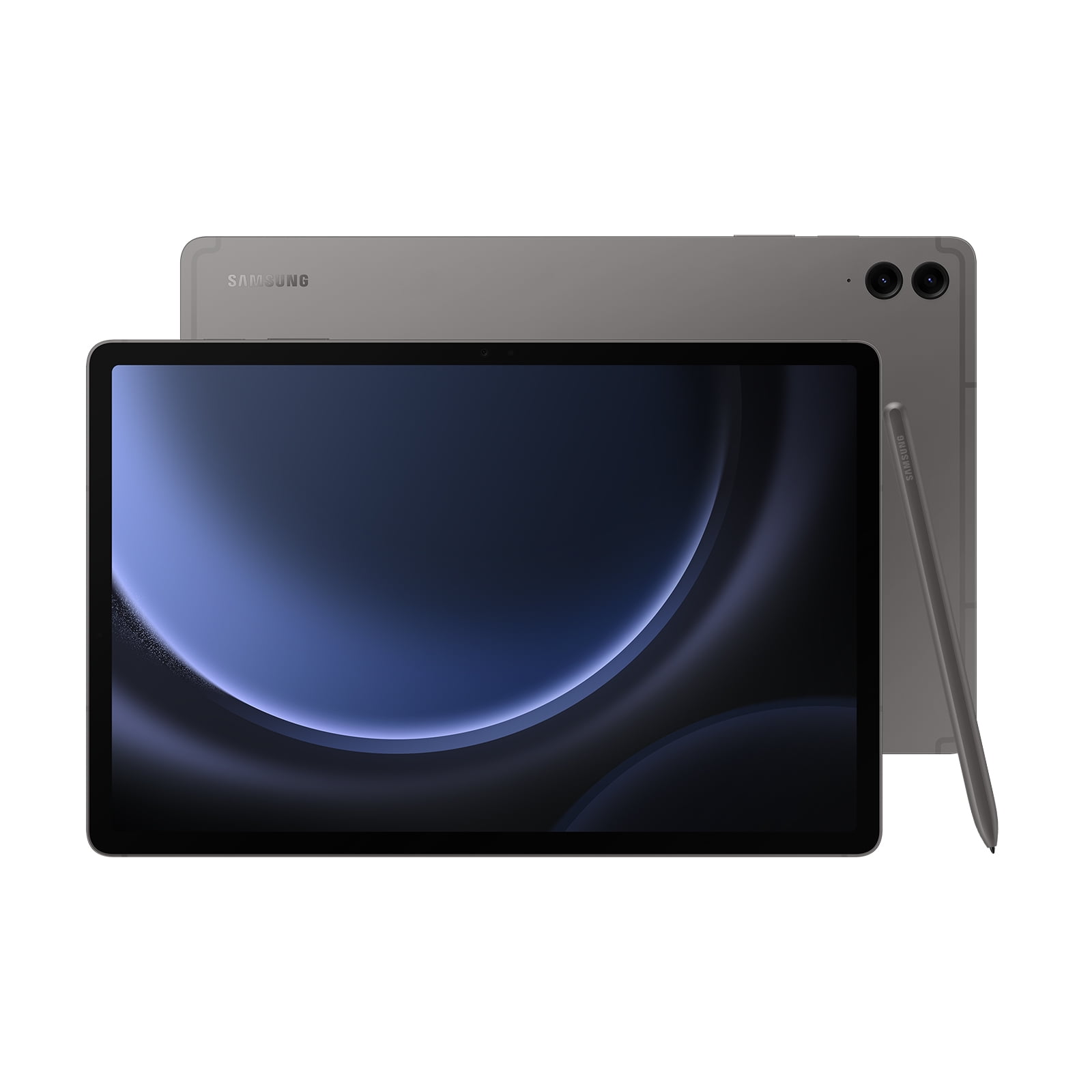
The Samsung Galaxy Tab S9 FE+ is a mid-range Android tablet with a 12.4-inch LCD display, Exynos 1380 processor, and included S Pen stylus. It targets students, creative hobbyists, and casual users who want a large screen and note-taking capabilities without paying flagship prices.
Key Specifications
- RAM
- 6/8GB
- Stylus
- S Pen (included, Bluetooth not supported)
- Weight
- 627g (Wi-Fi), 628g (5G)
- Battery
- 10,090mAh, supports 45W charging
- Display
- 12.4-inch LCD, 2560x1600, 90Hz
- Storage
- 128/256GB + microSD up to 1TB
- Processor
- Exynos 1380
- Water Resistance
- IP68
Overview
The Galaxy Tab S9 FE+ launched in late 2023 as a more affordable sibling to the flagship Tab S9 series. It keeps the 12.4-inch display size and S Pen compatibility but swaps the AMOLED for an LCD screen and the Snapdragon processor for Samsung's Exynos 1380. The result is a tablet that costs roughly half the price of the Tab S9+ while retaining many core features. It's designed for users who want a large canvas for notes, drawing, and media consumption without the premium price tag. Available on Amazon in Wi-Fi and 5G variants, it competes directly with the iPad Air and older iPad Pro models. The S Pen is included in the box – a rarity at this price point – and the tablet boasts an IP68 rating, meaning it can survive dust and water immersion.
Pros
The Galaxy Tab S9 FE+ has several strengths that make it attractive for budget-conscious buyers who need a large screen and stylus. From its included S Pen to its robust build quality, here are the features that stand out.
Included S Pen with Low Latency
The S Pen is included in the box, no extra cost. Samsung uses a Wacom-based digitizer that provides a natural writing and drawing experience. According to Samsung, the latency is just 2.8ms, which feels responsive for note-taking and sketching. The pen attaches magnetically to the back of the tablet for storage, though it doesn't charge wirelessly (the S Pen FE uses a AAAA battery, included). For students or professionals who take handwritten notes, this is a major value-add – competing iPads require a $129 Apple Pencil purchase.
Large 12.4-Inch LCD Display
The 12.4-inch TFT LCD screen offers a 2560x1600 resolution (WQXGA), resulting in a sharp 243 pixels per inch. While not as vibrant as AMOLED, it provides good color accuracy and brightness for indoor use. The 16:10 aspect ratio is well-suited for split-screen multitasking – you can run two apps side-by-side comfortably. The screen supports a 90Hz refresh rate, making scrolling and animations smoother than standard 60Hz panels. For media consumption, the large canvas is immersive, though black levels are typical for LCD (grayish in dark scenes).
Solid Performance for Everyday Tasks
The Exynos 1380 chipset (model number S5E8825) is built on a 5nm process, providing efficient performance for web browsing, streaming, note-taking, and light productivity. Geekbench 6 multi-core scores hover around 2800, comparable to the Snapdragon 778G. For most tasks, the tablet feels responsive. 8GB of RAM (base model) allows for smooth multitasking with several apps open. The Mali-G68 MP5 GPU handles casual games like Genshin Impact at medium settings, but heavy 3D games will stutter.
IP68 Water and Dust Resistance
One of the few tablets with an official IP68 rating – the Tab S9 FE+ can be submerged in up to 1.5 meters of fresh water for 30 minutes. This is rare at its price point and gives peace of mind for use by the pool, in the kitchen, or outdoors. Most competitors, including the iPad Air, lack any water resistance rating.
Excellent Battery Life
The 10,090mAh battery provides impressive endurance. In PCMark Work 3.0 battery test, the Tab S9 FE+ lasted over 13 hours, which translates to a full day of mixed usage (note-taking, browsing, video streaming). Real-world use can easily span two days for moderate users. Charging supports 45W fast charging via USB-C, but the charger is sold separately – a 45W adapter can charge from 0-100% in about 90 minutes.
Expandable Storage via MicroSD
Unlike many flagship tablets, the Tab S9 FE+ includes a microSD card slot that supports up to 1TB of additional storage. This is a huge advantage for users who store large media files, textbooks, or offline video downloads. The base model comes with 128GB, but you can easily expand it cheaply.
Cons
No tablet is perfect, and the Tab S9 FE+ makes several compromises to hit its price point. These drawbacks may be dealbreakers depending on your priorities.
LCD Screen Lacks Contrast and Vibrancy
While the LCD is decent, it can't match AMOLED or even the high-quality LCDs on iPads. Black levels are gray, and colors appear less saturated. In a dark room watching movies, the lack of deep blacks is noticeable. The 600-nit peak brightness is adequate indoors but struggles under direct sunlight. For artists, color accuracy is acceptable but not calibrated out of the box – you may need to adjust settings.
Exynos 1380 Performance Lags Under Heavy Load
The processor is fine for everyday tasks, but it falls behind the Snapdragon 8-series and Apple M-series chips in demanding workflows. Heavy photo editing in apps like Lightroom can be sluggish, and 3D gaming often requires lowering graphics settings. Benchmark scores are roughly half of the iPad Air’s M1 chip. For power users or gamers, this tablet will feel underpowered.
No AMOLED, No HDR Support
For media enthusiasts, the lack of an AMOLED panel and HDR support (no HDR10+ or Dolby Vision) means you're missing the best movie-watching experience. The display is limited to standard dynamic range. If you consume a lot of Netflix or HDR content, you'll be better served by an iPad with Liquid Retina XDR or a similarly priced Lenovo Tab with AMOLED.
Slow Charging Without 45W Adapter
The tablet supports 45W charging, but Samsung only includes a USB-C cable in the box – no charger. Buying a 45W adapter adds $25-50. Using a standard 15W charger, the 10,090mAh battery takes over 4 hours to fully charge. This is an inconvenient omission that adds cost.
Thick Bezels and Plastic Build
The bezels around the screen are noticeably thick compared to flagship tablets, giving it a slightly dated look. The back is made of plastic (with a soft-touch finish), which doesn't feel as premium as the aluminum iPads. It is also relatively heavy at 627 grams (Wi-Fi) – holding it one-handed for reading can be tiring.
No 3.5mm Headphone Jack
Like most modern tablets, the Tab S9 FE+ lacks a headphone jack. While Bluetooth headphones are common, wired audio users will need a USB-C to 3.5mm adapter. The dual speakers are decent (AKG-tuned) but lack the bass and separation of the iPad's quad speakers.
One UI Multitasking Can Be Cumbersome
Samsung's One UI includes DeX mode and split-screen, but the implementation isn't as polished as iPadOS. App compatibility with split-screen varies, and DeX sometimes lags. For productivity, the iPad Air still offers a smoother multitasking experience.
👍 Who It's For
The Galaxy Tab S9 FE+ is ideal for students who take handwritten notes and want a large canvas for annotating PDFs and textbooks. The included S Pen and expandable storage make it a practical choice for education. Casual users who mainly browse the web, stream video, and use social media will appreciate the big screen and long battery life. Creative hobbyists who sketch or paint digitally will find the S Pen responsive enough for most artwork, though professionals may want a higher-tier display. It's also great for families sharing a tablet – the IP68 rating means kids can use it worry-free around water.
👎 Who Should Avoid
Skip this tablet if you're a power user who needs high performance for video editing, 3D modeling, or heavy gaming – the Exynos chip won't keep up. Media enthusiasts who prioritize HDR movies and vibrant colors should look at AMOLED tablets or iPads with better displays. If you're invested in the Apple ecosystem (iMessage, AirDrop), the iPad Air (or even a used iPad Pro) will integrate seamlessly. And if you want a premium build with metal chassis and minimal bezels, this plastic tablet may feel like a downgrade.
See today's Samsung Galaxy Tab S9 FE+ price and available configurations on Amazon.
🛒 Buy on AmazonAs an Amazon Associate we earn from qualifying purchases.
Alternatives to Consider
| Product | Choose Samsung Galaxy Tab S9 FE+ if... | Choose the alternative if... |
|---|---|---|
| Apple iPad Air (5th gen, M1)$150 less expensive | You want a larger screen (12.4 vs 10.9 inches) and an included stylus without extra cost | You need superior performance, a better app ecosystem, and longer software support |
| Samsung Galaxy Tab S9+$400 less expensive | You want a similar S Pen experience and water resistance but on a budget | You demand an AMOLED display and flagship performance for gaming or creative work |
The iPad Air (5th generation) with M1 chip offers significantly better performance, a superior app ecosystem, and a more refined OS for productivity. It also has a 10.9-inch LCD display that’s brighter and more color-accurate, but it costs $150 more and requires an Apple Pencil purchase. If you prefer a pure Android tablet with a better display, the Lenovo Tab P12 Pro has a 12.6-inch AMOLED screen, though its software support is shorter. For budget buyers, the previous-gen Samsung Galaxy Tab S7 FE (2021) can be found cheaper but lacks IP68 and the latest software.
Is it worth the price?
At around $449, the Galaxy Tab S9 FE+ is worth it for students and casual users who will actively use the S Pen and appreciate the water resistance. The nearest alternative is the iPad Air M1 at $599, which costs $150 more but offers double the performance and a much better app library – that extra expense is justified for creative professionals. If your use case is more demanding, the Tab S9 FE+ will leave you wanting more.
📝 Bottom Line
The Samsung Galaxy Tab S9 FE+ is the right choice for students and casual users who want a large, water-resistant tablet with a stylus included – at a price that doesn't break the bank. Its S Pen, IP68 rating, and microSD support are genuine strengths rarely found at this price point. However, the LCD screen and mid-range processor are compromises that power users and media enthusiasts will find frustrating. If you primarily take notes, browse, and stream, this tablet delivers great value. But if you need top-tier performance or an OLED display, invest in the iPad Air M1 or a used Tab S9+ – the extra cost is justified. Buy it on Amazon if you fit the student/note-taking profile; skip it for anything more demanding.
Check current Samsung Galaxy Tab S9 FE+ availability and bundle options on Amazon.
🛒 Buy on AmazonAs an Amazon Associate we earn from qualifying purchases.
Frequently Asked Questions
Quick Summary
Key Pros
- ✓S Pen included in the box with low latency
- ✓Large 12.4-inch 90Hz LCD display
- ✓IP68 water and dust resistance
- ✓All-day battery life (10,090mAh)
- ✓Expandable storage via microSD up to 1TB
Key Cons
- ✗LCD display lacks deep blacks and HDR support
- ✗Processor (Exynos 1380) is weak for heavy gaming/editing
- ✗Battery charger not included; slow charging with common adapters
- ✗Thick bezels and plastic build feel less premium
- ✗No headphone jack
Ratings
Best For
- →College students taking handwritten notes
- →Casual media viewers who want a large screen
- →Budget-conscious creative hobbyists
- →Families needing a durable, water-resistant tablet