
Is LG UltraGear OLED 27GS95QE Worth It? Honest Review (2026)
Balanced look at strengths, weaknesses, and who should buy this OLED gaming monitor in 2026.
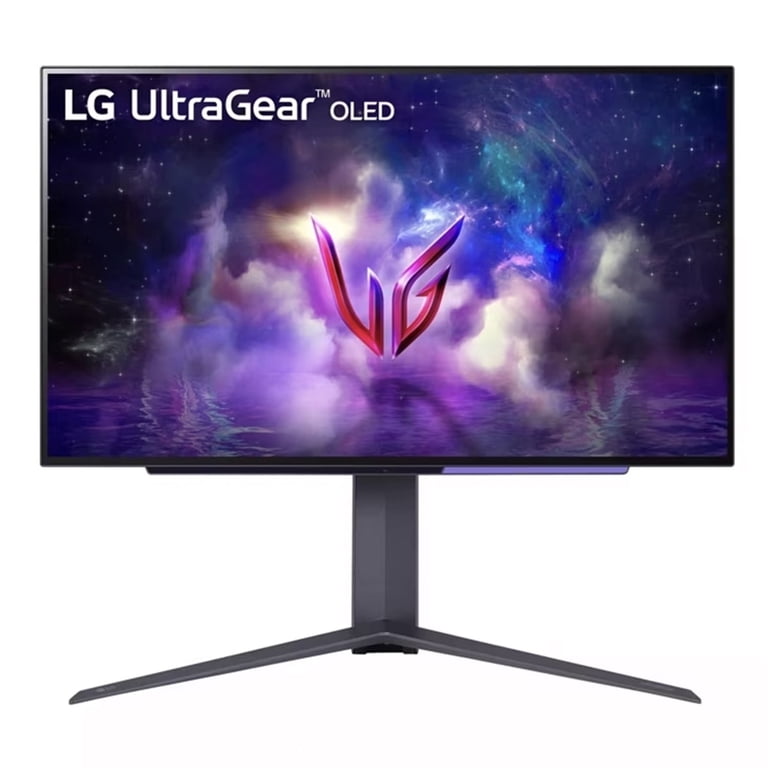
Quick Decision
Buy the LG UltraGear OLED 27GS95QE if you're a competitive gamer who values motion clarity and wants a matte screen for a bright room. Skip it if you need bright HDR, work with text-heavy applications, or require USB-C connectivity.
Best if you...
- Competitive FPS and racing gamers
- Console gamers with PS5 or Xbox Series X
- Users who play in bright, well-lit rooms
Skip it if you...
- Office workers who read text for hours
- HDR enthusiasts seeking 1000-nit brightness
- Users who need USB-C connectivity with a laptop
If you're shopping for a high-refresh-rate 1440p gaming monitor in 2026, the LG UltraGear OLED 27GS95QE likely appears on your radar. It was one of the earliest 27-inch OLEDs to offer a matte screen, targeting gamers who want OLED contrast but have bright rooms. But it also arrives at a premium price and carries some notable trade-offs in brightness and text clarity.
This analysis covers where the 27GS95QE excels, where it falls short, and who should actually buy it. We’ll evaluate the monitor using published manufacturer specs, third-party measurements from RTINGS and PCMag, and verified buyer feedback patterns. You’ll also find comparisons to alternatives like the Samsung Odyssey OLED G6 and the glossy LG 27GR95QE, plus practical accessories to complete your setup.
About the LG UltraGear OLED 27GS95QE
The LG UltraGear OLED 27GS95QE is a 27-inch QHD OLED gaming monitor with a 240Hz refresh rate, 0.03ms response time, and DisplayHDR 400 True Black certification. It pairs LG's WOLED panel with a matte anti-glare coating, making it one of the few OLEDs designed for brighter environments while still delivering perfect black and per-pixel contrast.
Key Specifications
- HDR
- DisplayHDR 400 True Black
- Panel
- 27-inch WOLED
- Stand
- Height, tilt, swivel, VESA 100x100
- Brightness
- 400 nits (peak HDR), 250 nits sustained (RTINGS)
- Resolution
- 2560x1440 (QHD)
- Color Gamut
- DCI-P3 98.5%
- Connectivity
- 2x HDMI 2.1, 1x DisplayPort 1.4, 2x USB 3.0
- Refresh Rate
- 240Hz (overclock capable)
- Response Time
- 0.03ms (GtG)
Overview
The LG UltraGear OLED 27GS95QE is part of LG’s 2024 UltraGear lineup, yet remains a strong contender in 2026 because OLED technology in this size and refresh tier hasn’t changed dramatically. It features a 27-inch 2560x1440 WOLED panel with a native 240Hz refresh rate and 0.03ms GtG response time, positioning it for hardcore gamers who value motion clarity above all else. Unlike many OLEDs, it uses an anti-glare matte coating, which distinguishes it from the glossy LG 27GR95QE that shares the same panel.
For most buyers, this monitor fits a specific niche: competitive gaming on PC and console, where the combination of quick response and high refresh makes a tangible difference. It also offers excellent contrast for immersive single-player titles. However, its modest brightness and text rendering issues mean it’s not the all-rounder that many IPS monitors are. LG sells it through major retailers including Amazon, and its price often fluctuates between $799 and $999 depending on sales.
Pros
The LG UltraGear OLED 27GS95QE delivers several strengths that justify its premium price for the right user. These are the headline features that set it apart from conventional LCD gaming monitors.
Exceptional Motion Clarity and Response Time
The LG UltraGear OLED 27GS95QE offers response times that no LCD panel can match. LG rates it at 0.03ms gray-to-gray, though RTINGS' real-world testing shows transitions in the range of 0.4ms to 0.6ms depending on the color change. Even at that higher number, it is several times faster than the 3-5ms you see on a typical IPS panel. Combine that with a 240Hz refresh rate, and fast-moving objects stay razor-sharp with no ghosting, trailing, or overshoot. For competitive games where you need to acquire targets quickly, this monitor delivers an exceptionally clear image during fast panning and fast character movement.
The absence of overdrive artifacts is another benefit. Many LCD monitors require you to enable overdrive to reduce ghosting, but that often introduces overshoot. OLED's per-pixel emission avoids this entirely, so you get a clean, predictable image at any frame rate. Even when you aren't hitting 240fps, motion interpolation from the panel's pixel response ensures you don't see the blur that plagues traditional monitors.
True OLED Contrast and Deep Blacks
Because each pixel emits its own light, the 27GS95QE can display perfect black by simply turning off pixels. That gives you an essentially infinite contrast ratio, making dark scenes in games and movies appear far richer than on any LCD. In practice, this means the night scenes in games like Cyberpunk 2077 or Elden Ring have a depth and realism that an IPS monitor cannot replicate.
The monitor also covers 98.5% of the DCI-P3 color gamut, which provides vibrant and saturated colors. Combined with the deep blacks, the image looks more lifelike and immersive, especially for HDR content that’s mastered to take advantage of wider color spaces. While it isn't a professional editing display, the color accuracy is decent out of the box, and LG offers a factory calibration report.
240Hz Refresh Rate with HDMI 2.1
The 27GS95QE supports up to 240Hz through both HDMI 2.1 and DisplayPort 1.4 connections. It supports native 1440p at 240Hz over HDMI 2.1, which is great news for console gamers – both the PS5 and Xbox Series X.|S can output 1440p at 120Hz, and the monitor will still accept a 120Hz signal without issue. PC gamers get the full 240Hz experience, and VRR (Variable Refresh Rate) works via both G-Sync compatible and FreeSync Premium Pro.
The HDMI 2.1 ports are also future-proof, supporting 4K at 120Hz if you ever connect a next-gen console and decide to use the monitor's built-in downscaling. For PC gamers, the single DisplayPort 1.4 handles 240Hz without any chroma subsampling. The monitor also includes two USB 3.0 ports that act as a simple hub for peripherals, though you won’t find USB-C or power delivery here.
Matte Anti-Glare Coating for Bright Rooms
Most OLED gaming monitors use a glossy screen finish, which helps preserve perceived sharpness and color depth but also reflects ambient light like a mirror. The 27GS95QE is unique because LG applied a matte anti-glare coating that significantly cuts down reflections. This makes it a more practical choice for gamers who play in a naturally lit room or near a window.
In RTINGS' testing, the matte finish reduced reflections by a noticeable margin compared to glossy alternatives, making blacks look deeper under bright lighting if you're sitting at a normal distance. It also makes the screen easier to clean and less prone to showing fingerprints. The trade-off is that the anti-glare layer can create a slight haze, which we’ll cover in the cons section.
Low Input Lag for Competitive Play
LG’s OLED panels are renowned for minimal input lag, and the 27GS95QE continues that trend. RTINGS measured input lag at around 2.4ms at 240Hz – that’s the delay between a GPU rendering a frame and the monitor displaying it. This is among the fastest of any monitor, faster than most 360Hz IPS displays. For esports titles like VALORANT or Counter-Strike 2, this gives you a tangible competitive edge because you’ll see and react to enemy movement a few milliseconds earlier.
Even at lower 60Hz for console gaming, the input lag remains low enough that you won’t feel any sluggishness, as long as you are running the latest firmware. The monitor also features a crosshair overlay and a black stabilizer function, though those are standard on gaming monitors.
Sleek Design and Ergonomic Stand
The monitor looks premium with a slim bezel and an understated back panel with a circular ring of LEDs that can be set to 12 different colors. The stand is sturdy and offers height, swivel, and tilt adjustments, so you can find a comfortable viewing position without aftermarket VESA mounts. It also has a standard 100x100 VESA mount if you want to use an arm.
For a gaming monitor, the design is mature – no aggressive gamer aesthetics or bright red accents. That makes it more acceptable in a dual-purpose workspace, though the lack of USB-C means you won't plug in a modern laptop with a single cable.
Cons
No monitor is perfect, and the LG UltraGear OLED 27GS95QE has a handful of drawbacks that matter depending on your use case. These are the areas where it fails to meet expectations for some buyers.
Low Sustained Brightness
LG claims a peak brightness of 400 nits in HDR mode, but that number refers to small highlight areas and is not sustainable. In RTINGS' testing, the monitor maintained around 250 nits for a full-screen white pattern, and the HDR peak brightness for a 400-nit test patch was around 341 nits. For a 10% window, it reached about 400 nits, but only for a short time before the automatic brightness limiter (ABL) kicked in. In a brightly lit room, the image will look dimmer and less vivid than a typical 300-nit LCD. If you play in a light-controlled space, this is far less of an issue, but for daytime gaming next to a sunny window, it could be frustrating.
The ABL also causes brightness changes during dynamic scenes. When a game transitions from a bright outdoor environment to a dark indoor one, the whole screen may get noticeably darker or brighter. Some users find this distracting, and LG offers an “OLED Care” setting to reduce the effect, but you can't eliminate it entirely. This is not a monitor for HDR enthusiasts seeking 1000-nit highlights; its per-pixel contrast gives it an edge in dark rooms, but the limited luminance caps the overall HDR impact.
Subpar Text Clarity Due to Subpixel Layout
The LG 27GS95QE uses an RGWB subpixel layout, which is common for WOLED panels. This arrangement causes text to appear with a slight color fringing – you may notice red and green edges around letters, especially with small font sizes. The problem is exacerbated because Windows uses ClearType for LCD displays, which does not fully compensate for the WOLED subpixel structure.
On a 27-inch 1440p screen, the pixel density is about 109 PPI, which is already lower than many 4K monitors. Add the subpixel issue, and text looks fuzzier than on a comparable IPS panel. This is a negligible drawback for gamers who primarily see large UI elements in games, but if you plan to use the monitor for coding, writing, or spreadsheet work, you may notice it immediately. It’s also worth noting that the matte coating adds a slight haze that can further soften text in comparison to glossy alternatives.
No USB-C Connectivity or KVM Switch
In 2026, many high-end monitors include USB-C with DisplayPort Alt Mode and power delivery so you can connect a laptop with a single cable. The 27GS95QE lacks any USB-C port – you get two HDMI 2.1, one DisplayPort 1.4, and two USB 3.0 Type-A ports. That means if you want to use this monitor with a modern MacBook or a thin-and-light Windows laptop, you need to buy an adapter or a separate USB-C to DP cable, and you still won't get USB-A data ports from the laptop without additional dongles.
There is also no KVM switch, so toggling between two source devices requires manually changing the input via the joystick menu. For a monitor that costs close to $900, the omission of USB-C is a miss for those hoping to use it as a work-from-home hub. The connectivity is adequate for pure gaming setups, but it limits the monitor's versatility as a do-everything display.
High Price Compared to LCD Alternatives
At around $899, the 27GS95QE costs roughly two to three times as much as a similarly specced IPS 1440p 240Hz monitor. For example, the Dell Alienware AW2723DF offers a 280Hz refresh rate and a 1ms response time for around $450, though it can't match OLED's contrast. For budget-conscious gamers, the premium price may be hard to justify unless they specifically value the near-instant pixel response and black levels.
Price is relative, though. Compared to other OLED options like the Samsung Odyssey OLED G6, the LG is often within $100-200 at similar street prices. Still, it’s a sizable investment, and you should consider whether you’ll actually use the advantages. If you only play a few hours a week, the price per hour of use becomes steep.
Potential Burn-In Risk
All OLED panels carry the eventual risk of burn-in when static images are displayed for prolonged periods. The 27GS95QE has built-in protections including LG’s OLED Care system, which runs a pixel refresh cycle and reduces brightness when it detects high temperatures. However, these measures don’t eliminate burn-in risk entirely – they just reduce it.
For gamers who only play at night and keep the monitor on varied content, the risk is low. But if you keep the display on while working with a static taskbar for eight hours a day, then game in the evening, you could see permanent image retention after heavy use. LG’s warranty covers burn-in for the first year in many regions, but it’s a limited warranty and not universal. RTINGS’ longevity tests on OLEDs have shown that modern OLEDs with good heat management can last several years without noticeable burn-in, but it’s still a consideration for mixed-use setups.
Moderate HDR Experience
Although the monitor passes DisplayHDR 400 True Black certification, its real-world HDR performance is limited. As noted, the 400-nit peak brightness is constrained to small highlights, and the ABL can cause HDR scenes to look inconsistent. In comparison to high-end LCD monitors with 1000+ nits peak, the LG doesn't produce the same dazzling highlights in HDR games or movies.
Where OLED wins is in the overall contrast and black levels, which gives the illusion of “good” HDR in darker environments. But if you’re expecting a transformative HDR upgrade over a typical IPS monitor, you might be underwhelmed. RTINGS rated the 27GS95QE’s HDR performance at 7.4/10, which is good but not exceptional. For a truly bright HDR experience, you’d need a monitor like the Samsung Odyssey Neo G8 (VA) or a full-array local dimming IPS.
Firmware and OSD Quirks
Some users have reported that the monitor occasionally fails to wake from input switching and that the 'Automatic Input Switch' feature can be buggy. A firmware update released in early 2025 fixed some of these issues, but the OSD still lacks the depth of LG's higher-end UltraGear models. The joystick navigation is responsive, but the menu structure feels outdated compared to competitors who offer multiple customizable crosshairs or a better on-screen display.
There is also no built-in speaker, which is common on gaming monitors, but you'll need to connect external audio. The headphone jack is a 4-pole TRRS, which may work with your headset, but you can't adjust the volume of the internal DAC from the OSD – you must control it through your system. These are minor annoyances, but they add up for a premium-priced product.
👍 Who It's For
The LG UltraGear OLED 27GS95QE is a perfect fit for competitive gamers who prioritize motion clarity and input latency above everything else. If you play fast-paced shooters or racing games and want a monitor that gives you a legitimate edge, the OLED response time and 240Hz refresh rate are exactly the features that matter. It’s also ideal for those who play in a moderately lit room where a glossy screen would cause annoying reflections; the matte coating lets you enjoy OLED's deep blacks without turning your room into a cave.
If you already own an OLED TV or phone and have noticed how crisp moving objects look, this monitor provides that same experience on a desk. Enthusiasts who enjoy dark atmospheric single-player games will appreciate the rich contrast and vibrant colors. The monitor supports both G-Sync and FreeSync, so it works smoothly with NVIDIA and AMD graphics cards alike, making it a flexible choice for PC builders. Console gamers – particularly on Xbox Series X and PS5 – benefit from the HDMI 2.1 ports and the 1440p 120Hz mode, so it’s a great match for next-gen consoles as well.
Additionally, the stand’s ergonomics and the subtle design mean it doesn't look out of place on a desk used for occasional work. If you’re willing to accept the text clarity trade-offs, you can use it for everyday productivity, but the monitor’s true domain is gaming and immersive media consumption.
👎 Who Should Avoid
The LG UltraGear OLED 27GS95QE is not a smart purchase if you spend more than a few hours a day editing text, coding, or working with spreadsheets. The subpixel layout makes text look noticeably less sharp, and the 27-inch 1440p resolution is modest for productivity. If your monitor is primarily for office work, a 4K IPS or a high-PPI monitor will serve you far better and cost less.
It’s also best to skip this monitor if you play in a very bright room with direct sunlight or have windows behind you. The 250-nit sustained brightness will force you to close blinds to see clearly, and the matte coating – while helpful – can’t overcome the lack of luminance. For a bright room, a 300-400 nit IPS with good anti-glare will be more comfortable.
Those on a tight budget should also look elsewhere. If $899 is a significant investment, you can get a very good 1440p 240Hz IPS monitor for around $400-500. The OLED advantages are real, but they aren't worth the extra cost if you can't fully appreciate them. Finally, if you want a single cable connection to your laptop for work, the lack of USB-C is a deal-breaker. Portable device owners who require power delivery and a KVM should consider a monitor like the Dell UltraSharp 34 Curved or Samsung ViewFinity S8.
See today's LG UltraGear OLED 27GS95QE price and available configurations on Amazon.
🛒 Buy on AmazonAs an Amazon Associate we earn from qualifying purchases.
Alternatives to Consider
| Product | Choose LG UltraGear OLED 27GS95QE if... | Choose the alternative if... |
|---|---|---|
| Samsung Odyssey OLED G6 (G60SD)Usually within $50-150 of each other depending on sales | You play in a bright room and want a matte anti-glare coating to reduce reflections. | You want higher peak HDR brightness (up to 1000 nits) and better text clarity for work tasks. |
| LG UltraGear OLED 27GR95QEThe 27GR95QE is typically $100-$200 cheaper | You play in a dark room and prefer a glossy screen with slightly sharper text and a lower price. | You can't tolerate reflections and need the matte coating for a lit room. |
| Dell Alienware AW2723DF (IPS)The LG costs roughly $400 more | You want OLED contrast in a dark room and are willing to pay triple the price for it. | You want a brighter, more affordable 280Hz monitor for mixed use including productivity. |
Two key alternatives stand out when you consider the 27GS95QE. The LG 27GR95QE is the glossy sibling, using the same WOLED panel without the matte coating. It offers slightly better text clarity and perceived brightness in a dark room, but it reflects light like a mirror. If you play in a dark room and don't mind reflections, the glossy version is often cheaper and looks better. On the other hand, the Samsung Odyssey OLED G6 (G60SD) uses a different QD-OLED panel that produces higher peak brightness (up to 1000 nits) and generally better text clarity due to its subpixel structure. However, it also has a glossy finish, and it doesn't offer HDMI 2.1 ports on all models – the G60SD has a single HDMI 2.1 plus DisplayPort.
If you want a matte coating, the Asus ROG Swift PG27AQDM is another option, but it comes with a high price and similar limitations to the LG. The Dell Alienware AW2723DF is a cheaper IPS alternative that trades OLED contrast for higher brightness and lower cost, making it a solid value pick for gamers who don't care about perfect blacks.
For most people, the decision comes down to whether you need the matte coating (LG 27GS95QE) or if you prefer a glossy screen with better brightness (Samsung G6 or LG 27GR95QE). If you're on a budget, the IPS options give away the contrast but save significant money.
Is it worth the price?
At approximately $899, the LG UltraGear OLED 27GS95QE is worth it for competitive gamers who will genuinely exploit the 240Hz refresh rate and the instant response time. The matte coating is a rare feature among OLEDs and makes it a standout for bright-room setups, something you cannot get from glossy alternatives. However, if you're mainly a casual gamer or prioritize productivity and HDR brightness, the premium price is harder to justify. In that case, the Samsung Odyssey OLED G6, usually priced similarly, offers up to 1000 nits of peak HDR brightness and better text rendering, making it a stronger buy for mixed use. For a strictly gaming-focused desk in a controlled lighting environment, the LG still earns its price tag, but for a versatile all-rounder, other options may offer more value.
📝 Bottom Line
The LG UltraGear OLED 27GS95QE is the right choice for dedicated gamers who value motion clarity above all else and need a monitor that works in ambient light. Its instantaneous pixel response and 240Hz refresh rate transform fast-paced gaming, and the matte screen is a practical advantage that few OLED rivals offer. If competitive titles are your primary use case, this monitor will give you a measurable edge for years to come.
The trade-offs are real, though. The 250-nit sustained brightness and text fringing mean this is not a one-size-fits-all display. Productivity work will feel compromised, and HDR enthusiasts won't be blown away. If you're expecting a bright, future-proof HDR monitor with USB-C docking convenience, you'll be disappointed. The burn-in risk further complicates everyday desktop use.
For esports players, console gamers in well-lit rooms, and anyone who already owns other OLED screens and craves that look on a desktop, the 27GS95QE is worth every bit of its premium. If you're casual about gaming or need a versatile workhorse monitor, save your money and look at an IPS display. The verdict: buy it for the motion, skip it for the brightness.
Check current LG UltraGear OLED 27GS95QE availability and bundle options on Amazon.
🛒 Buy on AmazonAs an Amazon Associate we earn from qualifying purchases.
Frequently Asked Questions
Quick Summary
Key Pros
- ✓0.03ms response time provides unmatched motion clarity with no ghosting
- ✓True OLED contrast with perfect blacks and 98.5% DCI-P3 color gamut
- ✓240Hz refresh rate via HDMI 2.1 works well with both PC and consoles
- ✓Matte anti-glare coating reduces reflections better than glossy alternatives
- ✓Input lag measured at ~2.4ms in third-party testing, one of the fastest monitors ever
Key Cons
- ✗Sustained brightness is only around 250 nits due to ABL, making it poor for bright rooms
- ✗Text clarity suffers from WOLED subpixel layout and matte coating, showing fringing on small fonts
- ✗No USB-C or KVM, so laptop users need adapters and can't switch sources easily
- ✗Premium price – costs 2-3x more than comparable IPS gaming monitors
- ✗Burn-in risk remains for heavy mixed use with static elements
Ratings
Best For
- →Competitive FPS and racing gamers
- →Console gamers with PS5 or Xbox Series X
- →Users who play in bright, well-lit rooms
- →Enthusiasts who want OLED contrast on a desktop