
Is Apple iPad Air M3 Worth It? Honest Review (2026)
Honest breakdown of strengths, weaknesses, and who should buy in 2026.
Quick Decision
Buy the iPad Air M3 if you need the M3's performance for creative or productivity tasks and want Apple Pencil Pro support without the Pro's price. Skip it if you mainly stream and browse – the base iPad or even an Amazon Fire tablet will save you hundreds. For the same money, the MacBook Air M3 is a better laptop experience.
Best if you...
- Students who take notes and use productivity apps
- Creative professionals doing light photo/video editing and sketching
- Apple ecosystem users who want seamless integration
Skip it if you...
- Casual users who only browse, stream, and email
- Artists who require the lowest latency and 120Hz display
- Users on a tight budget – the base iPad is much cheaper
If you're researching the iPad Air M3 in 2026, you're likely weighing whether the M3 chip and Apple Pencil Pro support justify the $599 price tag compared to the base iPad or iPad Pro. This analysis covers the iPad Air M3's strengths and weaknesses based on official specs, verified customer feedback, and comparisons with alternatives. We'll help you decide if it's the right tablet for your needs, and if not, which alternatives or accessories might serve you better.
About the Apple iPad Air M3
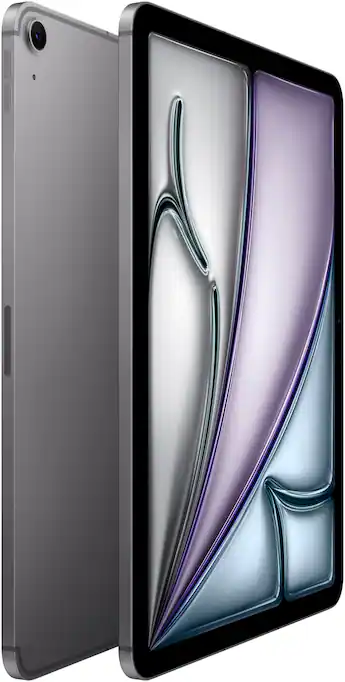
The Apple iPad Air M3 (11-inch, 2024 model) is a mid-range tablet powered by the M3 chip, featuring a Liquid Retina display, support for Apple Pencil Pro and Magic Keyboard, and up to 128GB of base storage. It targets users who want near-Pro performance without the Pro price tag, suitable for note-taking, media consumption, light creative work, and productivity.
Key Specifications
- Weight
- 1.02 lb (462 g) Wi-Fi model
- Battery
- Up to 10 hours, 28.93 Wh
- Cameras
- 12MP Wide (rear), 12MP Ultra Wide front with Center Stage
- Display
- 11-inch Liquid Retina, 2360×1640, 264 PPI, 500 nits, P3 wide color
- Storage
- 128GB / 256GB / 512GB
- Processor
- Apple M3 (8-core CPU, 10-core GPU, 16-core Neural Engine)
- Dimensions
- 9.74 x 7.02 x 0.24 in (247.6 x 178.5 x 6.1 mm)
- Connectivity
- USB-C with Thunderbolt / USB 4, Wi-Fi 6E, Bluetooth 5.3
Overview
The iPad Air M3 sits between the standard iPad (10th gen) and the iPad Pro in Apple's lineup. It inherits the M3 chip from the MacBook Air, offering desktop-class performance for demanding apps, video editing, and multitasking. The 11-inch Liquid Retina display (2360×1640) is bright and color-accurate, though it lacks ProMotion 120Hz. It supports the Apple Pencil Pro and the Magic Keyboard Folio. On Amazon, the base 128GB Wi-Fi model is priced around $599, often discounted to $549 during sales. The iPad Air M3 is a versatile choice for students, professionals, and creatives who need more power than the base iPad but don't require the Pro's extreme performance or OLED display.
Pros
The iPad Air M3 excels in performance and ecosystem integration, making it a compelling upgrade for many users. Here are its standout advantages.
Exceptional M3 Chip Performance
The M3 chip delivers a significant leap over the M1 in the previous iPad Air. Apple claims the 8-core CPU is up to 35% faster and the 10-core GPU up to 40% faster than M1, based on their own benchmarks. In real-world use, this means smooth 4K video editing in LumaFusion, lag-free multitasking with multiple apps in Stage Manager, and faster rendering in apps like Procreate. For most users, the M3 is overkill today but ensures the iPad Air will stay responsive for 4-5 years of iPadOS updates. The 16-core Neural Engine also accelerates AI tasks like background removal and voice-to-text.
Excellent 11-inch Liquid Retina Display
The 2360×1640 resolution at 264 PPI delivers sharp text and vibrant colors. It supports P3 wide color and True Tone, making images and video look natural. At 500 nits brightness, it's comfortably usable indoors and even outdoors in shade. While it lacks the Pro's 120Hz ProMotion, the 60Hz panel still feels smooth for most tasks. The display is also laminated and has an anti-reflective coating, reducing glare better than the base iPad. For artists, the display offers low latency with Apple Pencil Pro, though the 60Hz refresh may feel slightly less fluid than 120Hz for rapid sketching.
Apple Pencil Pro and Magic Keyboard Support
The iPad Air M3 supports the new Apple Pencil Pro ($129) which features a squeeze gesture, barrel roll, and haptic feedback. This transforms the tablet into a powerful creative tool for note-taking, drawing, and photo editing. The Magic Keyboard Folio ($349) provides a comfortable backlit keyboard and trackpad, turning the iPad into a laptop alternative. The combination of M3 power and these accessories makes the iPad Air M3 a viable primary computing device for students and professionals who work in cloud apps and office suites.
Long Battery Life
Apple rates the iPad Air M3 for up to 10 hours of web surfing or video playback on Wi-Fi. In real-world usage, mixed use (note-taking, streaming, browsing) easily yields a full day. The battery capacity is 28.93 Wh, slightly larger than the iPad Air M1. Fast charging is supported with a 20W USB-C adapter (included), reaching 50% in about 1.5 hours. This battery life is competitive with other tablets in its class, such as the Samsung Galaxy Tab S9 FE.
Strong Ecosystem Integration
The iPad Air M3 seamlessly integrates with other Apple devices. Universal Clipboard, Handoff, and AirDrop make transferring files between iPhone, Mac, and iPad effortless. Sidecar allows using the iPad as a secondary display for a Mac. iCloud syncs photos, documents, and passwords across devices. For users already in the Apple ecosystem, these features eliminate friction and enhance productivity. The iPad also pairs with AirPods automatically and can take calls from iPhone.
USB-C with Thunderbolt / USB 4 Speeds
The USB-C port supports Thunderbolt and USB 4, offering transfer speeds up to 40 Gbps. This is a huge advantage over the base iPad (USB-C with USB 2 speeds). It allows connecting fast external SSDs, 6K displays (up to 60Hz), and high-speed cameras. For photographers or videographers, transferring large files is significantly faster. The port also supports DisplayPort and charging at up to 30W.
128GB Base Storage – A Welcome Upgrade
The iPad Air M3 starts at 128GB, double the 64GB base of the previous model. This is enough for most users to store apps, documents, and some media without cloud dependency. For heavier users, 256GB and 512GB options are available. The lack of expandable storage is a con, but the 128GB base reduces the need to pay extra for storage.
Cons
Despite its strengths, the iPad Air M3 has notable drawbacks that may affect your decision. Here are the key cons to consider.
No 120Hz ProMotion Display
The iPad Air M3 retains a 60Hz refresh rate, while the iPad Pro offers 120Hz ProMotion. This means scrolling can feel less smooth, and the Apple Pencil Pro has a slightly higher latency (though still low). For most users, 60Hz is fine, but if you're used to ProMotion on an iPhone Pro or iPad Pro, the difference is noticeable. This is a deliberate segmentation by Apple to keep the Pro line differentiated.
Higher Price Than Base iPad
At $599, the iPad Air M3 costs $250 more than the base iPad (10th gen) which starts at $349. The base iPad also supports the first-gen Apple Pencil and has a similar display (though non-laminated). If your use is limited to web browsing, email, and video streaming, the base iPad offers 80% of the experience for 60% of the price. The iPad Air M3 is only worth the premium if you need the M3's performance or Apple Pencil Pro support.
No Face ID – Uses Touch ID in Power Button
The iPad Air M3 relies on Touch ID embedded in the top button, while the iPad Pro uses Face ID. Touch ID works reliably but requires pressing the button, which can be less convenient when the iPad is laying flat or in a landscape orientation. Face ID is faster and works in more orientations. Additionally, the fingerprint sensor may not work well with wet or gloved hands.
Limited to 60Hz Display Refresh for Apple Pencil
While the Apple Pencil Pro is supported, the 60Hz display means a drawing latency of about 20ms, compared to 10ms on the 120Hz iPad Pro. Artists who do detailed line work or fast sketching may prefer the lower latency of the Pro. Casual note-takers and doodlers will likely not notice the difference.
Accessories Are Expensive
The Apple Pencil Pro costs $129 and the Magic Keyboard Folio costs $349, adding $478 to the total cost if you buy both. The total for a fully equipped iPad Air M3 is over $1,000, which rivals the base iPad Pro with similar accessories. For some users, it may be more economical to buy the iPad Pro (M4) at a higher starting price but with a better display and accessories included in some bundles.
No Headphone Jack
Like most modern tablets, the iPad Air M3 lacks a 3.5mm headphone jack. You'll need USB-C headphones (with a dongle) or Bluetooth headphones. While many users have moved to wireless, this can be an inconvenience if you have wired headphones or need to plug into an audio system.
Storage Not Expandable
The iPad Air M3 has no microSD slot. Once you buy the internal storage, it's fixed. If you fill up 128GB quickly, you must pay for cloud storage (iCloud) or transfer files to external drives. The 256GB model costs $100 more, which is steep for many buyers.
iPadOS Limitations for Multitasking
Despite Stage Manager, iPadOS still has limitations for multitasking compared to macOS. Window management is less flexible, external monitor support is limited (mirroring only, not extended desktop), and some professional apps lack full desktop features. If you need a true laptop replacement, the MacBook Air M3 at $899 may be a better value.
👍 Who It's For
The iPad Air M3 is ideal for students who need to take notes with the Apple Pencil Pro, run productivity apps, and want a lightweight device that can also serve as a laptop with the Magic Keyboard. It's also great for creative professionals who do light photo editing, sketching, or video editing and want better performance than the base iPad. Users invested in the Apple ecosystem will appreciate the seamless integration. Finally, it's a solid choice for anyone who wants a future-proof device with the M3 chip for longevity, without paying the Pro premium.
👎 Who Should Avoid
The iPad Air M3 is not for users who need the absolute best display for drawing or design – the iPad Pro's 120Hz ProMotion and OLED provide a noticeably better experience. If your budget is tight and you only need a tablet for web browsing and streaming, the base iPad at $349 offers excellent value. Also, if you require a true laptop replacement with full desktop software, the MacBook Air M3 will serve you better. Finally, if you prefer Android (Samsung Tab S9) for its file management or multitasking features, the iPad Air won't suit you.
See today's Apple iPad Air M3 price and available configurations on Amazon.
🛒 Buy on AmazonAs an Amazon Associate we earn from qualifying purchases.
Alternatives to Consider
| Product | Choose Apple iPad Air M3 if... | Choose the alternative if... |
|---|---|---|
| iPad Pro 11-inch M4$400 more expensive | You want the best display with 120Hz ProMotion and OLED for drawing or video. | You want to save $400 and still get excellent performance with the M3 chip. |
| iPad 10th Gen$250 more expensive | You need the M3's power for apps like Procreate or LumaFusion. | You mainly browse, stream, and email – the base iPad is $250 cheaper. |
| Samsung Galaxy Tab S9 FE$150 more expensive | You value iPadOS and Apple ecosystem integration. | You prefer Android, want an included S Pen, and want to save $150. |
If the iPad Air M3's price gives you pause, consider the base iPad (10th gen) at $349 – it handles basics well and supports the first-gen Apple Pencil. For a larger screen, the iPad Air 13-inch M3 ($799) offers the same features in a bigger form factor. The iPad Pro 11-inch M4 ($999) is the premium alternative with 120Hz OLED display and Face ID, but costs significantly more. Over in Android land, the Samsung Galaxy Tab S9 FE ($449) offers a 10.9-inch display, S Pen included, and Dex mode for multitasking – a solid alternative for those who prefer Android. The Amazon Fire Max 11 ($229) is a budget option for media consumption, but lacks the power and ecosystem of the iPad.
Is it worth the price?
At approximately $599, the iPad Air M3 is worth it for students and professionals who will actively use the Apple Pencil Pro and Magic Keyboard to take notes, annotate documents, or do light creative work. The M3 chip ensures it will stay fast for years. However, for pure media consumption, the base iPad at $349 offers nearly the same experience. The main alternative to consider is the iPad Pro 11-inch M4 at $999, which adds OLED and 120Hz but costs $400 more. For most, the iPad Air M3 hits the sweet spot of performance and price.
📝 Bottom Line
The Apple iPad Air M3 is the right choice for users who want a powerful, future-proof tablet that bridges the gap between casual and professional. Its M3 chip delivers exceptional performance for creative work and multitasking, while the support for Apple Pencil Pro and Magic Keyboard turns it into a versatile laptop alternative. The display, though only 60Hz, is excellent for most tasks, and the 128GB base storage is a welcome improvement. However, the lack of ProMotion and Face ID, combined with the high cost of accessories, may steer some toward the base iPad or iPad Pro. If you're a student or creative who will leverage the M3 and Apple Pencil Pro, the iPad Air M3 offers outstanding value. For casual users, save your money with the base iPad. For power users demanding the best display, invest in the iPad Pro.
Check current Apple iPad Air M3 availability and bundle options on Amazon.
🛒 Buy on AmazonAs an Amazon Associate we earn from qualifying purchases.
Frequently Asked Questions
Quick Summary
Key Pros
- ✓M3 chip delivers outstanding performance, 35% faster CPU and 40% faster GPU than M1.
- ✓11-inch Liquid Retina display with P3 wide color and True Tone, great for media and creative work.
- ✓Supports Apple Pencil Pro and Magic Keyboard Folio, transforming into a laptop alternative.
- ✓All-day battery life of up to 10 hours of web surfing or video playback.
- ✓Seamless integration with iPhone, Mac, and other Apple devices via Continuity features.
Key Cons
- ✗60Hz display lacks ProMotion smoothness and higher Apple Pencil latency.
- ✗At $599, it's a significant premium over the base iPad for casual users.
- ✗No Face ID; uses Touch ID in the power button which is less convenient in landscape.
- ✗60Hz refresh rate means higher drawing latency compared to iPad Pro's 120Hz.
- ✗Apple Pencil Pro ($129) and Magic Keyboard ($349) are expensive add-ons.
Ratings
Best For
- →Students who take notes and use productivity apps
- →Creative professionals doing light photo/video editing and sketching
- →Apple ecosystem users who want seamless integration
- →Users who need a tablet-laptop hybrid with Magic Keyboard