
7 Best Which USB Microphones should I buy in 2026: Tested & Rank…
Compare the top USB podcasting mics by budget, room, and workflow — then pick the one that fits how you actually record.
Our Top Pick
Shure MV7+ Hybrid USB/XLR Podcasting Microphone
Best OverallCommitted podcasters who want broadcast-style sound now and an XLR upgrade path later.
View on Amazon →Key Factors to Consider
- 1.Dynamic vs condenser capsule — dynamic mics reject room echo and keyboard noise, condensers capture more detail and warmth but expose an untreated room; this is the single biggest decision for home podcasters
- 2.USB connection type and included cabling — USB-C is now standard, but check whether the box includes a USB-C to USB-A adapter or a cable long enough for your setup, and whether the mic works with iPhone/iPad out of the box
- 3.Headphone monitoring with zero-latency — a built-in 3.5mm jack with mic-gain and playback-mix control is essential for remote interviews and for catching problems while you record
- 4.Pickup pattern options — cardioid covers solo hosting; omnidirectional or bidirectional patterns let one mic capture two people or a roundtable, though two cheap mics usually sound better than one clever one
- 5.Onboard controls and DSP — physical gain knob, mute button, and built-in compressor/limiter/EQ mean less fiddling in software; some mics push all processing to a companion app instead, which is more powerful but adds a dependency
- 6.Mounting and desk isolation — look for an integrated shock mount, standard 5/8-inch and 3/8-inch threads, and compatibility with common boom arms; a mic that rattles every time you type is unusable no matter how good the capsule is
- 7.Recording resolution and headroom — 24-bit/48kHz is the practical standard for podcasting and is plenty; higher sample rates are marketing for most spoken-word recording, so don't pay extra for 96kHz
- 8.Software ecosystem and OS support — ShurePlus MOTIV, Rode Connect/Unify, Elgato Wave Link, and HyperX NGENUITY each do different things; check macOS, Windows, and mobile support before committing to a workflow
- 9.Upgrade path — a hybrid USB/XLR mic costs more upfront but lets you add an interface and mixer later without replacing your microphone, which matters if you're already planning a co-hosted or multi-mic show
- 10.Total cost including accessories — a boom arm, pop filter, and closed-back headphones will improve your sound more than an extra $80 on the microphone, so budget for them from the start
The Products
Shure MV7+ Hybrid USB/XLR Podcasting Microphone
✓ Pros
- •Dynamic capsule with tight cardioid pattern sounds controlled in ordinary, untreated rooms
- •Both USB-C and XLR outputs, so it survives an upgrade to an interface or mixer
- •Onboard DSP with EQ, compression, and limiting applied before your recording app sees the signal
- •Configurable touch mute panel and a headphone jack with voice/playback mix control
- •Integrated pop filter and sturdy yoke mount reduce the accessories you need to buy
- •Excellent build quality and long-term Shure support and firmware updates
✗ Cons
- •At roughly $280 it's the most expensive mic in this guide and hard to justify for a first show
- •Heavy enough that a flimsy desk stand will wobble — budget for a real boom arm
- •The best processing lives in the MOTIV app, so you're dependent on software for full control
- •Dynamic design needs close mic technique; speaking from too far away sounds thin
Best For:
Committed podcasters who want broadcast-style sound now and an XLR upgrade path later.
Not Recommended For:
Casual first-timers who aren't sure they'll keep podcasting and want to spend under $150.
Key Features:
Standout Feature:
A genuinely usable hybrid design: the same microphone is plug-and-play over USB and studio-ready over XLR.
VS Others:
Compared with the Rode NT-USB+, the MV7+ costs about $110 more but is dynamic rather than condenser, ignores room echo far better, and adds XLR output. Compared with the Samson Q2U, it delivers noticeably more polish and control — but the Q2U gets you most of the way there for a quarter of the price.
Why This One:
It's the safest long-term purchase on this list. If you want one microphone that sounds professional in a normal room, gives you real processing controls, and won't need replacing when you add an interface, this is the one.
Rode NT-USB+ Condenser USB Microphone
✓ Pros
- •Warm, detailed condenser sound that flatters most speaking voices
- •Zero-latency headphone monitoring with a voice/playback mix dial
- •Onboard APHEX compressor, exciter, and noise gate via Rode's free software
- •Physical gain knob and instant mute button on the body
- •Works with USB-C computers, iPhone, and iPad without extra hardware
- •Includes a desk stand and internal shock mounting — genuinely usable out of the box
✗ Cons
- •Condenser capsule picks up room echo and background noise in untreated spaces
- •Less forgiving of poor mic technique than a dynamic microphone
- •Full processing features require Rode's software rather than onboard hardware
- •The included desk stand transmits some keyboard vibration without a boom arm
Best For:
Solo hosts recording in reasonably quiet rooms who want a warm, detailed broadcast voice with easy monitoring.
Not Recommended For:
Podcasters in echoey rooms or noisy shared apartments who would fight the condenser's sensitivity every episode.
Key Features:
Standout Feature:
Zero-latency monitoring with a physical mix dial at a mid-range price — the feature most remote interviewers actually need.
VS Others:
It sits between the Samson Q2U and the Shure MV7+ on price and delivers more detail than the Q2U while costing far less than the MV7+. Against the Audio-Technica AT2020USB-X it's a close call — the Rode adds monitoring mix control and APHEX processing, while the Audio-Technica leans slightly more neutral.
Why This One:
It's the best balance of sound quality, features, and price for a solo podcaster who records in a normal, quiet room. If you want to hear a clear step up from a budget mic without paying flagship money, this is the pick.
Samson Q2U USB/XLR Dynamic Podcasting Microphone
✓ Pros
- •Dynamic capsule rejects room echo and background noise far better than budget condensers
- •Complete kit in the box: stand, pop filter, USB cable, and XLR cable
- •Both USB and XLR outputs, so it can move to an interface later
- •Headphone jack for direct monitoring — rare at this price
- •Truly plug-and-play with no drivers or software required
- •Costs a fraction of the alternatives, making it low-risk for a first show
✗ Cons
- •Capsule detail and depth are clearly a step below mid-range and premium mics
- •Headphone monitoring has no voice/playback mix control
- •Plastic body feels less durable than metal competitors
- •Can sound boxy on low voices without EQ, and the bundled stand is basic
Best For:
First-time podcasters on a tight budget who want a complete, usable kit with no extra purchases.
Not Recommended For:
Established shows chasing broadcast-grade detail, or anyone who wants premium build and onboard processing.
Key Features:
Standout Feature:
A complete, genuinely usable podcasting kit — mic, stand, pop filter, and both cables — for under $100.
VS Others:
It doesn't sound as good as the Rode NT-USB+ or Shure MV7+, and it shouldn't. What it does is deliver a dynamic, room-friendly sound and a full accessory kit for roughly a quarter of the MV7+'s price. Against the Fifine AM8 it's the more proven, more neutral choice with a better upgrade path.
Why This One:
If you're not certain podcasting will stick, this removes almost all the financial risk while still giving you audio that listeners won't complain about. It's also the best second mic for a co-host who's joining on a budget.
Audio-Technica AT2020USB-X Cardioid Condenser USB Microphone
✓ Pros
- •Clean, neutral condenser sound that works well for narration and interviews
- •Capacitive mute button with a visible status light on the front
- •Headphone jack with a mix dial for balancing voice against playback
- •Records up to 24-bit/96kHz for buyers who want headroom
- •Standard 5/8-inch thread and included stand make mounting easy
- •Well-established brand with broad accessory and support availability
✗ Cons
- •No onboard DSP, so processing must happen in your recording software
- •USB only — no XLR output for future upgrades
- •Condenser capsule is sensitive to room echo and background noise
- •Feature set is modest for the price compared with the Rode NT-USB+
Best For:
Podcasters who want a neutral, uncoloured condenser sound and prefer to do their processing in a DAW.
Not Recommended For:
Buyers in noisy or echoey rooms, or those who want onboard compression and limiting without extra software.
Key Features:
Standout Feature:
A visibly lit capacitive mute button plus mix-controlled monitoring — small features that matter enormously in live recording.
VS Others:
It's a close competitor to the Rode NT-USB+, which adds APHEX processing and a slightly warmer character for about $20 more. Choose the Audio-Technica if you want a neutral starting point and plan to do your own EQ; choose the Rode if you want the processing built in.
Why This One:
It's the least fussy way to get a genuinely clean condenser sound with proper monitoring, from a brand with decades of studio credibility. A solid pick for narrators and interviewers who like to mix their own audio.
Elgato Wave:3 USB Condenser Microphone
✓ Pros
- •Wave Link software provides independent virtual channels for voice, chat, and system audio
- •Built-in EQ, compression, and de-esser available live rather than in post
- •Capacitive mute button with clear visual state indication
- •Clipguard protection prevents sudden peaks from ruining a take
- •Front gain dial is easy to adjust mid-session
- •Included stand has standard threading for a boom arm
✗ Cons
- •Most of its value depends on installing and learning Elgato's software
- •Condenser capsule exposes untreated rooms and background noise
- •USB only, with no XLR path for future hardware upgrades
- •Wave Link's routing model takes time to understand if you're new to audio
Best For:
Podcasters and streamers who record on a computer and want software-based mixing, routing, and processing in one place.
Not Recommended For:
Anyone who wants a hardware-only workflow or records on a machine where they can't install companion software.
Key Features:
Standout Feature:
Wave Link turns a single USB mic into a multi-channel software mixer — the closest thing to a broadcast console at this price.
VS Others:
Against the HyperX QuadCast S, the Wave:3 trades RGB and multi-pattern flexibility for a much more capable software mixer. Against the Rode NT-USB+, it offers more routing but a slightly less forgiving sound and a heavier software dependency.
Why This One:
If your podcast is recorded on a computer alongside other audio sources, the Wave:3 solves routing and processing problems that other mics at this price simply ignore. It rewards users who like to tinker with settings.
HyperX QuadCast S USB Condenser Gaming Microphone
✓ Pros
- •Four selectable pickup patterns cover solo, two-person, and roundtable recording
- •Tap-to-mute panel on top is easy to reach during a live take
- •Integrated shock mount reduces keyboard and desk vibration
- •Configurable RGB can be dimmed or switched off for video use
- •Records up to 24-bit/96kHz over USB-C
- •Good value for the feature set if you also stream or record video
✗ Cons
- •Sensitive condenser capsule amplifies room echo and keyboard noise
- •Bulky body needs a sturdy boom arm; the included stand is basic
- •Software controls are limited compared with Wave Link or MOTIV
- •Sound is slightly coloured for pure spoken-word use versus more neutral mics
Best For:
Creators who podcast and stream from one desk and want one mic that handles both without extra software.
Not Recommended For:
Audio-first podcasters who want a neutral studio sound and have no interest in streaming features.
Key Features:
Standout Feature:
Four hardware pickup patterns with a one-touch mute — flexibility for multi-person recording without touching software.
VS Others:
It beats the Blue Yeti on mute ergonomics, shock mounting, and modern connection standards, and it costs less than the Rode NT-USB+. Compared with the Elgato Wave:3, it's better for multi-guest recording but weaker for software routing and processing.
Why This One:
It's the most flexible single-mic solution for someone whose podcast is one part of a broader content setup. The hardware mute and pattern dial are genuinely useful in a live recording.
Blue Yeti USB Multi-Pattern Condenser Microphone
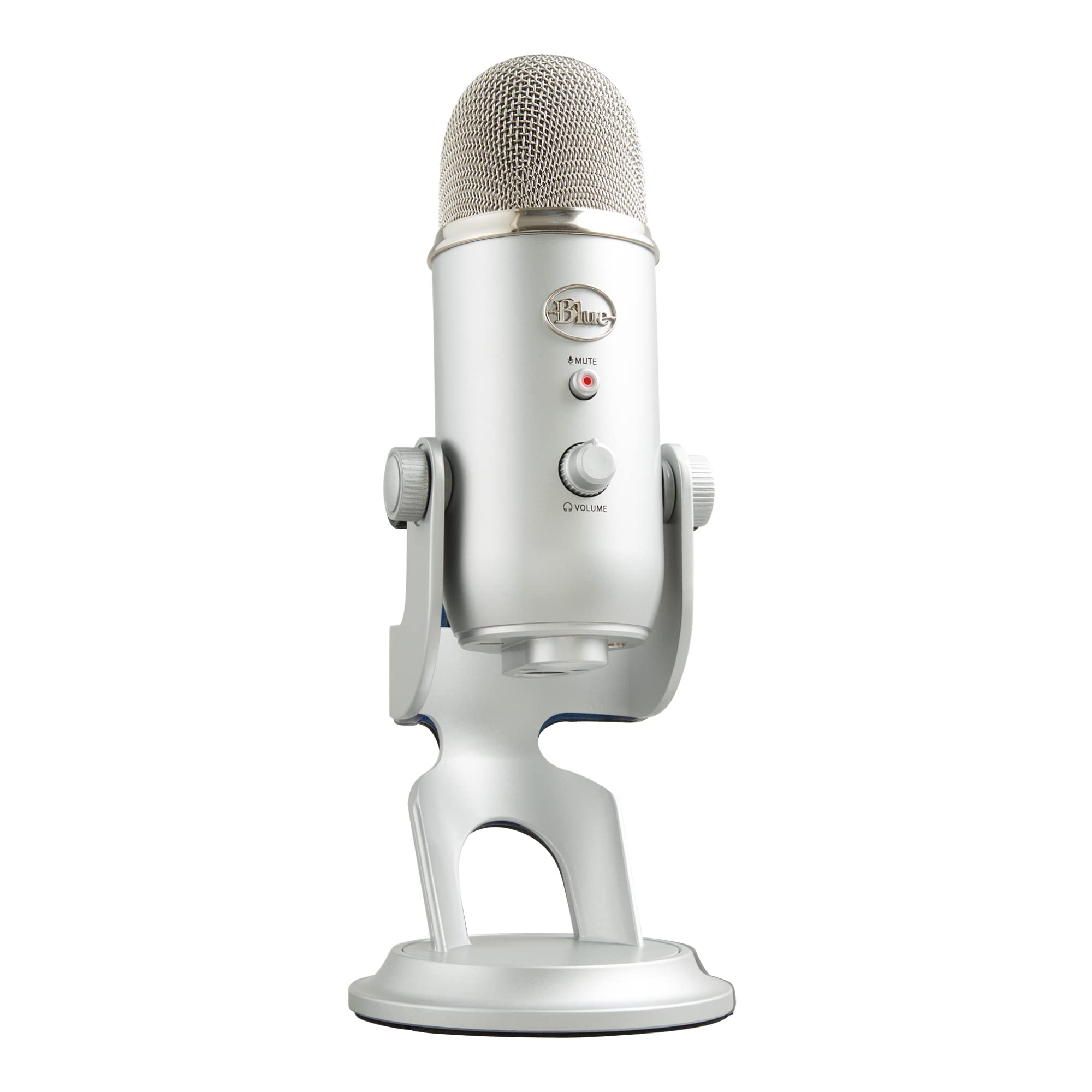
✓ Pros
- •Four pickup patterns including bidirectional, ideal for two-person recording with one mic
- •Physical gain, mute, and headphone volume controls on the body
- •Heavy, stable desk stand included — no immediate accessory purchase needed
- •Enormous user base means abundant setup and troubleshooting guidance
- •Frequently discounted, making it a strong value at sale prices
- •Works driver-free on macOS and Windows
✗ Cons
- •Sensitive condenser that sounds muddy in rooms without soft furnishings
- •Older revisions use mini-USB rather than USB-C — verify the version you're buying
- •No integrated shock mount, so desk bumps and keyboard thumps carry through
- •Now outclassed for solo podcasting by similarly priced newer microphones
Best For:
Budget-conscious hosts who need one microphone to capture two people sitting across a table.
Not Recommended For:
Solo podcasters in quiet rooms who want the cleanest possible voice for the money.
Key Features:
Standout Feature:
A hardware bidirectional pattern that lets a single microphone serve a two-person conversation properly.
VS Others:
The HyperX QuadCast S matches its pattern flexibility with better mute ergonomics and shock mounting. The Rode NT-USB+ and Audio-Technica AT2020USB-X both sound cleaner for solo work at a modest price premium. The Yeti's unique advantage remains the true bidirectional mode at a low price.
Why This One:
It's still the cheapest reliable way to record two people with one decent microphone. If you're starting a co-hosted show and the alternative is two mediocre mics, this is the sensible compromise.
Fifine AmpliGame AM8 USB/XLR Dynamic Podcasting Microphone
✓ Pros
- •Dynamic capsule that controls room echo and keyboard noise well for the price
- •Both USB and XLR outputs at a very low price point
- •Physical gain knob and a mute button with a visible RGB status ring
- •Headphone jack for direct monitoring
- •Driver-free USB setup on macOS and Windows
- •Frequently priced well under $70, making it low-risk
✗ Cons
- •Less detailed and less natural than the Samson Q2U at a similar price
- •Basic headphone amplifier with audible noise at high gain settings
- •No companion software or onboard DSP
- •Build feels less durable than metal-bodied competitors
Best For:
Very budget-constrained buyers who want a dynamic, room-friendly mic with an XLR upgrade path and prefer a visible mute indicator.
Not Recommended For:
Buyers who can stretch to the Samson Q2U, which sounds better for only slightly more money.
Key Features:
Standout Feature:
A dynamic capsule with USB and XLR outputs plus a visible mute ring for well under $70.
VS Others:
It undercuts the Samson Q2U on price but loses on sound quality and refinement; the Q2U also includes a pop filter, stand, and both cables. Against the Blue Yeti it's far better at rejecting room noise but less flexible for multi-person recording.
Why This One:
It's a legitimate option when the Q2U is unavailable or when a visible mute indicator matters for a live setup. Otherwise, spend the extra ten or twenty dollars on the Q2U.
Who Should Get What?
First-Time Podcaster in a Bedroom
You're launching your first show from a spare bedroom or apartment with bare walls and a noisy street outside. You've never used anything better than a headset mic, you're not sure podcasting will stick, and you want to spend as little as possible while still sounding credible.
Recommended:
Samson Q2U USB/XLR Dynamic Podcasting Microphone
The Q2U is a dynamic mic, which means it largely ignores the echo and background noise that make untreated rooms sound amateur. It includes a desk stand, a pop filter, and both USB and XLR cables in the box, so there's nothing else to buy to start. If podcasting doesn't stick, you've lost very little; if it does, the XLR output means the mic graduates to an interface rather than the drawer.
View on Amazon →Solo Host Doing Remote Interviews
You run a weekly interview show where every guest joins over the internet. You record in a treated-ish home office, you already own decent headphones, and you want a warm, broadcast-style voice with reliable headphone monitoring so you can hear your guest without echo or latency problems.
Recommended:
Rode NT-USB+ Condenser USB Microphone
The NT-USB+ has a condenser capsule that flatters the human voice, a zero-latency headphone jack with a mix control for balancing your voice against your guest, and onboard DSP that cleans up the signal before it ever reaches your recording app. It's the sweet spot where the sound clearly steps up from budget mics without the premium price of a hybrid flagship.
View on Amazon →Committed Podcaster Planning to Grow
You're 30 episodes in, you've outgrown your starter mic, and you already know you want to add a co-host, a mixer, and possibly live streaming within the next year. You'd rather buy once at a higher price than replace your microphone twice.
Recommended:
Shure MV7+ Hybrid USB/XLR Podcasting Microphone
The MV7+ is a dynamic mic that sounds controlled in real rooms, and it offers both USB and XLR outputs, so it works today as a plug-and-play mic and tomorrow through an interface or mixer without being replaced. Onboard DSP, a touch mute panel, and the MOTIV software give you broadcast-style processing without a separate chain.
View on Amazon →Podcaster Who Also Streams and Games
You record a podcast and stream from the same desk, with a mechanical keyboard, a PC fan, and a shelf of RGB gear behind you. You want a mic that looks the part on camera, mutes instantly when needed, and doesn't require a degree in audio routing to set up.
Recommended:
HyperX QuadCast S USB Condenser Gaming Microphone
The QuadCast S has a tap-to-mute top panel you can hit live without a mouse, an integrated shock mount that resists keyboard vibration, four pickup patterns for different setups, and configurable RGB that makes it read well on camera. It shares a single USB connection for both streaming and podcast capture, so there's no second workflow to learn.
View on Amazon →Two-Person Show at One Table
You and a co-host record in the same room, sitting across a small table, and you want to start with one microphone rather than buying two. Your budget is limited, the room is somewhat soft-furnished, and you're willing to trade some audio polish for simplicity.
Recommended:
Blue Yeti USB Multi-Pattern Condenser Microphone
The Yeti's bidirectional pattern is designed for two speakers facing each other across a single mic, which is exactly this setup, and the pattern switch is a physical dial rather than a software menu. It's also the most widely owned podcasting mic in the world, so troubleshooting advice is everywhere. Just accept that two cheap dynamic mics would eventually sound better and plan for that later.
View on Amazon →Hands-On Tinkerer Who Loves Processing
You enjoy EQ, compression, and routing more than you enjoy shopping, and you want separate volume control for your voice, your browser, and your music while you record. You're comfortable installing software and learning a mixer interface.
Recommended:
Elgato Wave:3 USB Condenser Microphone
The Wave:3 ships with Wave Link, which gives you independent virtual channels for voice, chat, and system audio plus built-in EQ and compression — a genuine mini-mixer in software at a mid-range price. The onboard gain dial and capacitive mute are physical and immediate, and the clipguard-style protection keeps sudden loud moments from ruining a take.
View on Amazon →Buying Guide: How to Choose
Bottom Line
Frequently Asked Questions
Which USB microphone should I buy for podcasting in 2026?▼
Dynamic or condenser: which is better for podcasting?▼
Is the Shure MV7+ worth the extra money over the Samson Q2U?▼
Do I need an XLR output on my USB microphone?▼
Which USB microphone is best for two people recording in the same room?▼
Do I need to buy a boom arm and pop filter separately?▼
Is 24-bit/96kHz better than 24-bit/48kHz for podcasting?▼
Which USB microphone has the best value for money?▼
Will a USB microphone work with my phone or tablet?▼
How do I stop my USB microphone picking up echo and background noise?▼
Do I need headphones while recording a podcast?▼
What's the best USB microphone under $100?▼
Need More Help Deciding?
Explore more buying guides to find the perfect product for your needs.
View All Buying Guides