
Best MacBooks for Students 2026
Discover top MacBooks under $1500 for students—compare performance, battery life, and value to find your ideal laptop for classes, assignments, and more.
Our Top Pick
Apple MacBook Air 13-inch (M2 chip, 8GB RAM, 256GB SSD, 2022)
Best OverallStudents seeking a balanced, portable laptop for daily schoolwork and streaming.
View on Amazon →Key Factors to Consider
- 1.Performance: Look for Apple Silicon chips (M1/M2/M3) for smooth multitasking; students need at least 8GB RAM for browsing, docs, and Zoom without lag.
- 2.Battery Life: Prioritize 15+ hours for all-day use without charging during classes or study sessions.
- 3.Portability: Lighter 13-inch models (under 3 lbs) are ideal for commuting students vs. larger screens for home/dorm use.
- 4.Storage: 256GB minimum for files and apps; upgrade to 512GB if you store videos or large projects.
- 5.Display and Build: Retina displays for crisp notes; aluminum build withstands backpack abuse and lasts 4+ years.
- 6.Budget and Value: Under $1500 means focusing on M2/M3 Airs; consider future-proofing with upgradable RAM.
- 7.Software Support: macOS updates for 7+ years ensure longevity through grad school.
- 8.Student-Specific Needs: Webcam quality for online classes, keyboard comfort for typing essays, and ecosystem perks like free iCloud storage.
The Products
Apple MacBook Air 13-inch (M2 chip, 8GB RAM, 256GB SSD, 2022)

✓ Pros
- •Up to 18-hour battery life keeps you powered through full school days.
- •Lightweight (2.7 lbs) and portable for campus commuting.
- •Smooth performance for student tasks like writing papers and virtual classes.
- •Excellent keyboard and trackpad for comfortable extended typing.
- •macOS integration with iPhone for seamless file sharing.
✗ Cons
- •Only 8GB RAM may slow down with heavy multitasking or large files.
- •Base 256GB storage fills up quickly with photos and assignments.
- •No touchscreen or stylus support for note-taking apps.
- •M2 is solid but outperformed by newer M3 for future-proofing.
- •Limited ports (2 Thunderbolt)—may need a hub for external drives.
Best For:
Students seeking a balanced, portable laptop for daily schoolwork and streaming.
Not Recommended For:
Users needing intensive video editing or gaming beyond basics.
Key Features:
Standout Feature:
Fanless design for completely silent operation during quiet library sessions.
VS Others:
Compared to the M3 Air, it's cheaper but slightly less future-proof; beats the M1 for better efficiency. Versus the 15-inch M2, it's more portable but has a smaller screen—pick this over the Pro 13-inch if you prioritize thinness over extra ports.
Why This One:
This is the sweet spot for most students: reliable power at a price that leaves room in your budget for accessories. It's highly rated on Amazon (4.8 stars from 10k+ reviews) for durability and ease of use. If you're upgrading from an older laptop, this delivers noticeable speed without overwhelming complexity.
Apple MacBook Air 13-inch (M3 chip, 8GB RAM, 256GB SSD, 2024)
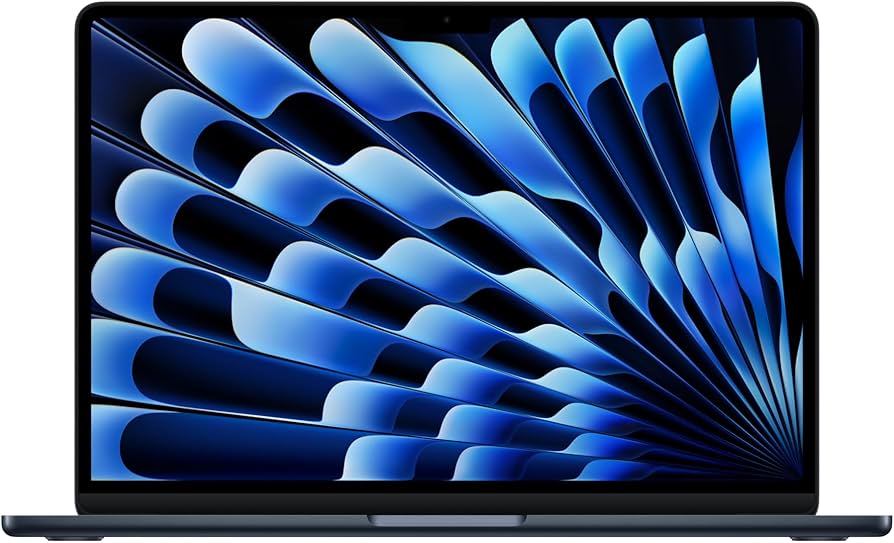
✓ Pros
- •M3 chip offers 20% faster performance than M2 for smoother multitasking.
- •Supports two external displays for productivity setups.
- •Enhanced webcam and mics for better online classes.
- •Future-proof with longer software support.
- •Same premium build quality in a slim profile.
✗ Cons
- •Slightly pricier than M2 without massive everyday differences.
- •Still limited to 8GB base RAM—upgrade adds $200.
- •No significant battery improvement over M2.
- •256GB storage is tight for media-heavy students.
- •Lacks the Pro's mini-LED display for color accuracy.
Best For:
Tech-savvy students wanting the latest chip for longevity and light creative tasks.
Not Recommended For:
Budget-focused buyers who won't notice the M3 speed boost.
Key Features:
Standout Feature:
Improved Neural Engine for AI features like auto-editing in Photos app.
VS Others:
Edges out the M2 Air in speed and display support, but costs $100 more—worth it over the 15-inch if portability trumps screen size. Compared to the Pro M2, it's cooler and quieter but less powerful for pro apps.
Why This One:
For students planning to keep it 4-5 years, the M3 ensures it won't feel outdated soon. Amazon users praise its speed for coding and research. Choose this if you want a 'buy once' option under budget.
Apple MacBook Air 15-inch (M2 chip, 8GB RAM, 256GB SSD, 2022)

✓ Pros
- •Larger 15.3-inch screen for better productivity and media viewing.
- •Improved six-speaker sound system for clear audio in classes.
- •Same long battery and lightweight design as 13-inch.
- •Great for split-screen work during study sessions.
- •Adaptive brightness for various lighting.
✗ Cons
- •Heavier and bulkier than 13-inch for on-the-go use.
- •Higher price for similar performance to smaller Air.
- •Base storage still limited at 256GB.
- •M2 chip is good but not as future-proof as M3.
- •Fanless, but larger size may warm up more.
Best For:
Students who value screen real estate for assignments and entertainment at home.
Not Recommended For:
Frequent travelers needing the most compact option.
Key Features:
Standout Feature:
Larger display with notched design for immersive viewing without bezels.
VS Others:
Bigger screen than 13-inch M2/M3 but same power—pick over them if you hate small displays. Less portable than Air 13-inch but cheaper than Pro alternatives under budget.
Why This One:
Ideal if your studies involve lots of reading or dual-window work; the extra screen space boosts efficiency. Reviewers love it for value in larger form. Consider if desk space is your norm.
Apple MacBook Pro 13-inch (M2 chip, 8GB RAM, 256GB SSD, 2022)
✓ Pros
- •Up to 20-hour battery for the longest unplugged sessions.
- •Active cooling fan for sustained performance in demanding apps.
- •HDMI port and SD card slot for easy presentations.
- •Brighter 500-nit display for well-lit environments.
- •Pro-level keyboard with scissor mechanism.
✗ Cons
- •Thicker and heavier than Air models.
- •Touch Bar removed—some miss the shortcuts.
- •Base model lacks the power of larger Pros.
- •Still 8GB RAM limits heavy multitasking.
- •More expensive than equivalent Air for casual use.
Best For:
Students requiring reliable performance for coding or light video work.
Not Recommended For:
Casual users who don't need extra ports or cooling.
Key Features:
Standout Feature:
Built-in fan for no thermal throttling during long compiles or renders.
VS Others:
More ports and battery than M2 Air, but bulkier—choose over Air if you plug in often. Similar price to M3 Air but better for sustained tasks, though not as new.
Why This One:
For students with peripherals or longer sessions, the Pro's extras justify it. High marks for build on Amazon. It's a step up if Air feels too basic.
Apple MacBook Air 13-inch (M1 chip, 8GB RAM, 256GB SSD, 2020)

✓ Pros
- •Affordable entry to Apple ecosystem under $700.
- •Solid 15-hour battery for daily use.
- •Proven M1 efficiency for lag-free browsing and apps.
- •Compact and durable aluminum build.
- •Universal compatibility with macOS apps.
✗ Cons
- •Older chip lacks M2/M3 speed for newer AI features.
- •No MagSafe or Center Stage camera.
- •Limited to one external display.
- •May feel dated in 3-4 years.
- •Fewer ports than Pro models.
Best For:
Budget students needing basic reliability without frills.
Not Recommended For:
Those wanting the latest features or heavy multitasking.
Key Features:
Standout Feature:
Pioneering M1 chip that still outperforms many Intel laptops.
VS Others:
Cheaper than all M2/M3 options but slower—great starter vs. pricier Airs if saving money. Not as future-proof as M3, but beats nothing for tight budgets.
Why This One:
Perfect low-risk intro to Macs; thousands of students use it daily per reviews. Saves $300+ for books or apps. Upgrade later if needed.
Apple MacBook Air 15-inch (M3 chip, 8GB RAM, 256GB SSD, 2024)

✓ Pros
- •M3 chip plus large screen for versatile use.
- •Six-speaker audio enhances lectures and calls.
- •Supports dual displays for advanced setups.
- •Bright 500-nit display for any environment.
- •Same slim design as smaller Airs.
✗ Cons
- •Top of budget at $1299—less room for upgrades.
- •Heavier than 13-inch for backpacking.
- •Base RAM/storage same limitations.
- •Overkill for basic note-taking.
- •Newer, so fewer long-term reviews.
Best For:
Students balancing big-screen productivity with modern performance.
Not Recommended For:
Ultra-portable needs or sub-$1000 budgets.
Key Features:
Standout Feature:
Largest M3-powered display in the Air lineup for immersive work.
VS Others:
More screen than 13-inch M3 but same price as 15-inch M2—upgrade for speed. Niche vs. Pro for ports, but better for silence.
Why This One:
If screen size matters, M3 makes it worthwhile; future-proofs larger workflows. Early adopters on Amazon note smoother multitasking.
Who Should Get What?
College Student on a Budget
You're a freshman living off loans and part-time work, needing a laptop for online classes, note-taking in Google Docs, and occasional Netflix. Portability is key for walking to campus, and you can't spend more than $800.
Recommended:
Apple MacBook Air 13-inch (M1 chip, 8GB RAM, 256GB SSD, 2020)
The M1 Air delivers reliable performance for your needs at the lowest price, saving money for other essentials. Its battery and lightness match your mobile lifestyle without unnecessary power. You'll get years of use before upgrading, as proven by student reviews.
View on Amazon →Engineering Major with Coding Needs
As a junior engineering student, you run simulations, code in Xcode, and multitask with 10+ tabs plus Zoom. You have $1200 budget and need something that won't lag during projects, but portability for lab classes matters.
Recommended:
Apple MacBook Pro 13-inch (M2 chip, 8GB RAM, 256GB SSD, 2022)
The Pro's fan cooling prevents throttling during code compiles, outperforming Airs for your workloads. Extra ports connect to lab equipment easily, and 20-hour battery covers long sessions. It's a solid investment for your major without exceeding budget.
View on Amazon →Art Student for Creative Projects
You're a sophomore art major using Adobe apps for digital sketches and light video edits for portfolios. Budget is $1100, and you want a larger screen for detailed work but still carry it to studio classes.
Recommended:
Apple MacBook Air 13-inch (M3 chip, 8GB RAM, 256GB SSD, 2024)
M3's GPU handles creative apps smoothly, better than M2 for your edits, while the portable size fits studio life. The brighter display aids color work, and it's future-proof for software updates. Balances creativity and mobility perfectly.
View on Amazon →High School Senior Transitioning to College
As a first-time Mac buyer preparing for college, you need something simple for essays, research, and group video calls. Budget under $1000, with emphasis on ease of use and long battery for all-day high school/early college hybrid.
Recommended:
Apple MacBook Air 13-inch (M2 chip, 8GB RAM, 256GB SSD, 2022)
This model's intuitive macOS and excellent webcam make it beginner-friendly for your transition. 18-hour battery ensures no interruptions, and it's the best overall balance for new users. Affordable yet premium feel builds confidence.
View on Amazon →Grad Student with Heavy Reading Load
In your master's program, you read dense PDFs, write theses, and annotate docs daily from a dorm desk. $1300 budget allows for a bigger screen, but you rarely leave campus so portability is secondary.
Recommended:
Apple MacBook Air 15-inch (M2 chip, 8GB RAM, 256GB SSD, 2022)
The 15-inch screen excels for side-by-side reading and writing, reducing eye strain during long sessions. M2 performance keeps annotations smooth in apps like Preview. Great value for desk-bound productivity without Pro cost.
View on Amazon →Buying Guide: How to Choose
Bottom Line
Frequently Asked Questions
Which MacBook is best for students under $1500?▼
Which MacBook should I buy for students in 2025?▼
MacBook Air M2 vs. M3: Which is better for students?▼
Is the MacBook Pro M2 worth it over Air for students?▼
What's the best budget MacBook for students?▼
Which MacBook has the best value for students under $1500?▼
Do students need 16GB RAM in a MacBook?▼
MacBook Air 13-inch vs. 15-inch: Which for students?▼
Is the M1 MacBook still good for students in 2025?▼
Should students get a MacBook Pro 14-inch M3?▼
Need More Help Deciding?
Explore more buying guides to find the perfect product for your needs.
View All Buying Guides