
Is Lenovo ThinkPad X1 Carbon Gen 12 Worth It? Honest Review (202…
Balanced look at the ThinkPad X1 Carbon Gen 12's strengths, weaknesses, and who should buy it in 2026.
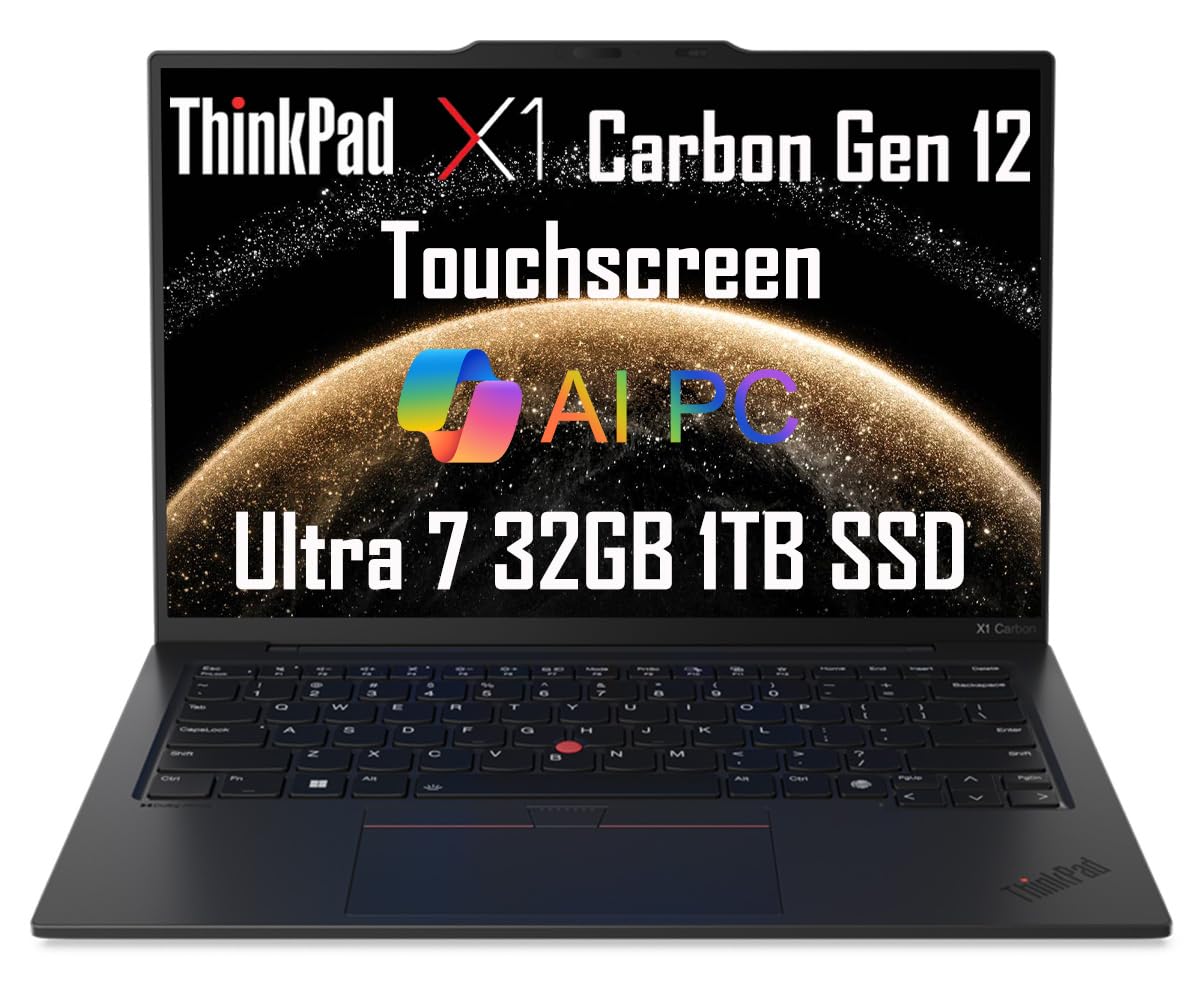
Quick Decision
Buy the ThinkPad X1 Carbon Gen 12 if you're a professional who types for hours, travels often, and values a light, durable chassis—this is one of the best ultrabooks you'll find. Skip it if you want the best value per dollar or need a discrete GPU, as cheaper laptops or MacBooks will serve you better.
Best if you...
- Business executives and C-level professionals
- Frequent travelers and consultants
- Software developers who write code for hours
Skip it if you...
- Gamers needing discrete GPU performance
- Video editors and 3D artists
- Budget-conscious shoppers seeking the best price-to-performance
If you're shopping for a premium business laptop in 2026, the Lenovo ThinkPad X1 Carbon Gen 12 is almost certainly on your radar. It's one of the most well-known names in the category, with a reputation for durability, a class-leading keyboard, and long-term reliability. But with a starting price around $1,650, it's worth asking whether this machine still justifies its premium in a market full of strong alternatives.
This guide gives you a balanced look at where the X1 Carbon Gen 12 excels and where it falls short. We've drawn on Lenovo's official specifications, independent testing from publications like RTINGS.com, and common feedback from verified buyer reports. We'll also cover who should buy it, who should skip it, and how it compares to rivals like the MacBook Air and Dell XPS 14. You can find current configurations and prices on Amazon, or continue reading for the full breakdown.
About the Lenovo ThinkPad X1 Carbon Gen 12
The Lenovo ThinkPad X1 Carbon Gen 12 is a premium 14-inch business ultrabook that pairs Intel Core Ultra processors with a light carbon fiber chassis. It targets professionals who need strong performance, excellent typing comfort, and all-day portability in a durable, travel-ready form.
Key Specifications
- RAM
- 16/32/64GB LPDDR5x (soldered)
- Ports
- 2x Thunderbolt 4, 2x USB-A 3.2 Gen 1, HDMI 2.1, 3.5mm audio
- Webcam
- 1080p with IR option
- Weight
- 2.42 lbs (1.09 kg) starting
- Battery
- 57Wh, up to 16.8 hrs (manufacturer estimate)
- Display
- 14-inch 16:10, 1920x1200 IPS or 2880x1800 OLED (120Hz)
- Storage
- 256GB–2TB PCIe 4.0 SSD (M.2 2280)
- Processor
- Intel Core Ultra 5/7 (Meteor Lake)
- Connectivity
- Wi-Fi 6E, Bluetooth 5.3, optional 4G/5G
Overview
The X1 Carbon has been Lenovo's flagship ultraportable for more than a decade. The Gen 12 refresh, launched in early 2024, was among the first business laptops to use Intel's Core Ultra processors, which added a neural processing unit (NPU) for AI-assisted features and improved power efficiency. The laptop keeps the iconic matte-black look, carbon fiber lid, and red TrackPoint nub, while modernizing with a 16:10 display, a 1080p webcam, and up to 64GB of soldered RAM.
Still a current model in 2026, the X1 Carbon Gen 12 sits at the top of Lenovo's business lineup. It's aimed at professionals who need a machine that's light enough to carry every day, tough enough to survive airport queues, and fast enough for demanding productivity workloads. It competes directly with the Dell XPS 14, Asus Zenbook 14, and Apple MacBook Air. While it's available from Lenovo directly, you can also purchase the ThinkPad X1 Carbon Gen 12 on Amazon, where resellers offer multiple configurations.
Pros
For many buyers, the X1 Carbon's strengths make it the obvious choice. It excels at the things that matter most in a business laptop: portability, typing comfort, battery endurance, and build quality. Here's a detailed look at why it earns its reputation.
1. Exceptionally Light 14-Inch Design (2.42 lbs)
At just 2.42 pounds (1.09 kg), the X1 Carbon Gen 12 is one of the lightest 14-inch laptops money can buy. It's even lighter than a 13-inch MacBook Air (2.7 lbs), and the difference is immediately noticeable when you're carrying it through an airport or between meeting rooms.
The carbon fiber lid and magnesium alloy base keep the chassis stiff without adding heft. The laptop is also impressively thin at 0.59 inches. Unless you need a 13-inch ultraportable, it's hard to find anything significantly easier to slip into a bag, which makes it a top pick for consultants and executives who live out of a backpack.
2. One of the Best Keyboards in Any Ultrabook
Lenovo's ThinkPad keyboard has been the gold standard for years, and the Gen 12 doesn't mess with a good thing. Key travel is still generous for an ultra-thin laptop (around 1.5mm), with a tactile, slightly soft landing that feels comfortable even after hours of typing. The layout is spacious, with a full-size F1–F12 row, dedicated Home/End/Page Up/Down keys, and both the TrackPoint nub and a large glass touchpad.
For developers, writers, and anyone who types all day, this keyboard alone can justify a premium. There's simply no Windows laptop that types better, and many users prefer it to the Magic Keyboard on MacBooks. The three-button TrackPoint provides an alternative way to move the cursor without lifting your fingers from the home row—a productivity win for some.
3. Solid Intel Core Ultra Performance with AI Boost
The Gen 12 is built on Intel's Core Ultra 'Meteor Lake' architecture, which combines performance and efficiency cores with a dedicated NPU. In benchmarks from RTINGS, the Core Ultra 7 155H model delivered strong single-thread performance and competent multi-core results for an ultraportable. You can handle dozens of browser tabs, heavy spreadsheets, 4K video streaming, and even light photo editing without slowdowns.
The NPU enables on-device AI features, such as background blur in video calls and Windows Studio Effects, without burdening the CPU or GPU. For everyday office work, the performance feels as snappy as pricier models. Just don't expect it to match a workstation-class laptop with a dedicated GPU—this chip is all about efficiency.
4. Long Battery Life That Lasts a Full Work Day
Lenovo rates the 57Wh battery at up to 16.8 hours of local video playback on the FHD+ display, following MobileMark 2018 tests. Real-world results are lower, but still strong: RTINGS measured 12.5 hours of web browsing on the IPS 1200p model. That comfortably gets you through an 8–9 hour workday with some to spare.
Choosing the optional 2.8K OLED display reduces battery life significantly (see cons), but the standard FHD+ panel is excellent for travelers. And when you do need to juice up, the 65W USB-C charger gets you from 0 to 80% in about an hour.
5. Sharp, Bright 16:10 Display Options
The X1 Carbon Gen 12 comes with several display choices, all of which use a taller 16:10 aspect ratio that shows more rows in spreadsheets and documents. The default IPS panel offers 1920x1200 resolution at up to 400 nits brightness—plenty for office lighting and low-glare, though not HDR-ready. A step-up 2.8K OLED is available with 120Hz refresh rate, deeper blacks, and full DCI-P3 color coverage, which is great for presenting or reviewing photos.
According to RTINGS, the IPS panel has good SDR brightness and excellent text clarity; the OLED option has near-infinite contrast and rich colors, but the reflective coating will be more noticeable in direct sunlight. For most business users, the base FHD+ screen is the smart value choice.
6. Rare Port Selection with Dual Thunderbolt 4 and USB-A
One of the biggest practical advantages of the X1 Carbon is its port selection. It packs two Thunderbolt 4 ports, two USB-A 3.2 Gen 1 ports, an HDMI 2.1 output, and a 3.5mm audio jack—everything you need to hook up dual 4K monitors, legacy USB peripherals, and a docking station without carrying a dongle.
Most thin-and-light laptops compromise here: the MacBook Air has only two USB-C ports, and the Dell XPS 14 drops USB-A in favor of microSD. The X1's inclusion of USB-A and HDMI is a huge convenience for road warriors who need to present in conference rooms or connect to existing office equipment.
7. Enterprise-Grade Security and Durability
Lenovo builds the X1 Carbon to meet MIL-STD-810H durability standards, meaning it can handle extreme temperatures, drops, and vibration. The carbon fiber construction is also resistant to dents. For business users, that longevity translates to lower total cost of ownership.
On the security side, the laptop includes a TPM 2.0 chip, an IR camera for Windows Hello face login, and a fingerprint reader. An optional PrivacyGuard screen filters readable angles so prying eyes on planes and trains can't see your data. These are the kinds of details IT departments and security-sensitive professionals appreciate.
Cons
No laptop is perfect, and the X1 Carbon Gen 12 has several trade-offs that could be dealbreakers depending on your needs. Here are the shortcomings you should weigh before buying.
1. High Price, Especially in Upgraded Configurations
The X1 Carbon Gen 12 starts at roughly $1,650 for a Core Ultra 5, 16GB RAM, 256GB SSD, and FHD+ display. That's already $450 more than a 16GB MacBook Air M3, which is faster for most tasks. Spec it up—Core Ultra 7, 32GB RAM, and OLED—and you're looking at $2,300–$2,500. That's MacBook Pro territory.
To be fair, the X1 often goes on sale for 20–30% off, and business pricing through Lenovo's B2B site can be lower. But if you're buying at retail, you're paying a big premium for the brand, the keyboard, and the portability.
2. Soldered RAM Means No Future Upgrades
All memory is soldered to the motherboard. If you buy a 16GB model and later decide you need 32GB, you can't add it. This is a major limitation for users who keep laptops for 3–5 years, as memory requirements are only rising. You must choose your RAM size at purchase and be confident it'll be enough.
The SSD, on the other hand, is a standard M.2 2280 drive and can be replaced, though it requires opening the machine. RAM is the bigger risk: 16GB is still fine for most office work in 2026, but power users would be wise to spring for 32GB.
3. No Discrete GPU Option Limits Graphics Performance
The X1 Carbon is strictly integrated graphics. The Core Ultra's Intel Arc iGPU is better than older Iris Xe graphics, handling light video editing and 1080p gaming at modest settings. But there's no option for an RTX or even a low-end MX-series GPU. Anyone needing GPU acceleration for CAD, 3D rendering, or serious gaming should look at the Dell XPS 14, Asus Zenbook 14 OLED (with RTX), or a small gaming laptop.
This isn't a flaw for day-to-day productivity—most business apps don't need a dGPU. But it does cap the laptop's versatility. If you want a machine that can do occasional content creation, you'll need to consider something else.
4. OLED Panel Cuts Battery Life by 25–30%
Do you want the vibrant OLED screen? Then prepare for shorter battery. RTINGS measured 8.4 hours of web browsing on the 2.8K OLED model, compared to 12.5 hours on the FHD+ IPS. That's a 33% drop—meaning most OLED owners will need to pack the power adapter for a full day of travel.
The trade-off is a stunning display: deep blacks, rich colors, and 120Hz smoothness. But if all-day battery is your top priority—the reason to buy an X1 Carbon—stick with the FHD+ IPS panel. Lenovo also offers a 'Low Power' 1200p display rated at 400 nits that squeezes out even more endurance.
5. Fans Get Audible Under Sustained Load
Thanks to the thin chassis, the X1 Carbon uses small cooling fans. In typical office use, they're nearly silent. But under sustained CPU load—think rendering a video, anti-malware scan, or compiling code—the fans ramp up with a noticeable whine. It's not obnoxious, but in a quiet video call or meeting, people may notice.
Users who run continuous heavy workloads should probably look for a laptop with a larger thermal envelope, like the ThinkPad T14s or a 15-inch workstation. For bursts of 10–15 minutes, it's fine.
6. Average Speakers for a Premium Laptop
The laptop uses two upward-firing speakers tuned with Dolby Atmos. They get loud enough, but the sound lacks bass and gets slightly shrill at maximum volume. Compared to the MacBook Air M3, which has some of the best laptop speakers around, the X1 sounds tinny when playing music or watching movies.
If you regularly watch Netflix in hotel rooms or listen to music without headphones, this could be a bigger issue. The 3.5mm headphone jack is standard, and Bluetooth works fine, but you'll want a good pair of headphones.
7. Base Configurations Sometimes Ship with 256GB SSD
Some base models, especially from third-party resellers, come with only 256GB of PCIe SSD storage. That's tight when Windows 11 plus Office takes up 60–80GB. After a few years of documents, photos, and local Outlook data, you'll be digging through files to free space.
The good news is that the SSD is a standard M.2 slot, so you can swap in a 1TB or 2TB drive for $100–$200. It's a bit involved but feasible. However, if you don't want to open your laptop, choose a configuration with at least 512GB at purchase.
👍 Who It's For
The ThinkPad X1 Carbon Gen 12 is for the business professional who spends 20+ hours a week on their laptop and values typing comfort, portability, and durability above all. It's a home run for consultants who travel weekly, executives who want to present from a machine that looks substantial, and developers who spend hours in a terminal and need a keyboard that doesn't tire their fingers.
It's also ideal for IT departments that deploy hundreds of laptops—Lenovo's enterprise manageability (vPro options, BIOS tools, and commercial warranties) is a strong draw. If you're a power user who needs 32GB RAM and a sharp screen but still want to carry less than three pounds, the Gen 12 (with 32GB and OLED) becomes a compelling choice.
👎 Who Should Avoid
If your main hobbies are gaming or video editing, look elsewhere. The lack of a discrete GPU makes it a poor fit for those tasks. The X1 Carbon's price is also hard to justify when you can get a MacBook Air with better speakers, comparable battery life, and more raw performance for less money. If your primary use is streaming, browsing, and typing in a coffee shop, the MacBook Air or a $700 ultrabook will do nearly as well.
It's also not for users who prefer a larger display or want a convertible design with active pen support. The X1 Carbon's touchscreen option exists but doesn't offer the same inking experience as the ThinkPad X1 Yoga or a Surface Laptop. If you need a 2-in-1 hinge, this isn't it.
See today's Lenovo ThinkPad X1 Carbon Gen 12 price and available configurations on Amazon.
🛒 Buy on AmazonAs an Amazon Associate we earn from qualifying purchases.
Alternatives to Consider
| Product | Choose Lenovo ThinkPad X1 Carbon Gen 12 if... | Choose the alternative if... |
|---|---|---|
| Apple MacBook Air 13 (M3 or M4)Typically $500–$700 less expensive | You need the best typing experience, Windows compatibility, and a more durable chassis with business-class security features. | You prefer macOS, want better speakers and battery life, and seek a lower price for comparable performance. |
| Dell XPS 14 (2024/2025)Comparable in price, sometimes $200 more with a dGPU | You want a lighter, more portable 14-inch machine with classic ThinkPad keyboard comfort and more USB-A ports | You need discrete graphics (RTX 4050) and are willing to accept more weight and a less reliable typing experience. |
| Lenovo ThinkPad T14s Gen 5Usually $200–$400 cheaper for similar specs | You want the absolutely lightest-and-thinnest ThinkPad with the top-tier keyboard and a slightly larger 57Wh battery. | You want a cheaper price and are okay with a slightly thicker profile and modestly heavier build. |
At its price, the ThinkPad X1 Carbon must be measured against serious competitors. The MacBook Air M3 (or M4 by 2026) offers similar weight, better speakers, faster single-core performance, and longer battery life for about $600 less. If you're tied to Windows, the Dell XPS 14 brings a bigger 3.2K OLED display and the option of an RTX 4050 GPU, but it's heavier and pricier. For a more affordable ThinkPad experience, the T14s Gen 5 offers 16:10, Ryzen AI chips, and a better price, though it adds about a quarter-pound.
You might also consider the Asus Zenbook 14 OLED, which at $800–$1,200 packs a gorgeous OLED panel and long battery life, though its build quality and keyboard input aren't ThinkPad-level. HP's Dragonfly Pro G4 is another premium alternative with a 120Hz OLED and excellent battery, but it has a different keyboard feel and less enterprise software support.
Is it worth the price?
At approximately $1,650 for the base model, the X1 Carbon Gen 12 is worth it for business users who will genuinely rely on its strengths: the keyboard, the ~2.4-pound weight, and the MIL-SPEC durability. If you're a Windows user who lives in email and spreadsheets, the premium translates into daily comfort and long-term reliability. However, if your tasks are light and you just want a slim laptop for web browsing and streaming, a $900 Asus Zenbook 14 OLED delivers similar screen quality and battery for hundreds less.
📝 Bottom Line
The Lenovo ThinkPad X1 Carbon Gen 12 remains one of the best 14-inch business ultrabooks in 2026, and it's the right choice for professionals who prioritize typing comfort and portability. The combination of a top-tier keyboard, a featherlight chassis, and MIL-SPEC durability is hard to beat. For the road warrior who lives in spreadsheets and email, it's a productivity tool that rarely gets in your way.
Its biggest drawbacks—the high price, soldered RAM, and average speakers—are real, but they may not matter to the intended user. If you can afford it and your IT department supports it, the X1 Carbon will serve you for five years and hold its value. We recommend sticking with the FHD+ display and choosing 32GB of RAM if you can stretch the budget, as that configuration balances battery life and long-term usability.
If you need a GPU for editing, want the speaker experience of a MacBook, or simply can't justify the premium, other laptops will serve you better. But for the executive, consultant, or developer who values the feel of a perfect keyboard and the freedom of a two-and-a-half-pound laptop, the X1 Carbon Gen 12 is worth every penny.
Check current Lenovo ThinkPad X1 Carbon Gen 12 availability and bundle options on Amazon.
🛒 Buy on AmazonAs an Amazon Associate we earn from qualifying purchases.
Frequently Asked Questions
Quick Summary
Key Pros
- ✓Ultra-light 2.42 lb carbon fiber chassis is among the lightest 14-inch laptops
- ✓Best-in-class keyboard with TrackPoint for marathon typing sessions
- ✓Intel Core Ultra performance with NPU for AI-enhanced features
- ✓Up to 16.8 hours claimed battery life; ~12.5 hours in real-world web browsing
- ✓Sharp 16:10 display options up to 2.8K OLED 120Hz
Key Cons
- ✗Premium price: $1,650+ base, up to $2,500 with OLED
- ✗Soldered RAM cannot be upgraded after purchase
- ✗No discrete GPU option for graphics-heavy work
- ✗OLED display reduces battery life by about 30%
- ✗Fans become audible under heavy workloads
Ratings
Best For
- →Business executives and C-level professionals
- →Frequent travelers and consultants
- →Software developers who write code for hours
- →IT administrators and corporate buyers