
Is SteelSeries Apex Pro TKL 2025 Worth It? Honest Review (2026)
Balanced look at the Apex Pro TKL's strengths, weaknesses, and who should buy it in 2026.
Quick Decision
Buy it if you're a competitive gamer who will use Rapid Trigger and per-key actuation daily. Skip it if you're budget-conscious and just want a mechanical keyboard with standard switches—cheaper options like the Wooting 60HE offer similar features for less.
Best if you...
- Competitive FPS players (Valorant, CS:GO, Overwatch)
- Esports enthusiasts who value sub-millisecond response
- Gamers who want per-key actuation tuning
Skip it if you...
- Budget-conscious gamers who just want a reliable keyboard
- Typists who prefer tactile or clicky mechanical switches
- Users who rely heavily on a numpad for productivity
If you're researching a new gaming keyboard in 2026, you're facing a crowded market packed with RGB, hot-swappable switches, and wireless features. Among the most talked-about options is the SteelSeries Apex Pro TKL 2025, a board that set itself apart with OmniPoint magnetic switches—switches that let you adjust the exact point at which every key registers. This guide breaks down the Apex Pro TKL's real strengths and weaknesses, so you can decide if it's worth the premium price tag.
We'll cover everything from the adjustable actuation system and Rapid Trigger to the software dependence and the missing numpad. You'll also see how it stacks up against key competitors like the Wooting 60HE and the Razer Huntsman V3 Pro TKL, plus which users are best suited for this keyboard and who should pass on it.
No product is perfect, and the Apex Pro TKL has its trade-offs. By the end of this analysis, you'll know exactly why this keyboard might be the right—or wrong—choice for your setup.
About the SteelSeries Apex Pro TKL 2025
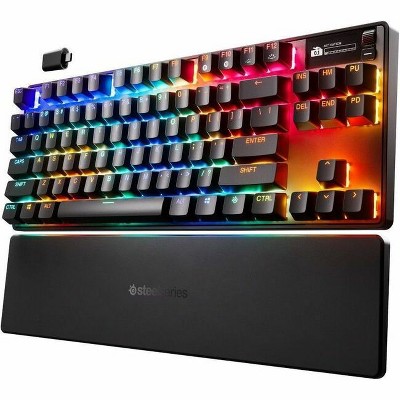
The SteelSeries Apex Pro TKL 2025 is a tenkeyless mechanical keyboard featuring OmniPoint 3.0 magnetic switches with per-key adjustable actuation from 0.1 mm to 4.0 mm. It targets competitive gamers who want the fastest possible response, offering 8,000 Hz polling, Rapid Trigger, and Rapid Tap. The keyboard also includes an OLED Smart Display, tri-mode wireless connectivity, and a durable aluminum build.
Key Specifications
- Frame
- Aluminum alloy top plate
- Price
- $249.99
- Layout
- TKL (87 keys)
- Weight
- Approximately 1.5 lbs (680 g)
- Keycaps
- PBT double-shot
- Software
- SteelSeries GG Engine
- Switch Type
- SteelSeries OmniPoint 3.0 magnetic
- Battery Life
- Up to 40 hours (2.4 GHz, backlighting off)
- Connectivity
- USB-C wired, 2.4 GHz wireless, Bluetooth 5.1
- OLED Display
- Small OLED for stats, macros, and customization
- Polling Rate
- 8000 Hz
- Actuation Range
- 0.1–4.0 mm, adjustable per key
Overview
The SteelSeries Apex Pro TKL 2025 is the latest evolution of SteelSeries' flagship competitive keyboard line. It ditches the numpad for a compact tenkeyless (TKL) layout that saves desk space and brings the mouse closer to your left hand—a favorite layout for shooters and esports players. The headline feature is the OmniPoint 3.0 magnetic switch, which uses a magnet instead of a physical contact leaf, allowing each key's actuation point to be set anywhere from 0.1 mm to 4.0 mm. That's a full 39x range, according to SteelSeries.
The keyboard also introduces Rapid Tap, a feature that prioritizes new inputs when you're pressing two keys simultaneously—useful for counter-strafing in Valorant and CS:GO. With 8,000 Hz polling, an OLED display, and a premium aluminum frame, the Apex Pro TKL aims to be the ultimate tool for precision-driven gamers. In 2026, it remains one of the few keyboards that offer both wireless flexibility and this level of per-key customization, and you can grab it on Amazon alongside a variety of accessories and alternatives.
Pros
The Apex Pro TKL 2025 packs several features you won't find on most other keyboards. The most important ones revolve around its OmniPoint switches, which give you micro-level control over performance. Here's what the keyboard does exceptionally well:
Pro 1: OmniPoint 3.0 Switches Let You Fine-Tune Every Keystroke
The defining feature of the Apex Pro TKL is its OmniPoint magnetic switches. According to SteelSeries, each key's actuation point can be adjusted from 0.1 mm to 4.0 mm, letting you make the keyboard as responsive or as forgiving as you need. In practice, you can set WASD keys to activate after a hair-trigger 0.1 mm press, while setting less-used keys like Ctrl or Alt to 2 mm to avoid accidental presses.
This customization happens per-key and can be saved to on-board memory. Competitive players in games like Valorant and CS:GO benefit most here, because a faster actuation on movement keys doesn't exist on traditional mechanical switches. The range is so wide that you can turn any key into a light tap or a deliberate press, depending on your playstyle.
Pro 2: Rapid Trigger and Rapid Tap Reduce Input Latency
Rapid Trigger is a mode that resets the key's actuation point as soon as you start releasing it, so repeated jumps or strafes register faster than with a standard mechanical switch. The 2025 model adds Rapid Tap, which handles simultaneous opposing inputs (like holding D and tapping A) without ghosting—a useful tool for executing advanced movement tech.
Rapid Trigger effectively makes the keyboard respond to the tiniest movements of your fingers, which can make your character stop, start, and turn faster. While not everyone needs this level of control, players who are serious about aim and movement will notice the difference in tracking-heavy shooters.
Pro 3: 8,000 Hz Polling Rate for Near-Zero Latency
At 8,000 Hz, the keyboard reports to your PC eight times faster than the typical 1,000 Hz gaming board. This doesn't make you a better player by itself, but it noticeably reduces the gap between keypress and on-screen action. Independent reviewers like RTINGS have measured wired latency under 1 ms, placing it among the fastest keyboards currently tested.
For anyone who's ever felt a slight delay in a crucial moment, this kind of response time is a tangible advantage. Even top-tier mechanical keyboards with 1,000 Hz polling feel slightly less immediate when you're pushing a key at split-second speed.
Pro 4: Solid Aluminum Build with Quality PBT Keycaps
The top plate is a single piece of aircraft-grade aluminum, giving the board a robust, stable feel that resists flexing under heavy typing. SteelSeries ships PBT double-shot keycaps, which hold their texture longer than ABS and resist excess shine. The result is a keyboard that looks and feels more premium than 90% of the competition.
The keycaps are also compatible with standard Cherry MX stems, so you can swap in any aftermarket keycap set if you want a different look or profile. The aluminum frame adds heft, but it also means the board won't slide around during aggressive gameplay sessions.
Pro 5: OLED Smart Display for Quick Info and Macros
The small OLED screen in the top right corner can show game stats, Discord notifications, or custom graphics. You can also adjust settings directly from the display, so you aren't locked out of configuration features when the SteelSeries GG software isn't running. It's more than a gimmick for players who like monitoring their framerate or using custom animations.
Rather than reaching for a second screen to check your mouse DPI or in-game stat, the OLED gives you that information right at your fingertips. The display is bright and clear, and SteelSeries' engine lets you upload custom images or bitmaps to personalize it.
Pro 6: Flexible Wireless Options with Long Battery Life
The Apex Pro TKL 2025 supports Bluetooth, 2.4 GHz wireless, and wired USB-C connections. SteelSeries rates the 2.4 GHz battery at up to 40 hours with the backlighting off, and you can lower the brightness to stretch it even further. For a keyboard with this many features, that's strong endurance.
Using Bluetooth can last even longer for work, and the 2.4 GHz dongle offers low-latency wireless for gaming. Switching between three paired devices is a quick button press, making this a versatile keyboard for desktop, laptop, and even tablet use.
Cons
No keyboard is perfect, and the Apex Pro TKL 2025 has some notable drawbacks that might be deal-breakers depending on your priorities. Here's an honest look at where it falls short:
Con 1: Price Ranges Above Most Enthusiast Keyboards
The Apex Pro TKL 2025 carries a $249.99 MSRP, roughly double what you'd pay for a solid mechanical keyboard with standard switches. Even compared to other analog keyboards, the Wooting 60HE often sells for $175–200 and offers a similar adjustable actuation set. For casual gamers who won't tweak per-key settings, the extra cost is hard to justify.
However, the premium is partly explained by the OLED screen, wireless connectivity, and 8K polling—features that aren't all in the Wooting. Still, you should consider whether you'll actually use those extra features before spending the money.
Con 2: Software Dependence for Full Feature Set
To change actuation points, enable Rapid Trigger, or map the OLED screen, you must install SteelSeries GG and create a profile. If you want to use the keyboard without the software, you'll get the default switch behavior and lose most advanced features. The software occasionally runs updates in the background and some users report it as resource-hungry, although recent versions are leaner.
This isn't a huge issue if you keep the software installed, but it can be annoying if you're keyboard-agnostic or use it on a locked-down office PC. The on-board memory does store profiles, so once you configure everything, you can unplug the software and the settings remain—but only for profiles you've already saved.
Con 3: TKL Layout Sacrifices the Numpad
Removing the number pad saves desk space for mouse movement, but it makes entering numbers slower for spreadsheet work and accounting. If you're a gamer who also uses your keyboard for office tasks, you may miss the numpad enough to look elsewhere. The 87-key format also means the navigation cluster is slightly rearranged compared to full-size boards.
For pure gaming, TKL is perfect—but for data entry or working with numbers, a full-size keyboard or a secondary numpad becomes necessary. SteelSeries does include a detachable cable, but there's no option to snap on a numpad module.
Con 4: Magnetic Switches Don't Have the Typical Mechanical Feel
OmniPoint switches use a magnet and spring rather than a physical contact leaf, so the tactile bump and bottom-out feel are different from Cherry MX Blues or Browns. Some users find the switches mushy or less satisfying for typing. The sound profile is also higher-pitched, and the bottom-out impact can be sharp. This is a taste issue, but it's worth trying before you commit.
If you're coming from a tactile or clicky mechanical keyboard, the linear, magnetically-damped feel of the OmniPoints might take some getting used to. The adjustable actuation makes them a jack-of-all-trades, but no single switch feel is as refined as dedicated mechanical switches like the Razer Optical Gen-3.
Con 5: No Hot-Swap Switch Compatibility
The board uses fixed OmniPoint switches, so you can't replace individual switches if one fails or if you want a different feel. Many cheaper keyboards now support hot-swappable mechanical switches, making the Apex Pro a less future-proof investment for tinkerers. If a key switch ever breaks, you'll need to send the whole board in for repair or replace the entire keyboard.
This is a major drawback for enthusiasts who like to customize their switch layout or try different tactile options. The Wooting 60HE, for instance, does offer hot-swappable switches, which gives it a longevity advantage for users who see switches as a consumable part.
👍 Who It's For
The SteelSeries Apex Pro TKL 2025 is built for the competitive gamer who wants every possible millisecond of advantage. If you play Valorant, CS:GO, Overwatch, or any fast-paced shooter where quick counter-strafes and precise key presses matter, the per-key actuation lets you set WASD to 0.1 mm for lightning-fast responses without worrying about accidental inputs. The Rapid Trigger and Rapid Tap features are particularly useful for advanced movement mechanics like burst-peeking and counter-strafing.
This keyboard also appeals to power users who like fine-tuning their gear. The OLED display shows system stats and can host custom graphics, while the on-board memory lets you carry profiles between machines. If you split time between gaming and productivity, the tri-mode wireless makes it easy to move between a desktop PC, a laptop, and even a tablet, all without rebinding.
Additionally, streamers and content creators will appreciate the clean TKL layout that leaves room for a mouse swing and the premium build that looks and feels high-end on a desk. The Switch with the most customizable options in this price tier, the Apex Pro TKL rewards those who invest time in setup.
👎 Who Should Avoid
The Apex Pro TKL 2025 is not for budget-conscious buyers. If you just want a reliable, great-feeling mechanical keyboard without tuning every key, you can get 90% of the experience from a $100–150 board like the Keychron V1 or the GMMK 2. The $249.99 price only makes sense if you'll actually use the advanced features—otherwise, you're paying a big premium for specs you won't notice.
Typists who prefer the distinct tactile bump or clicky sound of traditional mechanical switches should also look elsewhere. The OmniPoint switches feel smoother but less characterful, and the fixed nature of the switches means you can't drop in a set of Blue or Brown switches later. If customizing your switch feel is important, a hot-swappable keyboard like the Wooting 60HE or the Drop CTRL is a better fit.
People who rely heavily on a numpad for work (accounting, data entry, or 3D modeling) will find the TKL layout restrictive. And if you're on a security-sensitive system where installing third-party software is not permitted, the keyboard's advanced features remain locked away—leaving you with a very expensive but standard-feeling TKL board.
See today's SteelSeries Apex Pro TKL 2025 price and available configurations on Amazon.
🛒 Buy on AmazonAs an Amazon Associate we earn from qualifying purchases.
Alternatives to Consider
| Product | Choose SteelSeries Apex Pro TKL 2025 if... | Choose the alternative if... |
|---|---|---|
| Wooting 60HE$75 more expensive | You prioritize wireless connectivity, an OLED screen, and a TKL layout with arrow keys—plus you're willing to pay a bit more. | You want a hot-swappable 60% keyboard with the same analog switch benefits for $75 less and don't mind losing the OLED and wireless. |
| Razer Huntsman V3 Pro TKL$20 more expensive | You want per-key actuation and a TKL form factor with an OLED screen, but you're already in the SteelSeries ecosystem or prefer a linear switch feel. | You want Razer Synapse integration, opto-mechanical switches, and a lower price, and you can live without a display. |
| Corsair K70 Pro Mini Wireless$50 less expensive | You want tri-mode wireless, 8,000 Hz polling, and a TKL layout in a more compact package—and you don't need an OLED. | You prefer a 60% layout with a smaller footprint and want to spend less; the K70 Mini Wireless lacks the OLED and per-key actuation. |
| Keychron Q1 HE$50 less expensive | You value hot-swappable switches, a premium aluminum body, and 75% layout with function row, and you don't need wireless. | You want the most options for customization and a typing-friendly feel, while accept a heavier desk footprint and no OLED. |
If the Apex Pro TKL 2025 doesn't fit your needs, there are several excellent alternatives worth considering. The Wooting 60HE is the most obvious rival, offering the same adjustable actuation via Lekker magnetic switches, plus hot-swap support and a lower price. It doesn't have an OLED screen or wireless, but it's a favorite for competitive players who want the fastest response without extra bulk. The Razer Huntsman V3 Pro TKL is another strong choice, with Razer's own analog optical switches, a lower price, and better integration with the Razer Synapse ecosystem—but it lacks the OLED and per-key actuation range of the SteelSeries.
For those who want a more conventional mechanical keyboard at a lower price, the Corsair K70 Pro Mini Wireless is a great alternative: it's compact, wireless, and offers 8,000 Hz polling in a 60% layout. The Keychron Q1 HE is also worth a look if you want a premium metal case and adjustable actuation in a 75% layout. It's more typing-friendly than the Apex Pro TKL and also hot-swappable, though it doesn't have wireless or an OLED display.
Is it worth the price?
At approximately $249.99, the SteelSeries Apex Pro TKL 2025 is worth it only for gamers who will actively use the OmniPoint software suite—tuning actuation per key, using Rapid Trigger, and monitoring stats on the OLED. For those players, the speed and flexibility genuinely outclass any non-analog keyboard. However, if you're a casual gamer or type more than you game, a $150 keyboard like the Keychron V1 or even the $175 Wooting 60HE offers better value for your money.
📝 Bottom Line
The SteelSeries Apex Pro TKL 2025 is the right choice for competitive gamers who demand the ultimate in input speed and who will take the time to configure the OmniPoint switches to their exact liking. The 0.1 mm actuation, Rapid Trigger, and 8,000 Hz polling create a response that few other keyboards can match, and the aluminum build with PBT keycaps ensures it will last for years. If you're a serious FPS player, this is one of the best investments you can make in your gear.
Its biggest weakness is the premium price: at $249.99, it's $50–75 more expensive than the similarly capable Wooting 60HE, and that gap only makes sense if you genuinely need the OLED, wireless, and TKL layout with arrow keys. The keyboard also leans heavily on SteelSeries GG software—without it, you're losing the very features that justify the extra cost. And for those used to traditional mechanical switches, the magnetic OmniPoint feel may take time to adjust to.
In conclusion, the Apex Pro TKL 2025 is not for everyone, but it's undeniably a top-tier tool for its intended audience. If you're a competitive player who will use Rapid Trigger and per-key actuation, buy it—it's worth every penny. If you're a casual gamer, a typist, or someone who prefers hot-swappable switches, save your money and go with a cheaper alternative.
Check current SteelSeries Apex Pro TKL 2025 availability and bundle options on Amazon.
🛒 Buy on AmazonAs an Amazon Associate we earn from qualifying purchases.
Frequently Asked Questions
Quick Summary
Key Pros
- ✓Per-key adjustable actuation (0.1–4.0 mm) thanks to OmniPoint 3.0 switches
- ✓Rapid Trigger and Rapid Tap for ultra-fast repeated inputs
- ✓8,000 Hz polling rate delivers under 1 ms of latency
- ✓Premium aluminum frame and PBT keycaps that feel durable
- ✓OLED Smart Display for macros, stats, and custom graphics
Key Cons
- ✗Premium $249.99 price—about $50–75 higher than Wooting 60HE
- ✗Requires SteelSeries GG software for advanced features
- ✗TKL design omits the numpad, hurting productivity
- ✗Magnetic switch feel isn't for everyone, especially tactile/clicky fans
- ✗Switches are non-hot-swappable, limiting repairability and customization
Ratings
Best For
- →Competitive FPS players (Valorant, CS:GO, Overwatch)
- →Esports enthusiasts who value sub-millisecond response
- →Gamers who want per-key actuation tuning
- →Users who like OLED displays for stats and macros