Review Atlas
Review AtlasYour guide to a better purchase

Menu

Shop by Category

Get the App

Better experience on mobile

7 Best Which Gaming Keyboards should I buy in 2026: Tested & Ran…

Compare the best mechanical gaming keyboards and find your perfect match from $50 to $250.

Gaming KeyboardsMechanical gaming keyboardsPC gamers$50-$250
Choosing the right mechanical gaming keyboard can feel like a rabbit hole of confusing switches, layouts, and marketing hype – especially with prices ranging from budget to premium. You want something that feels great to type on, responds instantly in games, and doesn't break the bank. But with so many options from Corsair, Razer, Keychron, and others, it's easy to get stuck. This guide cuts through the noise. Whether you're a competitive FPS player looking for a fast and reliable keyboard, a night-owl typist who loves satisfying clicks, or a budget-minded gamer on a tight allowance, we'll help you find the perfect match. We've researched the most popular mechanical keyboards in the $50-$250 range, analyzed real customer feedback, and compared specs honestly. You'll see clear trade-offs and get straight recommendations – no guesswork. Our goal is simple: by the end of this guide, you'll confidently know exactly which keyboard to buy for your needs and budget. We'll walk you through the key factors, rank the top contenders, and provide buyer scenarios for different types of gamers. Let's get started.

Our Top Pick

Keychron V1

Best Value

PC gamers who love customization, prefer a compact layout (75%), and want a keyboard that feels fantastic for both gaming and typing.

View on Amazon →

Key Factors to Consider

  • 1.Switch type (linear, tactile, clicky) – affects feel and noise, crucial for both gaming and typing comfort.
  • 2.Form factor (full-size, tenkeyless, 75%, 60%) – matters for desk space, portability, and whether you need the numpad.
  • 3.Connectivity (wired, 2.4GHz wireless, Bluetooth) – wired is most reliable for gaming; wireless offers freedom but may add cost and latency considerations.
  • 4.RGB lighting and customization – some keyboards have per-key RGB, others are monochrome; check if the software fits your OS.
  • 5.Build quality and materials – aluminum vs plastic, keycap quality, and whether the case flexes under pressure.
  • 6.Hot-swappable switches – lets you change switches without soldering, ideal for tinkering and customization.
  • 7.Onboard memory and macro support – useful for saving profiles if you frequently travel or don't want to run software.
  • 8.Key rollover / anti-ghosting – essential for gaming; look for N-key rollover over USB.
  • 9.Price and warranty – balance your budget against features; check the warranty period and support reputation.
  • 10.Brand trust and community support – established brands like Corsair and Razer have robust software and support, while newer brands like Keychron offer community-driven firmware (QMK/VIA).

The Products

#1

Keychron V1

Best Value
Keychron V1
Overall
9.3/10
Value
9.8/10
Performance
8.9/10
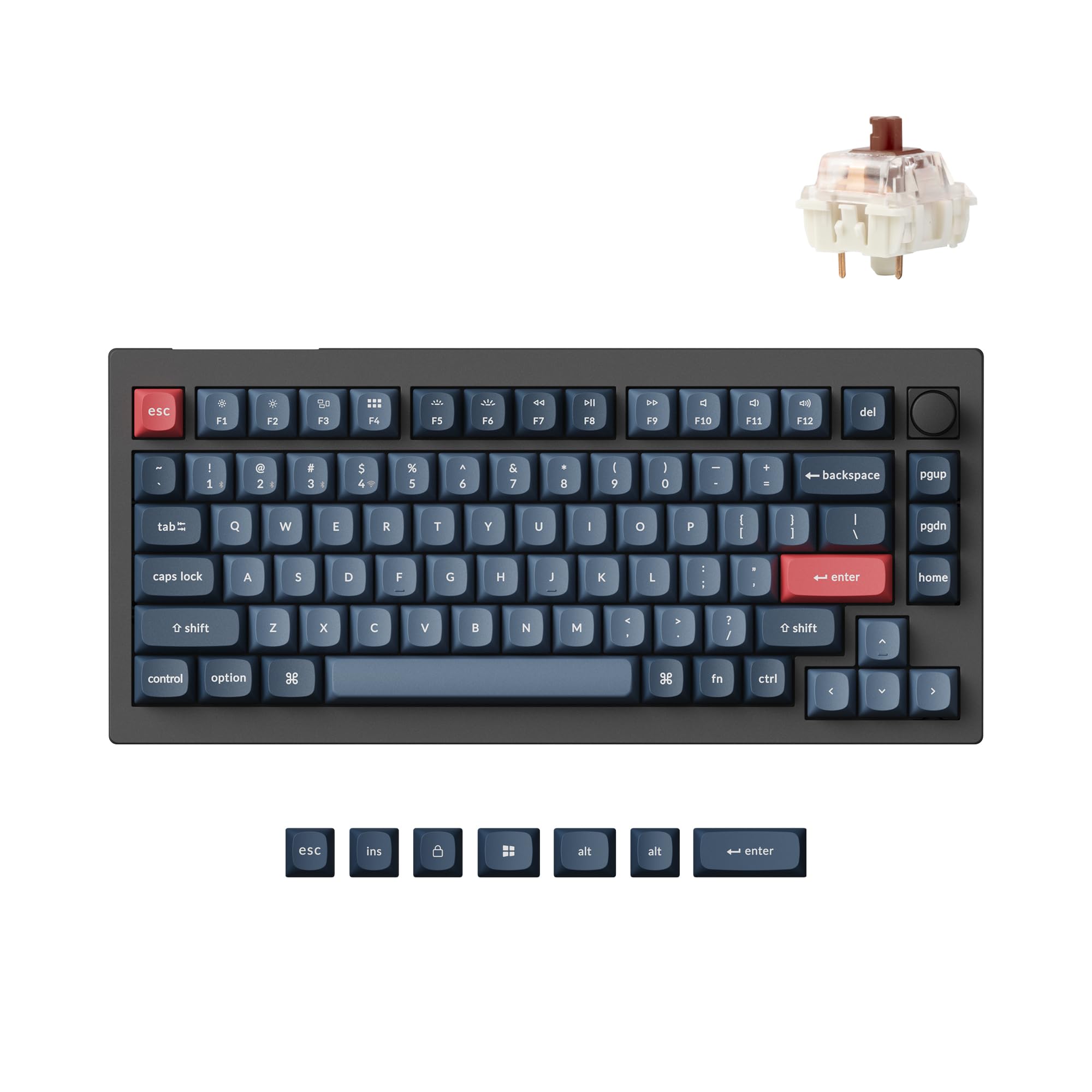
The Keychron V1 is a hot-swappable, 75% layout mechanical keyboard that has taken the enthusiast community by storm. It features a gasket-mounted design for a softer, more comfortable typing feel, and supports full QMK/VIA customization, meaning you can remap every key and create macros without touching software. With South-facing RGB LEDs and a durable ABS plastic body, it's built to last and looks great on any desk. Under the hood, the V1 offers both wired and Bluetooth 5.1 connectivity, so you can switch between up to three devices effortlessly. It's available with a wide range of switch options (from tactile Gateron Browns to smooth linear Reds), and the hot-swap sockets allow you to try different switches in minutes. For a keyboard under $100, it offers an insane amount of flexibility and premium features that rival boards twice its price. This is a fantastic choice for PC gamers who also type a lot, want a compact layout without losing arrow keys, and love to tinker. The built-in sound-dampening foam makes it one of the quietest and most satisfying typing experiences in this budget range, and the polished software experience gives you total control.

Pros

  • Hot-swappable switches – try different switches without soldering
  • Gasket-mounted design gives a creamy, cushioned typing feel
  • Full QMK/VIA support – remap any key, create macros, and control RGB
  • Excellent value – packs premium features at a budget-friendly price
  • Dual Bluetooth/2.4GHz/wired connectivity with multi-device pairing
  • South-facing RGB LEDs work well with keycap sets

Cons

  • Absent USB pass-through port (unlike some full-size keyboards)
  • Not available in a full-size (100%) layout – only 75% and other compact sizes
  • Pre-lubed stabilizers can feel rattle-y out of the box to picky users
  • Software is not plug-and-play for beginners who don't want to learn QMK
  • Case is plastic, not aluminum – may feel less premium to some

Best For:

PC gamers who love customization, prefer a compact layout (75%), and want a keyboard that feels fantastic for both gaming and typing.

Not Recommended For:

Hardcore enthusiasts who demand premium metal cases or need a dedicated numpad for Excel-heavy tasks.

Key Features:

75% compact layout with arrow keys and function rowGasket-mounted design for uniform flex and softer keypressesHot-swappable switches with support for 4-pin and 3-pin switchesQMK/VIA web-based configuration, full key remappingTri-mode connectivity: USB-C, Bluetooth 5.1, 2.4GHzSOUTH-FACING RGB LEDs with multiple lighting effectsDouble-shot ABS keycaps – legends won't fadeOSA profile keycaps with a comfortable, ergonomic shape

Standout Feature:

The gasket-mounted design and QMK/VIA support at a sub-$100 price – rare in its class.

VS Others:

The Keychron V1 sits between budget reddragon and premium brands like Corsair. Compared to the Corsair K70, it's more customizable and compact, while lacking a full-size layout and dedicated media keys. For gamers who want RGB and macro support without shelling out $150+, the V1 is a steal.

Why This One:

It offers the best mix of features, build quality, and price in this guide. If you want a mechanical keyboard that you can personalize to your exact taste, the Keychron V1 is the smart choice – you won't outgrow it.

#2

Corsair K70 RGB MK.2

Best Overall
Corsair K70 RGB MK.2
Overall
8.9/10
Value
8.4/10
Performance
9/10
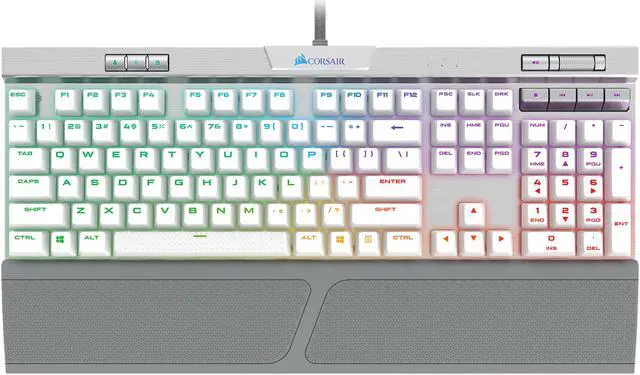
The Corsair K70 RGB MK.2 is one of the most recognized gaming keyboards in the world. It features a full aluminum frame, Cherry MX switches (Red, Blue, Brown options), and per-key RGB backlighting that syncs brilliantly with the iCUE software. The included detachable wrist rest is soft and comfortable for long sessions, and the dedicated media keys and volume roller are a godsend for players who like to quickly adjust audio. Gamers love the K70 because it's reliable and built like a tank. With a USB pass-through port for your mouse or headset, and 100% anti-ghosting with full N-key rollover, it's designed for esports-level performance. The brushed aluminum faceplate not only looks premium but also keeps the board stable during intense gameplay. The software, iCUE, is powerful but can be resource-heavy, though it gives you deep control over lighting and macros. If you're looking for a rock-solid full-size keyboard with all the bells and whistles and you prefer a linear switch for fast double-tapping in FPS games, the K70 is an excellent choice. It's an actual battle-tested favorite used by many esports pros and streamers.

Pros

  • Sturdy aluminum frame – premium build quality that lasts
  • Full per-key RGB with iCUE integration, plus a USB pass-through port
  • Multimedia controls and a smooth volume roller – very convenient
  • Cherry MX switches – reliable and widely available
  • Detachable wrist rest adds comfort for long gaming sessions
  • 100% anti-ghosting with full N-key rollover

Cons

  • iCUE software can be buggy and resource-hungry for some users
  • Non-hot-swappable switches – you're stuck with the chosen switch type
  • Keycaps are okay but may wear over time; not PBT by default
  • Large footprint – not ideal for small desks or traveling
  • Price premium is for the brand and design, not unique features

Best For:

Gamers who want a full-size, premium-looking keyboard with excellent build quality and a legacy of reliability.

Not Recommended For:

Keyboard enthusiasts who plan to swap switches or want a compact, minimalist layout.

Key Features:

Full-size layout with dedicated media keys and volume rollerAluminum unibody frame – extremely durablePer-key RGB with 16.8M colorsUSB 2.0 pass-through for peripherals8MB onboard memory for up to 3 saved profilesCherry MX switches with options for Red, Brown, or BlueDetachable soft-touch wrist rest

Standout Feature:

The combination of a premium aluminum chassis and polished multimedia controls at a mid-range price.

VS Others:

When compared to the Keychron V1, the Corsair K70 offers a full-size layout and more premium construction, but it lacks hot-swapability and QMK support. The Razer BlackWidow V4 is its direct rival; the Corsair feels sturdier, but Razer's newer switches give a smoother feel.

Why This One:

If you want a no-nonsense, full-size gaming keyboard that will last for years and won't require any tweaking, the K70 is a proven pick. It's especially great for gamers who hate customizing and want everything working out of the box.

#3

Razer BlackWidow V4

Razer BlackWidow V4
Overall
8.7/10
Value
7.6/10
Performance
9.2/10
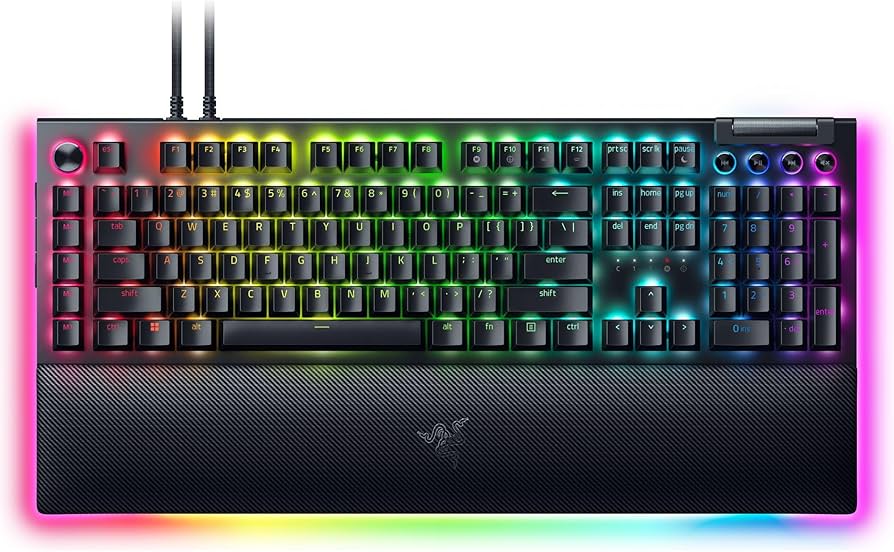
The Razer BlackWidow V4 is a full-size mechanical keyboard designed for serious gamers. It features Razer's new mechanical switches – available in clicky green or tactile/wired versions – and comes with a plush leatherette wrist rest that is magnetically attached. The board has a durable top plate with a matte finish that resists fingerprints, and it includes a set of ergonomic WASD keycaps in the box. The star of the show is the switch performance: Razer's latest switches have faster actuation points and smoother keystrokes than many competitors. The BlackWidow V4 also has per-key RGB with plenty of lighting presets and supports Razer Synapse for customization. You also get a multi-function roller and media keys, making it a multimedia powerhouse. The dedicated macro keys (5 on the left side) are perfect for MMO or MOBA players who need extra buttons. However, the board is not hot-swappable, and the keycaps are ABS (though double-shot). It's a great choice if you want a Razer ecosystem integration, need extra macro buttons, and enjoy a full-size layout with modern aesthetics.

Pros

  • Smooth, responsive Razer switches (green or tactile)
  • Built-in macro keys (5) for MMO/MOBA gamers
  • Magnetic leatherette wrist rest – very comfortable and easy to attach/detach
  • Dedicated media keys, roller, and a multifunction dial
  • High-quality build with a matte finish
  • Per-key RGB with Chroma sync

Cons

  • Not hot-swappable – can't change switches without soldering
  • Full-size layout takes up a lot of desk space
  • The left macro column can be accidentally pressed by new users
  • Software (Synapse) is heavy and nags for account creation
  • Price is higher than comparable boards with similar features

Best For:

Razer fans who want a feature-rich full-size keyboard with dedicated macro buttons and luxurious wrist rest.

Not Recommended For:

Budget-conscious gamers or those who prefer a clean, minimal layout without extra columns.

Key Features:

Razer mechanical switches with 100 million keystroke lifespan5 dedicated macro keysMulti-function roller and media buttonsMagnetic ergonomic wrist restPer-key Chroma RGB lightingAluminum top plateAvailable with clicky green or smooth linear switches

Standout Feature:

The integrated macro column and magnetic wrist rest set it apart from other full-size gaming keyboards.

VS Others:

The BlackWidow V4 goes head-to-head with the Corsair K70. It offers more macro keys and a nicer wrist rest, but the K70 has a more premium aluminum unibody. Compared to the SteelSeries Apex Pro, it lacks adjustable actuation but is considerably cheaper.

Why This One:

If you play complex games that require lots of bindings (MMOs) or value a comfortable wrist rest, the BlackWidow V4 gives you extra functionality without sacrificing style.

#4

Logitech G Pro X

Logitech G Pro X
Overall
8.5/10
Value
7.8/10
Performance
8.8/10
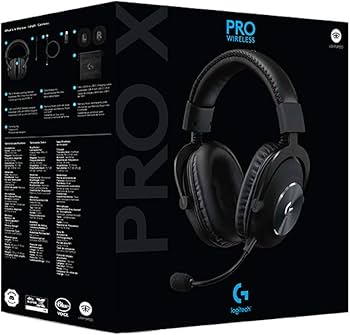
The Logitech G Pro X is a tenkeyless mechanical keyboard created with esports pros in mind. It focuses on performance and portability, stripping away the numpad and any excess. The G Pro X uses Logitech's GX switches (Brown or Blue by default) and is the first Logitech keyboard to feature hot-swappable switches, letting you customize the feel without soldering. It comes with a set of magnetic keycaps for easy replacement. Weighing in at just under 2 pounds, it's light enough to take to LAN parties. The detachable micro-USB cable also makes travel easier. The keyboard has a compact design that frees up mouse space, which is crucial for FPS players who use low sensitivity. The included G HUB software offers substantial RGB customization, though it only has single-color illumination (white) on the G Pro X model – a deliberate choice to focus on performance. This keyboard is ideal for esports enthusiasts who want a reliable, compact keyboard with hot-swappable switches and don't care about flashy RGB. It's a no-nonsense tool that gets the job done.

Pros

  • Hot-swappable switches – rare in Logitech products
  • Compact TKL design frees up desk space and is easy to carry
  • Detachable micro-USB cable improves portability
  • Built with pro input from esports athletes
  • Lightweight and durable construction
  • Magnetic keycaps for easy replacement

Cons

  • Only white backlighting – no per-key RGB
  • No dedicated media keys or volume wheel
  • Micro-USB is dated (not USB-C)
  • Price is a bit high for a TKL with single-color lighting
  • Not the best for productivity, especially if you need a numpad

Best For:

Prospective esports competitors and gamers who value speed, portability, and hot-swap flexibility over RGB flash.

Not Recommended For:

Users who want a full keyboard with numeric keypad or who love rainbow lighting effects.

Key Features:

Tenkeyless (TKL) layout without numpadHot-swappable GX switches (available with Brown, Blue, Red)Detachable micro-USB cableMagnetic keycapsLIGHTSYNC RGB with white backlightingMedal-grade aluminum alloy frame100% anti-ghosting with N-key rollover

Standout Feature:

The combination of hot-swappable switches and a pro-focused TKL layout in a Logitech board.

VS Others:

The Logitech G Pro X is more portable and cheaper than the SteelSeries Apex Pro, but it lacks adjustable actuation and any RGB. It's also less feature-packed than the Corsair K70, but wins on hot-swap and name-brand reliability.

Why This One:

If you're a competitive gamer who travels or has limited desk space and wants a reliable, hot-swappable keyboard, the G Pro X is a solid choice.

#5

SteelSeries Apex Pro

Best Premium
SteelSeries Apex Pro
Overall
9/10
Value
6.8/10
Performance
9.8/10
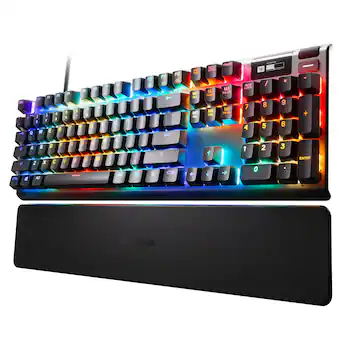
The SteelSeries Apex Pro is a flagship gaming keyboard known for its revolutionary OmniPoint adjustable actuation switches. You can set the actuation point from 0.4mm to 4.0mm on a per-key basis, allowing you to make keys ultra-sensitive for gaming or deeper for typing. The full-size aluminum frame feels premium, and the RGB lighting is beautifully bright with underglow. The OLED smart display can show stats, in-game events, or system info – a unique feature. This keyboard is a dream for gamers who want the absolute best in terms of response speed and customization. The adjustable actuation is a game-changer in FPS and MOBA titles, letting you set WASD to max sensitivity but keep your number keys deeper to avoid accidental presses. The detachable magnetic wrist rest adds comfort. However, all that innovation comes at a price, and the Apex Pro is not hot-swappable (the switches are proprietary). With its premium build and unique features, the Apex Pro is the best-performing keyboard on this list, but it's also the most expensive. If you're determined to have the cutting edge and are willing to pay for it, you'll be rewarded.

Pros

  • OmniPoint adjustable actuation (0.4–4.0mm) – vast customization
  • Premium aluminum build with a minimalist design
  • Bright RGB lighting and OLED smart display
  • Magnetic detachable wrist rest
  • USB pass-through port
  • Instant actuation for super-fast key presses

Cons

  • Very expensive compared to other keyboards in this guide
  • Proprietary switches – not hot-swappable, only OmniPoint compatible
  • Full-size layout only; no TKL version
  • The OLED screen is considered a gimmick by some users
  • Requires SteelSeries Engine for full functionality

Best For:

Enthusiast gamers who want maximum control over actuation and are willing to invest for the latest tech.

Not Recommended For:

Budget shoppers or anyone who doesn't care about tuning switch sensitivity to the millimetre.

Key Features:

OmniPoint adjustment – set actuation from 0.4mm to 4mm per keyWorld's fastest mechanical switch response (0.7ms)OLED Smart Display with in-game stats, Discord alerts, etc.Aluminum alloy framePer-key RGB illuminationUSB pass-through portMagnetic wrist rest

Standout Feature:

The OmniPoint adjustable actuation – simply not available on any other keyboard in this guide.

VS Others:

This is the most expensive keyboard here, but it outpaces the Keychron V1 and Corsair K70 in technical innovation. The Razer BlackWidow V4 offers more macro keys, but the Apex Pro's adjustable keys are a higher-tech advantage.

Why This One:

For gamers who demand the fastest response and love to tweak every parameter, the Apex Pro is the ultimate choice.

#6

Ducky One 3

Ducky One 3
Overall
8.4/10
Value
7.2/10
Performance
8.6/10
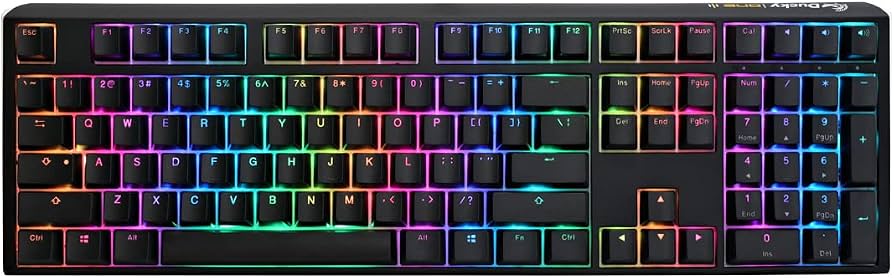
The Ducky One 3 is a premium mechanical keyboard crafted for enthusiasts who appreciate tactile feel and beautiful design. It features a full-time metal case (Aluminum), with dye-sub PBT keycaps that feel smooth to the touch and resist wear. The board is hot-swappable and compatible with 3-pin and 5-pin switches, so you can freely experiment with different switches without any soldering. The Ducky One 3 is honestly more of a typing keyboard than a gaming-focused one, but many gamers enjoys its excellent switch tuning and consistency. It's available in a range of case colors and switch types (Cherry MX, Kailh Box, etc.). The USB-C connector and three-level typed angle feet add comfort. You won't find crazy RGB or macro software – the One 3 is purposely simple, with a few on-board lighting modes and controls. This keyboard is for purists who want a high-quality, minimalist device that feels amazing to type on and will last a lifetime. It lacks dedicated macro keys and software, but it doesn't have the bloat either.

Pros

  • Hot-swappable – supports both 3-pin and 5-pin switches
  • Premium PBT dye-sub keycaps – excellent texture and durability
  • Solid aluminum case provides a sturdy typing base
  • USB-C connector with detachable cable
  • PCB-mounted stabilizers are pre-lubed – great out-of-the-box feel
  • Simple and clean design without gamer aesthetics

Cons

  • No RGB or macro software – just basic white/backlit patterns
  • No dedicated media keys or wrist rest
  • Full-size layout (though TKL and 65% versions exist, the one in this price is full-size)
  • Lacks Windows/Mac compatibility switch (some models are Windows-only)
  • Price is high for those who don't type much

Best For:

Keyboard enthusiasts, writers, and programmers who want an excellent typing experience with hot-swap capability and don't want bloaty software.

Not Recommended For:

Hardcore gamers who rely on macros, per-key RGB, and software integration.

Key Features:

Hot-swappable switch sockets (3-pin / 5-pin)Dye-sub PBT keycaps – legends won't fadeAluminum case in multiple colorsUSB-C detachable cablePre-lubed stabilizersHigh profile keycaps with standard MX stemsMinimal onboard lighting modes

Standout Feature:

The exceptionally satisfying out-of-the-box typing feel thanks to pre-lubed stabilizers and PBT keycaps.

VS Others:

The Ducky One 3 is a purist's tool compared to the feature-rich Corsair or Razer. It lacks RGB customization and macros but delivers superior key feel and keycaps. Against the Keychron V1, it's pricier and less feature-packed but has better build quality.

Why This One:

If you type more than you game and appreciate craftsmanship, the One 3 is a dream come true. It's a keyboard you'll enjoy using every day.

#7

HyperX Alloy Elite 2

HyperX Alloy Elite 2
Overall
8/10
Value
8.6/10
Performance
8.2/10
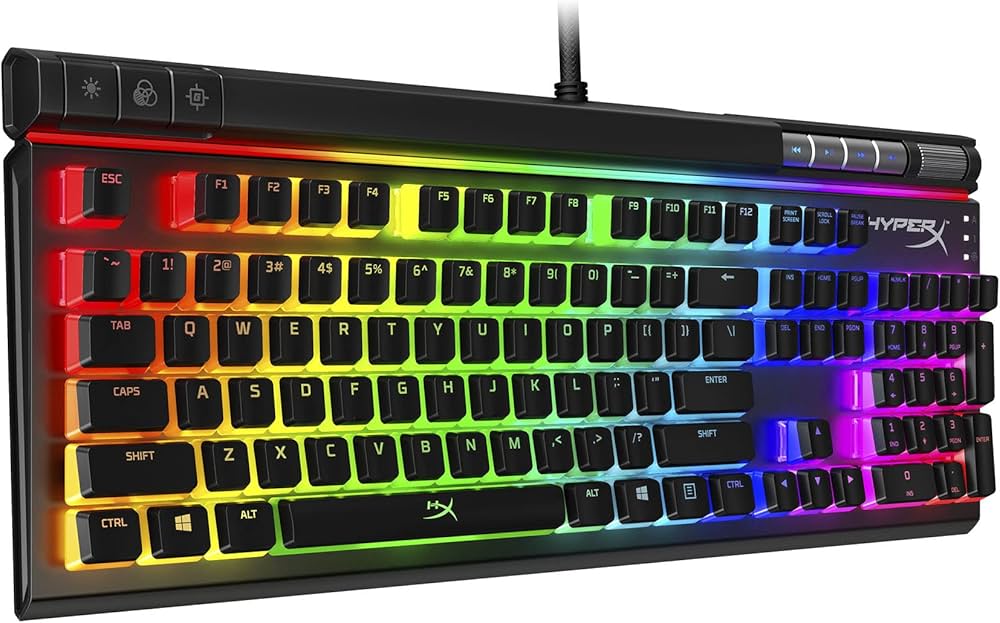
The HyperX Alloy Elite 2 is a full-size mechanical gaming keyboard that balances performance and affordability. It features HyperX linear red switches (or tactile aqua switches depending on version), a solid steel frame, and a striking light bar along the top edge. RGB lighting is per-key and bright, with a built-in game mode and N-key rollover for reliable gaming. Dedicated media keys and a volume wheel make it convenient for daily use. Unlike some premium boards, the Alloy Elite 2 includes a removable wrist rest and an extra keycap set with a key puller, which is nice. Keycaps are double-shot PBT – a step above many competitors at this price. While it lacks hot-swap switches and software customization is decent, the Alloy Elite 2 is a dependable choice for a full-sized keyboard that won't break the bank. It's perfect for gamers who want no-frills reliability and classic styling.

Pros

  • Smooth HyperX switches (linear or tactile)
  • Sturdy steel frame – great rigidity
  • Double-shot PBT keycaps resistant to wear
  • Dedicated media keys and volume wheel
  • Included puller and extra keys
  • Reasonable price for a full-size mechanical

Cons

  • Not hot-swappable – switches are soldered
  • No USB pass-through (some may miss it)
  • The light bar is purely decorative, no per-key zones
  • Software can be limited for macros and lighting
  • Keycaps are not the highest profile but fine

Best For:

Gamers who want a durable, full-size mechanical keyboard without paying for advanced features they won't use.

Not Recommended For:

Enthusiasts who want hot-swappable switches or deep macro programming.

Key Features:

Full-size layout with media keysHyperX mechanical switches (red or aqua)Steel frame constructionPer-key RGB lightingDouble-shot PBT keycapsN-key rollover, anti-ghostingRemovable wrist rest

Standout Feature:

The combination of PBT keycaps and a steel frame at a sub-$100 price point.

VS Others:

The HyperX Alloy Elite 2 is a cheaper, simpler Corsair K70. It lacks the aluminum premium feel and macro keys, but it's more budget-friendly with similar size. Compared to the Keychron V1, it has a full-size layout but no hot-swap or QMK support.

Why This One:

If you want a reliable full-size gaming keyboard with great build quality and PBT keycaps without spending over $100, the HyperX is a top pick.

#8

Redragon K556

Best Budget
Redragon K556
Overall
7.2/10
Value
9.4/10
Performance
7/10
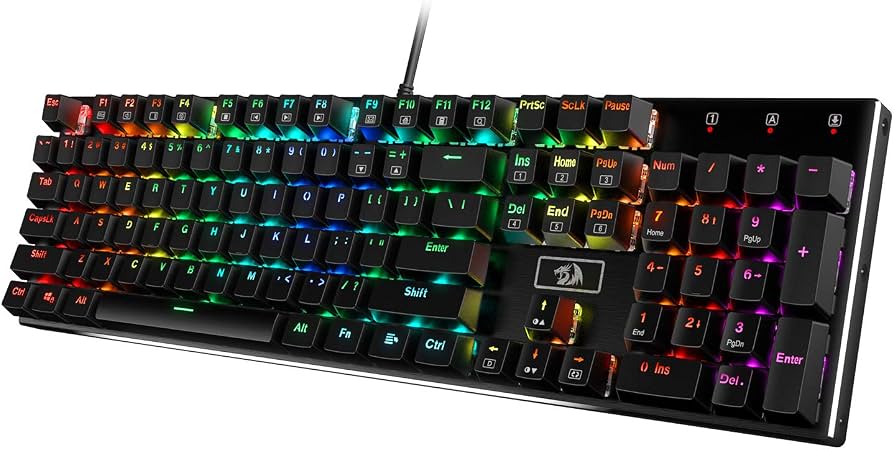
The Redragon K556 is a budget-friendly full-size mechanical keyboard that proves you don't need to spend a fortune for a decent gaming experience. It features genuine Redragon mechanical switches (similar to Cherry MX Red), a sturdy metal top plate, and rainbow backlighting with a variety of presets. The double-shot injection-molded keycaps are surprisingly good for the price, and it offers full N-key rollover for anti-ghosting. This keyboard is wired only, with a durable braided USB cable. There are no fancy software customization or macro features – it's a plug-and-play device. The build quality is decent, though it's mostly plastic, and the stabilizers can be rattly for some users. If you're just starting out and want to see if you like mechanical keyboards without spending a lot, the K556 is an easy choice. It's also popular among budget builds and first-time buyers.

Pros

  • Extremely affordable – one of the cheapest mechanical keyboards from a known brand
  • Solid metal top plate with a rugged finish
  • Double-shot keycaps resist wear
  • Rainbow backlighting with 20 preset modes
  • Full N-key rollover – anti-ghosting works well
  • Simple plug-and-play, no software needed

Cons

  • Switches are not hot-swappable and are clones of Cherry, no feature per-key RGB
  • Stabilizers can rattle (common at this budget)
  • No detachable cable, no wrist rest
  • Software is not provided, so no macro programmability
  • The rainbow LED isn't per-key; only colors zones

Best For:

Budget-conscious gamers or first-time mechanical keyboard buyers who want a full-size board under $60.

Not Recommended For:

Enthusiasts who need programmable macros, per-key RGB, or hot-swap capability.

Key Features:

Full-size layout with 104 keysRedragon mechanical switches (linear)Metal top plateDouble-shot ABS keycapsRainbow LED backlighting (multiple modes)N-key rollover with anti-ghostingBraided USB cable

Standout Feature:

Unbeatable price-to-performance ratio – a functional full-size mech for just $60.

VS Others:

The Redragon K556 is the cheapest keyboard here, so it obviously lacks the features of the Keychron V1 or Corsair K70. But if your budget is strict, it's far better than any membrane keyboard. It's a stepping stone.

Why This One:

If you only have $60 and need a mechanical keyboard that works, this is the one. You can always upgrade later.

Who Should Get What?

Budget-Conscious Collegiate Gamer

Alex is a college student living on a tight budget. They've been using a hand-me-down membrane keyboard and want a mechanical one for gaming and writing essays. They're not too interested in RGB or software, just a decent feel and reliability for under $70.

Budget:$50-$70
Use:Gaming (Fortnite, Valorant) and school assignments

Recommended:

Redragon K556

The Redragon K556 gives you a solid full-size mechanical keyboard for the price of a TKL. It has anti-ghosting and a metal top plate, so it'll survive dorm life. No software to fiddle with – just plug and play, perfect for a student without time for tinkering.

View on Amazon →

Competitive Esports Player

Priya is a semi-pro Call of Duty player who participates in online tournaments. She needs a fast, reliable keyboard that doesn't waste space. She prefers TKL or 75% layouts and wants a wired connection to minimize latency. She's willing to invest up to $200 for a competitive edge.

Budget:$150-$220
Use:Competitive FPS gaming and local LAN events

Recommended:

Logitech G Pro X

The Logitech G Pro X is a TKL board with hot-swappable switches, letting Priya try different switch types without buying new boards. It's extremely portable, has a detachable cable, and the aluminum frame is durable for travel. The fast GX switches deliver the response she needs at a great price.

View on Amazon →

Casual Gamer & Streamer

Mike is a part-time Twitch streamer who plays a mix of games like Apex Legends and Stardew Valley. He wants a keyboard that looks great on stream, has RGB, and provides macro keys for quick scenes. He also likes to rest his wrists during long sessions.

Budget:$100-$200
Use:Streaming, variety gaming, and everyday typing

Recommended:

Razer BlackWidow V4

The BlackWidow V4 has plenty of RGB to spice up the stream, and the 5 dedicated macro keys are perfect for stream hotkeys. The wrist rest is super comfy during 8-hour sessions. It's full-size so it covers everything, and the media controls are handy for adjusting music live.

View on Amazon →

Customization Enthusiast & Keyboard Modder

Sarah loves keyboard modding. She has a collection of switches and keycaps and wants a board that lets her swap them out easily. She's also into building custom keymaps with QMK/VIA and wants a layout that's compact but still has arrow keys.

Budget:$90-$150
Use:Custom keyboard building, gaming, and programming

Recommended:

Keychron V1

The Keychron V1 is hot-swappable and supports QMK/VIA – a perfect playground for Sarah. It's gasket-mounted, which she can tinker with, and the 75% layout fits her desk. The price leaves room for custom switches and keycaps.

View on Amazon →

Professional Typist / Programmer

James is a software developer who types 8+ hours a day. He cares about typing comfort and key feel more than RGB. He prefers tactile switches and wants a solid, minimalist keyboard without weird gamer fonts but still wants mechanical durability.

Budget:$120-$200
Use:Coding, writing, and occasional gaming

Recommended:

Ducky One 3

The Ducky One 3 is beloved by typists for its pre-lubed stabilizers and premium PBT keycaps. The hot-swappable feature means James can adjust switches later. It's clean, professional-looking, and built to last – perfect for a long workday.

View on Amazon →

Tech Enthusiast with Deep Pockets

Ethan is a hardcore PC gamer who wants the latest and greatest no matter the cost. He wants to brag about his specs and have the most innovative keyboard on the market. He plays competitive shooters and wants every advantage possible.

Budget:$250+
Use:Competitive gaming and showing off the setup

Recommended:

SteelSeries Apex Pro

The Apex Pro's OmniPoint adjustable actuation is a real innovation that gives Ethan control over every key's sensitivity. The OLED screen is cool and functional. It'll certainly be the centerpiece of his battlestation.

View on Amazon →

Buying Guide: How to Choose

Before you jump into buying a mechanical gaming keyboard, take a step back and ask yourself a few questions. First, what's your primary use? If you're a hardcore FPS player, you might prioritize linear switches and a compact layout for mouse space. If you type a lot, tactile or clicky switches with a full-size layout could be more comfortable. Second, what layout suits you? Full-size keyboards have a numpad but feel bulky; tenkeyless (TKL) removes the numpad to save space; 75% layouts (like the Keychron V1) keep the arrow keys and F-row but trim the rest. Consider your desk space and whether you need the numpad for work. Next, think about customization. Hot-swappable switches and QMK/VIA support are huge for long-term value – you can change the feel of the board without soldering. But if you prefer a simple plug-and-play experience, you can skip those features and save money. RGB lighting is nice, but it also drives up the price. Decide if you really need per-key RGB or just a single-color backlight. Budget also matters. In the $50-$100 range, you get reliable basics like the Redragon or HyperX. For $100-$200, you get hot-swap, better build materials, and advanced software. Above $200, you're paying for exclusive tech like adjustable actuation. Identify your ceiling, then look for the best features within that range. Don't forget to check warranty and software reliability. When comparing two keyboards, look at the switch options and the typing feel if you can (read reviews). Avoid the trap of over-spending on features you'll never use. A common mistake is buying a full-size keyboard when you actually prefer more desk space – many gamers end up moving to TKL or 75% later. Make a list of your must-haves and nice-to-haves, and then pick the one that ticks the most must-haves within your budget.

Bottom Line

The market for mechanical gaming keyboards in the $50-$250 range is saturated, but our top recommendations stand out for different reasons. If you want the best overall build and legacy, go with the Corsair K70 RGB MK.2 – it's a tank that will serve any gamer. If you value customization and a premium feel for less money, the Keychron V1 is an absolute steal; we highly recommend it for most hobbyists. For pure esports performance on a budget, the Logitech G Pro X offers portability and hot-swap. And if you have cash to splash for cutting-edge tech, the SteelSeries Apex Pro is the luxurious choice. Remember, the "best" keyboard is the one that fits your hands and your needs. Think about the switch feel you enjoy, the layout that fits your desk, and how much tinkering you want to do. Don't be afraid to start with a budget option like the Redragon K556 if you're new; you can always upgrade later. All the recommendations in this guide are solid, so you won't go wrong whether you choose one of our top picks or a runner-up. Now that you have a clear picture, we invite you to click through to Amazon, read the latest reviews, and check today's prices. Your hands will thank you. Happy gaming!

Frequently Asked Questions

Which mechanical gaming keyboard should I buy in 2026?
For most PC gamers, we highly recommend the Keychron V1 for its unbeatable value, hot-swap support, and QMK customization. If you need a full-size premium board, the Corsair K70 RGB MK.2 is a classic. For budget players, the Redragon K556 is the best cheap option.
What's the best budget mechanical gaming keyboard under $50?
There aren't many decent mechanical keyboards under $50, but the Redragon K556 (around $60) is the most reliable budget pick. If you can stretch a little, the HyperX Alloy Elite 2 (around $99) offers PBT keycaps and a steel frame for just $99.
Are hot-swappable keyboards worth it?
Yes, if you plan to try different switches or customize the feel over time. Hot-swappable saves you from soldering and allows you to replace failed switches easily. The Keychron V1 and Logitech G Pro X are excellent hot-swappable choices.
Is the SteelSeries Apex Pro worth the extra money?
The Apex Pro's OmniPoint adjustable actuation is a unique feature that can give competitive players a slight edge, but for most casual gamers, that $200–$250 price tag is hard to justify. If you have the budget and want the latest tech, it's worth it; otherwise, you can get great performance for half the price.
Which is better: Corsair K70 or Razer BlackWidow V4?
Both are excellent full-size keyboards. The Corsair K70 has a sturdier aluminum unibody and more refined media controls, while the Razer BlackWidow V4 offers macro keys and a more comfortable magnetic wrist rest. If you need macros, go Razer; if you want a tank, go Corsair.
Should I get a full-size, TKL, or 75% keyboard for gaming?
For gaming, a TKL (tenkeyless) or 75% layout is often better because it frees up mouse space and reduces your wrist travel. If you need the numpad for work or data entry, stick with a full-size. The Keychron V1 (75%) and Logitech G Pro X (TKL) are great compact options.
What switch type is best for FPS games?
Linear switches (e.g., Cherry MX Red, Razer Red, Gateron Red) are favored by FPS players because they have a smooth, uninterrupted keypress with no tactile bump, allowing for rapid double-taps. They're also quieter than clicky switches, but note that tactile switches (Brown) can also work well.
Can I use these keyboards with a Mac or console?
Most mechanical keyboards are PC-centric, but some support Mac or console compatibility. The Keychron V1 has a toggle for Windows/Mac and works with many consoles via USB (though features like lighting may be limited). The Logitech G Pro X and Corsair K70 are mainly Windows, though they will function on Mac via USB. Check product descriptions for specific compatibility.
Do I need to buy a keyboard with dedicated macro keys?
Only if you play MMO/MOBA games or want to automate streaming tasks. Most gamers are fine without dedicated macro keys because you can program any key through software macros (if supported). The Razer BlackWidow V4 includes dedicated macro keys, while others allow macros through software.
Is wireless gaming keyboard as good as wired for gaming?
Modern 2.4GHz wireless keyboards (like the Keychron V1 in 2.4GHz mode) have latency that's practically indistinguishable from wired. However, wired is still preferred by competitive players due to zero charging concerns and absolute stability. If battery life and cable clutter are concerns, wireless is convenient.
What is QMK/VIA support and does it matter?
QMK/VIA is open-source firmware that allows full remapping of every key, creation of layers, and customization of the RGB lighting through a web interface. It's highly valued by enthusiasts for limitless customization. It matters if you want to fine-tune your keyboard far beyond what brand software offers; otherwise, you can skip it. The Keychron V1 is the only keyboard in this guide with native QMK/VIA support.
How important is RGB lighting for gaming?
RGB is a personal preference and can enhance the aesthetic of your setup. It can also be useful for identifying key zones in games or in low-light situations. However, RGB doesn't affect performance and adds cost. If you're on a tight budget, skip RGB or choose a board with simple backlighting.

Need More Help Deciding?

Explore more buying guides to find the perfect product for your needs.

View All Buying Guides

Related Articles