
Is Samsung Galaxy Book2 Pro 360 Worth It? Honest Review (2026)
Balanced look at strengths, weaknesses, and who should still buy this 2-in-1 in 2026
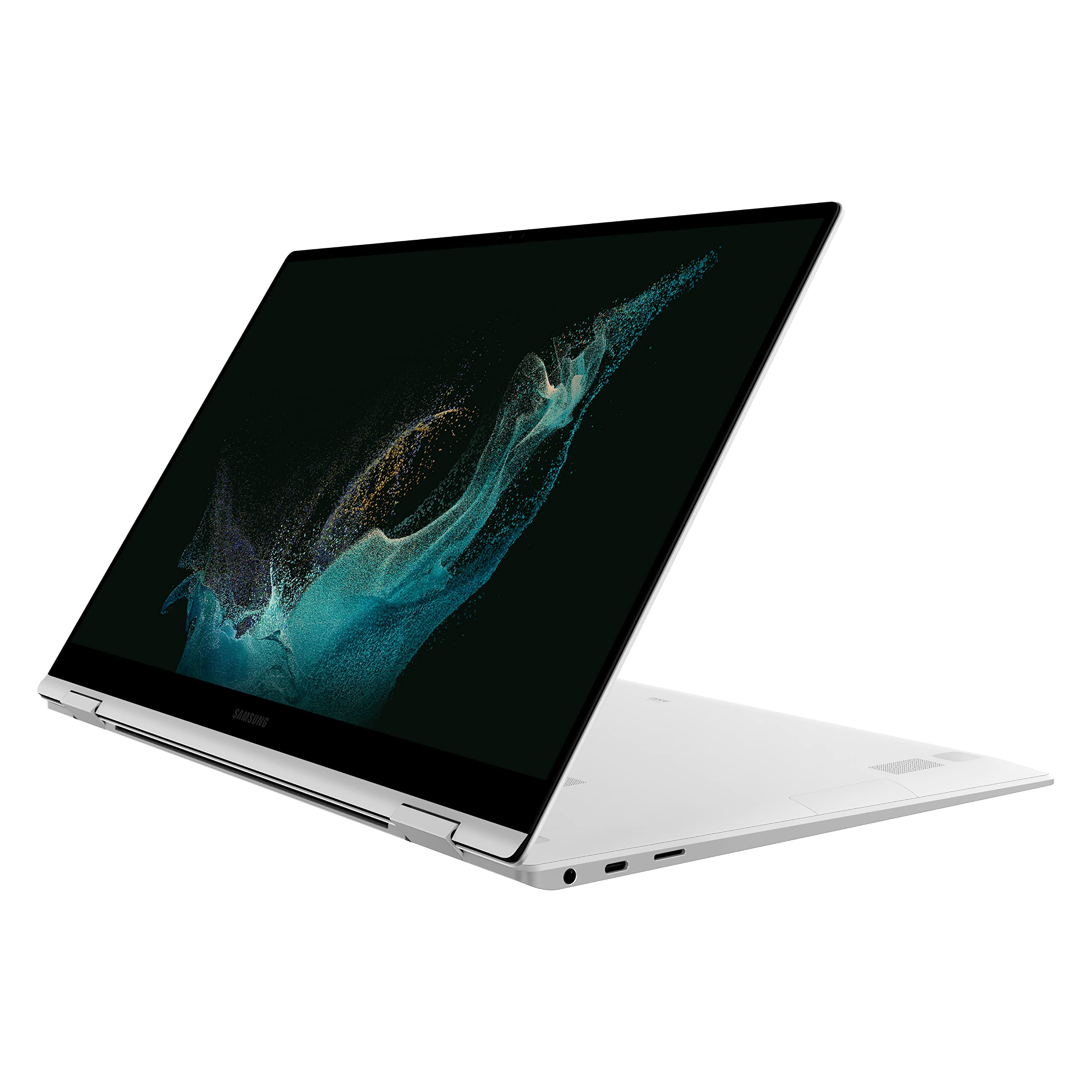
Quick Decision
Buy it if you want a lightweight 2-in-1 with a premium AMOLED display and included stylus for under $650. Skip it if you need current-generation performance, 16:10 ergonomics, or a device you will keep for more than three or four years. The display and portability make it exceptional value at its renewed price.
Best if you...
- Budget-conscious students needing a note-taking 2-in-1
- Galaxy phone owners who want deep ecosystem integration
- Professionals who prioritize portability (under 2.5 lbs)
Skip it if you...
- Gamers needing discrete GPU performance
- Video editors and 3D artists with demanding workloads
- Users who want to upgrade RAM or storage later
People searching for the Galaxy Book2 Pro 360 in 2026 usually have one thing on their minds: is a 2022 flagship 2-in-1 still worth buying at a discount? It's a reasonable question. Renewed and open-box units often appear on Amazon for $500-$650, offering a Super AMOLED display and an S Pen at a fraction of the price of current convertibles.
This analysis digs into the pros and cons based on Samsung's published specifications, independent third-party testing, and verified buyer feedback patterns. We'll cover performance, display quality, battery, build, and how it stacks up against the alternatives you should consider in 2026 — including newer Galaxy Book models, the HP Spectre, and the LG gram. We'll also point out which accessories make sense for new owners.
About the Samsung Galaxy Book2 Pro 360
The Samsung Galaxy Book2 Pro 360 is a 2-in-1 convertible laptop with a 360° hinge, Super AMOLED touchscreen, and S Pen in the box. Launched in 2022 with 12th Gen Intel P-series processors, it targets professionals and students who want a highly portable device for productivity, note-taking, and media. By 2026, it's available mainly through renewed or clearance channels.
Key Specifications
- RAM
- 8 / 16 / 32GB LPDDR5 (soldered)
- Ports
- 1x Thunderbolt 4, 1x USB-C, 1x USB-A, microSD, headphone jack (HDMI on 15.6-inch)
- S Pen
- Included, 4,096 pressure levels
- Webcam
- 1080p
- Weight
- 2.29 lbs (13.3-inch) or 3.11 lbs (15.6-inch)
- Battery
- 68Wh
- Display
- 13.3-inch 3K Super AMOLED (2880×1800, 120Hz) or 15.6-inch FHD AMOLED (1920×1080, 120Hz)
- Storage
- 256GB / 512GB / 1TB NVMe SSD
- Graphics
- Intel Iris Xe
- Processor
- Intel Core i5-1240P / i7-1260P (12th Gen)
Overview
The Galaxy Book2 Pro 360 was Samsung's premium convertible in 2022, available in 13.3-inch (3K) and 15.6-inch (1080p) versions. Both share the same core: a 12th Gen Intel P-series processor (i5-1240P or i7-1260P), soldered LPDDR5 RAM, fast NVMe storage, and a 68Wh battery. The aluminum chassis tips the scales at just 2.29 lbs (13.3-inch), making it one of the lightest convertibles ever made.
In 2026 the device has aged out of the retail mainstream, but it regularly appears as renewed stock on Amazon and other marketplaces. The appeal is obvious: the 13.3-inch model's 3K AMOLED panel still outclasses the LCD screens on most budget laptops selling for the same money. However, you're also accepting an older CPU platform, a 16:9 screen, and a design that predates the current wave of AI-featured Windows laptops. Whether the trade-off works depends entirely on how you'll use it.
Pros
The Galaxy Book2 Pro 360's strengths have not faded with age. Its AMOLED display remains one of the best panels you can get at this price point, and its combination of weight, battery, and S Pen support is still tough to beat.
AMOLED display that still looks better than most 2026 laptops
The 13.3-inch version features a 2880×1800 Super AMOLED panel with a 120Hz refresh rate. Samsung rates its color coverage at 120% of DCI-P3, and in practice, the panel produces deep blacks, excellent contrast, and vivid colors that LCD alternatives simply can't match. For streaming, photo editing, or design work, the display quality is the single most compelling reason to buy this laptop.
The 15.6-inch model uses a 1920×1080 AMOLED panel — still excellent contrast and color, but noticeably less sharp than the 13.3-inch 3K panel. If resolution matters to you, the smaller model is the better pick.
Ultra-light 2.29 lb design, rare for a 360° convertible
At 2.29 lbs (1.04 kg), the 13.3-inch Book2 Pro 360 is one of the lightest 2-in-1s ever made, and even the 15.6-inch model stays under 3.2 lbs. In practice, this means you can hold it like a tablet for reading or note-taking without fatigue, and it disappears into a backpack.
Competitors at this weight are rare — the LG gram is lighter, but it lacks the convertible hinge and OLED display. This portability is the single biggest reason to choose the Book2 Pro 360 over a bulkier convertible.
Battery life that gets you through the day
Samsung's official claim is up to 21 hours of video playback (15.6-inch i5 model), which in practice is optimistic. Independent reviewers have reported a range of roughly 8 to 12 hours in mixed-use testing, depending on model, screen brightness, and workload. Even at the conservative end, that's a full workday for most people.
The 68Wh battery pairs with a 65W USB-C charger, and Thunderbolt 4 means any standard 65W PD charger will work. You can easily leave the charger at home on a typical office or school day.
S Pen included — no $130 add-on required
Unlike the iPad, where the Pencil costs extra, the Galaxy Book2 Pro 360 ships with an S Pen in the box. It supports 4,096 levels of pressure, and Samsung's low-latency technology makes writing on the AMOLED panel feel natural.
For students and note-takers, this is a ready-to-use digital notebook. The pen attaches magnetically to the side for storage, and it works with Samsung Notes, drawing apps, and presentation tools without any setup.
12th Gen P-series performance is plenty for everyday work
The Intel Core i5-1240P and i7-1260P processors deliver solid performance for Office suites, browsers, email, video calls, and light creative work. Combined with LPDDR5 RAM and NVMe SSDs, the laptop feels responsive for general productivity.
For 90% of what people do on a laptop — writing, spreadsheets, web apps, streaming — the hardware is more than adequate. The performance gap versus new processors is real, but it only becomes noticeable in heavy multi-core workloads.
Seamless Galaxy ecosystem integration
If you own a Galaxy phone or tablet, the Book2 Pro 360 is the best Windows laptop to pair with it. Samsung Multi Control lets you use one mouse and keyboard across devices, Quick Share enables wireless file transfers, and notifications, clipboard, and photos sync automatically.
This is a genuine differentiator — no other Windows laptop integrates as smoothly with Galaxy Android devices. For Galaxy phone owners, these workflow benefits are a strong reason to choose Samsung over a competing 2-in-1.
Thunderbolt 4 opens up docks, eGPUs, and fast storage
Both models include a Thunderbolt 4 port (40Gbps), enabling fast data transfer, external GPU support, and connections to multiple 4K displays. The dedicated USB-C port handles 65W fast charging, and there's a USB-A port for legacy devices.
This means the laptop works with standard docks and monitors — you're not locked into a proprietary ecosystem.
Quality AKG quad speakers with Dolby Atmos
The quad-speaker setup tuned by AKG delivers room-filling audio with better clarity and bass than most ultrabooks. For watching movies and listening to music on the sofa, the sound quality is a pleasant surprise for such a thin device.
Cons
The Book2 Pro 360 is not without compromises, and a few of them are more noticeable in 2026 than they were at launch. Here's where it falls short.
12th Gen Intel — now three or four generations behind
By 2026, Intel has moved well past Alder Lake (12th Gen) to Core Ultra series chips with substantially better efficiency and integrated NPUs for AI. The i5-1240P and i7-1260P in the Book2 Pro 360 still handle daily productivity fine, but their performance-per-watt lags newer chips, which translates to shorter battery life than the best 2026 ultrabooks in the same tasks.
If you tend to keep laptops five years or more, you'll notice the age sooner — especially as Windows 11 updates and web apps grow more demanding.
RAM is soldered — you cannot upgrade later
The LPDDR5 memory is fixed to the motherboard. The base config ships with just 8GB, and 8GB of RAM is tight for 2026 multitasking when you have many browser tabs, Teams, and background apps open.
Samsung offers 16GB and 32GB configs, but they cost more and the 32GB version is rare in the renewed market. If you buy this laptop, get at least 16GB from the start; there is no second chance.
Integrated graphics only — no discrete GPU option
Intel Iris Xe graphics are fine for office work and streaming, but they're not a gaming or video editing GPU. Most modern AAA games will require low settings and reduced resolutions and still struggle to hold 30 FPS.
Creative professionals doing heavy 4K video editing or 3D rendering will be frustrated. While an external GPU is theoretically possible via Thunderbolt, that's an expensive addition that defeats the purpose of a budget laptop.
16:9 aspect ratio steals vertical space
Both screen sizes use a 16:9 aspect ratio. When you're writing documents, browsing, or coding, those letterbox bars eat into usable vertical space.
Modern competitors — the LG gram, HP Spectre x360, and Samsung's own newer Book5 Pro — use taller 16:10 or 3:2 panels, which show 10–15% more content per screen. For productivity, this is a meaningful drawback.
Limited ports on the 13.3-inch model
The 13.3-inch version lacks HDMI. To connect an external monitor or TV, you'll need to use one of the USB-C/Thunderbolt 4 ports with an adapter or hub — an extra $30–60 purchase.
It also has only one Thunderbolt 4 port (plus one USB-C), so if you want to charge and use a display simultaneously, you'll need a powered dock. The 15.6-inch retains HDMI, but both models lack a full-size SD slot (only microSD), which matters for photographers.
S Pen has nowhere to hide
The S Pen attaches magnetically to the side, but there's no garage or silo. In a backpack or bag, the pen can easily come loose and be lost — and a replacement S Pen costs $40–80.
It's a minor annoyance for home users, but for students and commuters who toss the laptop into a bag daily, losing the stylus is a real possibility.
OLED burn-in is a long-term risk
Super AMOLED is gorgeous, but the organic materials degrade over time. Static elements like the Windows taskbar can leave permanent ghost images if the laptop is used heavily at high brightness with static content.
Samsung includes pixel-shift and other mitigations, and short-term users rarely see issues, but long-term owners should vary content and reduce brightness. It's a general OLED concern, not unique to this laptop.
Renewed-market quality varies
Buying a 2022 laptop in 2026 means you're likely buying renewed or used stock. Battery health, external scratches, and warranty coverage vary from unit to unit, and you may not get the full original warranty.
Unlike a new purchase, you're relying on the condition listing and return policy of the reseller. It's a practical risk that comes with the lower price.
👍 Who It's For
The Galaxy Book2 Pro 360 is a smart buy in 2026 for three specific types of people.
First, budget-conscious students and professionals who want a genuinely premium 2-in-1 experience — AMOLED, S Pen, light weight — without paying $1,200+ for a new convertible. If you find a solid renewed unit for around $500, you're getting a laptop that looked and felt premium in its day, and still does in handling and display quality.
Second, existing Galaxy phone users. The integration between the Book2 Pro 360 and Galaxy phones — Multi Control, Quick Share, Samsung Notes syncing — is something you can't get with any other Windows laptop. It makes the whole ecosystem more useful.
Third, note-takers and digital artists on a budget. The included S Pen plus a fold-flat 360° hinge creates a very natural digital notebook experience. If your primary workflows are writing, sketching, and basic photo editing, the hardware is more than up to it.
👎 Who Should Avoid
You should skip the Book2 Pro 360 if your work or play depends on graphics power. Gamers will be disappointed by Iris Xe, and content creators doing heavy 4K video editing or 3D rendering will want a machine with a discrete GPU.
Likewise, if you value having the latest silicon and future AI features (Windows CoPilot+), a 12th Gen laptop is already behind. The soldered RAM means you can't future-proof the memory, and the 16:9 screen puts it at an ergonomic disadvantage to newer 16:10 convertibles.
Additionally, anyone who needs full-size SD cards, built-in HDMI on a smaller laptop, or a long five-plus-year upgrade path should look elsewhere — the LG gram and HP Spectre x360 are better fits for those needs.
See today's Samsung Galaxy Book2 Pro 360 price and available configurations on Amazon.
🛒 Buy on AmazonAs an Amazon Associate we earn from qualifying purchases.
Alternatives to Consider
| Product | Choose Samsung Galaxy Book2 Pro 360 if... | Choose the alternative if... |
|---|---|---|
| Samsung Galaxy Book5 Pro 360Roughly $500–700 more expensive new | Budget matters and you're comfortable with 2022 internals in exchange for a superb AMOLED display and S Pen | You want a 16:10 AMOLED screen, current-gen Core Ultra processor, AI features, and a longer useful life |
| HP Spectre x360 14$300–400 more expensive | You prefer lighter weight, the bundled S Pen, and a lower price for a similar OLED experience | You want a newer processor, a taller 3:2 OLED panel, and premium build quality |
| LG gram 14 2-in-1Similar price for similarly configured models | You want a bundled stylus and OLED contrast at a similar price point | You'd rather have a 16:10 display, newer internals, and full-size HDMI, and don't need the S Pen |
| Apple MacBook Air M2Similar price for renewed/used units | You need Windows, a touchscreen, or an included stylus for note-taking | You prioritize pure portability, battery, and app ecosystem, and don't need touch |
The two most relevant 2026 alternatives are Samsung's own current-generation Galaxy Book Pro 360 line and the HP Spectre x360 14. The Galaxy Book5 Pro 360 fixes most of the Book2's weaknesses: taller 16:10 AMOLED, newer Core Ultra processors, an NPU for AI features, and a longer performance lifecycle. It costs significantly more — roughly $1,100–$1,300 new — but if you plan to keep the laptop for years, the extra cost is justified.
For similar money to a renewed Book2 Pro 360, the LG gram 14 offers a 16:10 anti-glare display, better port selection, and newer internals, though it lacks the pen and AMOLED pop. The HP Spectre x360 14 is a premium alternative with a gorgeous 3K OLED and excellent build quality, but it costs $300–400 more. And Apple's MacBook Air M2 remains the battery-life king for non-touch users, though you give up touchscreen and S Pen entirely. Bottom line: the Book2 Pro 360 wins when budget is tight and display plus portability are top priorities; it loses when you want up-to-date hardware or 16:10 ergonomics.
Is it worth the price?
At roughly $500–650 for renewed units, the answer is 'depends.' For budget-focused students and professionals who'll use the S Pen and AMOLED display regularly, yes — it offers premium convertible features at half the price of a new model. For gamers, video editors, or anyone who expects five-plus years of modern performance, no; a new Galaxy Book5 Pro 360 at about $1,200 is the better investment despite costing roughly twice as much.
📝 Bottom Line
The Samsung Galaxy Book2 Pro 360 is the right choice in 2026 for budget-focused shoppers who want a premium 2-in-1 experience — a superb AMOLED display, ultra-light build, and included S Pen — at a fraction of the price of a new convertible. For about $500–650 for a renewed unit, you get hardware that was genuinely best-in-class in 2022 and remains competitive for everyday productivity and media. The display alone beats most new laptops at that price, which is the heart of its value proposition.
The trade-offs are real. The 12th Gen Intel processor, soldered RAM, and integrated graphics mean you're committing to yesterday's platform with no upgrade path. Long-term owners should pick a 16GB model, budget for a USB-C hub, and expect the S Pen to need a safe place. If your workload is writing, browsing, note-taking, or light creative work, these weaknesses will rarely bother you.
Skip the Book2 Pro 360 if you're a gamer, a heavy video editor, or someone who wants a laptop to last five-plus years with full current-gen performance. In those cases, spending more on a Galaxy Book5 Pro 360 or an HP Spectre x360 14 is the wiser investment. Buy the Book2 if you value the display and portability more than the promise of future-proof performance.
Check current Samsung Galaxy Book2 Pro 360 availability and bundle options on Amazon.
🛒 Buy on AmazonAs an Amazon Associate we earn from qualifying purchases.
Frequently Asked Questions
Quick Summary
Key Pros
- ✓Super AMOLED display (3K/120Hz on the 13.3-inch) with excellent color and contrast
- ✓Ultra-light 2.29 lb design, rare for a 360° convertible
- ✓All-day battery life: 8–12 hours in mixed-use tests, up to 21 hours claimed by Samsung
- ✓S Pen included in the box with 4,096 pressure levels
- ✓Solid everyday performance from 12th Gen Intel P-series chips
Key Cons
- ✗Outdated 12th Gen Intel platform (three+ generations behind by 2026)
- ✗Soldered RAM; 8GB base config is not future-proof
- ✗Integrated Iris Xe graphics — not built for gaming or video editing
- ✗16:9 screen gives less vertical workspace than 16:10 rivals
- ✗No HDMI on the 13.3-inch model; plan on a USB-C hub
Ratings
Best For
- →Budget-conscious students needing a note-taking 2-in-1
- →Galaxy phone owners who want deep ecosystem integration
- →Professionals who prioritize portability (under 2.5 lbs)
- →Digital artists and illustrators on a budget