
Is Apple MacBook Air 15 M3 Worth It? Honest Review (2026)
Honest breakdown of strengths, weaknesses, and who should buy in 2026
Quick Decision
Buy it if you need a large-screen laptop that's incredibly portable with all-day battery life. Skip it if you require heavy performance for video editing or gaming, or if you need more than two ports. The MacBook Air 15 M3 is a fantastic daily driver for most users.
Best if you...
- Students needing a portable large-screen laptop
- Remote workers who value battery life and silence
- Photo editors who need color-accurate display
Skip it if you...
- Gamers requiring dedicated graphics
- Heavy video editors or 3D renderers
- Users needing multiple external monitors
The MacBook Air 15 M3 is Apple's answer to users who crave a large display without the bulk of a Pro model. With its M3 chip, it promises solid performance for daily tasks while maintaining the Air's signature thin and light design. This analysis covers the key pros and cons to help you decide if it's the right laptop for your needs. We'll provide a balanced look at its strengths, weaknesses, and ideal use cases, along with comparisons to top alternatives and essential accessories available on Amazon.
About the Apple MacBook Air 15 M3
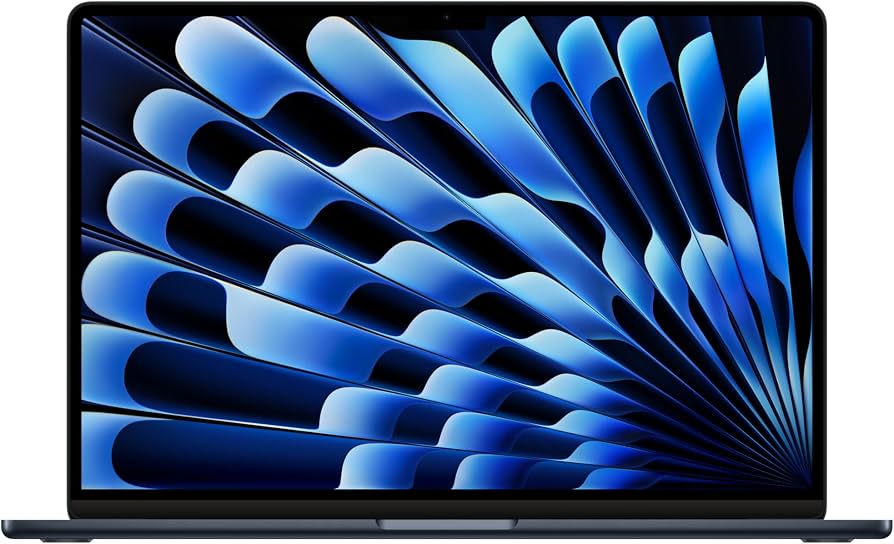
The Apple MacBook Air 15 M3 is a thin-and-light laptop featuring Apple's M3 chip, a 15.3-inch Liquid Retina display, and up to 18 hours of battery life. Designed for everyday productivity, creative work, and media consumption, it targets users who want a large screen in a portable package.
Key Specifications
- Ports
- 2 Thunderbolt 4, MagSafe 3, 3.5mm headphone jack
- Memory
- 8GB unified (configurable to 16GB or 24GB)
- Weight
- 3.3 pounds
- Battery
- Up to 18 hours
- Display
- 15.3-inch Liquid Retina (2880x1864)
- Storage
- 256GB SSD (configurable up to 2TB)
- Processor
- Apple M3 (8-core CPU, 10-core GPU)
Overview
The MacBook Air 15 M3 is the largest Air ever, offering a 15.3-inch Liquid Retina display in a chassis that weighs just 3.3 pounds and is only 0.45 inches thick. It runs on Apple's M3 chip, which delivers capable performance for tasks like web browsing, office work, photo editing, and light video editing. The fanless design ensures silent operation, and the battery is rated for up to 18 hours of video playback. It's a compelling choice for students, professionals, and anyone who values portability and a big screen. Available on Amazon starting at $1,299.
Pros
The MacBook Air 15 M3 excels in several key areas that matter to most buyers: battery life, display quality, and portability. Here's a detailed look at its top strengths.
Exceptional Battery Life Up to 18 Hours
The MacBook Air 15 M3 boasts up to 18 hours of battery life according to Apple's official specifications. In real-world mixed usage, this translates to a full workday of web browsing, email, and document editing without needing a charge. The efficient M3 chip and optimized macOS power management are key contributors. This makes it one of the longest-lasting 15-inch laptops available, outperforming many Windows competitors by several hours. For users who work remotely or travel frequently, this eliminates the need to carry a charger for most day trips.
Large, High-Resolution 15.3-Inch Display
The 15.3-inch Liquid Retina display offers a resolution of 2880x1864, providing sharp text and vibrant colors. With a peak brightness of 500 nits and support for the P3 wide color gamut, it's excellent for photo editing, watching movies, and general productivity. The thin bezels give it a modern look and maximize screen real estate in a relatively compact body. However, it is limited to 60Hz, which may disappoint users accustomed to higher refresh rates.
Silent and Cool Fanless Design
The M3 chip's efficiency allows the MacBook Air 15 to operate without fans, meaning zero noise under even heavy loads. This is a huge plus for quiet environments like libraries, offices, or bedrooms. The laptop remains cool to the touch during typical use, though sustained intensive tasks can cause heat buildup and slight performance throttling. For everyday tasks, it stays silent and comfortable.
Impressive M3 Performance for Everyday Tasks
The M3 chip delivers snappy performance for tasks like web browsing, video conferencing, light photo and video editing, and coding. With an 8-core CPU and 10-core GPU, it handles multiple apps and browser tabs easily. According to Apple, the M3 is up to 60% faster than the M1 in CPU tasks and up to 50% faster in GPU tasks. This means it can easily replace an older Intel-based MacBook Air or Pro for most users.
Thin and Lightweight at 3.3 Pounds
Weighing just 3.3 pounds and measuring 0.45 inches thick, the MacBook Air 15 is remarkably portable for a 15-inch laptop. It's easy to slip into a backpack and carry all day without strain. This portability doesn't sacrifice build quality; the unibody aluminum chassis feels premium and durable. It's ideal for students who move between classes or professionals who commute.
Excellent Six-Speaker Sound System
The MacBook Air 15 features a six-speaker array with force-cancelling woofers, delivering clear, balanced audio that fills a room. It supports Spatial Audio with Dolby Atmos, making it great for watching movies and listening to music without external speakers. The sound quality is notably better than many thin-and-light competitors, including the smaller 13-inch MacBook Air.
MagSafe Charging with USB-C Support
MagSafe 3 provides a secure magnetic connection that prevents accidental trips, and it frees up the two Thunderbolt ports for other peripherals. You can also charge via USB-C, offering flexibility. The included 35W dual-port adapter (or optional 70W) allows charging of both the laptop and another device, such as an iPhone or iPad, with a single wall plug.
Cons
However, no laptop is perfect, and the MacBook Air 15 M3 has some notable trade-offs that may affect your decision. Here are the key drawbacks to consider.
Limited to 8GB Base RAM (Not Upgradeable)
The base model comes with 8GB of unified memory, which is sufficient for basic tasks but may feel inadequate for heavy multitasking or running multiple virtual machines. RAM is soldered and cannot be upgraded later, so choosing 16GB or 24GB is advisable for future-proofing, but adds cost. Users who keep many browser tabs open or use memory-intensive apps should opt for at least 16GB.
Only Two Thunderbolt Ports (Plus MagSafe and Headphone)
With just two Thunderbolt 4 ports, connectivity is limited. You'll need a dongle or hub to connect multiple peripherals like an external monitor, USB-A devices, or an SD card. This is a common complaint among MacBook Air users, especially those who need to connect multiple displays (the M3 supports up to one external display with lid closed). For power users, the MacBook Pro offers more ports.
Display Limited to 60Hz Refresh Rate
While the display is beautiful, it runs at a standard 60Hz, lacking the smooth scrolling and responsiveness of higher refresh rates found on Pro models (120Hz ProMotion) and many Windows laptops. For general use, 60Hz is fine, but if you're accustomed to 120Hz, you'll notice the difference. This is a clear differentiator between the Air and Pro lines.
1080p Webcam Still Mediocre in Low Light
The 1080p FaceTime HD camera performs adequately in good lighting, producing sharp video. However, in low-light conditions, image quality degrades with noticeable noise and grain. While it's an improvement over previous 720p cameras, it still lags behind the best Windows laptops with higher-end webcams. For frequent video conferencing in dimly lit rooms, consider external webcam alternatives.
Higher Price Than Windows Alternatives
Starting at $1,299, the MacBook Air 15 is more expensive than many similarly specced Windows laptops, such as the Dell XPS 15 or HP Spectre x360, which often offer more ports, higher refresh rates, and touchscreens. The premium is justified for many by macOS and build quality, but budget-conscious buyers may find better value elsewhere.
Storage Starts at 256GB (Not Upgradeable)
The base storage of 256GB fills up quickly with modern apps, photos, and files. Like RAM, the SSD is soldered and cannot be upgraded later. Users who store large media libraries or install many applications should consider the 512GB or 1TB options, which increase the price. Cloud storage can help, but local storage is limited and expensive to configure at purchase.
No HDMI or SD Card Slot
The lack of an HDMI port means you'll need an adapter to connect to external monitors or projectors, common in presentations or dual-display setups. The absence of an SD card slot is a drawback for photographers and videographers who frequently transfer files from cameras. These omissions force reliance on dongles.
👍 Who It's For
The MacBook Air 15 M3 is ideal for students who need a large screen for research and writing but also want a laptop that's easy to carry between classes. Remote workers and professionals who spend hours in video calls will appreciate the excellent battery life and silent operation. Creative professionals who edit photos or light videos on the go will benefit from the color-accurate display and fast M3 performance. It's also a great choice for everyday consumers who want a premium laptop for browsing, streaming, and productivity without the complexity of Windows.
👎 Who Should Avoid
If you're a gamer, the integrated GPU cannot handle modern AAA titles at playable frame rates; a Windows gaming laptop or console would be better. Heavy video editors or 3D renderers will find the fanless design leads to thermal throttling during sustained loads; the MacBook Pro 14 with active cooling is more suitable. Users who need multiple external monitors or many ports will be frustrated by the limited connectivity. Those on a tight budget may find better value in Windows alternatives like the Dell XPS 15 or HP Envy 16, which offer similar specs for less.
See today's Apple MacBook Air 15 M3 price and available configurations on Amazon.
🛒 Buy on AmazonAs an Amazon Associate we earn from qualifying purchases.
Alternatives to Consider
| Product | Choose Apple MacBook Air 15 M3 if... | Choose the alternative if... |
|---|---|---|
| MacBook Air 13 M3$200 more expensive | You want a larger display for productivity and media without sacrificing the lightweight design. | You prefer a smaller, more portable laptop and want to save $200. |
| MacBook Pro 14 M3$300 less expensive | You need the thin-and-light design with a large screen and fanless operation. | You require sustained performance for video editing, more ports, and a Mini-LED display. |
| Dell XPS 15Similar price range | You prioritize macOS ecosystem, battery life, and build quality. | You prefer Windows, need more ports, or want a higher refresh rate display. |
For a smaller screen and lower price, the MacBook Air 13 M3 offers the same M3 performance in a 13.6-inch package starting at $1,099. It's even lighter at 2.7 pounds, making it the ultimate ultraportable. If you need sustained performance for tasks like video editing or programming, the MacBook Pro 14 M3 starts at $1,599 and includes active cooling, more ports (HDMI, SD slot, MagSafe, three Thunderbolt 4), and a superior Mini-LED display with ProMotion 120Hz. Windows users should consider the Dell XPS 15, which offers a 15.6-inch OLED option, more ports, and higher refresh rates, often at a similar or lower price. The HP Spectre x360 16 is another strong alternative with a 2-in-1 design and touchscreen.
Is it worth the price?
At approximately $1,299, the MacBook Air 15 M3 is worth it for users who prioritize portability and a large screen for everyday tasks like browsing, writing, and media. The main alternative is the MacBook Air 13 M3 at $1,099, which offers nearly identical performance in a smaller package. For creative professionals needing sustained performance, the MacBook Pro 14 M3 at $1,599 is a better investment despite the higher price and weight.
📝 Bottom Line
The MacBook Air 15 M3 is the right choice for users who need a lightweight, large-screen laptop for everyday productivity, media, and light creative work. Its combination of excellent battery life, silent operation, and a stunning display makes it one of the best ultraportable 15-inch options available. The top strengths are its 18-hour battery life, portable design, and fanless operation, while the main drawbacks are the limited port selection and lack of upgradeability. If you can live with two Thunderbolt ports and need a laptop that carries easily and lasts all day, the MacBook Air 15 M3 is a solid investment. However, if you need more performance, ports, or a higher refresh rate, consider the MacBook Pro 14 or a Windows alternative. For most students and professionals, this is a worthwhile purchase that will serve them well for years.
Check current Apple MacBook Air 15 M3 availability and bundle options on Amazon.
🛒 Buy on AmazonAs an Amazon Associate we earn from qualifying purchases.
Frequently Asked Questions
Quick Summary
Key Pros
- ✓Exceptional battery life rated up to 18 hours.
- ✓Large, high-resolution 15.3-inch Liquid Retina display with P3 wide color.
- ✓Silent, fanless operation with no moving parts.
- ✓Fast M3 performance for daily tasks and light creative work.
- ✓Remarkably thin and lightweight at 3.3 pounds.
Key Cons
- ✗Base 8GB RAM may be insufficient for heavy workloads; not upgradeable.
- ✗Only two Thunderbolt ports require dongles for peripherals.
- ✗Display limited to 60Hz, lacks smooth scrolling of ProMotion.
- ✗1080p webcam quality degrades in low light.
- ✗Higher price than many comparable Windows ultrabooks.
Ratings
Best For
- →Students needing a portable large-screen laptop
- →Remote workers who value battery life and silence
- →Photo editors who need color-accurate display
- →Travelers seeking a lightweight 15-inch machine