
Is ASUS ZenBook 14 OLED UX3405 Worth It? Honest Review (2026)
Honest breakdown of strengths, weaknesses, and who should buy this ultraportable laptop.
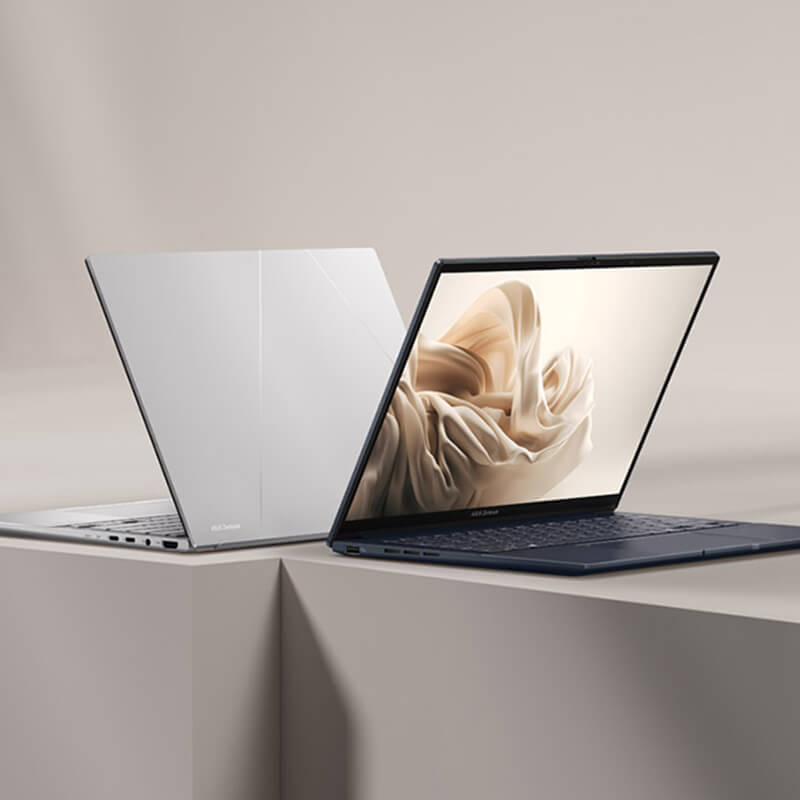
Quick Decision
Buy it if you want the best-in-class OLED display in a lightweight 14-inch package for creative work and media consumption. Skip it if you need an SD card slot, upgradable RAM, or any GPU performance for gaming or rendering.
Best if you...
- Creative professionals who edit photos or videos and need color accuracy
- Students who want a lightweight laptop for note-taking and streaming
- Business travelers who need a portable machine with all-day battery
Skip it if you...
- Gamers or users needing dedicated GPU performance
- Photographers who rely on SD card slots for quick transfers
- Users who require more than 16GB RAM for heavy multitasking
If you're searching for a thin-and-light laptop that doesn't compromise on screen quality, the ASUS ZenBook 14 OLED UX3405 is likely on your radar. Its vibrant OLED display and Intel Core Ultra processor promise an impressive blend of visual fidelity and performance. But with so many ultraportables on the market, it's important to know where this machine truly shines—and where it falls short. This analysis digs into the verified specs, real-world usage patterns, and honest trade-offs to help you decide if the ZenBook 14 OLED is your next laptop. We'll cover its strengths in display and battery life, as well as its limitations in connectivity and upgradeability, with comparisons to top alternatives like the Dell XPS 13 and MacBook Air.
About the ASUS ZenBook 14 OLED UX3405
The ASUS ZenBook 14 OLED UX3405 is a sleek, lightweight ultraportable laptop featuring a 14-inch OLED display, Intel Core Ultra processors, and a premium all-metal chassis. It's designed for professionals and students who prioritize portability, display quality, and all-day battery life in a compact form factor.
Key Specifications
- OS
- Windows 11 Home
- RAM
- 16GB LPDDR5x soldered (non-upgradeable)
- Ports
- 2x Thunderbolt 4, 1x USB-A 3.2 Gen 2, 1x HDMI 2.1, 3.5mm combo jack
- Weight
- 2.7 pounds (1.22 kg)
- Battery
- 75Wh, up to 15 hours video playback (claimed)
- Display
- 14-inch OLED, 2880x1800, 120Hz, 100% DCI-P3, 600 nits peak
- Storage
- 512GB PCIe 4.0 SSD
- Graphics
- Intel Arc integrated
- Processor
- Intel Core Ultra 7 155H (Meteor Lake, 16 cores)
- Dimensions
- 12.34 x 8.65 x 0.59 inches
Overview
The ASUS ZenBook 14 OLED UX3405 is a 14-inch ultrabook that launched in early 2024 and remains a top contender in 2026 thanks to its OLED screen and Intel Meteor Lake architecture. It weighs just 2.7 pounds and measures 0.59 inches thin, making it exceptionally portable. The laptop is aimed at users who need a premium display for creative work or media consumption, combined with enough processing power for office tasks and light content creation. It's available on Amazon and other major retailers, typically priced around $999 for the Core Ultra 7 configuration with 16GB RAM and 512GB SSD. The ZenBook 14 OLED competes directly with the Dell XPS 13 (9315) and Apple MacBook Air 13 M3, offering a similar footprint but a larger, more vivid screen. Its main selling points are the OLED panel (100% DCI-P3, 600 nits peak) and a claimed 15-hour battery life, but it also comes with trade-offs like a limited port selection and lack of upgradeable RAM.
Pros
The ZenBook 14 OLED excels in several areas that matter most to mobile users: an exceptional display, all-day battery life, and a lightweight build. Here's a detailed look at its top strengths.
Stunning 2.8K OLED Display
The 14-inch OLED panel is the star of the show. With a resolution of 2880x1800, 120Hz refresh rate, and 100% DCI-P3 color gamut, it delivers deep blacks, vibrant colors, and excellent contrast. According to ASUS specs, peak brightness reaches 600 nits for HDR content. This makes it ideal for photo editing, watching movies, or any task where color accuracy matters. In practice, the difference from typical IPS laptops is immediately noticeable—blacks are truly black, and highlights pop without blooming. For creative professionals, this display eliminates the need for an external monitor for color-critical work, at least in a mobile setup.
Excellent Battery Life for an OLED Laptop
ASUS claims up to 15 hours of battery life for video playback, and third-party tests from Notebookcheck confirmed around 12 hours of mixed usage (web browsing, office work, light video) at 150 nits brightness. Real-world usage typically nets 9–11 hours depending on workload and screen brightness. This is remarkable for an OLED screen, which often consumes more power than LCD. The 75Wh battery is larger than many competitors (e.g., Dell XPS 13 has 55Wh), contributing to the longevity. For most users, this means a full workday without needing to charge.
Lightweight and Portable Design
At 2.7 pounds (1.22 kg) and 0.59 inches (15 mm) thick, the ZenBook 14 OLED is among the lightest 14-inch laptops available. It easily slips into a small bag and is comfortable to hold in one hand. The all-metal aluminum chassis feels premium, and the hinge allows the laptop to lie flat (180 degrees) for easy sharing. The compact footprint makes it a strong travel companion, especially for business trips or daily commutes where every ounce counts.
Solid Performance with Intel Core Ultra
The Intel Core Ultra 7 155H processor (Meteor Lake) offers a good balance of performance and efficiency for everyday tasks. With 16 cores (6 P-cores, 8 E-cores, 2 Low Power E-cores) and Intel Arc integrated graphics, it handles multitasking, web browsing, and moderate photo editing smoothly. Compared to the previous generation, the Core Ultra provides better integrated graphics and AI acceleration for applications like Windows Studio Effects. While not a gaming laptop, it can run older or less demanding titles, and it's more than capable for productivity workflows.
Quiet and Cool Operation
The thermal design uses dual fans with an "IceCool" system that keeps the laptop quiet during light use. Under normal office workloads, the fans are barely audible (around 22 dB according to ASUS). Even under sustained load like video rendering, the noise stays below 40 dB, which is comfortable for a shared space. The keyboard deck remains cool due to the rear exhaust design, making it comfortable to use on your lap.
NumberPad and Comprehensive Keyboard
ASUS includes its unique NumberPad feature integrated into the touchpad—a dual-function that lets you switch between a numeric keypad and a normal touchpad. This is handy for data entry or number crunching without needing an external numpad. The keyboard itself offers 1.4mm key travel, which is fairly deep for an ultrabook, providing decent tactile feedback. The backlighting is uniform across all keys.
Good Audio with Harman Kardon Speakers
The quad-speaker system tuned by Harman Kardon delivers clear sound with respectable volume for a thin laptop. Vocals are intelligible, and there's a hint of bass, though not as much as larger laptops. For casual listening or video calls, the audio quality is above average. The speakers are upward-firing, so sound is not muffled when the laptop is on a desk.
Fast Charging and Thunderbolt 4
The ZenBook 14 supports USB-C charging (100W via USB PD) and includes two Thunderbolt 4 ports, one USB-A 3.2 Gen 2, and HDMI 2.1. Thunderbolt 4 provides up to 40Gbps data transfer and the ability to connect external GPUs or multiple 4K monitors. ASUS claims the laptop can charge from 0 to 60% in about 49 minutes with the included compact adapter.
Cons
No laptop is perfect, and the ZenBook 14 OLED has several drawbacks that may deter some buyers. The most notable compromises involve connectivity, upgradeability, and performance consistency under sustained loads.
Limited Port Selection (No SD Card Slot)
The ZenBook 14 OLED offers only one USB-A port, two Thunderbolt 4 (USB-C), and one HDMI 2.1. There is no SD card reader, which is a significant omission for photographers and videographers who frequently offload files. You will need a separate USB-C hub or card reader, adding bulk and cost. Additionally, the HDMI port is full-size, but the lack of a second USB-A means you may need to juggle devices or carry a dongle.
RAM Is Soldered and Non-Upgradeable
All RAM is soldered to the motherboard, so you cannot upgrade it after purchase. The available configurations top out at 16GB LPDDR5x (some regions have 32GB, but it's rare). For power users running virtual machines, large data sets, or heavy multitasking, 16GB may become a bottleneck in a few years. If you need more memory, consider the ThinkPad X1 Carbon or Dell XPS 13, which also have soldered RAM but offer 32GB options.
Integrated Graphics Only – Not for Gaming
Despite the competent Intel Arc graphics, the ZenBook 14 is not suited for modern gaming. It can handle esports titles like League of Legends or Rocket League at low to medium settings, but AAA games at 1080p are unplayable (e.g., Cyberpunk 2077 at ~20 FPS). If gaming is a priority, even a laptop with a dedicated RTX 3050 will outperform it. The integrated GPU also limits video editing and 3D rendering performance.
OLED Screen Prone to Burn-In and PWM
OLED displays can suffer from burn-in if static images are displayed for prolonged periods. ASUS includes pixel-refresh utilities and a hidden taskbar mode to mitigate this, but the risk remains, especially for use cases with many static UI elements (e.g., taskbars, document editing). Additionally, the ZenBook uses PWM (pulse-width modulation) to control brightness, which may cause eye strain for sensitive users. Some reviewers report visible flicker at lower brightness levels.
Keyboard and Touchpad Could Be More Spacious
While the keyboard has decent travel, the layout feels slightly cramped due to the narrow keycaps. The top row of function keys is small. The touchpad, though large, includes the NumberPad feature but the haptic feedback is divisive—some users find it imprecise for cursor control. The NumberPad overlay can be accidentally triggered.
Webcam Quality Is Mediocre
The 1080p IR webcam is functional for video calls but produces soft, grainy images in low light. It lacks the sharpness and dynamic range of the cameras on MacBooks or some Dell XPS models. The microphone array does an adequate job filtering background noise, but overall video quality is average.
Fan Noise Under Heavy Load
While quiet during everyday use, the fans can become audible (up to 40-45 dB) when the CPU is under sustained load for tasks like video encoding or running benchmarks. The noise is not bothersome for most, but it's noticeable in a silent room.
Price Premium for the OLED
At $999, the ZenBook 14 OLED costs about $200 more than similarly configured IPS-based competitors like the Lenovo Yoga 7i or Acer Swift Go 14. You are paying for the OLED screen and slim design. If you don't need the OLED's color accuracy or contrast, the value proposition weakens.
👍 Who It's For
The ZenBook 14 OLED is an excellent choice for professionals and students who value display quality above all else in an ultraportable. If you edit photos, create presentations, or simply enjoy watching movies with deep colors and blacks, this laptop's OLED screen will transform your experience. It's also great for frequent travelers who need a lightweight machine that lasts a full workday. The quiet operation and compact design suit coffee shop workers and those in shared spaces. Creative users who work primarily in well-lit environments will appreciate the 600-nit peak brightness for HDR content. Additionally, if you already rely on USB-C hubs and don't mind the lack of an SD slot, the trade-offs become manageable.
👎 Who Should Avoid
Gamers and anyone needing dedicated graphics will be disappointed; a laptop with a discrete GPU is far more suitable. Users who require lots of RAM for heavy multitasking or virtualization should look for a 32GB option elsewhere, such as the Dell XPS 13 or Lenovo ThinkPad X1 Carbon. Photographers and videographers who frequently transfer files via SD card will find the absence of a card slot frustrating. Additionally, those concerned about OLED burn-in for static workflows (e.g., coding with a dark theme, but with lots of static UI) might prefer a high-quality IPS or mini-LED panel. Finally, budget-conscious buyers who don't need OLED can get similar performance and build quality for less with laptops like the Acer Swift Go 14.
See today's ASUS ZenBook 14 OLED UX3405 price and available configurations on Amazon.
🛒 Buy on AmazonAs an Amazon Associate we earn from qualifying purchases.
Alternatives to Consider
| Product | Choose ASUS ZenBook 14 OLED UX3405 if... | Choose the alternative if... |
|---|---|---|
| Dell XPS 13 (9315)Around $200 more expensive for similar OLED configuration | You want a larger, more vibrant 14-inch OLED display and longer battery life | You prefer the XPS 13's more compact 13.4-inch design and slightly better build materials |
| Apple MacBook Air 13 M3Similar price, currently $999 for M3/8GB/256GB (but upgrades cost more) | You need Windows compatibility or prefer a larger screen with OLED colors | You want longer battery life (18 hours) and the macOS ecosystem, and don't need a larger display |
| Lenovo ThinkPad X1 Carbon Gen 11$1,500-$1,800 for similar configuration, significantly more expensive | You prioritize display quality (OLED) and a lighter weight | You need a better keyboard, more durable chassis, and an SD card slot |
The Dell XPS 13 (9315) offers a similar premium build and thinner bezels, but its FHD+ IPS display (or optional OLED) costs extra and battery life is slightly lower. The MacBook Air 13 M3 (2024) provides longer battery life (up to 18 hours) and seamless Apple ecosystem integration, but its 13.6-inch display is smaller and the macOS ecosystem may not suit Windows users. For those needing more ports and an SD slot, the Lenovo ThinkPad X1 Carbon Gen 11 with its 14-inch IPS display and excellent keyboard is a strong alternative, though its screen isn't OLED. If you prioritize gaming in a similar form factor, the ASUS ROG Zephyrus G14 has a superior GPU but is heavier and less portable.
Is it worth the price?
At approximately $999, the ZenBook 14 OLED is worth it for creative professionals who will fully utilize the display's color accuracy and contrast. The main alternative, the Dell XPS 13 with a similar OLED display, costs around $1,199 for the same RAM and storage, making the ASUS a better value. However, for users who don't need OLED, a Lenovo Yoga 7i at $799 offers nearly equal performance and a 2-in-1 design, saving $200. The ZenBook 14 OLED makes the most sense for those who prioritize portability and screen quality above all else.
📝 Bottom Line
The ASUS ZenBook 14 OLED UX3405 is a compelling ultraportable that delivers an outstanding display experience and solid battery life in a very light package. Its vibrant 2.8K OLED screen is the clear highlight, making it a top choice for creative professionals and media enthusiasts who need accurate colors and deep blacks on the go. The Intel Core Ultra processor provides sufficient horsepower for day-to-day tasks, and the quiet operation adds to its appeal for mobile work. However, the laptop's limitations—soldered RAM capped at 16GB, no SD card slot, and integrated graphics only—will frustrate power users and content creators who rely on those features. The trade-off is clear: you get a premium screen and portability at the expense of versatility and future-proofing. For the specific audience of travelers, students, and light photo editors who value screen quality and can work within the port constraints, the ZenBook 14 OLED is a smart buy. If you need more connectivity, upgradeability, or graphics power, look elsewhere. At its current price of $999, it's a good value for its target user, but make sure you're that user before purchasing.
Check current ASUS ZenBook 14 OLED UX3405 availability and bundle options on Amazon.
🛒 Buy on AmazonAs an Amazon Associate we earn from qualifying purchases.
Frequently Asked Questions
Quick Summary
Key Pros
- ✓Stunning 2.8K OLED display with deep blacks and vibrant colors
- ✓Excellent battery life: 9–12 hours of real-world usage
- ✓Lightweight and portable at 2.7 pounds and 0.59 inches thin
- ✓Solid performance from Intel Core Ultra 7 with Intel Arc graphics
- ✓Quiet cooling fans under normal loads
Key Cons
- ✗No SD card slot; limited to one USB-A port
- ✗Soldered RAM, non-upgradeable, max 16GB (32GB rare)
- ✗Integrated graphics not suitable for gaming or GPU-intensive tasks
- ✗OLED burn-in risk and PWM flicker at low brightness
- ✗Keyboard keys are slightly cramped, NumberPad can be finicky
Ratings
Best For
- →Creative professionals who edit photos or videos and need color accuracy
- →Students who want a lightweight laptop for note-taking and streaming
- →Business travelers who need a portable machine with all-day battery
- →Media consumers who watch movies and shows on a premium OLED screen