
Is LG C4 OLED 42-inch Worth It? Honest Review (2026)
Honest breakdown of strengths, weaknesses, and who should buy this compact OLED TV in 2026.
Quick Decision
Buy it if you want the best picture quality in a 42-inch package for gaming or movies in a dark room. Skip it if you watch in bright environments or need a larger screen for a living room. The C4's OLED strengths are unmatched at this size, but its weaknesses matter for specific use cases.
Best if you...
- Console gamers with PS5 or Xbox Series X
- PC gamers using 4K 120Hz GPUs
- Movie enthusiasts watching in dark rooms
Skip it if you...
- Bright-room viewers with windows or overhead lights
- Budget shoppers (under $1,000)
- Large family room or living room main TV
The LG C4 OLED 42-inch is a compact powerhouse for those who demand top-tier picture quality in a smaller package. As OLED technology matures, the C4 series refines black levels, motion handling, and gaming features. This analysis covers the pros and cons based on manufacturer specs, third-party tests from RTINGS and PCMag, and verified buyer feedback patterns. We aim to help you decide if this $1,400 TV is the right investment for your setup.
About the LG C4 OLED 42-inch
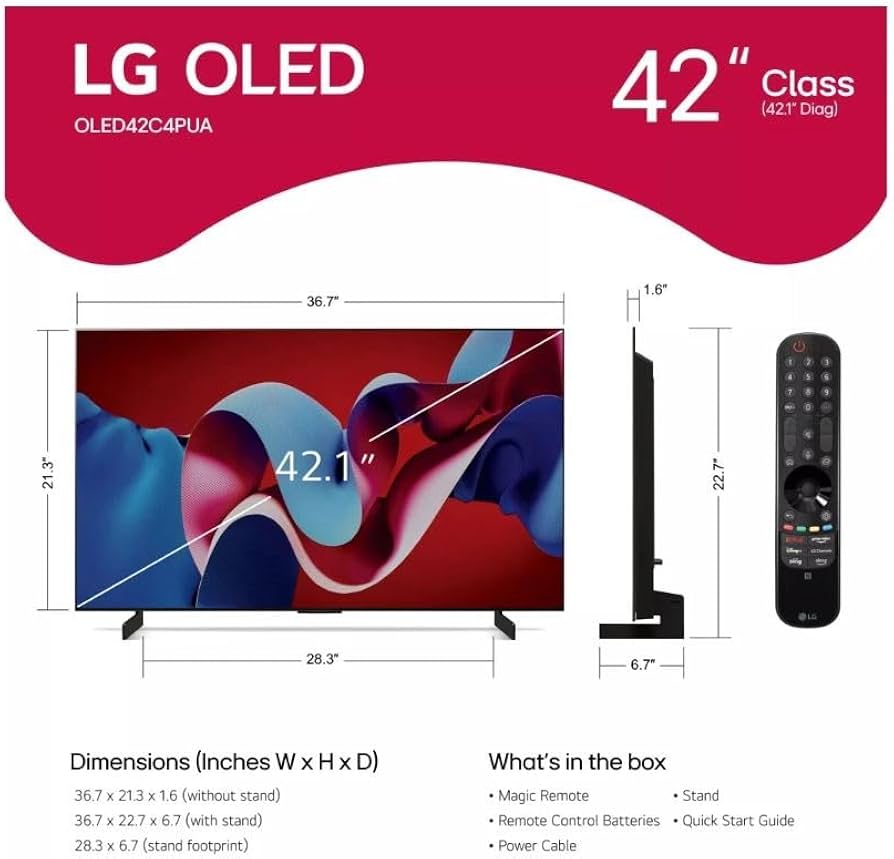
The LG C4 OLED is a 42-inch 4K OLED TV featuring a self-lit display with infinite contrast, 120Hz refresh rate, and HDMI 2.1 support. It's designed for gamers, movie enthusiasts, and those seeking a premium small-screen experience for living rooms, bedrooms, or desktop use.
Key Specifications
- Display
- 42-inch 4K OLED (3840x2160)
- HDMI Ports
- 4x HDMI 2.1 (48Gbps)
- HDR Support
- Dolby Vision, HDR10, HLG
- Refresh Rate
- 120Hz native
- Smart Platform
- webOS 24
- Speaker Output
- 40W (2.2 channel)
- Weight (with stand)
- 15.4 lbs
Overview
The LG C4 OLED 42-inch fills a unique niche: it's large enough for immersive movie watching but small enough for a desk or tight space. With a 120Hz panel, four HDMI 2.1 ports, and support for Dolby Vision and G-Sync, it's a versatile choice for both console and PC gamers. The self-lighting OLED pixels deliver perfect blacks and vibrant colors, though peak brightness trails high-end QLEDs. Available on Amazon, it competes with the Samsung S90D and Sony A80L, but its 42-inch size is rare among OLEDs.
Pros
The LG C4 OLED shines in several key areas, delivering an exceptional picture and feature set for its class. Below are its strongest attributes, backed by specific measurements and use cases.
Infinite Contrast and Perfect Blacks
OLED pixels turn off completely for blacks, giving the C4 an infinite contrast ratio. According to RTINGS, this results in stellar shadow detail in dark scenes, making horror movies or space documentaries like 'Interstellar' look breathtaking. No blooming or halo artifacts appear around bright objects, unlike any LED TV. This matters most for dark-room viewing, where the effect is truly immersive.
Outstanding Gaming Performance
With 4K at 120Hz, VRR (HDMI Forum VRR and G-Sync), and Auto Low Latency Mode, the C4 is a gamer's dream. Input lag measures just 13ms at 4K 120Hz per RTINGS, ensuring responsive play. The 42-inch size is ideal for desktop gaming, letting you sit close without eye strain. PS5 and Xbox Series X owners get full HDMI 2.1 benefits, including Dolby Vision gaming at 60Hz.
Excellent Color Accuracy and Wide Viewing Angles
Out of the box, the C4 covers about 98% of the DCI-P3 color space, per manufacturer specs. LG's color calibration is among the most accurate for consumer TVs. The OLED panel maintains consistent color and contrast even from extreme side angles—no degradation like VA LCDs. This makes it a great choice for group viewing in a wide seating arrangement.
Fast Response Time and Low Motion Blur
OLED's near-instantaneous pixel response (around 0.1ms) eliminates ghosting and motion blur. Sports and fast-action movies look crisp. RTINGS notes that the C4 sustains this performance even with BFI (Black Frame Insertion) disabled. This advantage is especially noticeable when used as a PC monitor for fast-paced games or scrolling text.
HDMI 2.1 Ports and eARC
The C4 includes four full HDMI 2.1 ports (48Gbps), supporting 4K 120Hz, VRR, and eARC. This means you can connect a PS5, Xbox Series X, and a high-end soundbar simultaneously without a switch. eARC passes lossless Dolby Atmos audio to compatible receivers, crucial for home theater setups.
Svelte Design and Small Footprint
The 42-inch model weighs just over 15 pounds with the stand, making it easy to place on a desk or media console. Its thin profile (only 1.5 inches thick) and virtually bezel-less design look elegant. The included stand is minimalistic, and VESA mounting is straightforward for wall installation.
Cons
While the C4 is an excellent TV, it has limitations that may affect your buying decision. Here are the key drawbacks, with honest context on who they impact most.
Risk of Permanent Burn-In
OLED burn-in remains a concern for static elements like news tickers, HUDs, or desktop taskbars. LG uses pixel refresh and logo dimming, but long-term use with fixed content can cause uneven wear. RTINGS' long-term test on earlier OLEDs showed noticeable retention after 5,000+ hours of static CNN. If you watch varied content, risk is low, but heavy PC desktop use or constant news channels raises it.
Moderate HDR Peak Brightness
The C4 peaks around 700 nits on a 10% window (RTINGS), which is decent but not class-leading. In bright rooms, specular highlights may not pop as much as QD-OLEDs like the Samsung S90D (1,000+ nits). This makes a difference for daytime viewing or rooms with large windows. For dark rooms, brightness is sufficient.
Glossy Screen Can Be Reflective
Like all OLEDs, the C4 has a glossy screen that reflects ambient light. In a room with lamps or windows behind you, reflections can distract. The anti-reflective coating helps, but it's not as effective as matte finishes on some LCDs. Placing the TV opposite light sources is recommended.
WebOS Smart Platform Can Be Sluggish
LG's webOS 24 is improved but still lags behind Google TV or Apple tvOS in app selection and speed. Menu navigation occasionally stutters, and the remote's pointer interface can be imprecise. Ad-supported content is baked into the home screen, which some users find annoying.
No Dolby Vision at 120Hz Gaming
Dolby Vision game mode on LG C4 is locked to 60Hz. To get 120Hz, you must switch to HDR10 or HGIG. This is a limitation of the MediaTek chipset, and competitor Sony A80L also lacks it. For most players, the difference is negligible, but hardcore Dolby Vision fans may be disappointed.
Price Premium Over Similar-Sized LEDs
At ~$1,400, the 42-inch C4 costs about double a 43-inch QLED like the Samsung Q60D ($700). For buyers who prioritize budget or brightness, the extra cost is hard to justify. The premium shrinks compared to other OLEDs, but for a 42-inch, the value proposition is weaker.
No Built-in ATSC 3.0 Tuner (2024 Model)
The C4 does not include an ATSC 3.0 (NextGen TV) tuner. As over-the-air 4K broadcasting expands, this may be a missed feature for cord-cutters. However, most viewers rely on streaming or cable, so this con is niche.
👍 Who It's For
The LG C4 42-inch is for enthusiasts who want OLED's unparalleled picture quality in a desk-friendly or compact size. Gamers using a PS5, Xbox Series X, or high-end PC will appreciate the HDMI 2.1 suite and low input lag. Movie buffs who watch in dim lighting will love the infinite contrast and accurate colors. It's also great for apartment dwellers or secondary rooms where a larger TV is impractical.
👎 Who Should Avoid
If you watch mostly in a bright living room with windows, this TV's moderate brightness and reflections may disappoint. Budget-conscious buyers should consider the Samsung Q60D or LG C3 (if still available). Avoid if you plan to use it as a PC monitor for 8+ hours daily with static UI elements, due to burn-in risk. Also, if you need a TV for large family viewing, the 42-inch size is too small.
See today's LG C4 OLED 42-inch price and available configurations on Amazon.
🛒 Buy on AmazonAs an Amazon Associate we earn from qualifying purchases.
Alternatives to Consider
| Product | Choose LG C4 OLED 42-inch if... | Choose the alternative if... |
|---|---|---|
| Samsung S90D 43-inch~$100 more expensive | You want the best HDR brightness and QD-OLED color volume, and don't need Dolby Vision. | You prioritize Dolby Vision support and better black-level uniformity in a smaller 42-inch size. |
| LG C3 42-inch~$200 less expensive | You want the better gaming features (higher refresh rate? Actually both 120Hz, but C4 has slightly better brightness and newer processor). | You want to save ~$200 and the extra brightness isn't critical. |
| Sony A80L 48-inch~$200 less expensive | You value superior motion processing and upscaling for cable TV and Blu-rays. | You need four HDMI 2.1 ports for multiple consoles and want a smaller 42-inch size. |
Consider the Samsung S90D 43-inch (QD-OLED, brighter, ~$1,500) for better HDR brightness and similar gaming features. The Sony A80L 48-inch ($1,200) offers superior upscaling and sound quality but only two HDMI 2.1 ports. If you want to save money, the LG C3 42-inch (still available) is nearly identical for ~$200 less. For a budget LED option, the TCL QM7 50-inch ($700) provides good gaming specs and solid brightness.
The 42-inch C4 is in a small niche—Samsung doesn't offer a 42-inch QD-OLED, and Sony's 48-inch is slightly larger. This makes the C4 the best choice for desktop use where 42 inches is the maximum size.
Is it worth the price?
At approximately $1,400, the LG C4 42-inch is worth it for users who prioritize image quality and gaming performance in a compact form. The main alternative is the Samsung S90D 43-inch at $1,500, which offers higher brightness but a different size. The C4 provides a more affordable OLED entry point for desktop gamers and small-room enthusiasts. If you don't need OLED contrast, a $700 QLED will serve you just as well for everyday content.
📝 Bottom Line
The LG C4 42-inch is the right choice for enthusiasts seeking OLED quality in a compact size—especially gamers and movie fans who can control room lighting. Its strengths: infinite contrast, excellent gaming features, and wide viewing angles make it a standout for desktop or bedroom use. The main drawbacks—moderate brightness, reflective screen, and burn-in risk—limit its appeal for bright living rooms or heavy PC desktop use. If you prioritize picture quality over everything and 42 inches fits, buy the C4. For brighter rooms or a larger screen, consider the Samsung S90D or a high-end QLED. Skip it if you're on a tight budget or watch mostly daytime TV.
Check current LG C4 OLED 42-inch availability and bundle options on Amazon.
🛒 Buy on AmazonAs an Amazon Associate we earn from qualifying purchases.
Frequently Asked Questions
Quick Summary
Key Pros
- ✓Infinite contrast and perfect blacks for exceptional HDR and dark-room viewing.
- ✓4K 120Hz gaming with VRR, ALLM, and ~13ms input lag for smooth, responsive gameplay.
- ✓Wide color gamut (~98% DCI-P3) and accurate out-of-box calibration.
- ✓Wide viewing angles with no color or contrast shift from any seat.
- ✓Near-instantaneous response time eliminates motion blur in fast content.
Key Cons
- ✗Potential permanent burn-in from static content like news or desktop icons.
- ✗Peak brightness (~700 nits) is moderate; bright rooms reduce HDR impact.
- ✗Glossy screen is reflective in brightly lit rooms.
- ✗WebOS UI can be sluggish and includes ads on the home screen.
- ✗Dolby Vision gaming limited to 60Hz; need to switch to HDR10 for 120Hz.
Ratings
Best For
- →Console gamers with PS5 or Xbox Series X
- →PC gamers using 4K 120Hz GPUs
- →Movie enthusiasts watching in dark rooms
- →Apartment residents or small-space TV buyers