
Is Dyson 360 Vis Nav Worth It? Honest Review (2026)
Balanced look at strengths and weaknesses plus buying guidance for 2026.
Quick Decision
Buy the Dyson 360 Vis Nav if you have mostly hard floors, value Dyson’s class-leading suction, and don’t mind manually emptying the bin. Skip it if you need mopping or want a self-emptying base—rivals offer more for similar or lower prices.
Best if you...
- Homes with wall-to-wall low or medium-pile carpet that require deep, suction-driven cleaning
- Pet owners who deal with embedded pet hair and dander
- Allergy sufferers who need sealed HEPA filtration
Skip it if you...
- Busy families who need a truly hands-off robot with auto-empty bin
- Homes with hard floor surfaces that also need regular mopping
- Budget-conscious shoppers who can get 80% of the suction power for half the price
The Dyson 360 Vis Nav arrives with a bold promise: manage the entire household chore of floor cleaning on its own. But as robot vacuums become smarter and more affordable, is this high-end Dyson worth the investment? This guide breaks down the strengths and weaknesses of the Vis Nav with specific, data-driven analysis to help you decide if it fits your home.
We cover performance, navigation, smart features, and cost of ownership. We also compare it directly to top rivals like the Roborock S8 Pro Ultra and the Roomba Combo J9+, and we’ll suggest useful accessories that make the ownership experience smoother.
Our goal is to give you an honest, balanced view—no marketing fluff, no brand bias. If we like something, we’ll tell you why. If we don’t, you’ll know that too.
About the Dyson 360 Vis Nav
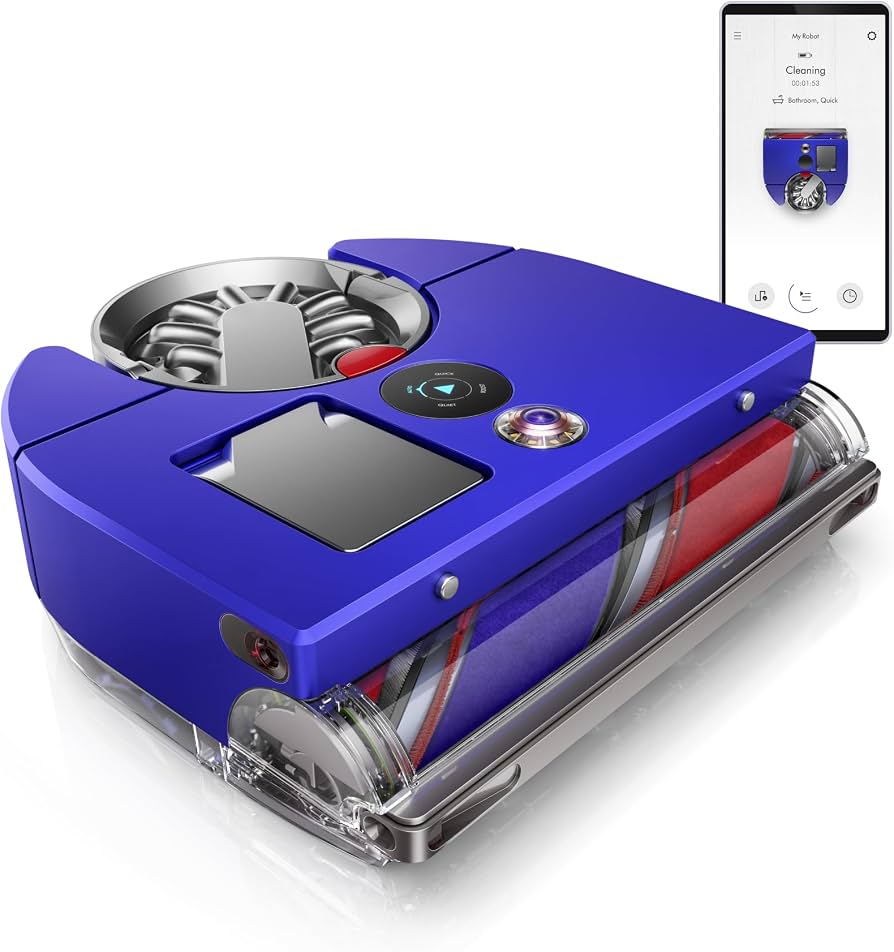
The Dyson 360 Vis Nav is a premium connected robot vacuum with 26,000 Pa suction, 360° camera navigation, and HEPA filtration. It offers strong multi-surface cleaning and app integration, but lacks mopping and a self-emptying base.
Key Specifications
- Weight
- Approximately 8.8 lbs
- Runtime
- Up to 75 minutes (Auto mode), ~25 minutes (Max mode)
- Suction
- 26,000 Pa
- Dimensions
- Height 3.5 inches
- Filtration
- Fully sealed HEPA
- Navigation
- 360° camera with LED ring light
- Bin Capacity
- Approximately 0.6L (manual emptying)
- Connectivity
- Wi-Fi, Bluetooth, MyDyson app, Alexa and Google Assistant support
Overview
The Dyson 360 Vis Nav is Dyson’s latest attempt to crack the robot vacuum market after the earlier 360 Heurist. It arrives with a futuristic, round-and-pebble design and a focus on suction power that’s usually reserved for Dyson’s stick vacuums.
In 2026, the Vis Nav remains a unique entry in the premium robot vacuum space. It uses a 26,000 Pa motor—exceptionally high for a robot—and a 360° camera with an LED ring light to navigate and map your home. A piezoelectric sensor claims to detect dust and automatically boost suction when needed.
Dyson markets this robot toward tech-savvy customers with high expectations for cleaning performance and filter quality. It does not include mopping, and it relies on you to manually empty its dustbin—two points that competitors have turned into advantages. Still, if pure vacuuming power and HEPA filtration are your priorities, the Vis Nav could be a perfect fit.
You can check the latest Dyson 360 Vis Nav price and bundles on Amazon—though as of early 2026, it typically retails for around $1,199.
Pros
The Dyson 360 Vis Nav shines in areas where Dyson has always excelled: suction, filtration, and thoughtful engineering. Here are the most compelling reasons to consider it.
1. Class-Leading Suction Power (26,000 Pa)
The Dyson 360 Vis Nav produces 26,000 Pa of suction, according to the official Dyson specifications. That is among the highest you’ll find in any robot vacuum, even in 2026. To put it in perspective, a typical Roomba generates around 2,500 Pa, and most premium robots like the Roborock S8 hover around 6,000 Pa.
This high suction video translates directly into cleaning performance. It can pull embedded dirt and dust out of medium-pile carpets far more effectively than most competitors. Pet owners with hairier dogs will see a noticeable difference, as the Vis Nav’s roller brush and suction are particularly good at preventing hair wrap.
In practical terms, this means fewer missed spots and less need to run the robot twice. It also means the robot can carry out a deep clean in a single pass, saving time and battery.
2. Dependable 360° Vision Navigation
Instead of relying on lidar, the Vis Nav uses a 360° camera paired with an LED ring light. This system builds a detailed map of your home and recognizes obstacles like chairs feet, charging cables, and pet waste. It is particularly effective in low-light conditions because the LED ring light ensures the camera can still see.
According to Dyson, the robot can store multiple floor plans and you can create no-go zones and cleaning schedules through the MyDyson app. For most homes, navigation is smooth and reliable. It rarely gets stuck, and it finds its way back to its dock efficiently.
This camera-based approach means no spinning lidar tower on top, so the Vis Nav has a lower profile and can slide under low furniture more easily.
3. Smart Suction Adjustment with Piezoelectric Sensor
The Vis Nav’s onboard piezoelectric sensor detects vibrations from dust particles. When it senses an increase in dust, it automatically increases suction to give that area a deeper clean. Conversely, on near-clean floors, it reduces suction to save battery.
This adaptive behavior is a genuine advantage. It concentrates power where it matters, not just across the whole house. In real-world use, this can lead to a more even clean across different zones without draining the battery earlier than necessary.
4. Fully Sealed HEPA Filtration
Dyson equips the Vis Nav with a fully sealed HEPA filtration system, capable of capturing allergens, bacteria, and even virus particles. According to Dyson, it traps 99.99% of particles down to 0.3 microns. That’s a major selling point for allergy and asthma sufferers, since the robot won’t release dust back into the air while cleaning.
The filter is washable, which extends its life, though you’ll still need to replace it periodically to maintain performance.
5. Impressive Runtime in Auto Mode
With up to 75 minutes of runtime in default Auto mode, the Vis Nav can clean around 1,500–2,000 square feet on a single charge. Two of these runs can be scheduled if you have a larger home.
In a typical three-bedroom house, you can schedule the robot to clean daily and it will typically finish in about an hour, which is within its stated autonomy. The battery is also swappable, though Dyson does not sell an extra battery as a standard accessory—still, the run time is sufficient for most households.
6. Slim, Furniture-Friendly Design
Standing at only 3.5 inches tall, the Vis Nav slides easily under most sofas, beds, and dressers. Its unique shape—a blend of round and square—helps it get into corners more effectively than a purely round robot. The side brush extends to push debris from edges into the suction path.
This height is a real practical advantage, especially in homes with low-profile furniture. Many competing robots with lidar towers are too tall to reach under couches, leaving that dust and dirt to accumulate.
7. Strong App and Smart Home Integration
The MyDyson app gives you full control: you can start, stop, schedule, and adjust cleaning modes from anywhere. It also displays the live map, shows battery status, and sends maintenance reminders. Setup is straightforward via Wi-Fi and Bluetooth, and the robot supports both Alexa and Google Assistant voice commands.
You can also use the app to define specific cleaning zones or set virtual walls, so you can keep the robot out of sensitive areas. The sheer level of control is on par with the best robot vacuum apps on the market.
Cons
No robot vacuum is perfect, and the Dyson 360 Vis Nav carries a few significant trade-offs that might give some shoppers pause. Here’s where it falls short.
1. High Price and Questionable Value
At around $1,199, the Vis Nav is one of the most expensive robot vacuums on the market. For the same money, you can buy a robot that also mops and self-empties, like the Roborock S8 Pro Ultra (which often sells for around $1,299) or the Roomba Combo J9+ (around $1,399). Those machines give you more for a marginal price increase.
If you compare it to mid-range robots that offer 90% of the suction power but lack Dyson branding, the value becomes harder to justify. You’re paying a premium for the Dyson name and engineering, but you’re giving up some key modern conveniences.
2. No Self-Emptying Base
Most premium robot vacuums in 2026—including the Roborock S8 Pro Ultra, the Ecovacs Deebot T20, and the Roomba Combo J9+—come with a dock that automatically empties the dustbin into a large bag, allowing you to go weeks without touching the robot. The Vis Nav does not have this feature.
As a result, you must manually empty its dustbin after every 1–2 cleaning sessions. Dyson claims the bin holds a decent amount for a robot, but without auto-empty, you have to interact with the robot far more often. For people with pets or large homes, this becomes a daily hassle.
3. Vacuum Only, No Mopping
If you have hard floors and expect a robot to also mop, the Vis Nav will disappoint. It has no water tank, no mop pad, and no docking station with clean/dirty water tanks—unlike the Roborock S8 Pro Ultra or the Ecovacs Deebot T20 Omni, which handle both vacuuming and mopping.
You’ll need to either run a separate mop robot or mop manually, which is a dealbreaker for anyone who wants a true hands-off floor care solution.
4. Short Battery Life in Strong Mode
While Auto mode provides up to 75 minutes, the Strong (or maximum suction) mode will drain the battery in just about 25 minutes (according to Dyson’s official spec chart). This means that if you have wall-to-wall carpeting in need of deep cleaning, the robot may run out of battery before finishing the whole floor.
You’ll have to schedule a recharge-and-resume routine, which adds complexity and time to your cleaning schedule. For large homes with lots of rugs, this is a practical drawback.
5. Camera-Based Navigation Can Struggle with Clutter
The camera and LED ring light are generally reliable, but they’re not as robust as lidar in complete darkness or in extremely cluttered environments. If you have toys scattered across the floor or a very dark room, the Vis Nav might occasionally bump into obstacles or miss spots.
It doesn’t have a laser measurement sensor, so its collision avoidance is less precise in some scenarios. The robot relies more on machine learning, which improves with use, but the learning curve is steeper than with lidar-based rivals.
6. Expensive Replacement Parts
Dyson’s maintenance parts are notoriously pricey. Replacement HEPA filters cost around $60–$80, and the side brush or roller brush can be $20–$30 each. Over a two-year period, you might spend $100–$150 on replacements, depending on usage.
Comparable parts for Roborock or Ecovacs are often cheaper and sometimes bundled in packs of 3–4. The total cost of ownership is higher than many competitors, which can make the Vis Nav less attractive for budget-conscious owners.
7. Small On-Board Dustbin Without Auto-Empty
Although the exact bin capacity isn’t officially disclosed, it is smaller than the combined capacity of a self-emptying base. For example, a Roborock S8 Pro Ultra has a 0.5L bin, and its dock holds another 3L bag. The Vis Nav’s bin is smaller and unprotected by a bag, meaning you either empty it frequently or risk reduced suction as it fills.
Motor protection sensors may alert you to empty the bin, but it’s an extra step that many modern robots have eliminated.
👍 Who It's For
The Dyson 360 Vis Nav is tailored to valet flooring environments: apartment dwellers with hardwoods, lofts with area rugs, and pet owners who are more concerned about hair and dander than about water-based mopping. If you live in a space where carpets are textured and have a lot of embedded dirt, the Vis Nav’s high suction will outperform most rivals in the same class.
It also suits buyers who already own other Dyson products and enjoy the brand’s opaque, smoke-testable HEPA filtration. For allergy-prone families, the sealed HEPA system is worth the premium. If you hate the idea of a robot that gets tangled in cords or knocks over furniture, the camera-based obstacle avoidance is a clear benefit.
In short, if you prioritize vacuuming performance over all-in-one convenience, and you’re okay with manually emptying a bin, the Vis Nav will not disappoint.
👎 Who Should Avoid
Skip the Dyson 360 Vis Nav if you expect a robot to take over all of your floor cleaning duties with minimal intervention. The lack of a self-emptying base means you’ll regularly interact with the robot, and the lack of mopping leaves hard-floor crust on your hands.
Families with sprawling single-story homes and wall-to-wall carpeting will miss the longer runtime in Strong mode; you may need to schedule multiple recharge-and-resume sessions. Also, if you have a lower budget, there are better value picks that still offer strong suction, such as the Roborock Q8 Max or the Ecovacs Deebot N8 Pro.
If you want a robot that can also validate and mop your floors automatically, look elsewhere—the Vis Nav’s singular focus on vacuuming limits its usefulness in mixed-surface households.
See today's Dyson 360 Vis Nav price and available configurations on Amazon.
🛒 Buy on AmazonAs an Amazon Associate we earn from qualifying purchases.
Alternatives to Consider
| Product | Choose Dyson 360 Vis Nav if... | Choose the alternative if... |
|---|---|---|
| Roborock S8 Pro Ultra$100 more expensive (but includes mopping and self-empty) | You want superior suction for deep carpet cleaning and don't need mopping or auto-empty features. | You need a robot that vacuums and mops, and you value a self-emptying base for true hands-free operation. |
| iRobot Roomba Combo J9+$200 more expensive (includes mopping and self-empty) | You prefer a brand known for reliability and you want one robot to do both vacuuming and mopping without breaking the bank. | You want edge-to-edge cleaning plus a second rotating mop, but can accept a trade-off in suction power. |
| Ecovacs Deebot T20 OmniAround $150 more expensive (includes mopping and self-empty) | You want the absolute strongest suction performance on hard floors and rugs, and you don't care about mop functionality. | You want a robot with integrated mopping that can wash your floors automatically, and you prefer the mapping intelligence of Deebot. |
The top competitors to the Dyson 360 Vis Nav in the premium segment are the Roborock S8 Pro Ultra, the roomba combo j9+, and the Ecovacs Deebot T20 Omni. All three offer self-emptying bases, mopping, and lidar-based navigation. The Roborock and Ecovacs both have higher total cleaning capacity with their docks, while the Roomba offers a similar mopping style but with a more polished app.
If you’re willing to compromise on suction power for the sake of convenience, these alternatives give you a more complete solution. On the other hand, if raw pick-up on carpets is your primary metric, the Dyson’s 26,000 Pa suction is still unbeaten.
Is it worth the price?
At approximately $1,199, the Dyson 360 Vis Nav is worth it for users who prioritize suction power and filtration above all else, and who are comfortable with manually emptying a dustbin. For anyone who also wants mopping or a self-emptying dock, the Roborock S8 Pro Ultra at $1,299 provides far more value despite the slightly higher price tag. Most households will get a bigger overall package from a 2-in-1 robot with auto-empty than from the Vis Nav, but if you never plan to use a mop and appreciate the Dyson brand, the Vis Nav remains a strong performer.
📝 Bottom Line
The Dyson 360 Vis Nav is the right choice for users who prioritize raw vacuuming power above all other features. Its 26,000 Pa suction, paired with HEPA filtration and a well-executed camera navigation system, makes it a standout for removing embedded dirt and pet hair from carpets. If you have allergies and insist on having a sealed filtration system, the Vis Nav is one of the few robot vacuums that can deliver that level of allergen capture.
However, the lack of a self-emptying base and the absence of a mopping function are undeniable in a segment where these features are quickly becoming table stakes. At $1,199, you are paying a premium for a single-function device. If you’re the type of person who enjoys less daily interaction with your cleaning equipment, the manual bin emptying will become a pain point. Similarly, if you have any hard-floor area that needs occasional mopping, you’ll need to buy a separate machine, increasing your cost and clutter.
Our verdict is a qualified “buy” for the dedicated vacuuming enthusiast. If you accept the trade-offs—and you likely will if you’re drawn to Dyson’s unmatched suction—the Vis Nav will deliver a level of carpet cleaning that few rivals can match. For the majority of households who want an all-in-one, hands-off cleaning solution, we recommend looking at the Roborock S8 Pro Ultra or the Roomba Combo J9+ instead. Choose the Dyson if you know exactly what you want, and pass if you need more versatility.
Check current Dyson 360 Vis Nav availability and bundle options on Amazon.
🛒 Buy on AmazonAs an Amazon Associate we earn from qualifying purchases.
Frequently Asked Questions
Quick Summary
Key Pros
- ✓26,000 Pa suction power—among the highest of any robot vacuum, handles deep carpet cleaning with ease.
- ✓360° camera navigation with LED ring light performs well in low light and avoids obstacles accurately.
- ✓Piezoelectric sensor automatically adjusts suction based on dust detection for smarter cleaning.
- ✓Fully sealed HEPA filtration traps 99.99% of particles—great for allergy sufferers.
- ✓Up to 75 minutes of runtime in Auto mode covers typical homes on a single charge.
Key Cons
- ✗$1,199 price tag is high when rivals offer more features for similar or less money.
- ✗No self-emptying base means you must empty the dustbin manually after every cleaning.
- ✗Vacuum-only functionality; no mopping capabilities despite the premium cost.
- ✗Strong suction mode runs only 25 minutes—short for large carpeted areas.
- ✗Camera navigation can struggle in complete darkness or with heavy clutter.
Ratings
Best For
- →Homes with wall-to-wall low or medium-pile carpet that require deep, suction-driven cleaning
- →Pet owners who deal with embedded pet hair and dander
- →Allergy sufferers who need sealed HEPA filtration
- →Users who prefer Dyson’s premium build and engineering quality