
Is Amazon Kindle Scribe Worth It? Honest Review (2026)
Balanced look at strengths, weaknesses, and who should buy it in 2026.
Quick Decision
Buy it if you want a large e-reader with a stylus for textbook PDFs and margin notes, and you already live in the Kindle ecosystem. Skip it if you only read fiction or if you expect iPad-like handwriting features. The Scribe is a niche product that does a few things brilliantly, but it's not a replacement for a tablet.
Best if you...
- Researchers and grad students who annotate PDFs
- Professionals who take longhand meeting notes
- Avid readers who want a one-device Kindle library and notebook
Skip it if you...
- Bath readers who rely on IPX8 water resistance
- Sketchbook artists needing layers and pressure sensitivity
- Fiction-only readers who won't use the pen
The Kindle Scribe is a different kind of Kindle: it's a large-format e-reader with a built-in stylus that turns it into a digital notebook. If you're comparing it against the Kindle Paperwhite, a reMarkable tablet, or an iPad, you're probably trying to figure out whether this hybrid device justifies its price. This analysis covers the Scribe's key strengths and weaknesses, who should buy it, and who should stick with a simpler e-reader. We'll also look at realistic alternatives and useful accessories. By the end, you'll know exactly where this device fits (or doesn't) into your reading and note-taking routine. The device is sold in several configurations on Amazon, and we'll point out the right one for most buyers later in this guide.
About the Amazon Kindle Scribe
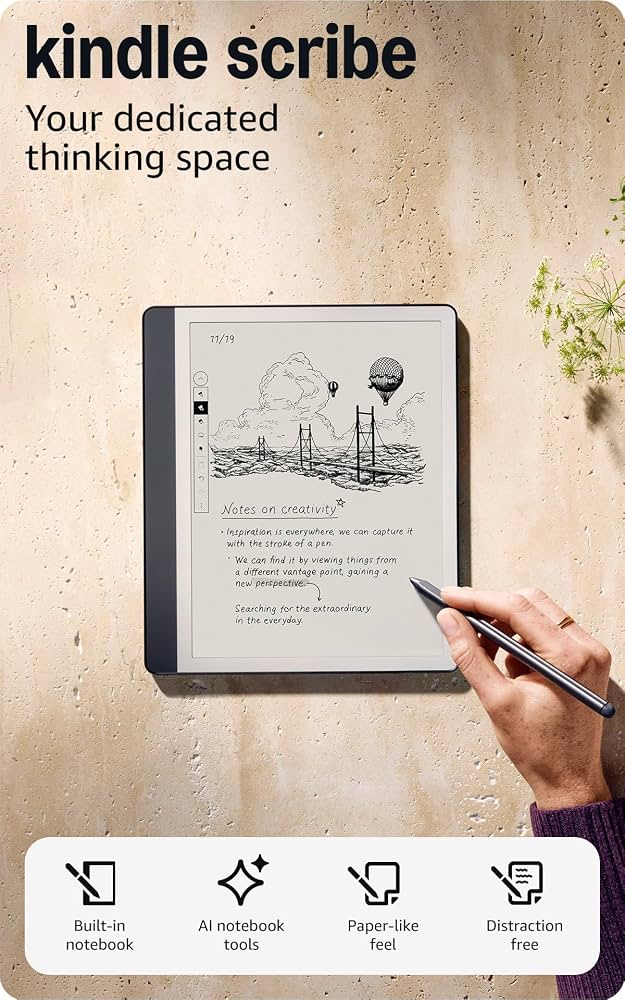
The Amazon Kindle Scribe is a 10.2-inch e-book reader that also functions as a digital notebook. It pairs a high-resolution E Ink display with a stylus, letting you read, annotate PDFs, and take handwritten notes. It's aimed at readers who want more than a standard Kindle and are willing to pay for a focused writing and reading tool.
Key Specifications
- Pen
- Basic or Premium stylus (included with bundle)
- Audio
- No speaker, Bluetooth for audiobooks
- Ports
- USB-C
- Weight
- 433 grams
- Battery
- Up to 12 weeks (based on 30 minutes/day reading)
- Display
- 10.2-inch E Ink Carta 1200, 300 PPI, 16 shades of gray
- Storage
- 16GB or 64GB
- Dimensions
- 9.0 x 7.7 x 0.22 inches
- Front Light
- Adjustable warm light with 35 LEDs
- Connectivity
- Wi-Fi, Bluetooth (for Audible and Alexa)
Overview
The Kindle Scribe sits in an odd middle ground between a dedicated e-reader and a digital notebook. It has a 10.2-inch E Ink Carta 1200 display at 300 PPI, the same pixel density as the Paperwhite but on a significantly larger canvas. You get adjustable front lighting with warm tone options, up to 12 weeks of battery life (according to manufacturer claims), and seamless access to the Kindle Store.
The device is especially appealing if you already live in the Kindle ecosystem: you can send documents to the Scribe via email, mark up PDFs, and sync notes to the Kindle smartphone app. The Scribe is sold on Amazon, often with a bundle that includes the Basic or Premium Pen. For anyone evaluating it in 2026, the key question isn't whether it's a great Kindle — it is — but whether those extra note-taking skills justify the premium over the Paperwhite and the compromises versus a dedicated tablet.
Pros
The Scribe earns its price tag in a few clear areas. Its large, sharp E Ink screen is ideal for reading and document work, and the included stylus is surprisingly functional for a Kindle. The battery life and distraction-free nature are also major benefits. Below are the standout strengths.
Large 300 PPI Display That Rivals Modern Tablets
The Kindle Scribe's 10.2-inch E Ink display is its most obvious strength. At 300 PPI, text is as sharp as on the Kindle Paperwhite, but the bigger canvas means fewer page turns and a true book-page feel. The official specs list 16 shades of gray and 35 LEDs for adjustable warm lighting.
For readers of large PDFs — academic papers, textbooks, sheet music — the extra space makes a huge difference. You can view a full page without panning or zooming, something that's frustrating on a 6.8-inch Paperwhite. The built-in front light lets you read in total darkness, and the warm color temperature gradually reduces blue light for evening reading.
The matte E Ink surface also reduces glare outdoors, making it easier on the beach or in very bright rooms than a typical LCD tablet. If you buy this device primarily for reading, it's one of the best digital displays you'll find in this price class, especially for non-fiction and PDFs.
Included Stylus Turns the Scribe Into a Digital Notebook
Unlike any other Kindle, the Scribe comes with a stylus — either the Basic Pen or the Premium Pen depending on the bundle. You can write directly on the screen, take notes in dedicated notebooks, mark up PDFs, and even add sticky notes to books. The Wacom-based pen tech delivers low latency, and most user feedback confirms it feels more like writing on paper than on an iPad without a paper-like screen protector.
The tablet's note-taking interface is organized into notebooks, and you can use templates (lined, dotted, grid) or draw freehand. There's a lasso tool to move or resize selected ink, and notes get synced to the Kindle app for simple retrieval. For students or professionals who annotate research documents, the ability to highlight and handwrite in the margins of a PDF without juggling a printed copy is genuinely useful.
Is it as polished as a dedicated note-taking device like a reMarkable? Not quite, but it's a solid step up from what you can do on an iPad with a standard note app once you factor in the paper-like display and the lack of glare. And since the stylus is included, you're not paying the $100+ extra that an Apple Pencil costs on top of a tablet.
Battery Life That Lasts for Weeks, Not Days
Here's a battery life figure you can't get from any full tablet: Amazon rates the Scribe at up to 12 weeks of use, based on 30 minutes of reading per day with the internet off and light set at 13. In practice, regular note-taking and syncing will shorten that, but most users still get between three and six weeks before charging — far beyond the 10-hour typical lifespan of an iPad. With USB-C charging and a full charge that takes around two to three hours, you basically never think about battery anxiety.
This is a feature that quietly improves the whole experience. You can throw the Scribe in a bag or leave it on a nightstand for a month and still find it ready when you pick it up. No daily topping up, no watching a percentage shrink. For a device you leave home with and then don't touch during vacation, that's a compelling advantage.
A Distraction-Free Space for Focused Work and Reading
There is nothing to just "check" on a Kindle Scribe. It doesn't have a web browser that actually works well, there are no push notifications, no games, and no app store. That's a feature, not a bug, for many people. You're left with a large high-quality screen and a stylus. That's it.
Writers and students who struggle with phone or tablet distraction appreciate having a dedicated device for deep reading and note-taking. You can't check email, Instagram, or Twitter on the Scribe. Working through a dense journal article with the Scribe feels closer to working with paper than with any general-purpose tablet. This is the core value proposition versus an iPad: the harder it is to get distracted, the more you get done.
Deep Integration With the Kindle Ecosystem
If you already own Kindle e-books, the Scribe drops you into your library with zero friction. It gives you access to the Kindle Store, Whispersync for syncing reading progress, and the ability to send documents to the device via email. The "Send to Kindle" feature works with PDFs, Word docs, images, and web articles.
Because notes made on the Scribe sync to the free Kindle app, you can review your handwritten notes on your phone or through the web. The large side of the Kindle ecosystem matters if you subscribe to Kindle Unlimited or read a lot of Kindle titles — the Scribe is one of the only e-ink devices on the market with full integration with Amazon's lending library and exclusive offers.
USB-C Charging and Plenty of Storage for Most Use Cases
The Scribe has modern USB-C charging and comes in two storage options: 16GB and 64GB. While an average e-book takes up only 2–5MB, the extra space becomes relevant for PDFs, illustrated PDFs, and notebooks with lots of handwriting. The 64GB model is designed for people who plan to store entire libraries of PDFs.
For most users, 16GB is actually enough — you can fit thousands of e-books and thousands of pages of handwritten notes before running out of space. The 64GB option costs a bit more, but it's worth considering if you work with large research documents or want to keep five-plus years of notes on the device without having to offload them.
Cons
No product hits every target, and the Kindle Scribe is no exception. The biggest weaknesses are the price, the lack of water resistance, and some limitations in its note-taking software. Depending on your priorities, these may or may not matter.
Considerably More Expensive Than Other Kindles
The Scribe starts at about $339.99 for the 16GB version, which is around $180–$190 more than a 2024 Kindle Paperwhite at $149.99. That's a lot to pay for the ability to write on a Kindle. If the note-taking features don't become part of your routine, you're essentially paying $190 extra simply for a 10.2-inch screen.
Compared to the 6.8-inch Paperwhite, the Scribe is also more expensive than many full-featured tablets: you can buy a base iPad (A14, 10.9-inch) for around $349, so the Scribe isn't a budget device. It's only "good value" if you genuinely need both an e-reader and a digital notebook in one package.
No Water Resistance (Unusual for a Premium Kindle)
Every modern Kindle except the Scribe has an IPX8 rating, which means it's safe to read in the bathtub or by the pool. The Scribe has no official water resistance rating, so there's no guarantee it'll survive a splash or an accidental dunk. Amazon doesn't state an IP rating, so you're on your own.
For many readers, bathtub sessions are part of the appeal of a Kindle. With the Scribe, you'd need to keep it well clear of water, which is a step backward from the $149 Paperwhite. This might be the single most overlooked weakness when people compare specs.
Note-Taking Software Is Less Flexible Than Dedicated E-Ink Tablets
While the Scribe does let you draw and handwrite notes, its software doesn't have the same depth as that of a reMarkable 2 or a Supernote. You don't get an endless canvas, intricate layer controls, or advanced tag-based organization out of the box. Amazon has improved the Scribe's software with firmware updates — adding layers, a lasso tool, and more templates — but it's still a simpler app than what you'll find on devices built specifically for note-taking.
There are also quirks: you can't easily change the pen type or width in the middle of a note, and handwriting-to-text conversion (while present) isn't as polished as what you get on a tablet from Microsoft or Apple. If you're planning to replace all your paper notebooks with a strict E Ink workflow, you may find the Scribe limiting.
No MicroSD Card Slot, So Storage Is Fixed
The Scribe comes with either 16GB or 64GB of internal storage, and neither is expandable. If you buy the base 16GB model and then discover you want to store large PDFs of full scanned books or hundreds of hours of audiobooks (via Audible), you could hit the limit. Audiobook files are particularly hungry: a single audiobook can be 200–1,000MB, so 16GB fills quickly if you download a full library.
E-books themselves rarely pose a problem, but heavy PDF users should strongly consider the 64GB version. It's a $50 premium at ordering time, so it's better to decide early than to regret it later.
The Stylus Adds Recurring Costs and Requires Care
While the stylus is included, it isn't a "set it and forget it" tool. The felt nibs wear down over time and need to be replaced — replacement nib packs are available from several accessory brands for around $10–$15 for a pack of 8. Depending on how hard you press, a nib typically lasts between two and six months. Some users report the nibs wearing out much faster if they use the Premium Pen's eraser aggressively or use a lot of pressure.
If you buy the version with the Basic Pen, you don't get the dedicated eraser button that makes the Premium Pen so much more convenient. Upgrading to the Premium Pen costs extra, which adds to the total cost of ownership.
E-Ink Refresh Rate and Ghosting Affect the "Fluidity" of Writing
Even with the improvements Amazon has made, E Ink technology still refuses to be as fluid as an LCD or OLED panel. While writing on the Scribe feels very close to paper, scrolling through documents is jittery, and page transitions leave a faint "ghosting" outline for a moment. This is a fundamental aspect of E Ink, not a defect, but it means you won't get the buttery smooth screen experience of an iPad.
If you want to sketch quickly, draw curves, or continuously scroll through PDFs, the Scribe's display will feel slightly sluggish. Ghosting is especially noticeable when you switch between the light and dark mode (dark mode turns the screen black, and the previous text remains briefly visible). It's a minor annoyance but can accumulate during a long note-taking session.
👍 Who It's For
The Kindle Scribe is made for readers who annotate and for people who enjoy handwritten notes but hate organizing paper. If you read dense non-fiction, academic papers, or long PDFs and want to highlight and add margin notes, the Scribe is one of the best e-ink options. Students and researchers who need to keep years of reading notes searchable and synced will especially appreciate the integration with the Kindle app. If you're a novelist or journal-keeper who wants a distraction-free writing tool, you'll find the Scribe is less tempting than a reMarkable 2 but still pleasant to use; the larger screen and longer battery are both valuable.
It's also a great option for someone who wants a single device for both leisure reading and occasional note-taking rather than carrying both an e-reader and a digital notebook.
👎 Who Should Avoid
Skip the Scribe if you primarily read fiction and don't take notes. A Kindle Paperwhite gives you the same reading quality for $150–$190 less and adds water resistance. Designers or sketchbook users who need layer controls and robust shape tools will be frustrated by the Scribe's limited drawing app — consider a reMarkable 2 or a Samsung tablet. Similarly, if you already own an iPad and your note-taking depends on iOS apps, the Scribe is redundant and less capable. Finally, if your library is built on borrowing from public libraries through OverDrive, the Kobo Elipsa is a better fit.
See today's Amazon Kindle Scribe price and available configurations on Amazon.
🛒 Buy on AmazonAs an Amazon Associate we earn from qualifying purchases.
Alternatives to Consider
| Product | Choose Amazon Kindle Scribe if... | Choose the alternative if... |
|---|---|---|
| reMarkable 2Similar price range, but reMarkable requires a separate pen purchase. | You want a backlit display and access to the Kindle Store for books, plus the ability to read in the dark. | Your focus is advanced note-taking with layers, tags, and a more paper-like writing feel. |
| Kobo Elipsa 2EKobo Elipsa 2E typically costs $399, about $60 more than the Scribe. | You want the Kindle book ecosystem and a more affordable route into note-taking. | You borrow e-books from public libraries via OverDrive and want an always-visible front light. |
| iPad 10th Generation + Apple Pencil 1iPad alone starts around $349 and the pencil adds $79; total is comparable but more versatile. | You want a distraction-free reading device with a large e-ink display and no app temptations. | You need a full tablet for email, web, color photos, and video, or you prefer Apple Notes and handwriting-to-text. |
| Onyx Boox Note Air3Boox Note Air3 often costs $399+ and offers more software, but adds complexity. | You want the simplest Kindle-centric e-reader experience and no device complexity. | You want an Android e-ink tablet that runs Kindle, Kobo, Notion, and other third-party apps. |
The closest direct competitor is the reMarkable 2, priced around $299 for the tablet alone plus $79 for the Marker. That device is designed for note-taking rather than reading, and its software has more granular pen settings and a cleaner paper-like feel. But it doesn't have a front light (so you can't read in the dark) and offers limited e-reader integration. The Kobo Elipsa 2E is another strong e-ink notebook that supports OverDrive/library borrowing and has a built-in adjustable light, though it doesn't give you access to the Kindle bookstore. If you want a device that also runs apps like Notion or a web browser, the Onyx Boox Note Air 3 (with its Android OS) is the bridge.
If you're okay with a standard LCD tablet, a base iPad 10th Generation plus an Apple Pencil 1 is cheaper than a Premium Bundle Scribe once you factor in a case, and it does far more: full color display, video calls, apps and multitasking. But it isn't a dedicated reading device; the eye fatigue of a backlit screen and the continual app distractions are the trade-offs.
Is it worth the price?
At approximately $339.99 for the 16GB model, the Scribe is worth it for readers who regularly annotate PDFs or write longhand notes and want to move away from paper. For casual fiction readers, a Kindle Paperwhite at $149.99 gives you the same display quality and reading experience for $190 less. If you need a full-featured writing workspace, a reMarkable 2 (around $299 plus pen) is slightly cheaper, but its added note-taking power comes at the cost of no front light and no Kindle bookstore access.
📝 Bottom Line
The Kindle Scribe is the right choice for readers who see a screen as a tool, not a playground. Its 10.2-inch 300 PPI E Ink display is superb for large PDFs, and the included stylus is surprisingly natural for note-taking, making it a valuable replacement for a pile of notebooks. The tight Amazon integration, weeks-long battery life, and distraction-free design are exactly what people who want focused work from a digital device are looking for. Is it perfect? No — the lack of water resistance and the limited note organization are real, and at $340, it's a serious premium over a Paperwhite.
Where the Scribe earns its keep is in the middle: you read a lot, you want to mark up texts, and you know you'll use the pen. For that specific workflow, it's the best device on the market unless you want to spend more or trade the front light. If you only care about consuming books, the Paperwhite does 90% of the work for 55% of the price. If you need advanced note-taking, the reMarkable 2 offers more control but without light or the Kindle Store.
Bottom line: Buy the Scribe if you'll genuinely annotate e-books and PDFs, or if you want a big, distraction-free reading screen. Skip it if you're a pure consumer of fiction or if you need water resistance for bathtub reading. The Scribe isn't a category killer, but it's the right tool for a particular kind of reader—and for them, nothing else on the shelf quite matches it. If you already live in Amazon's Kindle ecosystem, the Scribe becomes an even better buy.
Check current Amazon Kindle Scribe availability and bundle options on Amazon.
🛒 Buy on AmazonAs an Amazon Associate we earn from qualifying purchases.
Frequently Asked Questions
Quick Summary
Key Pros
- ✓Large 300 PPI display makes reading and PDF work comfortable
- ✓Included stylus and usable note-taking tools
- ✓Battery lasts weeks, far longer than any tablet
- ✓Focused, distraction-free environment
- ✓Tight Kindle ecosystem integration
Key Cons
- ✗Premium price — about $180+ more than Kindle Paperwhite
- ✗No water resistance rating
- ✗Note-taking tools are less advanced than reMarkable/Supernote
- ✗No microSD slot, so storage is fixed at 16GB or 64GB
- ✗Recurring cost for stylus nibs
Ratings
Best For
- →Researchers and grad students who annotate PDFs
- →Professionals who take longhand meeting notes
- →Avid readers who want a one-device Kindle library and notebook
- →Writers who want a distraction-free device