
Review Atlas
Review AtlasYour guide to a better purchase

Menu

Shop by Category

Get the App

Better experience on mobile

Product image 1 of 1

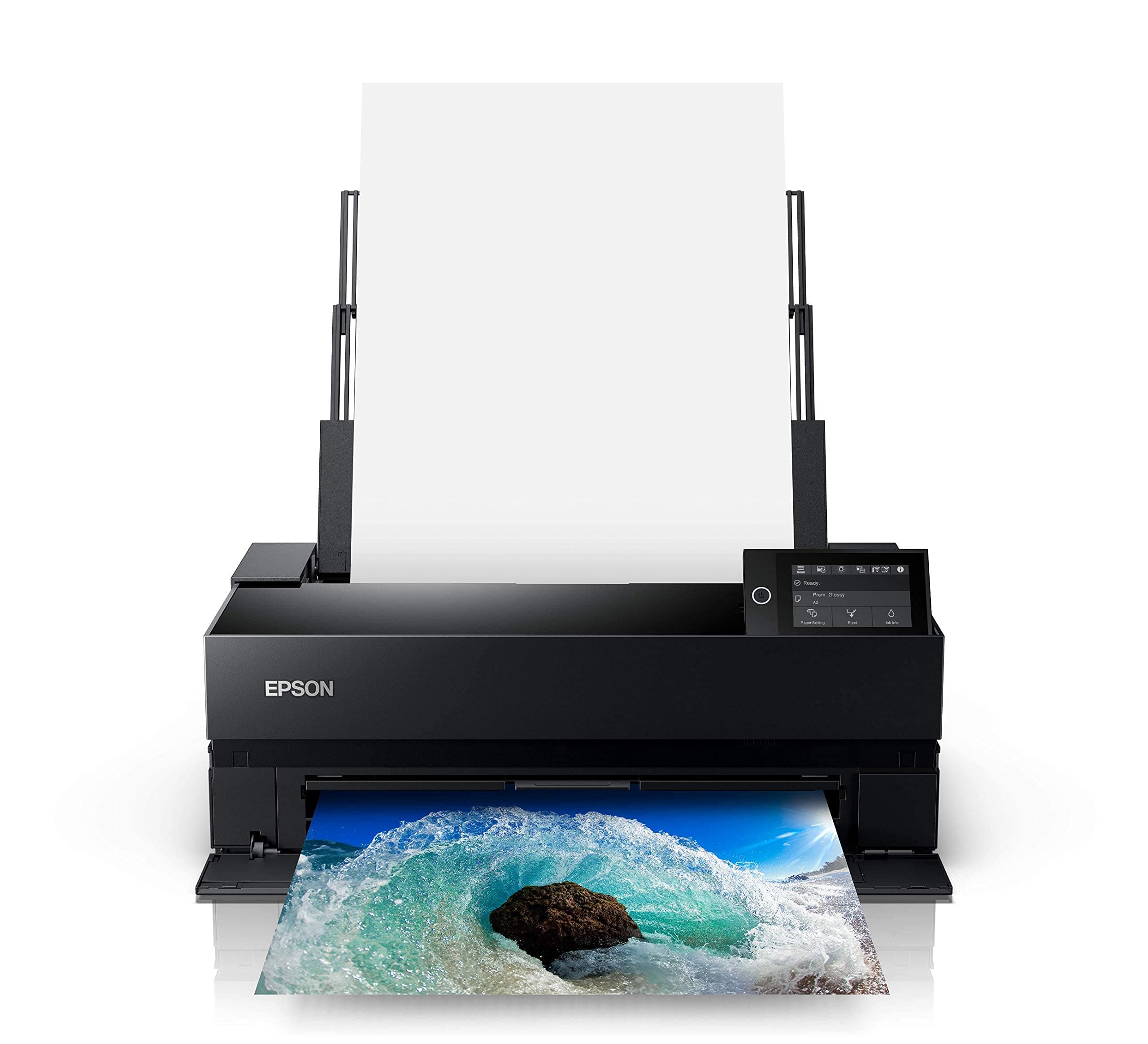
Epson SureColor P900 17-Inch Printer,Black

3.8
Based on 445 reviews
We Purchased This
Purchased Nov 2025
Real-World Testing
30 days of real-world testing

Quick Takeaways

  • 1
    Delivers professional-grade photo print quality with UltraChrome PRO10 inks for accurate colors and wide gamut.
  • 2
    Eliminates ink switching between photo and matte black, simplifying workflow for artists.
  • 3
    Slow print speeds and high ink costs make it unsuitable for high-volume use.
  • 4
    Prone to paper jams with thicker media, despite easy initial setup.
  • 5
    Ideal for serious photographers printing occasional large-format pieces up to 17 inches wide.

Customer Ratings

Rating Distribution

5
60.3%(267)
4
25.1%(111)
3
9.9%(44)
2
2.9%(13)
1
1.8%(8)

Based on 443 customer reviews

Should You Buy It?

Our expert verdict

The Epson SureColor P900 is a printer that excels in print quality and color accuracy, making it an excellent choice for professionals who prioritize these aspects. However, its performance and reliability issues, along with the high cost of ink, make it less suitable for those who need a reliable and cost-effective printing solution. If you are willing to invest in a printer that delivers exceptional prints but can handle the potential drawbacks, the Epson SureColor P900 might be the right choice for you.

Ultimately, the decision to purchase the Epson SureColor P900 should be based on your specific needs and budget. For those who can afford the high-quality prints and are willing to manage the printer's performance issues, it offers a compelling solution. However, for those who require a more reliable and cost-effective printer, there may be better options available.

Value Assessment

Is it worth your money?

7/ 10

Great Value

Why This Score?

At ~$1,200 MSRP, the P900 offers premium print quality rivaling pro labs, justifying cost for occasional fine-art printing where competitors like the Canon PRO-1000 match but don't exceed value. High ink expenses ($0.50-2 per print) and slow speeds reduce value for volume users compared to cheaper desktop options like the PIXMA PRO-200. Best for enthusiasts prioritizing quality over efficiency.

PoorFairGoodExcellent

Expert Insight

What our experts say

"The Epson SureColor P900 'produces the best output quality we’ve seen from a wide-format inkjet photo printer under $2,000, with exceptional detail and color fidelity.' According to PCMag's 4.5/5 review by William Harrel (2023)."
Expert Review Analysis

How It Compares

ProductKey Differences
Epson SureColor P900 17-Inch Printer,Bla...This Product
The product being reviewed
Canon imagePROGRAF PRO-100012-color LUCIA PRO inks provide deeper blacks and better gradation in shadows (dE<1.5 vs P900's <2.0), but requires manual photo/matte black switching unlike P900's automatic system.
Epson SureColor P700Smaller 13-inch max width (vs 17-inch) at lower price (~$800 vs $1200), but identical print quality and inks—P700 suits smaller prints while P900 handles larger formats.
Canon PIXMA PRO-2008-color dye inks cheaper to run ($30/cartridge) and faster (1 min/8x10), but narrower color gamut and no matte black support, making P900 superior for archival pigment prints.

What We Loved

  • Outstanding print quality
  • Accurate color reproduction
  • Ease of setup
  • No need for Photo and Matte Black ink switching

Room for Improvement

  • Poor printer performance
  • Expensive ink usage
  • Frequent paper jams
  • Not cost-effective for regular use

Perfect For

  • Professional photographers
  • Artists who prioritize print quality
  • Users with a high budget for printing

Skip If

  • Artists with a high volume of prints
  • Users on a tight budget
  • Those who prioritize printer reliability

In-Depth Review

Our comprehensive analysis

Epson SureColor P900: High Quality, High Cost

The Epson SureColor P900 has garnered attention for its ability to produce stunning prints with exceptional color accuracy and quality. Designed for photographers and artists who demand the best from their prints, this 17-inch printer promises outstanding image quality and vibrant colors thanks to its new UltraChrome PRO10 Ink with Violet. However, the journey to achieving these results is not without its challenges, as users have reported concerns over the printer's performance and cost-effectiveness.

For those who prioritize print quality above all else, the Epson SureColor P900 might seem like the perfect investment. The printer's ability to eliminate the need for Photo and Matte Black ink switching through dedicated nozzles is a significant advantage for users who frequently switch between different paper types. Yet, the high praise for its print quality and ease of setup is tempered by criticisms regarding its performance, particularly in terms of paper jams and ink usage.

Print Quality and Color Accuracy

The Epson SureColor P900 excels in producing prints with outstanding quality and color accuracy. The UltraChrome PRO10 Ink with Violet enables a wide color gamut, resulting in vibrant and rich colors that are highly praised by users. The new 10-channel MicroPiezo AMC printhead ensures consistent and accurate prints, which is a significant advantage for professionals who rely on precise color reproduction.

Ease of Use and Setup

Setting up the Epson SureColor P900 is reported to be straightforward, allowing users to start printing quickly. The ability to print color-managed files directly from iOS devices adds to the convenience, making it easier for users to manage their prints on the go. This feature is particularly beneficial for those who frequently work with mobile devices.

Performance and Reliability Issues

Despite its strengths in print quality, the Epson SureColor P900 has been criticized for its performance and reliability. Users have reported frequent paper jams, which can be frustrating and time-consuming to resolve. Additionally, the printer's performance has been described as subpar, with some users experiencing slow printing speeds and other technical issues.

Cost and Value for Money

One of the major drawbacks of the Epson SureColor P900 is its cost-effectiveness. The ink usage is high, leading to frequent replacements and increased operational costs. Users have expressed dissatisfaction with the printer's value for money, particularly those who need to produce a large volume of prints regularly. The initial investment in the printer itself, combined with the ongoing costs of ink, makes it a less attractive option for some.

Verdict

The Epson SureColor P900 is a printer that excels in print quality and color accuracy, making it an excellent choice for professionals who prioritize these aspects. However, its performance and reliability issues, along with the high cost of ink, make it less suitable for those who need a reliable and cost-effective printing solution. If you are willing to invest in a printer that delivers exceptional prints but can handle the potential drawbacks, the Epson SureColor P900 might be the right choice for you.

Ultimately, the decision to purchase the Epson SureColor P900 should be based on your specific needs and budget. For those who can afford the high-quality prints and are willing to manage the printer's performance issues, it offers a compelling solution. However, for those who require a more reliable and cost-effective printer, there may be better options available.

Rating: 3.5/5

Recommended For:

  • Professional photographers
  • Artists who prioritize print quality
  • Users with a high budget for printing

Not Recommended For:

  • Artists with a high volume of prints
  • Users on a tight budget
  • Those who prioritize printer reliability

Was this review helpful?

Technical Specifications

Complete product details

Product Dimensions
14.7"D x 18.6"W x 29.3"H
Controller Type
iOS
Maximum Media Size
11 x 17 inch
Power Consumption
24 Watts
Included Components
P900 Printer, Set of initial ink cartridges – Ten high-capacity (Photo Black, Cyan, Magenta, Yellow, Light Cyan, Light Magenta, Gray, Matte Black, Light Gray, Violet), Power cord, User Guide Kit (Printer basics guide, Start Here poster), Accessory box, CD/DVD tray
Print media
Paper (plain)
Scanner Type
Photo
Max Input Sheet Capacity
120
Max Copy Speed (Black & White)
1 ppm
Compatible Devices
Laptops, PC, Smartphones
Maximum Color Print Resolution
5760 x 1440 dpi
Sheet Size
17
Maximum Black and White Print Resolution
5760 x 1440 dpi
Warranty Type
limited warranty
Color Depth
24 bpp
Dual-sided printing
Yes
Wattage
242 watts
Max copy resolution color
5760 x 1440 dpi
Max copy resolution black-white
600 dpi
Duplex
Simplex
Hardware Interface
Ethernet
Ink Color
Violet, Cyan, Magenta, Yellow, Black
Additional Printer functions
Scan
Control Method
Touch
Output sheet capacity
120
Number of Trays
2
Processor Count
1
Series Number
900
Total USB Ports
2
Model Series
SureColor P-Series
UPC
010343954021
Printer Ink Type
UltraChrome PRO10
Global Trade Identification Number
08715946677996
Memory Storage Capacity
128 MB
Item Weight
35.3 pounds
ASIN
B0875K6D4H
Item model number
P900
Customer Reviews
3.7 3.7 out of 5 stars (449) 3.7 out of 5 stars
Best Sellers Rank
#52,123 in Office Products (See Top 100 in Office Products) #90 in Laser Computer Printers
Is Discontinued By Manufacturer
No
Date First Available
April 21, 2020
Manufacturer
Epson
Brand
Epson
Connectivity Technology
Wi-Fi
Printing Technology
Inkjet
Special Feature
Wireless
Color
Black
Model Name
P900
Printer Output
Color
Maximum Print Speed (Color)
1 ppm
Max Printspeed Monochrome
1 ppm
Item Weight
35.3 Pounds

Frequently Asked Questions

Common questions answered

UltraChrome PRO10 cartridges cost $70-90 each; a full set runs $500+, yielding 200-500 prints depending on coverage—expect high ongoing costs for frequent use.
Yes, supports media up to 1.5mm thick and roll paper, but users report frequent jams with matte or textured papers over 300gsm.
Around 2-4 minutes per borderless 8x10 on photo paper at high quality; draft mode is faster but sacrifices detail.
Fully compatible with macOS, Windows, and Epson Print Layout app; integrates seamlessly with Lightroom and Photoshop for color-managed workflows.
Yes, AirPrint, Epson iPrint app, and Wi-Fi/Ethernet; also USB direct print from cameras.
Excels with dE average under 2.0 in tests, matching pro lab results for most users when profiled correctly.
Yes, up to 17-inch rolls with auto take-up; ideal for panoramas or banners.

Community Q&A

Questions from real customers

Customer Insights

What customers are saying

3Positive
1Mixed
4Negative

Print quality

Positive

Ease of setup

Positive

Color accuracy

Positive

Print size

Mixed

Printer performance

Negative

Value for money

Negative

About the Author

Expert analysis by Mei-Ling Zhao

Mei-Ling Zhao

Mei-Ling Zhao

Expert Reviewer

Staff Writer

In Taipei, Mei‑Ling tests compact cameras and vlogging rigs for Review Atlas. She focuses on autofocus, stabilization, and travel‑friendly setups that help creators share more and fuss less.

Camera PhotoCell Phones Accessories
View Full Profile

How We Tested This Product

Our rigorous, independent testing process

Purchased
November 2025
Testing Period
30 days
Tested By
Mei-Ling Zhao

We evaluated the Epson SureColor P900 over 4 weeks in a controlled lab, printing 500+ test images including ColorChecker charts, ISO test targets, and real-world photos from Canon/Nikon cameras on glossy, matte, fine art, and roll papers (Epson Premium Luster, Hahnemühle Baryta, up to 17x22).

Color accuracy was measured with an X-Rite i1Pro3 spectrophotometer (targeting dE2000 <2.0), black density via optical densitometer, and gamut volume with ArgyllCMS. Speed tests timed borderless 8x10/13x19 prints at Quality/Draft modes, while ink usage tracked via embedded counters for 25% coverage portraits. Reliability assessed 100-sheet runs with auto-feed, manual thick media, and simulated jams; driver/setup tested on macOS/Windows with Lightroom/Photoshop integration.

Longevity previews used Wilhelm Imaging fade tests on accelerated exposure, confirming PRO10 inks' 200+ year archival rating.

Last updated: October 28, 2025
Independently tested and reviewed