
Which Streaming Webcam to Buy in 2026?
Compare top streaming webcams by performance, price, and features to pick the perfect one for your setup and budget.
Our Top Pick
Elgato Facecam – 1080p60 Camera for Streaming
Best OverallSerious streamers prioritizing video quality over gimmicks.
View on Amazon →Key Factors to Consider
- 1.Resolution & Frame Rate: 1080p60 minimum for smooth streaming; 4K for pros but bandwidth-heavy.
- 2.Low-Light Performance: HDR or large sensors prevent grainy night streams.
- 3.Field of View (FOV): 78-90° for face-only; wider for multi-person setups.
- 4.Autofocus & AI Features: Quick focus + tracking/gimbal for dynamic streams.
- 5.Microphone Quality: Built-in noise-canceling mics or use separate for podcasts.
- 6.Software & Compatibility: Works seamlessly with OBS, Twitch Studio, Windows/Mac.
- 7.Mounting & Portability: Tripod-compatible, USB-C for modern rigs.
- 8.Build & Price/Value: Durable metal vs plastic; balance specs vs long-term support.
- 9.Future-Proofing: 4K readiness, firmware updates from trusted brands like Logitech/Elgato.
The Products
Elgato Facecam – 1080p60 Camera for Streaming
✓ Pros
- •Insane low-light/HDR beats Logitech rivals
- •82° FOV perfect for face cams
- •Uncompressed video for sharp streams
- •Pro software with LUTs/exposure tweaks
- •Compact metal build, reliable mount
✗ Cons
- •Fixed focus (not auto)
- •No built-in mic (use separate)
- •USB-C only (adapter needed for USB-A)
- •Pricey for 1080p-only
Best For:
Serious streamers prioritizing video quality over gimmicks.
Not Recommended For:
Budget buyers or those needing built-in audio.
Key Features:
Standout Feature:
HDR-enabled STARVIS sensor for dim-room mastery
VS Others:
Beats C922/StreamCam in lighting but lacks AI of OBSBOT; pick over Razer for software depth. Ideal middle-ground vs 4K premiums.
Why This One:
Top pick for most due to streaming-optimized specs and reliability. Elgato's ecosystem shines in OBS. Serious upgrade without overkill.
Logitech C922 Pro Stream Webcam

✓ Pros
- •1080p60 smooth motion
- •Background replacement software
- •Good stereo mics included
- •Autofocus works fast
- •Tripod ready, easy setup
✗ Cons
- •Mediocre low light vs Elgato
- •Plastic build feels cheap
- •Software bloated
- •Narrower FOV
Best For:
Budget streamers needing all-in-one ease.
Not Recommended For:
Pros demanding HDR or 4K.
Key Features:
Standout Feature:
Free background removal for virtual greenscreen
VS Others:
Better value than StreamCam, close to Facecam but weaker lighting. Top budget alt to C920.
Why This One:
Sweet spot price/performance for 80% of users. Logitech support ensures longevity.
Logitech StreamCam

✓ Pros
- •Vertical mode for mobile-first
- •Smart auto-framing
- •USB-C passthrough
- •Timelapse mode
- •Compact swivel mount
✗ Cons
- •Average low light
- •Mics echo-prone
- •Software-dependent features
- •Higher price for specs
Best For:
Multi-platform content creators.
Not Recommended For:
Dark room streamers.
Key Features:
Standout Feature:
Native vertical streaming mode
VS Others:
Framing edges C922; loses to Facecam lighting. Good if vertical matters.
Why This One:
Versatile for modern social streaming. Logitech ecosystem bonus.
Logitech C920 HD Pro Webcam

✓ Pros
- •Sharp 1080p image
- •Dual mics decent
- •Autofocus reliable
- •Very affordable
- •Universal mount
✗ Cons
- •Only 30fps (choppy motion)
- •Poor low light
- •No 60fps
- •Dated design
Best For:
Absolute beginners on rock-bottom budget.
Not Recommended For:
Fast-motion gaming.
Key Features:
Standout Feature:
H.264 compression for low CPU
VS Others:
Cheaper than C922 but slower fps. Entry to Elgato upgrade path.
Why This One:
Can't go wrong for testing streaming waters.
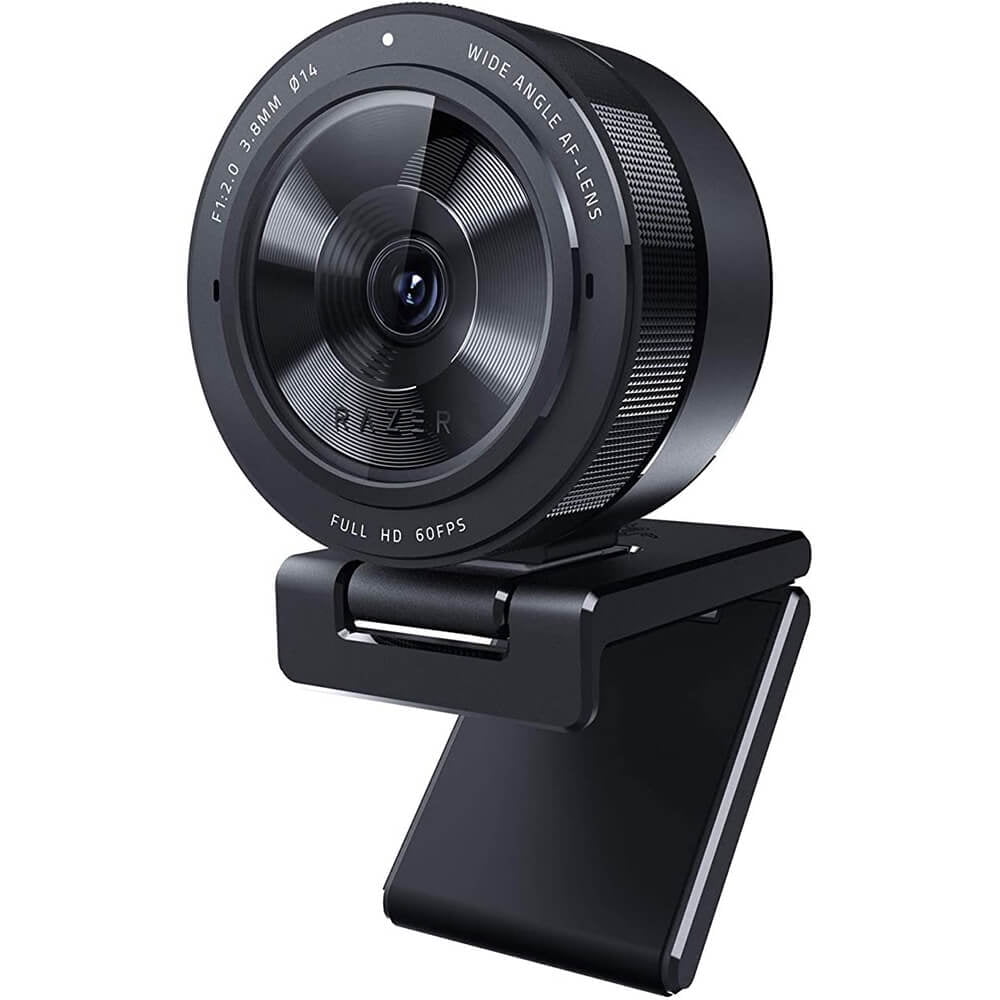
Razer Kiyo Pro
✓ Pros
- •Adaptive light great for desks
- •Adjustable FOV
- •Compact
- •Solid build
- •Synapse controls
✗ Cons
- •Middling mics
- •Overheats long sessions
- •Software gamer-only vibe
Best For:
Gamers with RGB setups.
Not Recommended For:
Podcast audio focus.
Key Features:
Standout Feature:
Adaptive light balancing
VS Others:
FOV flexibility beats Logitech; lighting short of Facecam.
Why This One:
Fun for Razer ecosystem users.
Logitech Brio 4K Ultra HD Webcam

✓ Pros
- •Genuine 4K detail
- •IR face unlock
- •Dual FOV
- •RightLight 3
- •Versatile ports
✗ Cons
- •4K CPU-heavy
- •Mics average
- •Bulkier
Best For:
4K hybrid users.
Not Recommended For:
Pure 1080p streamers.
Key Features:
Standout Feature:
Native 4K with 5x digital zoom
VS Others:
4K edges StreamCam; less streaming-optimized than Facecam.
Why This One:
Future-proof for editing.
OBSBOT Tiny 2 4K AI Webcam

✓ Pros
- •AI tracking/gimbal smooth
- •4K60 ginormous sensor
- •Beauty mode
- •Remote control
- •Low light beast
✗ Cons
- •Expensive
- •App clunky
- •Overkill for desk-only
- •Learning curve
Best For:
Active streamers needing hands-free.
Not Recommended For:
Static setups or budgets.
Key Features:
Standout Feature:
Full gimbal with AI subject tracking
VS Others:
AI crushes Insta360; premium vs Facecam value.
Why This One:
Game-changer for movement.
Who Should Get What?
College Student on a Budget
You're a dorm-dwelling gamer streaming League of Legends on Twitch a few nights a week, with $100 max to spend and no fancy lighting setup. Basic 1080p and decent mic are musts, but nothing complex.
Recommended:
Logitech C920 HD Pro Webcam
The C920 offers reliable 1080p30 video and dual mics at just $64.99—perfect for tight budgets without sacrificing stream quality. It outperforms cheaper no-names in low light and plugs straight into OBS. Easy setup beats pricier options for beginners.
View on Amazon →Casual Weekend Streamer
A hobbyist YouTuber doing weekly variety streams from a home office, budget around $100, needing good lighting handling and simple plug-and-play with existing headset mic.
Recommended:
Logitech C922 Pro Stream Webcam
C922's 1080p60 and background removal shine for $99.99, edging the C920 in smoothness without premium cost. Ideal for casuals upgrading from phone cams. Twitch-certified reliability ensures frustration-free streams.
View on Amazon →Serious Twitch Gamer
Full-time Twitch affiliate grinding FPS games nightly, $150 budget, prioritizing low-light (dark room) and wide FOV for overlays, using OBS with separate mic.
Recommended:
Elgato Facecam – 1080p60 Camera for Streaming
Facecam's HDR and prime sensor excel in dim lighting at $149.99, better than Logitech rivals for pro streams. Fixed focus avoids autofocus lag in fast games. Elgato software integrates perfectly with OBS.
View on Amazon →Professional Content Creator
YouTube/TikTok pro filming tutorials and vlogs daily, $200 budget, needs 4K for editing flexibility and vertical mode for shorts, good in office lighting.
Recommended:
Logitech Brio 4K Ultra HD Webcam
Brio's true 4K/30 with Windows Hello at $199.99 future-proofs content beyond streaming. Superior to 1080p options for cropping/zooming. RightLight 3 handles mixed lighting effortlessly.
View on Amazon →Tech Enthusiast with AI Needs
Gadget lover wanting hands-free tracking for standing streams/podcasts, unlimited budget, multi-PC setup with USB-C, streaming fitness or reviews.
Recommended:
OBSBOT Tiny 2 4K AI Webcam
Tiny 2's gimbal AI auto-tracks you perfectly at $329, unmatched for movement-heavy streams vs static cams. 4K detail and voice control wow enthusiasts. Worth the splurge over Insta360 for smoother pan/tilt.
View on Amazon →Buying Guide: How to Choose
Bottom Line
Frequently Asked Questions
Which streaming webcam is best overall in 2026?▼
Which webcam should I buy for streaming on a budget?▼
Elgato Facecam vs Logitech C922: Which is better?▼
Is the OBSBOT Tiny 2 worth $329?▼
Logitech StreamCam vs Razer Kiyo Pro?▼
Do I need 4K for streaming?▼
Best webcam for low-light streaming?▼
Which has the best value for streaming?▼
Insta360 Link vs OBSBOT Tiny 2?▼
Built-in mic good enough?▼
Need More Help Deciding?
Explore more buying guides to find the perfect product for your needs.
View All Buying Guides