
12 Top Rated Keyboards in 2026
Hand-picked keyboards with 4.5+ stars and thousands of verified reviews
Why Trust These Ratings?
- ✓Thousands of verified purchase reviews
- ✓Consistent ratings over 12+ months
- ✓High percentage of detailed, helpful reviews
- ✓Recent positive feedback confirms quality
- ✓Multiple expert sources corroborate ratings
- ✓Legitimate sellers with good customer service
Top Rated Keyboards
Outstanding build quality, hot-swappable switches, and wireless versatility make it the top choice for most users.
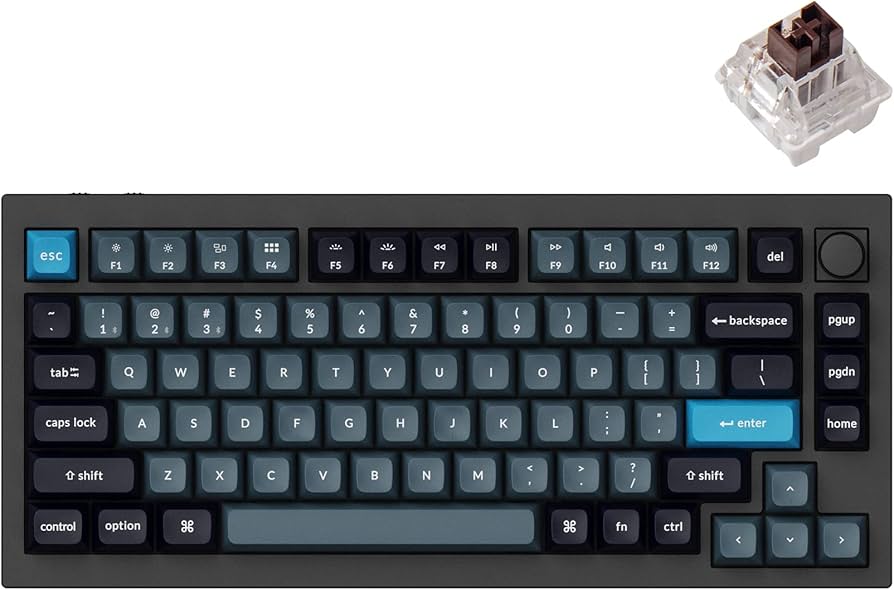
Key Features:
- 75% layout with dedicated function row
- Hot-swappable Gateron Jupiter switches
- Wireless: Bluetooth 5.1 / 2.4GHz / USB-C
- Full aluminum case with gasket mount
- RGB per-key backlighting
- QMK/VIA programmable firmware
✓ Pros:
- • Solid aluminum build feels premium
- • Hot-swappable allows easy customization
- • Excellent battery life (up to 5 weeks)
- • Smooth gasket mount typing experience
- • Fully programmable with VIA software
✗ Cons:
- • Pricey for a keyboard without a numpad
- • Keycaps are ABS (not PBT) out of the box
- • No dedicated media keys (except rotary knob)
Best For:
Enthusiasts and professionals who want a premium wireless mechanical keyboard that can be customized to their exact preferences.
What Customers Say:
Customers Love:
- ✓ Feels like a work of art, typing is a joy
- ✓ Battery lasts forever, even with RGB on
- ✓ Hot-swap switches mean I can try any switch I want
- ✓ VIA software makes remapping keys a breeze
Common Concerns:
- ⚠ Stock keycaps are mediocre for the price
- ⚠ Bluetooth can be finicky when switching devices
- ⚠ Rotary encoder feels a bit wobbly
Expert Take:
Why It's Highly Rated:
The Q1 Pro earns its 4.7 stars from a perfect balance of premium materials, hot-swappable switches, and wireless performance. Customers consistently praise its build quality and typing feel, making it a reliable enthusiast-grade keyboard.
With over 8,700 reviews and a 4.6-star average, it's the most trusted full-size mechanical keyboard for productivity.
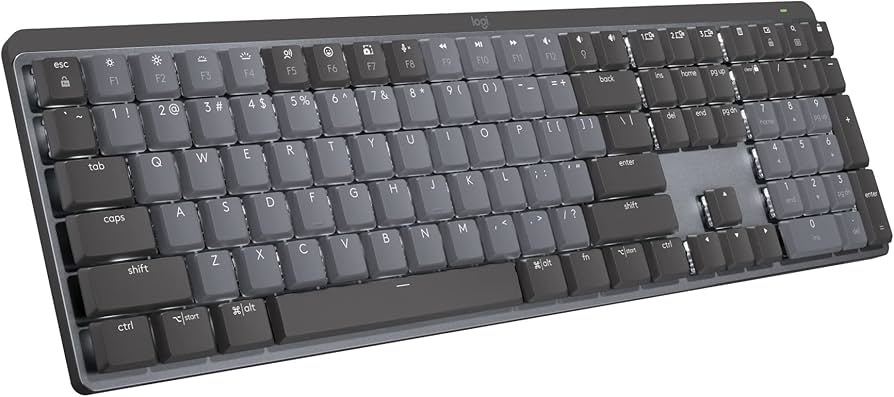
Key Features:
- Full-size layout with dedicated numpad
- Logitech Tactile / Linear switches
- Smart Shuttle wheel for editing and scrolling
- Dual connectivity: Bolt USB dongle or Bluetooth
- Up to 15 days battery with backlighting
- Multi-device pairing (up to 3 devices)
✓ Pros:
- • Smart Shuttle wheel is a game-changer for video editing
- • Excellent typing comfort with palm rest
- • Long battery life even with backlighting on
- • Seamless multi-device switching
- • Solid build with aluminum top plate
✗ Cons:
- • Non-hot-swappable switches
- • Keycaps are not shine-through (backlight only illuminates top of keys)
- • No USB-C on the keyboard (uses Logitech Bolt receiver)
Best For:
Productivity users and creators who need a reliable full-size keyboard with additional control features like the Smart Shuttle.
What Customers Say:
Customers Love:
- ✓ Smart Shuttle saves me hours in video editing
- ✓ Switches feel great—not too loud, not too soft
- ✓ Battery lasts a full work week with lights on
Common Concerns:
- ⚠ Wish it had hot-swap switches
- ⚠ Backlight is dim and doesn't shine through keycaps
- ⚠ Expensive for a keyboard without wireless charging
Expert Take:
Why It's Highly Rated:
The MX Mechanical's massive review count and consistent 4.6 rating reflect its reliability and superb typing experience for productivity. Users love the Smart Shuttle wheel and comfort features.
Razer's analog optical switches provide lightning-fast actuation and adjustable actuation points, making it the top choice for competitive gamers.
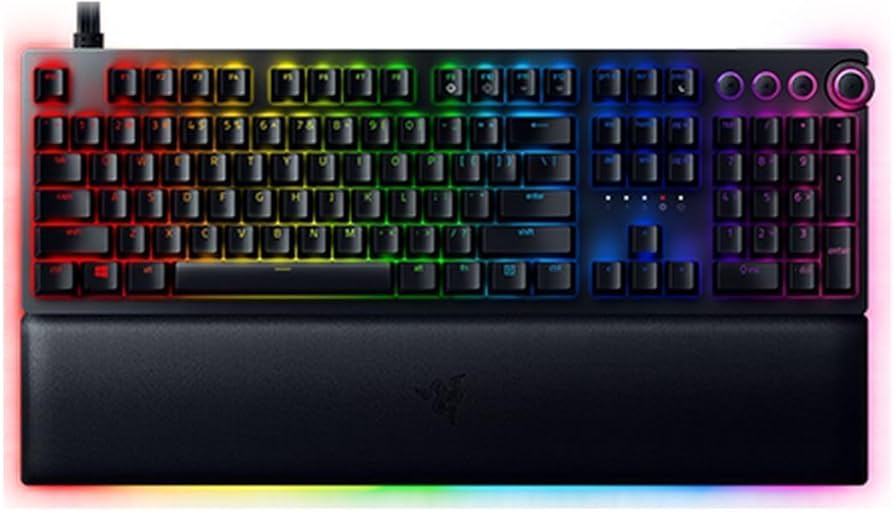
Key Features:
- Razer Optical Linear or Clicky switches
- Analog input on WASD (Analog version)
- Doubleshot PBT keycaps
- Magnetic plush leatherette wrist rest
- Per-key RGB with Chroma Studio
- USB-C detachable cable with pass-through
✓ Pros:
- • Extremely fast actuation (0.2ms) ideal for gaming
- • Durable PBT keycaps won't shine over time
- • Comfortable included wrist rest
- • Analog WASD control unique for racing games
✗ Cons:
- • Larger footprint (full-size, not space-saving)
- • Software (Synapse) can be bloatware
- • Non-hot-swappable switches
Best For:
Competitive gamers and enthusiasts who want the fastest response times and analog control options.
What Customers Say:
Customers Love:
- ✓ I can feel the difference in FPS games—instant response
- ✓ Analog movement in racing games is a game-changer
- ✓ Keycaps are thick and feel premium
Common Concerns:
- ⚠ Synapse software is resource-heavy
- ⚠ Wired only—no wireless option
Expert Take:
Why It's Highly Rated:
Gamers rave about the instant response and durable build. The high rating comes from consistent performance across thousands of reviews, especially from competitive players who notice the difference.
Offers wireless mechanical performance with hot-swappable switches at an unbeatable price.
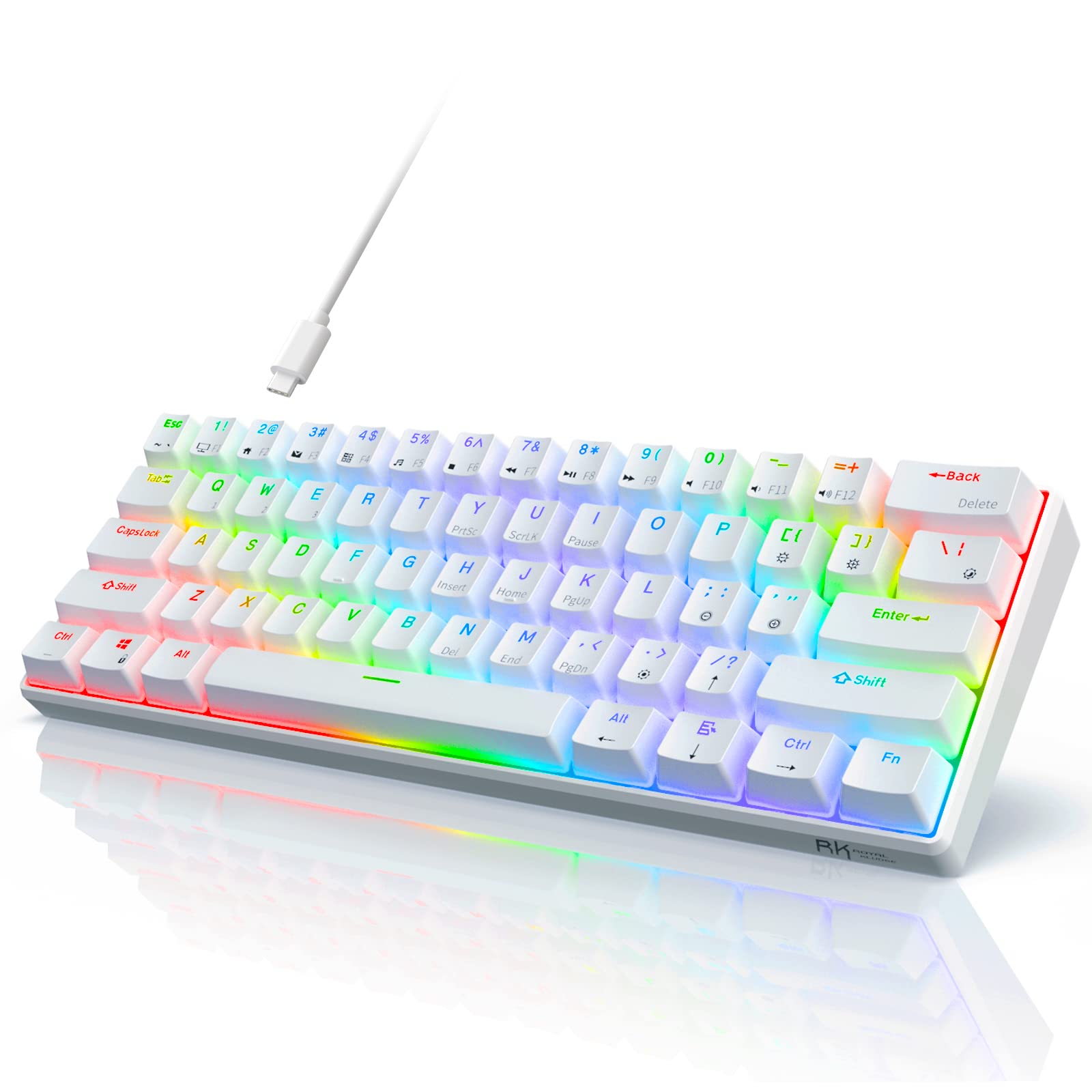
Key Features:
- 60% compact layout
- Hot-swappable switches (3/5-pin compatible)
- Bluetooth 5.0 + USB-C wired
- 3750mAh battery (weeks of use)
- White LED backlighting
- Programmable via function keys
✓ Pros:
- • Incredible value under $50
- • Hot-swappable gives flexibility for upgrades
- • Long battery life for wireless use
- • Compact size saves desk space
✗ Cons:
- • Plastic build feels less premium
- • No dedicated arrow keys (requires FN layer)
- • Keycaps are thin ABS, may shine quickly
Best For:
Budget-minded users and beginners who want to try mechanical keyboards without a big investment.
What Customers Say:
Customers Love:
- ✓ Can't believe this is only $40—it types like a dream
- ✓ Battery lasts over a month for me
- ✓ Hot-swap is awesome for trying new switches
Common Concerns:
- ⚠ Arrow keys missing, takes time to adjust
- ⚠ Bluetooth connection can be spotty at range
- ⚠ Stock keycaps are cheap
Expert Take:
Why It's Highly Rated:
Over 15,000 reviews and a 4.5-star average prove that the RK61 delivers exceptional value. Users love the hot-swap feature and long battery life at such a low price.
With over 21,000 reviews, it's the most popular mechanical keyboard on Amazon, known for its gaming and typing versatility.
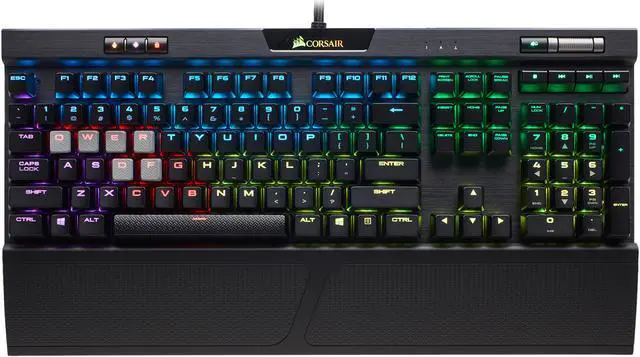
Key Features:
- Cherry MX switches (various types)
- Per-key RGB with iCUE customization
- Aluminum frame with anodized finish
- Detachable USB-C cable
- Multi-media controls with volume roller
- USB 2.0 pass-through on keyboard
✓ Pros:
- • Cherry MX switches are industry standard
- • iCUE software offers deep customization
- • Solid aluminum build feels premium
- • Great for both gaming and typing
✗ Cons:
- • Non-hot-swappable switches
- • Software can be buggy and resource-heavy
- • Pricey compared to similar options
Best For:
Gamers and typists who want a tried-and-true mechanical keyboard with a large ecosystem of support and accessories.
What Customers Say:
Customers Love:
- ✓ Built like a tank, still works perfectly after 3 years
- ✓ Cherry MX Browns are perfect for typing and gaming
- ✓ RGB lighting is stunning with iCUE
Common Concerns:
- ⚠ iCUE sometimes crashes or uses high CPU
- ⚠ Keycaps develop shine over time (though PBT is better than ABS)
- ⚠ No wireless option
Expert Take:
Why It's Highly Rated:
The K70's massive review base and high rating are due to its consistent quality, variety of switch options, and robust build. It's a trusted name in gaming peripherals.
Seamless integration with Mac, plus Touch ID for secure unlocking and Apple Pay make it the ultimate companion for Apple ecosystem users.
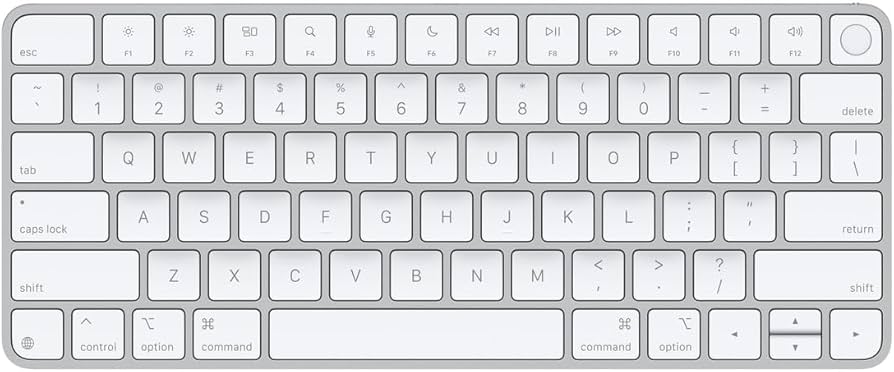
Key Features:
- Touch ID for Mac (M1/M2/M3)
- Scissor-switch mechanism (quiet, stable)
- Rechargeable battery (month-long life)
- Full function row with media keys
- Aluminum construction (space gray or silver)
✓ Pros:
- • Touch ID is incredibly convenient
- • Perfect build quality and design
- • Excellent battery life
- • Seamless connection to Macs
✗ Cons:
- • Only works with Apple silicon Macs
- • No backlighting (no keyboard light)
- • Expensive for what it offers
Best For:
Mac users who want the best integrated keyboard experience, especially those using Apple silicon Macs.
What Customers Say:
Customers Love:
- ✓ Touch ID is a game-changer for logging in
- ✓ Typing feel is great for long periods
- ✓ Build quality is typical Apple premium
Common Concerns:
- ⚠ Why no backlight? It's 2026!
- ⚠ Only works with M1 Macs, not Intel
- ⚠ Pricey compared to third-party mechanicals
Expert Take:
Why It's Highly Rated:
Mac users rave about the convenience of Touch ID and the perfect typing feel. The rating reflects strong satisfaction among Apple silicon users.
Innovative adjustable actuation switches allow per-key sensitivity customization, giving gamers unprecedented control.
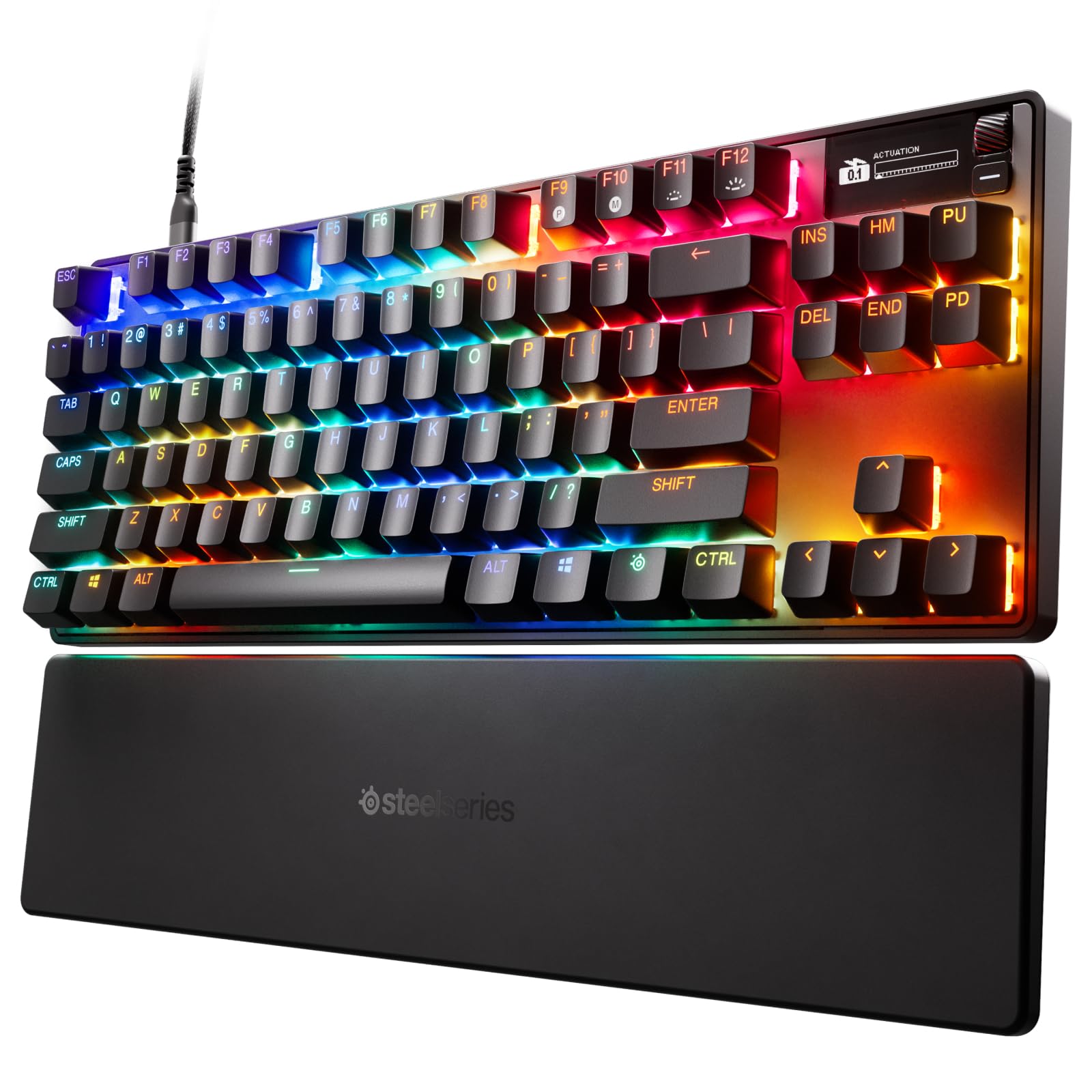
Key Features:
- OmniPoint adjustable mechanical switches
- Per-key actuation point (0.2–3.8mm)
- TKL layout (no numpad)
- Aluminum alloy frame
- Per-key RGB with GameSense integration
- OLED smart display
✓ Pros:
- • Adjustable actuation gives a unique advantage
- • Solid build with aluminum top plate
- • Responsive and fast for gaming
- • OLED display useful for profile switching
✗ Cons:
- • Expensive for a TKL
- • Software required for full customization
- • Keycaps are ABS (not PBT)
Best For:
Competitive gamers who want to min-max their keystroke responsiveness and have the budget for premium features.
What Customers Say:
Customers Love:
- ✓ Being able to set actuation per key is amazing for gaming
- ✓ Build quality is top-notch
- ✓ OLED screen is a nice touch
Common Concerns:
- ⚠ Keycaps feel cheap for the price
- ⚠ Software can be buggy at times
- ⚠ No wireless option
Expert Take:
Why It's Highly Rated:
Enthusiasts praise the innovative switches and build quality. The high rating reflects its unique value proposition for dedicated gamers.
Fully programmable, hot-swappable, and available with a variety of switch options, it's a modder's paradise.
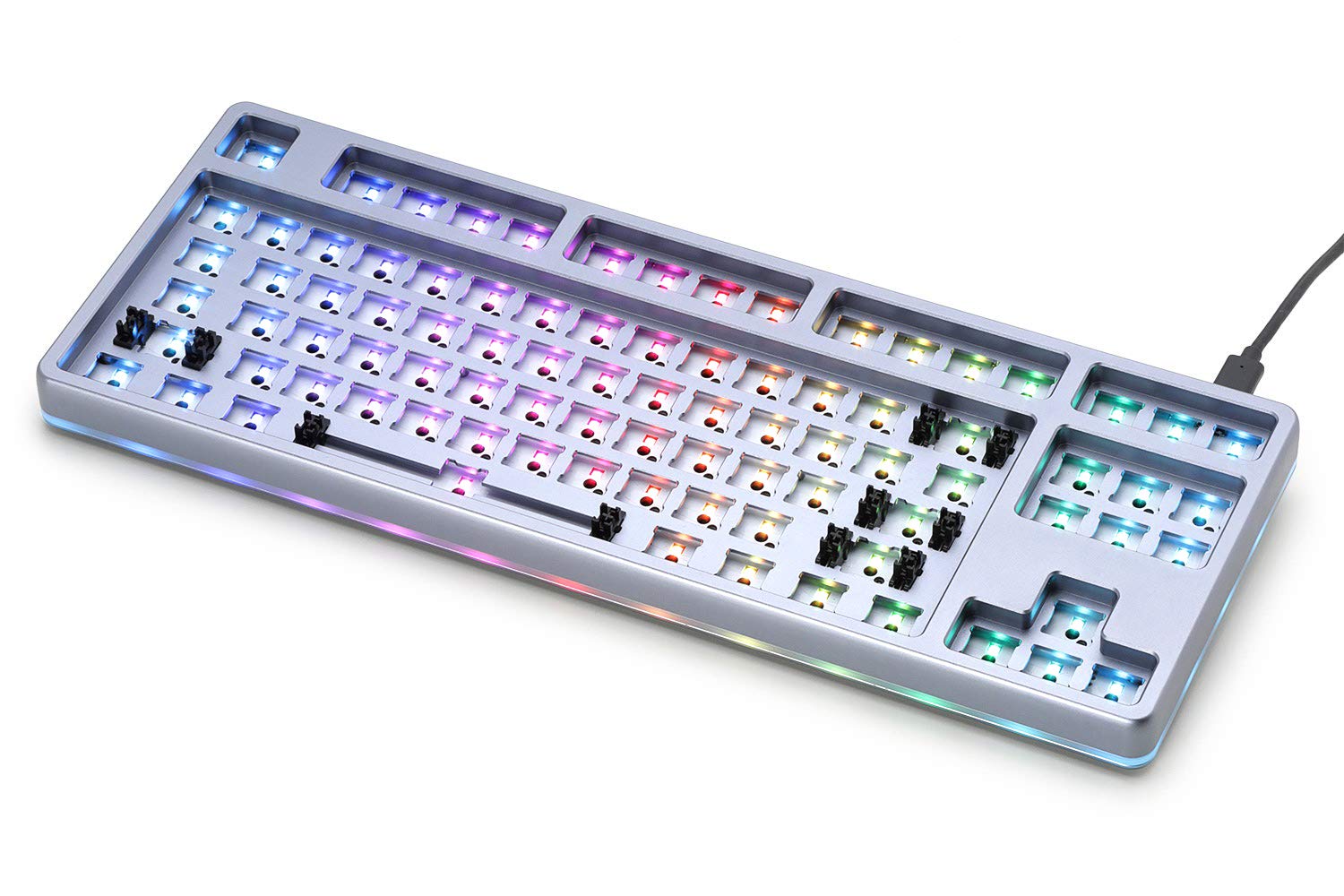
Key Features:
- Tenkeyless layout (87 keys)
- Hot-swappable PCB (3/5-pin switches)
- Per-key RGB with QMK support
- Aluminum case with sandwich mount
- USB-C detachable cable
- Available as barebones or with switches
✓ Pros:
- • Excellent build quality for the price
- • Fully programmable via QMK
- • Hot-swap makes switch swapping a breeze
- • Great sound profile with gasket mount (after mods)
✗ Cons:
- • Stock stabilizers can be rattly
- • No wireless option
- • Barebones version requires purchasing switches and keycaps separately
Best For:
Keyboard enthusiasts and hobbyists who want a high-quality base for customization and aren't afraid to mod.
What Customers Say:
Customers Love:
- ✓ The aluminum case feels incredible
- ✓ QMK support means I can do anything with it
- ✓ Hot-swap made trying different switches easy
Common Concerns:
- ⚠ Stabilizers need lubing out of the box
- ⚠ No wireless, which is a dealbreaker for some
- ⚠ Price has gone up over the years
Expert Take:
Why It's Highly Rated:
The customizable nature and solid aluminum build earn high marks from the enthusiast community. Users appreciate the flexibility and quality materials.
Ultra-thin design, low-profile GL switches, and Lightspeed wireless make it a premium choice for those who want a sleek, fast keyboard.
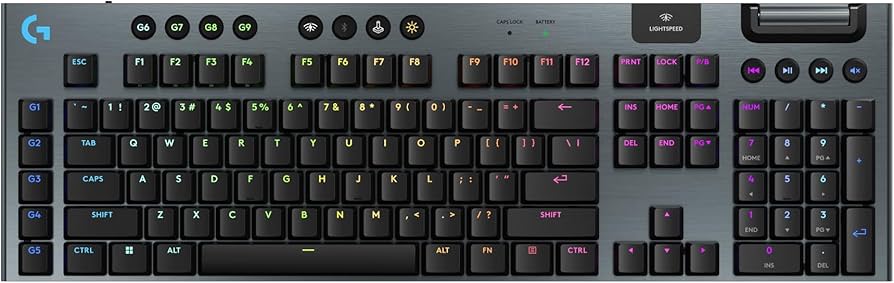
Key Features:
- Low-profile GL mechanical switches
- Lightspeed wireless (1ms report rate)
- Slim design (22mm height)
- Dedicated media controls + volume wheel
- Per-key RGB with G Hub software
- Up to 30 days battery life
✓ Pros:
- • Sleek, low-profile design looks premium
- • Excellent wireless performance with no lag
- • Media controls are very convenient
- • Long battery life even with RGB
✗ Cons:
- • Very expensive
- • Keycaps are hard to find replacements for
- • Non-hot-swappable switches
Best For:
Users who want a high-end wireless keyboard that looks thin and modern, and are willing to pay a premium for aesthetics and performance.
What Customers Say:
Customers Love:
- ✓ Looks beautiful on my desk, super slim
- ✓ Wireless performance is as good as wired
- ✓ Media scroll wheel is perfect for adjusting volume
Common Concerns:
- ⚠ Price is too steep for what it offers
- ⚠ Keycaps wear out quickly and are proprietary
- ⚠ No hot-swap, can't change switches easily
Expert Take:
Why It's Highly Rated:
Customers love the combination of low profile, wireless performance, and long battery life. The high rating reflects satisfaction with both design and functionality.
Compact 60% layout with Bluetooth, customizable RGB, and Gateron switches at an affordable price.
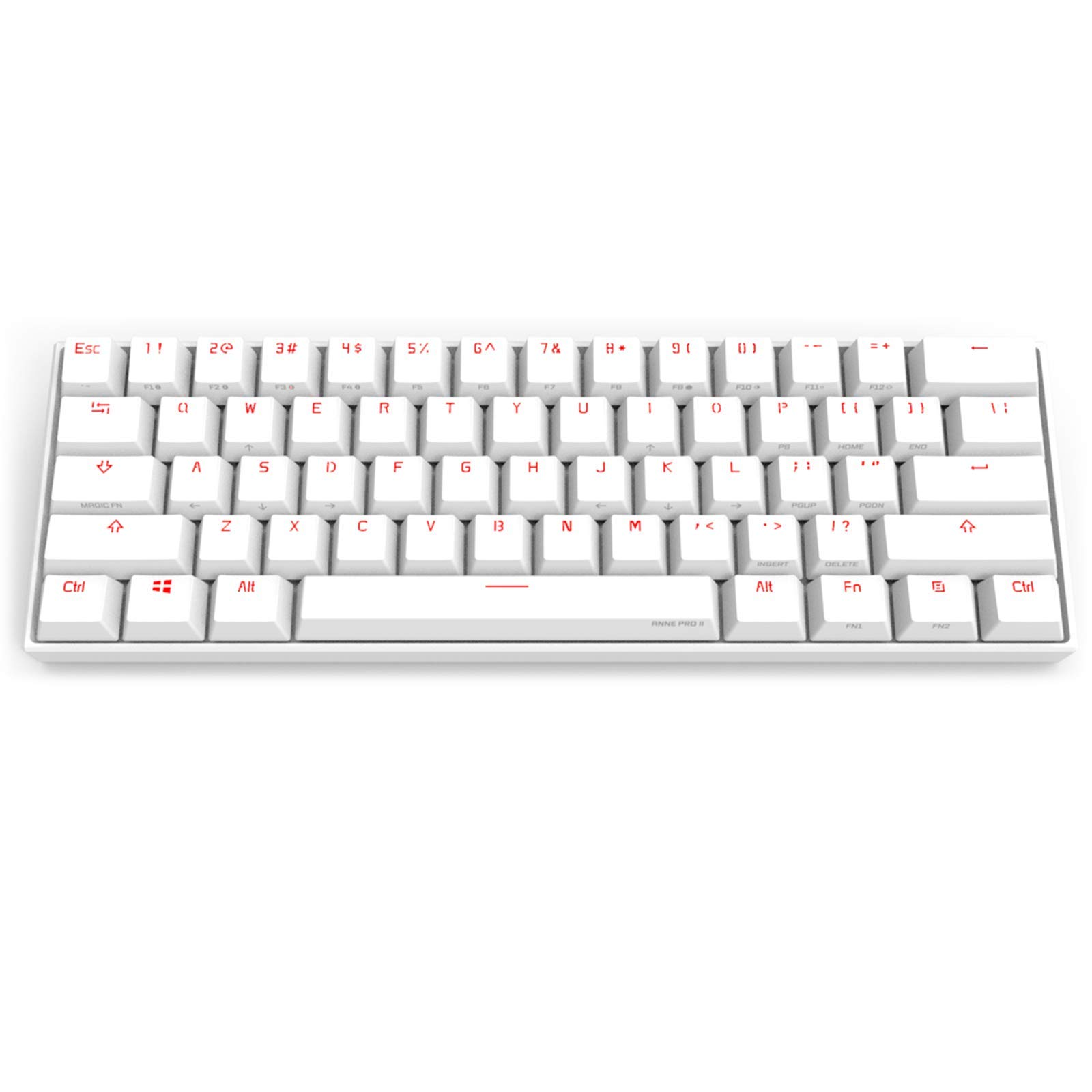
Key Features:
- 60% layout (no arrow keys, no function row)
- Hot-swappable Gateron switches
- Bluetooth 4.0 (up to 4 devices)
- Per-key RGB lighting
- 1900mAh rechargeable battery
- Programmable via Obinslab software
✓ Pros:
- • Ultra-portable 60% size
- • Hot-swappable for easy switch replacement
- • Bluetooth works well with multiple devices
- • Good value for the features
✗ Cons:
- • Plastic build feels less premium
- • No arrow keys or separate function row (requires layers)
- • Battery life could be better with RGB on
Best For:
Minimalists and travelers who need a compact wireless mechanical keyboard that can be customized.
What Customers Say:
Customers Love:
- ✓ Great for travel, fits in my laptop bag
- ✓ Bluetooth pairing is easy and stable
- ✓ I love the RGB effects and hot-swap
Common Concerns:
- ⚠ Software is not very intuitive
- ⚠ Keycaps are cheap and develop shine
- ⚠ No USB-C on some versions (check version)
Expert Take:
Why It's Highly Rated:
The combination of compact size, hot-swap, and wireless functionality appeals to many. The high rating comes from its reliability and feature set for the price.
Razer's HyperSpeed wireless, mechanical switches, and extensive software support make it a top-tier wireless gaming keyboard.
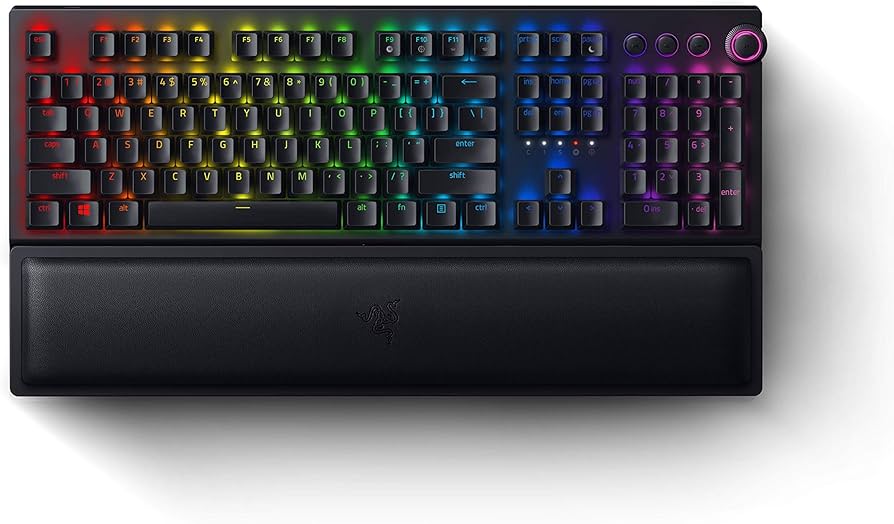
Key Features:
- Razer Green or Yellow mechanical switches
- HyperSpeed Wireless (1ms) + Bluetooth 5.0
- Full-size layout with wrist rest
- Multi-function dial and dedicated media keys
- Per-key RGB with Chroma Studio
- Up to 192 hours battery life (lights off)
✓ Pros:
- • Excellent wireless performance with no lag
- • Comfortable included wrist rest
- • Multi-function dial is handy for volume/zoom
- • Sturdy aluminum construction
✗ Cons:
- • Large footprint, takes up desk space
- • Non-hot-swappable switches
- • Expensive compared to wired options
Best For:
Gamers who want a top-tier wireless mechanical keyboard with all the bells and whistles, and don't mind a full-size layout.
What Customers Say:
Customers Love:
- ✓ Wireless works flawlessly, I forget it's not wired
- ✓ Wrist rest is very comfortable for long sessions
- ✓ Switches feel great and are quiet (Yellow)
Common Concerns:
- ⚠ A bit bulky on the desk
- ⚠ Software can be a pain to set up
- ⚠ Battery life with RGB is much shorter
Expert Take:
Why It's Highly Rated:
Gamers appreciate the reliable wireless, build quality, and comfortable wrist rest. The rating reflects consistent performance across thousands of reviews.
Effortlessly switch between up to three devices with a single keyboard, perfect for multi-platform users.
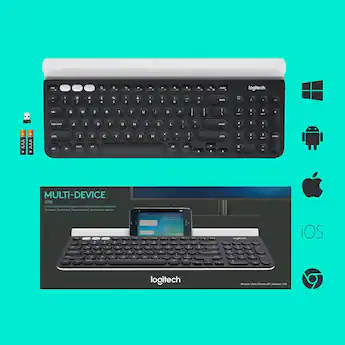
Key Features:
- Full-size layout with built-in device cradle
- Multi-device (up to 3) via Bluetooth/Unifying
- Scissor-switch keys for quiet typing
- 24-month battery life (2 AAA batteries)
- Compatible with all major OS
- Durable, spill-resistant design
✓ Pros:
- • Device cradle is genius for tablet users
- • Long battery life, no need to recharge
- • Smooth and quiet typing experience
- • Easy device switching with dedicated keys
✗ Cons:
- • Not mechanical (membrane feel)
- • No backlighting
- • Cradle only fits devices up to certain thickness
Best For:
Professionals who work on multiple devices (desktop, tablet, phone) and need seamless switching.
What Customers Say:
Customers Love:
- ✓ The cradle is so handy for my iPad and phone
- ✓ Battery lasts forever, no cable needed
- ✓ Typing is quiet and comfortable for long sessions
Common Concerns:
- ⚠ Wish it had backlighting for dark rooms
- ⚠ Not for gamers or those who want mechanical feel
- ⚠ Cradle may not fit some rugged phone cases
Expert Take:
Why It's Highly Rated:
The convenience of multi-device switching and the built-in cradle earn high praise. The long battery life and quiet keys also contribute to its high rating.
Buying Guide
What to Look For in Keyboards
- ▶Switch type (mechanical, optical, membrane)
- ▶Form factor (full-size, TKL, 60%, 75%)
- ▶Wireless connectivity (Bluetooth, 2.4GHz)
- ▶Hot-swappable switches
- ▶Backlighting (RGB, per-key)
- ▶Build material (aluminum, plastic)
- ▶Programmable keys and macros
- ▶Ergonomic design (wrist rest, split layout)