Review Atlas
Review AtlasYour guide to a better purchase

Menu

Shop by Category

Get the App

Better experience on mobile

????????????????????????

Should I Buy Steam Deck? Complete Guide 2026

We help you decide if the Steam Deck is the right handheld gaming PC for your needs and budget.

Recommendation: depends
πŸ›’ Buy on AmazonAs an Amazon Associate we earn from qualifying purchases.

Quick Answer

The Steam Deck is a fantastic purchase for dedicated PC gamers who want portability and have a substantial Steam library. For casual gamers, Nintendo fans, or those on a tight budget, alternatives like the Switch or a gaming laptop may be better. Evaluate your gaming habits and budget before buying.

You've seen the reviews, you've heard about the flexibility, but you're still on the fence. The Steam Deck promises to let you play your PC games anywhere, but at $399 and up, it's a serious investment. Common concerns include whether you'll actually use it, if the performance is enough, and how it compares to alternatives like the Nintendo Switch or a gaming laptop. This guide will help you cut through the hype and decide based on your personal situation. The short answer: It depends on your gaming habits and budget.

What is Steam Deck?

The Steam Deck is a portable gaming PC with a 7-inch touchscreen, built-in controls, and a custom AMD processor that can run modern AAA games at 30-60fps. It comes in three storage configurations: 64GB eMMC ($399), 256GB NVMe SSD ($529), and 512GB NVMe SSD with anti-glare screen ($649). You can also expand storage via microSD card. It runs SteamOS, a Linux-based OS, but you can install Windows for broader compatibility. The Deck is designed to play your existing Steam library, and it supports thousands of games, with Valve's Proton compatibility layer allowing many Windows-only games to run.

Why the Hesitation?

Many potential buyers hesitate because of the price: $399 is still a lot for a gaming device, especially when you can get a Nintendo Switch OLED for $349. Battery life is a major concern, often 2-8 hours depending on the game. Some worry about performance: will it run their favorite games smoothly? There's also the learning curve: SteamOS is not Windows, and tweaking settings may be needed. Size and weight can be off-puttingβ€”it's heavier than a Switch. Finally, the fear of buyer's remorse: will you actually use it on the go, or will it just sit at home?

Key Reasons TO Buy

  • βœ“Play your entire Steam library on the go
  • βœ“Excellent value for a portable gaming PC
  • βœ“Highly customizable with SteamOS or Windows
  • βœ“Great community support and active updates from Valve
  • βœ“Can also emulate older consoles (PS2, Wii, etc.)
  • βœ“Better ergonomics and trackpads than competitors
  • βœ“Powerful enough for most modern games at 30-60fps

Key Reasons NOT to Buy

  • βœ—Limited battery life (2-8 hours) for demanding games
  • βœ—Bulky and heavy (about 1.5 lbs) compared to Switch
  • βœ—Not all Steam games are compatible (check ProtonDB)
  • βœ—Requires tweaking for optimal performance
  • βœ—Relatively expensive for a secondary device
  • βœ—Can get hot and loud under load
  • βœ—Better alternatives like the ASUS ROG Ally have higher performance (but cost more)

Should YOU Buy? Different Scenarios

PC Gamer with Large Backlog

βœ“ YES

You have hundreds of Steam games you've never played and want to play them during commutes or while traveling.

Budget: $400-$650

Usage: Daily use on buses/trains, weekends at cafes

Why: The Steam Deck is perfect for clearing your backlog. Its performance handles most games well, and the portability lets you play anywhere.

Consider instead: If you only travel occasionally, a Nintendo Switch OLED for $349 might be better, but it won't play your Steam games.

Casual Gamer on a Budget

βœ— NO

You play a few hours a week, mostly indie games, and don't want to spend too much.

Budget: Under $350

Usage: Occasional gaming at home or on trips

Why: The Steam Deck is overkill for casual use. A Nintendo Switch Lite ($199) or even a tablet with cloud gaming would be cheaper and simpler.

Consider instead: Consider the Nintendo Switch Lite (Amazon ASIN: B0B3J6B3Z1) for casual gaming on a budget.

Hardcore Gamer Demanding High Performance

βœ— NO

You want to play the latest AAA titles at high settings and 60fps, and you value graphical fidelity.

Budget: Over $1000

Usage: Mostly at home, occasional LAN parties

Why: The Steam Deck can't match a desktop or high-end gaming laptop for performance. For $1000+, a gaming laptop like the Acer Predator Helios 16 would be much more powerful.

Consider instead: Look for a gaming laptop on Amazon, such as the Acer Predator Helios 16 (ASIN: B0BV2T2K5B).

Nintendo Fan Considering Switch vs Steam Deck

βœ— NO

You love Nintendo exclusives but want to try PC gaming on the go.

Budget: $300-$400

Usage: Gaming on the go with a mix of Nintendo and indie games

Why: If you're primarily a Nintendo fan, the Steam Deck can't play Zelda or Mario. Stick with the Switch for exclusives, or get both if your budget allows.

Consider instead: Nintendo Switch OLED (Amazon ASIN: B09BGCSK2L) is the best for Nintendo exclusives.

Backlog Gamer Who Also Wants Emulation

βœ“ YES

You want to play retro games from PS2, GameCube, etc., in addition to your Steam library.

Budget: $400-$500

Usage: Daily portable use, retro gaming heavy

Why: The Steam Deck is excellent for emulation due to its powerful APU and active community. You can play classics up to PS3/Xbox 360 era.

Consider instead: No alternative comes close for the price; consider a high-end Android emulator handheld like the AYN Odin, but the Deck offers more power.

Key Factors to Consider

  • β†’Your existing Steam library size and game preferences
  • β†’How often you'll use it away from your main gaming setup
  • β†’Budget for the device plus accessories (screen protector, case, SD card)
  • β†’Tolerance for technical tweaking and compatibility issues
  • β†’Need for a portable gaming solution vs. other devices like Switch or laptop
  • β†’Desire for emulation and retro gaming capabilities
  • β†’Long-term investment: will you still want it in 2 years?

Questions to Ask Yourself

  • ?Can I comfortably afford the Steam Deck without financial stress?
  • ?Will I actually use it regularly, or will it gather dust?
  • ?Do I have a large Steam library that I haven't finished?
  • ?Have I considered alternatives like the Nintendo Switch or a gaming tablet?
  • ?Am I comfortable with potentially tinkering with settings to get games to run?
  • ?What is my backup plan if I don't like it? (Return policy, resale)
  • ?Do I need portability, or would a desktop upgrade be more beneficial?

Detailed Analysis

The Steam Deck is best suited for gamers with a large Steam library who want the flexibility of PC gaming on the move. Its real-world performance is impressive for a handheld: games like Elden Ring run at 30-40fps on medium settings, while indie titles run flawlessly at 60fps. The biggest strength is the software: SteamOS is optimized for controller input and quick resume. However, not all games are certifiedβ€”Valve rates them as Verified, Playable, or Unsupported. You can also install emulators, making it a retro gaming powerhouse. Compared to the ASUS ROG Ally (an alternative, not on Amazon), the Deck has better ergonomics and value. Long-term, the Deck is built to be repairable and Valve provides regular updates. The resale value is decent but drops with new models. For Amazon alternatives, you might consider the Nintendo Switch (B09BGCSK2L is a Switch accessory) for exclusive games, or a gaming laptop (like the Acer Nitro 5) if you need more power. But as a dedicated handheld PC, the Deck is unique.

Related Products & Alternatives

Steam Deck 64GB
#1
alternative

Steam Deck 64GB

$399.99

The base model Steam Deck with 64GB eMMC storage. Ideal if you plan to use a microSD card and don't need fast internal storage for large games.

πŸ’‘ Why We Recommend It

It's the cheapest entry into the Steam Deck ecosystem, great for budget-conscious buyers who will add a microSD.

βœ“ Best For

Gamers on a tight budget who don't mind slower internal storage.

πŸ›’ Check Price on Amazon β†’
Nintendo Switch OLED
#2
alternative

Nintendo Switch OLED

$349.99

Nintendo's flagship handheld with a vibrant 7-inch OLED screen and hybrid design. Excellent for Nintendo exclusives and family-friendly gaming.

πŸ’‘ Why We Recommend It

A strong alternative if you prioritize Nintendo games, or want a lighter device with better battery life.

βœ“ Best For

Nintendo fans, casual gamers, and families.

πŸ›’ Check Price on Amazon β†’
SanDisk 1TB microSDXC Card
#3
complement

SanDisk 1TB microSDXC Card

$99.99

A high-capacity microSD card perfect for expanding the Steam Deck's storage. Allows you to store more games without upgrading internal storage.

πŸ’‘ Why We Recommend It

Essential for the base 64GB model, but useful for any Deck owner who wants more space.

βœ“ Best For

Steam Deck owners who need extra storage for large game libraries.

πŸ›’ Check Price on Amazon β†’
JSAUX Steam Deck Docking Station
#4
accessory

JSAUX Steam Deck Docking Station

$49.99

A docking station that adds USB ports, HDMI output, and Ethernet to your Steam Deck, enabling desktop mode and external display gaming.

πŸ’‘ Why We Recommend It

Transforms the Deck into a home console; great for playing on a TV or monitor.

βœ“ Best For

Users who want to use the Steam Deck as a desktop replacement or for local multiplayer.

πŸ›’ Check Price on Amazon β†’
DBrand Killswitch Case for Steam Deck
#5
protection

DBrand Killswitch Case for Steam Deck

$59.95

A rugged protective case with a kickstand and magnetic travel cover. Offers excellent drop protection and improved ergonomics.

πŸ’‘ Why We Recommend It

The Deck is large and portable, so a good case prevents damage and makes holding it more comfortable.

βœ“ Best For

Frequent travelers or anyone who wants to keep their Steam Deck pristine.

πŸ›’ Check Price on Amazon β†’
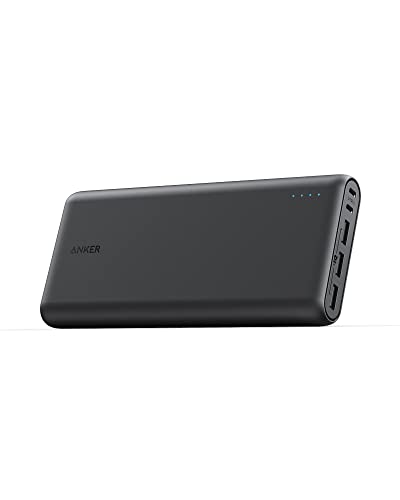
Anker PowerCore 26800mAh Power Bank
#6
complement

Anker PowerCore 26800mAh Power Bank

$59.99

A high-capacity portable charger that can extend the Steam Deck's battery life significantly. Supports USB-C Power Delivery for fast charging.

πŸ’‘ Why We Recommend It

Battery life is a common complaint; a power bank can double or triple playtime on the go.

βœ“ Best For

Travelers and long gaming sessions away from outlets.

πŸ›’ Check Price on Amazon β†’
ASUS ROG Ally Handheld
#7
alternative

ASUS ROG Ally Handheld

$699.99

A competitor handheld PC with a 120Hz display, Windows 11, and a more powerful AMD Z1 Extreme processor. Higher performance but also higher price.

πŸ’‘ Why We Recommend It

If you need more graphical power and don't mind Windows, the ROG Ally is a strong alternative.

βœ“ Best For

Users who want maximum performance and are willing to spend more.

πŸ›’ Check Price on Amazon β†’

Bottom Line

The Steam Deck is a fantastic device for PC gamers who want portability and already have a library of games. If you travel frequently, have downtime away from your desk, and enjoy indie and AAA games, it's a great buy. However, if you're a casual gamer who only plays a few hours a week and doesn't have a Steam library, a Nintendo Switch might be a better fit. Also, if you need high-end performance for the latest AAA titles, a gaming laptop or desktop is more capable. Buy the Deck if you understand its limitations and are excited about the idea of playing your PC games anywhere.

Best For

  • βœ“Gamers with a large Steam library who want portability
  • βœ“Frequent travelers or commuters who have gaming time away from home
  • βœ“Indie game enthusiasts who play less demanding titles
  • βœ“Tech enthusiasts who enjoy customization and tinkering
  • βœ“Parents who want to play PC games while supervising kids
  • βœ“Backlog gamers who want to clear their Steam library anywhere

Not Recommended For

  • βœ—People who only play Nintendo exclusive games (buy a Switch instead)
  • βœ—Casual gamers who play a few hours per week and prefer simplicity
  • βœ—Players who want the highest graphical fidelity and 4K gaming
  • βœ—Budget-conscious buyers who can't afford extra accessories (SD card, case)
  • βœ—Users who need a laptop for work/school and want a gaming device-combo
  • βœ—People who dislike troubleshooting and tweaking technical settings

Frequently Asked Questions

Should I buy Steam Deck in 2026?

Yes, if you have a large Steam library and want portable gaming. It's still relevant in 2026 with continued software support, but consider upcoming models if you can wait.

Is Steam Deck worth buying?

For PC gamers who value portability, yes. It offers great value for money, converting your Steam library into a portable system. However, for casual gamers or Nintendo fans, it may not be worth it.

Should I get Steam Deck or Nintendo Switch?

It depends on your game library. If you love Nintendo exclusives, get the Switch. If you have a large Steam library, get the Steam Deck. The Switch is lighter and has better battery life, while the Deck is more powerful and versatile.

Is Steam Deck a good buy for emulation?

Absolutely. The Steam Deck is one of the best emulation devices, capable of running most systems up to PS3. It's a great buy for retro gaming enthusiasts.

When should I buy the Steam Deck?

The best time is during Steam sales or Black Friday for discounts. Also, consider if you need it now vs. waiting for a potential Steam Deck 2 (no official release date yet).

What should I consider before buying Steam Deck?

Consider your game library, how often you'll use it, your tolerance for tweaking, budget for accessories, and whether you prefer a lighter device like the Switch.

Who should buy Steam Deck?

PC gamers with a large Steam library, frequent travelers, indie game lovers, and tech enthusiasts who enjoy customization.

Can I play Windows games on Steam Deck?

Yes, through Steam's Proton compatibility layer. Many Windows games work, but some require tweaks or installing Windows. Check ProtonDB for game compatibility.

How long does the Steam Deck battery last?

2-8 hours depending on game intensity. Lower-demand indie games last longer, while AAA titles drain faster. You can adjust settings to extend battery life.

Is the Steam Deck comfortable to hold?

Most users find it comfortable due to its ergonomic grips, but it is heavy (669g). Extended use may cause fatigue; a carrying case or grip can help.

Should I buy the 64GB or 512GB Steam Deck?

If you're on a budget and don't mind using a microSD card for storage, the 64GB is fine. The 512GB offers faster internal storage and an anti-glare screen, which is better for outdoor use.

What accessories should I buy with Steam Deck?

Essential accessories: a microSD card for storage, a screen protector, a carrying case, and a power bank for longer sessions. Optional: docking station for TV play.

Ready to Make Your Decision?

We hope this guide helped you decide whether Steam Deck is right for you.

πŸ›’ Buy Steam Deck on AmazonAs an Amazon Associate we earn from qualifying purchases.
Browse More Guides