

#1
main
Razer Blade 14 Gaming Laptop
$1999
The star of the show: flagship 14-inch gaming laptop with RTX 4070.
💡 Why We Recommend It
Direct purchase if it fits your needs.
✓ Best For
Dedicated gamers and creators.
Get the App
Better experience on mobile
Overcome hesitation about the $1999 Razer Blade 14—decide if its premium power fits your gaming and portability needs without regret.
Razer Blade 14 is excellent for portable high-performance needs but not for everyone due to price and battery. Ideal for pros; alternatives better for value seekers. Weigh your usage before deciding.
You're eyeing the Razer Blade 14 because it's one of the most powerful 14-inch gaming laptops, promising uncompromised performance in a sleek, portable package—but at $1999, you're wondering if it's worth the premium price or if cheaper alternatives deliver similar punch. Common hesitations include battery life concerns, thermal throttling during long sessions, Razer's spotty customer support, and whether you truly need its power for everyday tasks.
This guide tackles your doubts head-on: we'll break down real user experiences, compare to rivals, and give you a clear decision framework. Spoiler: It's a 'depends'—perfect for mobile gamers, but overkill (and overpriced) for casual users.
The Razer Blade 14 is Razer's flagship slim gaming laptop, blending high-performance components into a vapor-chamber-cooled aluminum unibody that's just 0.66 inches thick and weighs 3.59 pounds. Key specs include AMD Ryzen 9 8945HS CPU, up to RTX 4070 GPU, 32GB DDR5 RAM, 1TB PCIe SSD, and a 14-inch 2560x1600 240Hz display with 100% DCI-P3 color accuracy.
It excels at 1440p gaming at high frame rates, video editing, 3D rendering, and even light AI workloads, all while being portable enough for travel. Razer builds it with premium materials and customizable RGB keyboard, sold via their site, Best Buy, or Amazon. Its popularity stems from being the 'MacBook of gaming laptops'—stylish, powerful, and MacBook-thin without sacrificing guts.
The $1999 price tag is the biggest hurdle; many hesitate wondering if it's inflated for the Razer brand when Lenovo or ASUS offer similar specs for $1500 less. Battery life is another fear—expect 4-6 hours for light use, but just 1-2 hours gaming unplugged, leading to 'range anxiety' for travelers.
Buyers worry about thermals causing throttling after 30 minutes of heavy loads, Razer's history of build quality issues (e.g., screen wobble, hinge problems), and poor warranty support based on Reddit and forum complaints. Timing matters too—with new 2025 AMD/RTX refreshes rumored, is now the right time? Many compare to ASUS ROG Zephyrus G14 or MSI Stealth, fearing buyer's remorse if it doesn't outperform value options.
College student gaming occasionally, doing homework, light Photoshop; wants portability.
Budget: Under $1200
Usage: 4-6 hours/week gaming, daily schoolwork.
Why: Too expensive for light use; battery/thermals frustrate portability. Better value elsewhere.
Consider instead: Lenovo IdeaPad Gaming 3 with RTX 4050.
Freelancer editing 4K footage, Premiere/DaVinci, travels to client sites.
Budget: $2000+
Usage: Daily 8+ hours creative work, occasional gaming.
Why: RTX 4070 accelerates renders; portable power matches workflow perfectly.
Competitive gamer attending LANs, streams Twitch.
Budget: $2000-$2500
Usage: 20+ hours/week high-FPS gaming.
Why: 240Hz display + slim design ideal for travel/tourneys; performance shines.
Remote employee using Excel, Zoom, Netflix; rarely games.
Budget: $800-$1000
Usage: Light daily tasks, plugged in.
Why: Overpowered and wasteful; poor battery for unplugged use.
Consider instead: Dell Inspiron 14 with Ryzen 7.
Owns 2019 laptop, wants future-proof gaming machine.
Budget: $1800+
Usage: Weekend AAA gaming, modding.
Why: Major upgrade in portability/performance; resale softens cost.
Ideal for power users like esports pros, game developers, or video editors needing mobility without bulk—real owners rave on NotebookCheck about 100+ FPS in AAA titles at 1440p. However, casual gamers report frustration with heat/noise on r/GamingLaptops.
Vs alternatives: ASUS ROG Zephyrus G14 ($1800) matches performance with better battery/thermals; Lenovo Legion Slim 5 ($1400) crushes value; MacBook Pro M3 ($2000) wins for creators but no discrete GPU. Amazon's top rival is the Gigabyte Aorus 14 (similar specs, $1600).
Long-term: 3-year lifespan with upgrades, but resale dips if thermals fail. Experts (PCMag 4/5) praise design; users (3.9/5 Amazon) cite support issues. In 2025, expect RTX 50-series refresh—current model still competitive amid OLED trend.
The star of the show: flagship 14-inch gaming laptop with RTX 4070.
Direct purchase if it fits your needs.
Dedicated gamers and creators.

Cheaper rival with similar AMD/RTX specs, better battery, OLED option.
Nearly identical performance for $200 less.
Value-focused buyers.

Budget beast with RTX 4060, larger screen, superior cooling.
Best value for high performance.
Cost-conscious gamers.

Dual-fan cooler reduces temps by 20C during long sessions.
Mitigates Blade's thermal issues.
Heavy users.

Slim portable charger for extended unplugged use.
Extends battery life on the go.
Travelers.

Water-resistant 14-inch sleeve for safe transport.
Protects premium chassis.
Portable users.
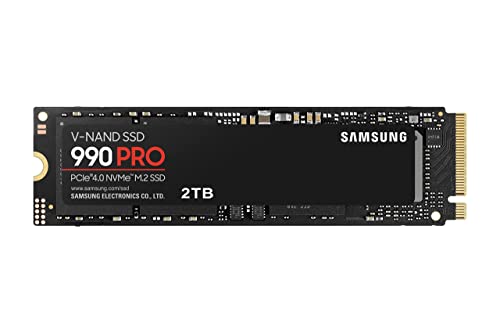
Fast upgrade for storage-heavy games/edits.
Easy swap doubles capacity.
Content creators.

Ergonomic gaming mouse with 30K DPI.
Perfect Razer ecosystem match.
Gamers.
The Razer Blade 14 shines for those prioritizing portability and power, but skip if budget or battery matters more—it's 'depends' on your needs. Buy if you're a traveling gamer/creator with $2000 ready; wait for 2025 refresh otherwise. Consider alternatives like ASUS G14 on Amazon for similar thrills cheaper.
Final advice: Test in-store, buy extended warranty, and pair with cooling accessories. If it aligns, pull the trigger confidently—no regrets for the right user.
Depends: Yes for mobile pros/gamers; no for casuals or budget buyers. See scenarios.
Strong for performance/portability, but value lags vs Lenovo/ASUS. Good if style matters.
Zephyrus for better battery/value; Blade for slimmer design/Razer software.
Worth it for heavy users; overpriced for light tasks—check usage first.
Now if needed; wait for Prime Day or 2025 models if patient.
Budget, thermals, battery, alternatives, and your workflow.
Traveling gamers/creators needing top power in 14-inch form.
Blade for portability; Legion for cooling/value.
4-6 hours light use; poor for gaming—carry charger.
Yes: SSD/RAM easy; GPU soldered.
We hope this guide helped you decide whether Razer Blade 14 is right for you.