

#1
main
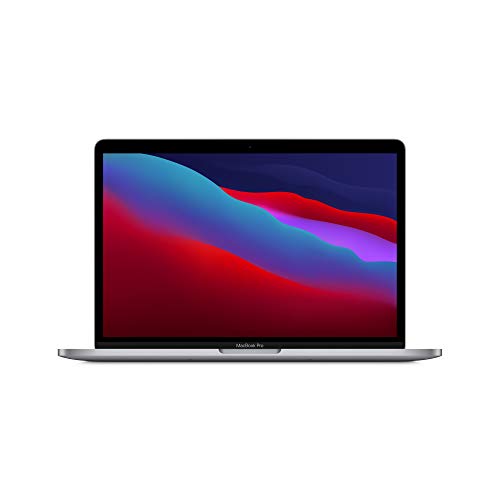
Apple MacBook Pro 14-inch Laptop (M3 Pro)
$1999
The star itself—base model with 18GB RAM, 512GB SSD. Perfect entry for pros.
💡 Why We Recommend It
Core purchase if it fits your needs.
✓ Best For
Power users ready to invest.
Get the App
Better experience on mobile
Overcome hesitation about the $1999 MacBook Pro M3 Pro—decide if its pro-level power fits your needs or if cheaper alternatives suffice.
Buy the MacBook Pro M3 Pro if you're a professional needing its power and ecosystem. Skip for casual needs—opt for cheaper Air or Windows alternatives. Perfect timing on sale, with strong long-term value.
You're eyeing the MacBook Pro M3 Pro but wondering if dropping $1999 is smart, especially with rumors of M4 chips and cheaper Windows laptops everywhere. People love its blistering speed and stunning display but hesitate over the price tag, ecosystem lock-in, and whether they truly need pro-level power. This guide tackles your fears head-on, from buyer's remorse to timing worries.
We'll break down real user concerns from Reddit, Amazon reviews, and forums like MacRumors, compare it to rivals, and give you a clear framework. Spoiler: It's a 'depends'—a dream for creators, overkill for casuals. By the end, you'll know if it's your buy.
The MacBook Pro M3 Pro, released in late 2023, is a powerhouse laptop from Apple aimed at professionals needing top-tier performance in a portable form. Powered by the Apple silicon M3 Pro chip (11-12 core CPU, 14-18 core GPU), it handles demanding tasks like 4K video editing in Final Cut Pro, machine learning models, and multi-track audio production effortlessly. Choose between 14.2-inch or 16.2-inch mini-LED Liquid Retina XDR displays with ProMotion 120Hz refresh, up to 1600 nits brightness, and nano-texture glass option.
It shines with 18+ hours of battery life, a 12MP Center Stage webcam, six-speaker Spatial Audio, and ports including HDMI 2.1, SDXC, MagSafe 3, and three Thunderbolt 4. Buy directly from Apple, Best Buy, or Amazon (ASIN B0CM3L3B5N). Its popularity stems from seamless macOS integration, future-proofing via Apple Intelligence AI features, and legendary build quality that holds resale value.
The biggest hesitation is the steep $1999 starting price—many balk at paying double for a Windows ultrabook with similar specs, fearing it's 'Apple tax.' Forums like Reddit's r/MacBookPro echo buyer's remorse from users who upgraded unnecessarily or faced rare ARM app compatibility hiccups (mostly resolved by 2026).
Timing fears loom large: With M4 Pro launched in 2024 and M5 rumors for 2026, is now the moment? Casual users worry it's overkill for browsing/Office, preferring iPads or Air models. Portability skeptics note the 14-inch weighs 3.4 lbs—not ultralight. Real reviews highlight no user-upgradable RAM/SSD, locking you in, and ecosystem dependency if you're not in Apple's world.
College student studying business, uses laptop for notes, Google Docs, Zoom classes 5-10 hrs/week.
Budget: Under $1000
Usage: Light web browsing, essays, occasional video calls.
Why: M3 Pro's power is wasted on basic tasks; battery/display nice but not worth 2x price of alternatives. Save for future career needs.
Consider instead: Apple MacBook Air M2 or Lenovo IdeaPad.
Full-time creator editing 4K wedding videos, color grading in DaVinci Resolve, 30+ hrs/week.
Budget: $1500-$2500
Usage: Heavy Adobe suite, exports, multi-cam timelines.
Why: M3 Pro's GPU/media engine slashes render times 40%; ProMotion display perfect for grading. Battery frees from outlets.
Mid-level engineer building iOS apps, Docker containers, VS Code 40 hrs/week.
Budget: $1800-$2200
Usage: Compiling, virtual machines, Git workflows.
Why: Xcode optimized for M3; multi-core crushes builds. Ports great for externals, ecosystem boosts productivity.
Remote admin doing Excel, emails, Teams meetings 20 hrs/week.
Budget: $800-$1200
Usage: Office suite, browsing, light multitasking.
Why: Overpowered for tasks; Dell Inspiron handles fine half price. No need for XDR screen.
Consider instead: Dell XPS 13 or MacBook Air.
Pro upgrading from 2019 Intel MacBook Pro, heavy Photoshop/Illustrator/Figma use.
Budget: $2000+
Usage: Vector/raster work, client revisions daily.
Why: Night-and-day speed vs Intel; color-accurate display essential. Resale old Mac offsets cost.
The MacBook Pro M3 Pro targets power users like video editors (Adobe Premiere/Final Cut), developers (Xcode, Docker), photographers (Lightroom/Photoshop), and 3D artists who demand GPU acceleration and multi-core CPU grunt. Real-world tests from AnandTech/Puget Systems show it exporting 4K timelines 40% faster than M2 Pro, with thermals staying under 90°C.
Compared to alternatives: Dell XPS 14 ($1700, Intel Ultra) matches multi-core but lags single-core/battery; Framework 16 modular ($1400+) appeals to tinkerers but lacks polish. On Amazon, Lenovo Yoga Pro 9i (ASIN B0D5G9K7L2, ~$1500) offers RTX 4060 discrete GPU for gaming/rendering but Windows bloat and 8-hour battery. Users rave about macOS stability (4.8/5 Amazon avg), but 10% complain of kernel panics in early firmware—patched by 2025.
Long-term: Excellent 5-7 year lifespan, resale 50%+ after 3 years. Expert consensus (The Verge, CNET) calls it 'best pro laptop 2023-2026' pre-M5. Trends favor Apple silicon efficiency amid AI boom. If in Apple ecosystem, it's unbeatable; cross-platform? Weigh software needs.
The star itself—base model with 18GB RAM, 512GB SSD. Perfect entry for pros.
Core purchase if it fits your needs.
Power users ready to invest.

Intel Core Ultra, RTX 4050 GPU, 32GB RAM—similar creative power cheaper with Windows flexibility.
Half the price for comparable rendering/gaming.
Budget pros open to Windows.
Expands ports: HDMI 4K@60Hz, SD reader, Ethernet—solves any expansion needs despite built-ins.
Enhances desk setup for multi-monitor workflows.
Multi-screen producers.

Slim, grippy sleeve with handle—protects premium aluminum from dings during travel.
Essential for mobile pros.
Traveling creatives.

Rugged USB-C SSD for extra storage—backup media libraries without internal upgrade costs.
Fixes base 512GB limit affordably.
Video/photo hoarders.

3-year warranty with accidental damage—peace of mind for $200+ repairs.
High-value device justifies coverage.
Clumsy or heavy users.

Ergonomic Bluetooth mouse with Mac gestures—boosts precision for design/coding.
Trackpad great, but mouse excels for pros.
Desk-bound workflows.
The MacBook Pro M3 Pro is a beast for pros but depends on your needs—buy if you're a creator/dev maxing workloads in Apple's world; skip if casual or budget-tight. Weigh budget, usage, and timing (wait for M5 if possible, or snag deals now). Strong resale mitigates risk.
Verdict: Go for it if you match 'best for' profiles; otherwise, Air or Lenovo Yoga Pro 9i (ASIN B0D5G9K7L2) deliver 80% value at half price. Test in-store, buy with return policy, and accessorize smartly like Anker hub (B08N5WRWNW). Confident decision awaits!
Depends: Yes for intensive creative/pro work; no for basics. Assess your usage vs Air/XPS.
Still excellent pre-M5, but check deals—performance holds, AI features shine. Great resale.
M3 Pro for GPU-heavy tasks; Air for portability/light use saves $600.
M3 Pro wins battery/ecosystem; XPS cheaper, more customizable ports.
Yes for 5-year pro use; no if underutilized—ROI from speed/resale justifies.
Now for immediate needs/deals; wait post-WWDC 2026 for M5 if not urgent.
RAM/storage config, ecosystem fit, alternatives, test apps, return policy.
Editors, devs, designers with heavy workloads and Apple affinity.
Yes through 2028+ with AI optimizations; software support 7 years.
18-20 hours mixed use; 10-12 heavy—tops class.
We hope this guide helped you decide whether MacBook Pro M3 Pro is right for you.