

#1
main
Acer Predator Helios 16 Gaming Laptop
$1799
The star itself: RTX 4070 model with i9, 32GB RAM, 1TB SSD. Prime shipping and returns.
💡 Why We Recommend It
Core purchase for high-end gaming.
✓ Best For
Serious gamers and creators
Get the App
Better experience on mobile
Overcome hesitation about the $1799 Acer Predator Helios 16 gaming laptop—we break down if its power justifies the price for your gaming and productivity needs.
Buy if you're a power user with budget and stationary setup—delivers exceptional value. Skip/wait if portability or cost concerns you; alternatives abound. Assess via our framework for confidence.
You're eyeing the Acer Predator Helios 16, but that $1,799 price tag has you second-guessing: Is this beast of a gaming laptop worth it, or will it gather dust after the hype fades? Many hesitate over its bulk, battery life, and whether cheaper alternatives deliver similar thrills. People consider it for AAA gaming at high settings, video editing, and multitasking without compromise.
This guide tackles your doubts head-on, from real user regrets to glowing reviews. We'll explore pros, cons, and fit for your life. Spoiler: It's a 'depends'—perfect for serious gamers, overkill for casuals.
The Acer Predator Helios 16 is a premium gaming laptop built for high-performance tasks. It packs 13th/14th-gen Intel Core i7/i9 CPUs, NVIDIA GeForce RTX 4060-4080 GPUs, 16GB-32GB RAM, 1TB SSD (expandable), and a stunning 16-inch 2560x1600 IPS display at 240Hz with G-Sync. Acer's Predator line emphasizes aggressive styling with per-key RGB keyboards, 5th-gen AeroBlade 3D fans, and liquid metal thermal paste for sustained boosts.
Made by Acer, a Taiwanese giant in budget-to-premium PCs, it's sold via Amazon, Best Buy, and Acer.com. It's popular for blending workstation power with gaming flair—run Cyberpunk 2077 at ultra or edit 4K video seamlessly. What sets it apart: 5-zone mini-LED display option, AI-optimized NitroSense software, and robust build versus slimmer ultrabooks.
The biggest hesitation is the steep $1,799 price—buyers wonder if it's overkill when $1,000 laptops handle Fortnite fine. Forums like Reddit's r/GamingLaptops highlight battery life (2-3 hours unplugged), weighing 5.7lbs making it non-portable, and fan noise like a jet engine during loads.
Fear of buyer's remorse looms: Will it age quickly with new RTX 50-series looming? Many compare to ASUS ROG Strix or Lenovo Legion, questioning Acer's build quality reputation. Timing worries—wait for Black Friday or 2026 refreshes?—and uncertainty if you need desktop replacement power add to paralysis.
College student gaming occasionally, doing homework, tight on cash.
Budget: Under $1,200
Usage: 2-3 hours gaming/week + schoolwork
Why: Overpowered and pricey for light use; battery/weight issues hurt portability. Better value elsewhere.
Consider instead: MSI Thin GF63 gaming laptop
20-something playing AAA games 30+ hours/week at home.
Budget: $1,500-$2,000
Usage: High-settings gaming marathons
Why: RTX 4080 crushes demands; cooling sustains boosts. Great display/IO.
Freelancer editing 4K footage, occasional gaming, desk-based.
Budget: $1,800+
Usage: 8+ hours rendering/editing daily
Why: i9 + RTX power accelerates workflows; color-accurate screen shines.
Remote worker needing laptop for emails, light tasks, travel often.
Budget: $1,000-$1,500
Usage: Portable web/office use
Why: Heavy, short battery—wrong for mobility. Slimmer options better.
Consider instead: Dell XPS 13 or similar ultrabook
Old laptop owner wanting future-proof rig for games/work.
Budget: $1,700-$2,200
Usage: Mixed heavy gaming/productivity
Why: Upgradable specs extend life; outperforms predecessors hugely.
Ideal for competitive gamers, streamers, and creators needing raw power—think esports pros grinding Valorant or YouTubers rendering Premiere Pro timelines. Real users on Amazon (4.5/5 stars, 500+ reviews) praise frame rates but gripe about heat/weight; PCMag calls it 'budget RTX 40 beast' vs pricier Razer.
Versus alternatives: Cheaper MSI GF63 ($800, RTX 4050) for casuals; premium ASUS ROG Zephyrus ($2,200, slimmer) for portability. On Amazon, Lenovo Legion Pro 5i (B0C7C4R9GQ-like) offers similar specs cheaper. Long-term: Strong resale (70% value after 2 years), but dust buildup needs cleaning.
Expert takes (Laptop Mag): Top mid-range gamer. Trends: RTX 40-series maturing, but 50-series 2026 may drop prices 20%. Users love expandability but regret portability—perfect desk warrior.
The star itself: RTX 4070 model with i9, 32GB RAM, 1TB SSD. Prime shipping and returns.
Core purchase for high-end gaming.
Serious gamers and creators

Ergonomic wired mouse with 6400 DPI optical sensor—perfect for precise aiming in FPS games on your Helios.
Enhances gaming precision.
Competitive players

Compact RGB mechanical keyboard to pair with Helios for desk setup, reducing laptop keyboard wear.
Better typing/gaming experience.
Extended sessions

Dual fans cool your Helios during marathons, extending component life amid its already strong internals.
Manages extra heat.
Long gaming runs
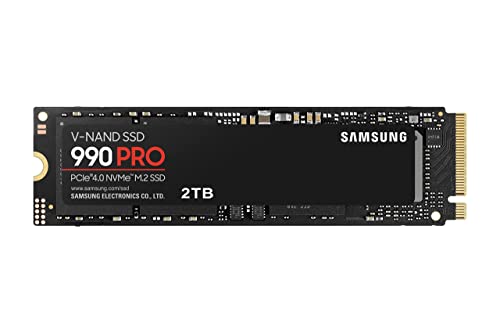
PCIe 4.0 SSD for easy Helios storage expansion—add games without slowdowns.
Future-proofs storage.
Large game libraries

Lightweight headset with 7.1 surround for immersive audio on Predator games.
Upgrades sound.
Immersive gaming

Budget RTX 4050 option for casuals—similar form but less power.
Cheaper entry to gaming.
Light users

Padded 16-inch sleeve protects your Helios during rare travels.
Safeguards investment.
Occasional movers
The Acer Predator Helios 16 shines for power-hungry users but falters on portability—buy if you're desk-bound and crave top-tier gaming/creation. Skip if budget-tight or mobile-first; wait for 2026 RTX 50 models potentially slashing prices.
Final advice: Use our questions/scenarios to self-assess. If yes, grab on Amazon (B0CP8D4R5S) with accessories like cooling pad (B0C7C4R9GQ). Confident? Hit buy. Doubts? Explore MSI alternatives.
Depends: Yes for heavy gamers/creators; no for casuals/portable needs. Matches your usage?
Strong at $1,799 for RTX 40 power, but wait for RTX 50 refresh if not urgent—sales make it great value.
Helios better cooling/display; Legion slimmer/better battery. Choose Helios for raw power.
Yes for 1440p ultra gaming; overkill otherwise—compare specs to needs.
Now if needed; wait for Black Friday/Prime Day or 2026 models for 20% off.
Budget, battery tolerance, usage intensity, alternatives like ASUS ROG.
Gamers/editors with $1,800 budget, desk use— not travelers.
2-4 hours light use; plug in for gaming.
3-5 years with upgrades; RTX 40 handles 2026 titles well.
Fan noise, weight, bloatware—fixable with tweaks.
We hope this guide helped you decide whether Acer Predator Helios 16 is right for you.