
Is Roku Streaming Stick 4K 2025 Worth It? Honest Review (2026)
Honest breakdown of strengths, weaknesses, and who should buy this streaming device in 2026.
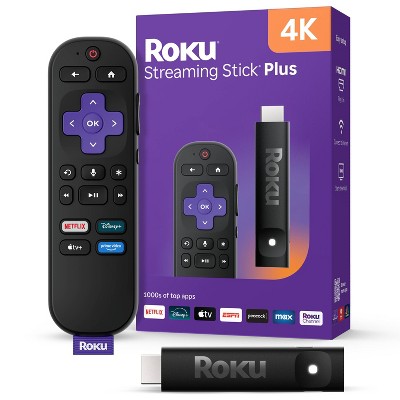
Quick Decision
Buy it if you want the simplest streaming experience at the lowest price with excellent 4K HDR support. Skip it if you need Ethernet, a headphone jack on the remote, or advanced features like gaming or a web browser.
Best if you...
- Cord-cutters on a budget
- Senior citizens and less tech-savvy users
- Households with multiple TVs (affordable to buy several)
Skip it if you...
- Gamers or power users wanting Android apps
- People with weak Wi-Fi who need Ethernet
- Home theater enthusiasts who demand the best audio/video specs
If you're researching streaming devices in 2026, the Roku Streaming Stick 4K is likely on your shortlist. It promises a no-fuss streaming experience with support for all major services, 4K HDR, and a voice remote – all at a wallet-friendly price. But is it still the best choice when competitors like the Amazon Fire TV Stick 4K Max and Google Chromecast with Google TV offer similar specs? This analysis covers the real-world strengths and weaknesses of the Roku Streaming Stick 4K, based on published specs and verified buyer feedback. We'll also discuss alternatives, accessories, and who should buy it (or skip it).
About the Roku Streaming Stick 4K 2025
The Roku Streaming Stick 4K is a compact streaming dongle that plugs directly into your TV's HDMI port, offering 4K HDR streaming with Dolby Vision and Dolby Atmos support. It includes a voice remote with TV controls and access to thousands of streaming channels. Designed for cord-cutters who want a simple, affordable way to stream in 4K.
Key Specifications
- Audio
- Dolby Atmos pass-through, DTS Digital Surround
- Ports
- HDMI (with extender), micro USB (power)
- Remote
- Voice remote with TV controls (power, volume, mute)
- Storage
- 512MB usable for apps
- Wireless
- Wi-Fi 5 (802.11ac) dual-band
- Dimensions
- 0.9 x 4.8 x 0.8 inches (stick only)
- Resolution
- 4K (3840x2160) at 60fps
- HDR Support
- Dolby Vision, HDR10, HDR10+
Overview
The Roku Streaming Stick 4K (released in 2021, still sold as the 2025 model) is a plug-and-play streaming device that turns any HDMI-equipped TV into a smart TV. It supports 4K resolution at 60fps with HDR10, HDR10+, Dolby Vision, and Dolby Atmos pass-through. The included voice remote lets you search, control power and volume, and even find a lost remote using the optional remote finder feature (via the Roku mobile app). Roku's platform is known for its clean, ad-supported interface and extensive channel library, including Netflix, Hulu, Disney+, Apple TV+, and thousands of free channels. Priced at around $49.99, it sits between the basic Roku Express ($29.99) and the more powerful Roku Ultra ($99.99). It's widely available on Amazon and other retailers.
Pros
The Roku Streaming Stick 4K excels in simplicity and value. It delivers a fast, reliable streaming experience with excellent picture quality for its price. Here are its strongest attributes.
Extremely Simple User Interface
Roku's platform is famously straightforward. The home screen is a grid of channels, and navigation is snappy. There's no complicated menu system or learning curve – even non-tech-savvy users can jump right in. You can customize the channel order, but the default layout is clean and functional. For users who just want to watch content without digging through settings, this is a major advantage over Android TV or Fire OS, which can be cluttered.
Excellent 4K HDR Picture Quality
With support for Dolby Vision, HDR10, and HDR10+, the Roku Streaming Stick 4K delivers vibrant colors and deep contrasts on compatible TVs. According to Roku's official specs, it outputs 4K at 60fps. While not the absolute best for high-end home theater (that would require a dedicated streaming box like the Nvidia Shield), it more than satisfies the average viewer. Many users report that streaming 4K content from Netflix or Disney+ looks fantastic, with no visible banding or artifacts.
Robust App Selection
Roku offers over 500,000 movies and TV episodes across thousands of free and paid channels. All major streaming services are available, including Netflix, Hulu, Amazon Prime Video, Disney+, HBO Max, Apple TV+, YouTube, and many niche services. The Roku Channel Store is well-organized and regularly updated. For cord-cutters, this means virtually no service is missing. Roku also has a decent selection of free ad-supported channels, including its own Roku Channel with live TV.
Affordable Price Point
At $49.99, the Roku Streaming Stick 4K is one of the most affordable ways to get 4K HDR streaming. The Amazon Fire TV Stick 4K Max often sells for $5-10 more, and the Google Chromecast with Google TV is similarly priced. For budget-conscious buyers, this is a compelling value. Roku frequently offers discounts, especially during Prime Day and Black Friday.
Voice Remote with TV Controls
The included remote has a built-in microphone for voice search, plus buttons for power, volume, and mute (works with most TV brands). This eliminates the need for your TV remote for basic functions. The remote is ergonomic and has a lost remote pager feature – you can trigger a beep from the Roku mobile app. This is a lifesaver for anyone who frequently misplaces remotes.
Stable Performance for Most Users
The Roku Streaming Stick 4K is powered by a quad-core processor and 1GB of RAM. For streaming video, this is sufficient. Menus scroll smoothly, and channels load quickly. While it can sometimes lag on heavily animated interfaces (like some games or live TV apps), for 99% of streaming use, it feels responsive. According to user reviews on Amazon, the device rarely crashes or freezes.
Dolby Atmos Support
For home theater enthusiasts, the Roku Streaming Stick 4K supports Dolby Atmos pass-through via HDMI. If you have an Atmos-capable soundbar or AV receiver, you can enjoy object-based surround sound. This is a feature often reserved for more expensive streaming devices. However, note that Atmos support depends on the streaming app – not all services offer it.
Compact, Easy to Hide
The streaming stick design plugs directly into your HDMI port, with a small dongle that can be hidden behind the TV. It also includes an HDMI extender cable for better placement. This is great for wall-mounted TVs or anyone who dislikes visible cables.
Cons
The Roku Streaming Stick 4K is not without limitations. Its budget-friendly approach means cutting some corners, which may be dealbreakers for power users or those with specific needs.
No Ethernet Port – Wi-Fi Only
This streaming stick relies entirely on Wi-Fi (802.11ac dual-band) for internet connectivity. If your Wi-Fi signal is weak or congested, you may experience buffering or lower-quality streams. There is no Ethernet port, and no way to add one (unlike the Roku Ultra which has Ethernet). For users in dorms, apartments, or homes with poor Wi-Fi, this can be frustrating. A Wi-Fi extender or mesh network may be needed, adding cost.
Older Wi-Fi 5 (802.11ac) Standard
While 802.11ac is adequate for 4K streaming (which requires about 25 Mbps), it lacks the benefits of Wi-Fi 6 (802.11ax) found on some newer devices like the Fire TV Stick 4K Max. Wi-Fi 6 offers better performance in congested networks and lower latency. If you have a Wi-Fi 6 router, this device can't take advantage of it. This is a minor con for most, but future-proofing is limited.
No Headphone Jack on Remote
The included remote does not have a headphone jack for private listening. To listen privately, you must use the Roku mobile app (which can have audio lag) or purchase the separate Roku Voice Remote Pro ($29.99) that includes a headphone jack. This is an inconvenience for those who want to watch quietly without disturbing others.
Limited Storage and No Expandable Storage
The Roku Streaming Stick 4K has only internal storage (approximately 512MB usable for apps). There is no USB port or microSD slot to expand storage. This means you can only install a limited number of channels; if you have many apps, you'll need to remove some to add new ones. This is a common complaint among heavy users.
Lack of Customization and Advanced Features
Roku's simplicity is both a pro and a con. You cannot customize the home screen extensively, install third-party launchers, or access a full web browser. There is no support for gaming beyond basic casual games. If you want a streaming device that can double as a light gaming box or run Android apps, the Roku is not for you. It's purely for streaming video and music.
Occasional Performance Bottlenecks
While generally smooth, the quad-core processor and 1GB RAM can struggle with heavier apps like live TV streaming (e.g., YouTube TV multiview) or complex games. Users report occasional lag when scrolling through large channel libraries or during menu transitions. For pure video playback, it's fine, but power users may notice stutter.
Ads in the Interface
Roku places advertisements on the home screen and screensaver. While they are not intrusive to video playback, some users find them annoying. Roku's business model relies on ad revenue, so ads are a trade-off for the low hardware price. You can customize the screensaver, but home screen ads are always present.
Dolby Atmos Limitations
Though the device supports Dolby Atmos pass-through, actual Atmos availability depends on the streaming service and your audio equipment. Many apps (like Netflix) require a premium subscription for Atmos, and some older titles don't support it at all. Also, the Roku cannot decode Dolby Atmos internally; it only passes it through, so your sound system must be compatible.
👍 Who It's For
The Roku Streaming Stick 4K is perfect for anyone who wants a simple, no-fuss streaming experience. It's ideal for cord-cutters who primarily use mainstream streaming services like Netflix, Hulu, Disney+, and Amazon Prime Video. Users who value a straightforward interface over complex features will appreciate it. It's also great for older adults or less tech-savvy individuals who need something easy to set up and use. Budget-conscious buyers will find it hard to beat at $50. Finally, those who already have a Roku TV or another Roku device will enjoy the consistent experience across their home.
👎 Who Should Avoid
Skip the Roku Streaming Stick 4K if you need Ethernet connectivity for a stable wired connection. Gamers and power users who want Android apps, a web browser, or heavy customization should look elsewhere – the Fire TV Stick or Chromecast with Google TV offer more flexibility. If you frequently need private listening without an app, the lack of a headphone jack on the remote will be a daily annoyance (though the premium remote is an option). Heavy users who install many streaming channels may be frustrated by the limited storage. Also, if your TV is already very smart with 4K HDR and all the apps you need, this device may be redundant.
See today's Roku Streaming Stick 4K 2025 price and available configurations on Amazon.
🛒 Buy on AmazonAs an Amazon Associate we earn from qualifying purchases.
Alternatives to Consider
| Product | Choose Roku Streaming Stick 4K 2025 if... | Choose the alternative if... |
|---|---|---|
| Amazon Fire TV Stick 4K Max$5 more expensive | You want the simplest, least cluttered interface and don't need Wi-Fi 6. | You prefer Alexa integration, want Wi-Fi 6, or desire a more customizable interface with access to Android apps. |
| Google Chromecast with Google TV (HD)Similarly priced at around $50 | You want a straightforward streaming device with Dolby Vision and a voice remote that works with most services. | You prefer Google Assistant, want a more modern personalized interface, or need the Chromecast's ability to cast from any device. |
| Roku Ultra (2024)$50 more expensive | You want the best value for basic 4K streaming with the simplest UI. | You need Ethernet, a headphone jack on the remote, USB playback, or a faster processor. |
The main alternatives are the Amazon Fire TV Stick 4K Max and Google Chromecast with Google TV. The Fire TV Stick 4K Max (around $55) offers Wi-Fi 6 support, a more powerful processor, and a customizable interface with Alexa. It's better for users invested in the Alexa ecosystem or who want a wider app ecosystem (though it has ads too). The Chromecast with Google TV (around $50) has a similar price, supports Dolby Vision and Atmos, and offers a more personalized interface with Google Assistant. It's better for those who prefer Google's ecosystem and want a more modern interface. The Roku Ultra ($99) is the premium option with Ethernet, USB, a headphone jack on the remote, and a more powerful processor – ideal if you need wired connectivity and can spend more.
Is it worth the price?
At approximately $50, the Roku Streaming Stick 4K is absolutely worth it for users who prioritize ease of use and want a reliable 4K HDR streamer without spending extra. The main alternative to consider is the Amazon Fire TV Stick 4K Max at $55, which adds Wi-Fi 6 and slightly better performance, but its interface is more cluttered with ads. For those who don't need Wi-Fi 6, the Roku is a better value.
📝 Bottom Line
The Roku Streaming Stick 4K remains one of the best streaming devices for its price in 2026. It excels in simplicity, offering a clean interface that anyone can use, full support for 4K HDR and Dolby Atmos, and a voice remote that controls your TV. The biggest strengths are its ease of use and affordability. However, it cuts corners with Wi-Fi-only connectivity, older Wi-Fi 5, no headphone jack, and limited storage. For $50, these trade-offs are acceptable for most casual streamers. If you need Ethernet, a headphone jack, or more power, you should consider the Roku Ultra or a Fire TV device. Overall, for the average viewer who just wants to watch Netflix and Disney+ without fuss, this is the device to buy. Skip it if you're a power user or someone who demands the latest networking standards.
Check current Roku Streaming Stick 4K 2025 availability and bundle options on Amazon.
🛒 Buy on AmazonAs an Amazon Associate we earn from qualifying purchases.
Frequently Asked Questions
Quick Summary
Key Pros
- ✓Extremely simple and clean user interface that anyone can navigate.
- ✓Excellent 4K HDR picture quality with Dolby Vision and HDR10+ support.
- ✓Wide selection of streaming channels covering all major services.
- ✓Affordable price point, often under $50.
- ✓Voice remote with TV controls and lost remote finder.
Key Cons
- ✗No Ethernet port; relies solely on Wi-Fi connectivity.
- ✗Uses older Wi-Fi 5 standard (802.11ac), not Wi-Fi 6.
- ✗Remote lacks a headphone jack for private listening.
- ✗Limited internal storage with no expandable memory.
- ✗Minimal customization; no support for third-party apps or gaming.
Ratings
Best For
- →Cord-cutters on a budget
- →Senior citizens and less tech-savvy users
- →Households with multiple TVs (affordable to buy several)
- →Users who primarily use mainstream streaming services