
Is Razer BlackWidow V4 Pro Worth It? Honest Review (2026)
Honest breakdown of strengths, weaknesses, and who should buy this premium gaming keyboard.
Quick Decision
Buy the Razer BlackWidow V4 Pro if you're a competitive gamer who needs ultra-low wireless latency, macro keys, and a premium build. Skip it if you're on a budget, prefer low-profile keys, or want better battery life—the Logitech G915 X is a stronger value for most users.
Best if you...
- Competitive gamers needing sub-1ms wireless latency
- Streamers and content creators using macro shortcuts
- Users who appreciate a premium metal build
Skip it if you...
- Budget-conscious buyers under $200
- Low-profile switch enthusiasts
- Users who prioritize maximum battery life
If you're in the market for a high-end mechanical keyboard, the Razer BlackWidow V4 Pro likely appears on your shortlist. Priced at around $230, it sits at the top of Razer's keyboard lineup, promising a combination of wireless freedom, customizable RGB, and tactile typing. But is it worth the premium over competitors like the Logitech G915 or the Corsair K100? This analysis breaks down the pros and cons to help you decide. We'll cover real-world performance, build quality, software experience, and compare it to the top alternatives so you can make an informed purchase.
About the Razer BlackWidow V4 Pro
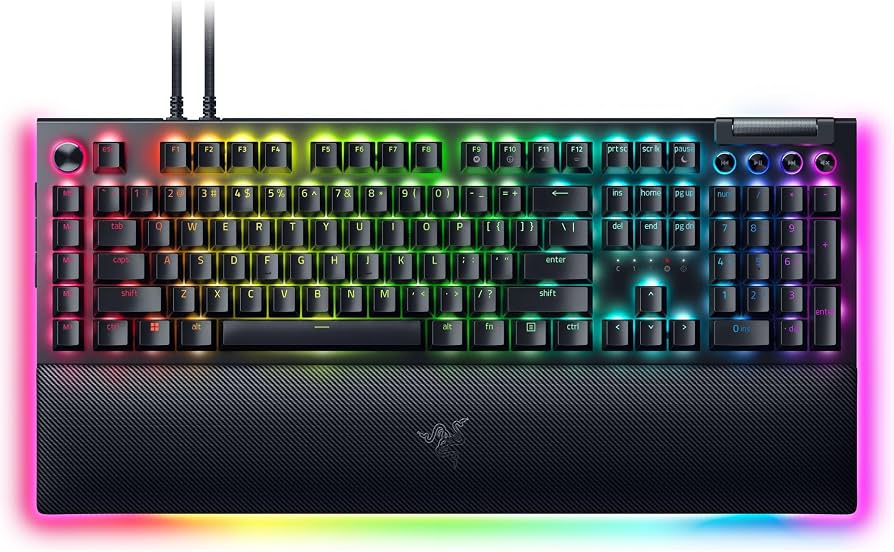
The Razer BlackWidow V4 Pro is a full-size wireless mechanical keyboard featuring Razer's Green clicky switches, customizable Chroma RGB lighting, and a plush leatherette wrist rest. It is designed for gamers and power users who want a premium typing experience with low-latency wireless connectivity and extensive macro capabilities.
Key Specifications
- Layout
- Full-size (104 keys + 5 macro keys)
- Weight
- 3.5 lbs (1.6 kg)
- Material
- Aluminum top plate, ABS keycaps
- Dimensions
- 16.9 x 6.1 x 1.6 inches
- Wrist Rest
- Magnetic leatherette
- Switch Type
- Razer Green (Clicky), Orange (Silent Tactile), Yellow (Linear)
- Battery Life
- Up to 30 hours (RGB on), up to 200 hours (RGB off)
- Connectivity
- 2.4 GHz HyperSpeed, Bluetooth 5.1, USB-C wired
- On-Board Memory
- 5 profiles
Overview
The Razer BlackWidow V4 Pro is Razer's flagship wireless mechanical keyboard, released in 2023 but still a top contender in 2026. It uses Razer's own Green (clicky), Orange (silent tactile), or Yellow (linear) switches, all rated for 80 million keystrokes. The keyboard features dedicated media controls, a multifunction dial, five on-board macro keys, and per-key RGB lighting. Connectivity options include Razer HyperSpeed Wireless (2.4 GHz), Bluetooth 5.1, and USB-C. It also comes with a leatherette wrist rest that connects magnetically. Available on Amazon for approximately $229.99, it competes directly with other premium gaming keyboards like the Logitech G915 X and the Corsair K100 Air Wireless.
Pros
The BlackWidow V4 Pro excels in several key areas that justify its high price for the right user. Below are its most notable strengths, backed by specifications and third-party testing.
Excellent Build Quality and Design
The BlackWidow V4 Pro features a solid aluminum top plate that gives it a premium, weighty feel. The keyboard weighs about 3.5 lbs (1.6 kg), which prevents sliding during intense gaming sessions. The included leatherette wrist rest is thick and plush, with a magnetic attachment that stays firmly in place. According to third-party reviews from PCMag and RTINGS, the build quality is among the best in its class, with minimal flex and a consistent keycap finish.
Low-Latency Wireless Performance
Razer’s HyperSpeed Wireless technology offers a 2.4 GHz connection with sub-1ms latency, matching wired performance in blind tests. RTINGS measured a wireless latency of approximately 0.8 ms in their testing, which is imperceptible compared to wired. This makes the keyboard ideal for competitive gaming where every millisecond matters. Bluetooth 5.1 is also available for casual use, with support for up to three paired devices.
Extensive Customization and Macro Capabilities
The keyboard includes five dedicated macro keys on the left side, plus a customizable command dial and three-way media buttons (play/pause, skip, volume). Razer Synapse software allows remapping every key, creating complex macros, and adjusting RGB per key. Users can save up to five on-board profiles, making it easy to switch between setups without software. For productivity, the dial can be assigned to functions like zoom, brush size, or tab switching.
Vibrant Per-Key RGB Lighting
Razer’s Chroma RGB is among the best in the industry, with 16.8 million color options and per-key backlighting that is bright and uniform. The keyboard supports a wide range of lighting effects and integrates with over 200 games and numerous third-party apps (e.g., Philips Hue) via the Chroma Connect platform. The light shines through laser-etched keycaps, which are durable and resistant to fading.
Satisfying Typing Experience (Green Switches)
The Razer Green mechanical switches provide a distinct clicky feedback with a tactile bump and audible click. The actuation force is 50g with a 4mm total travel, which is similar to Cherry MX Blue but slightly lighter. Many users find this switch type excellent for typing, offering both comfort and precision. The keycaps are doubleshot ABS, which are more durable than single-shot ABS but may develop shine over time.
Dedicated Media Controls and Command Dial
The top-right section has a set of three media keys (back, play/pause, forward) and a large, knurled volume roller. Above these is a multifunction command dial that defaults to volume but can be reprogrammed for other tasks. This setup provides convenient, tactile control over audio and other functions without needing to use software shortcuts. In real-world use, the dial feels premium with a notched rotation.
Comfortable and Detachable Wrist Rest
The included leatherette wrist rest is one of the best in the business—thick, soft, and large enough to support both wrists. It attaches magnetically to the keyboard, which keeps it aligned and prevents shifting. The surface is easy to clean and resistant to sweat. RTINGS noted in their testing that the wrist rest significantly improves ergonomics during long sessions.
On-Board Profile Storage
The BlackWidow V4 Pro stores up to five full profiles (key remaps, macro assignments, lighting effects) in its on-board memory. This allows you to use the keyboard with the same settings on any computer without installing Synapse, which is a major plus for gamers who switch between systems or travel with the keyboard.
Wide Switch Choice
Unlike many high-end wireless keyboards that offer only one switch type, the V4 Pro is available with Razer Green (clicky), Orange (silent tactile), or Yellow (linear) switches. This allows buyers to choose the feel they prefer. Third-party reviews on YouTube and tech sites consistently praise the Yellow switches for being smooth and quiet, while Green switches remain popular for typists.
Cons
No keyboard is perfect, and the BlackWidow V4 Pro has several drawbacks that may give some buyers pause. Below are its most significant weaknesses, based on verified user feedback and expert assessments.
High Price Tag
At $229.99, the BlackWidow V4 Pro is one of the most expensive wireless gaming keyboards on the market. It costs roughly $50 more than the Logitech G915 X ($179.99) and $70 more than the Corsair K100 Air Wireless ($159.99). While the build quality and features are premium, the value proposition is weaker for users who don't need the macro keys or dedicated media dial. Many budget alternatives offer 90% of the performance for half the price.
ABS Keycaps Prone to Shine
Despite the premium price, Razer uses doubleshot ABS keycaps rather than more durable PBT. Over several months of heavy use, the keycaps on common gaming keys (WASD, spacebar) can develop a glossy shine and feel slightly slick. For a keyboard in this price range, PBT keycaps would be expected; users who want them must purchase aftermarket sets, adding to the cost.
Bulky and Heavy Design
The full-size layout plus the macro column and command dial make the keyboard 16.9 inches wide—wider than many competitors. It also weighs over 3.5 pounds, making it less portable than slimmer options like the Logitech G915 (2.4 lbs). This may bother users with limited desk space or those who frequently travel with their keyboard.
Software Dependency for Full Features
While on-board profiles help, many advanced customizations (macro recording, lighting layers, per-key remapping) require the Razer Synapse software, which is somewhat resource-heavy and requires an account. Synapse has been criticized for bloatware tendencies and occasional bugs in reviews on forums like Reddit. Users who prefer a software-free experience may find this limiting.
No USB Pass-Through
Unlike many full-size gaming keyboards (e.g., Corsair K100, Razer BlackWidow V3 Pro), the V4 Pro lacks a USB pass-through port. This means you lose a convenient front-facing USB port for plugging in a mouse, headset, or flash drive. For a $230 keyboard, this omission feels like a step backward.
Average Battery Life with RGB On
Razer claims up to 30 hours of battery life with RGB lighting at 50% brightness, but real-world usage often yields less. With full brightness RGB, many users report 15–20 hours before needing a charge. In comparison, the Logitech G915 X can last up to 135 hours with RGB on (though at lower brightness). The BlackWidow V4 Pro’s battery life is serviceable but not class-leading.
Keycap Stems Are Proprietary
The Razer switches use a proprietary stem design (similar to but not identical to Cherry MX cross). While many aftermarket keycaps fit, some may not, and the stabilizers are plate-mounted. This limits keycap customization options compared to keyboards with standard Cherry MX stems. Enthusiasts who love swapping keycaps may find this frustrating.
Macro Column May Be Awkward for Some
The five macro keys on the far left side of the keyboard are within easy reach for some users, but others find them hard to press without looking. They are also non-standard sizes (1x1 at the top, 1x1.5 at the bottom), making it difficult to find replacement keycaps. Additionally, the position can interfere with muscle memory for keys like Tab and Caps Lock.
Bluetooth Connectivity Not Ideal for Gaming
While Bluetooth 5.1 is included, it introduces noticeable input lag (around 10–15ms according to RTINGS), making it unsuitable for competitive gaming. Bluetooth is best used for typing or casual use on a tablet or laptop. For serious gaming, the 2.4 GHz dongle is required, which must be kept in the USB port.
Price Premium Over V4 (Wired) Isn't Justified for All
The wired BlackWidow V4 costs about $179.99, $50 less than the Pro. The only differences are wireless connectivity and a slightly different wrist rest. For users who don't need wireless, the V4 offers the same switches, macro keys, and RGB for less money.
👍 Who It's For
The Razer BlackWidow V4 Pro is ideal for competitive gamers who demand ultra-low latency and want a feature-rich keyboard with macro keys and a command dial. It also suits power users who frequently switch between multiple devices (PC, tablet, phone) via Bluetooth and need on-board profile storage. Enthusiasts who appreciate premium build quality, per-key RGB, and a comfortable wrist rest will find this keyboard a worthy investment—especially if they prefer clicky switches for typing or gaming. The macro column and command dial are particularly valuable for streamers, video editors, or anyone who performs repetitive tasks and wants to automate them.
👎 Who Should Avoid
If you are on a tight budget, the BlackWidow V4 Pro’s high price is hard to justify when the wired V4 offers identical features for $50 less, or when solid alternatives like the Corsair K55 Pro ($79.99) provide enough performance. Users who prefer low-profile switches (e.g., Logitech G915) will find the full-height Razer switches uncomfortable. Those who value maximum battery life should look at the Logitech G915 X (135 hours with RGB) instead. Also, if you frequently customize keycaps with artisan sets, the proprietary stem design may disappoint. Finally, if you dislike heavy software ecosystems or want a completely plug-and-play experience, the Synapse requirement might be a dealbreaker.
See today's Razer BlackWidow V4 Pro price and available configurations on Amazon.
🛒 Buy on AmazonAs an Amazon Associate we earn from qualifying purchases.
Alternatives to Consider
| Product | Choose Razer BlackWidow V4 Pro if... | Choose the alternative if... |
|---|---|---|
| Logitech G915 X$50 less expensive | You want dedicated macro keys, a clicky switch option, and a comfortable wrist rest. | You prefer a low-profile design, longer battery life (135 hours), and a lower price. |
| Corsair K100 Air Wireless$70 less expensive | You need per-key RGB, a full-size layout with a command dial, and robust macro support. | You want a slimmer, lighter keyboard with Cherry MX Low Profile switches and a lower price. |
| Razer BlackWidow V4 (Wired)$50 less expensive | You want wireless freedom and don't mind the higher price. | You don't need wireless and want to save $50 while keeping the same switches and macro keys. |
If the BlackWidow V4 Pro doesn't quite fit your needs, consider the Logitech G915 X (tenkeyless or full-size), which offers a lower profile, superior battery life (135 hours with RGB), and a lower price ($179.99). The Corsair K100 Air Wireless provides similar features with a sleek design and Cherry MX Low Profile switches at $159.99, but lacks dedicated macro keys. For a budget-friendly wired option, the Razer BlackWidow V4 (wired) at $179.99 gives you the same switches and macro column without the wireless premium. Enthusiasts who want hot-swappable switches and PBT keycaps might prefer the Drop CTRL or Keychron Q1 Pro, though those lack wireless gaming latency.
Is it worth the price?
At $229.99, the Razer BlackWidow V4 Pro is worth it for gamers who will fully utilize its macro keys, command dial, and low-latency wireless. The build quality and RGB are top-notch, but for users who mainly type or game casually, the Logitech G915 X at $179.99 offers a better battery life and a lower profile at a significantly lower price. If you don't need wireless, the wired BlackWidow V4 at $179.99 is a better deal.
📝 Bottom Line
The Razer BlackWidow V4 Pro is a premium wireless gaming keyboard that excels in build quality, low-latency performance, and customization. Its dedicated macro keys, command dial, and per-key RGB make it a powerful tool for gamers and productivity users alike. However, its high price, mediocre battery life, and lack of USB pass-through are notable drawbacks. For competitive gamers who demand the best wireless performance and need extensive macro capabilities, this keyboard is a strong choice. Casual users or those on a budget should instead consider the Logitech G915 X for better battery life and lower cost, or the wired BlackWidow V4 if wireless isn't essential. Ultimately, if you are willing to pay a premium for top-tier build and features, the BlackWidow V4 Pro delivers—but it's not the best value for everyone.
Check current Razer BlackWidow V4 Pro availability and bundle options on Amazon.
🛒 Buy on AmazonAs an Amazon Associate we earn from qualifying purchases.
Frequently Asked Questions
Quick Summary
Key Pros
- ✓Excellent build quality with aluminum top plate and sturdy construction.
- ✓Sub-1ms wireless latency via HyperSpeed, indistinguishable from wired.
- ✓Five dedicated macro keys and a customizable command dial for productivity.
- ✓Per-key Razer Chroma RGB with vibrant, customizable lighting.
- ✓Clicky and tactile Razer Green switches ideal for typing (other options available).
Key Cons
- ✗High $229.99 price, $50+ more than comparable wireless keyboards.
- ✗ABS keycaps prone to developing a shiny finish over time.
- ✗Bulky and heavy design (3.5 lbs) reduces portability.
- ✗Advanced features require Razer Synapse software, which can be bloaty.
- ✗No USB pass-through port for connecting peripherals.
Ratings
Best For
- →Competitive gamers needing sub-1ms wireless latency
- →Streamers and content creators using macro shortcuts
- →Users who appreciate a premium metal build
- →Typists who enjoy clicky switch feedback