
MacBook Air M3 15-inch Pros and Cons: Complete Analysis 2026
Honest breakdown of the M3 MacBook Air's performance, battery, and value for students, professionals, and creators in 2025.
Quick Decision
See the full analysis below — including who this is best for and who should skip it.
Best if you...
- Apple ecosystem users syncing with iPhone/iPad
- Students for note-taking and online classes
- Remote professionals for all-day productivity
Skip it if you...
- Gamers seeking high-frame-rate play
- Video editors with 4K+ workflows
- Budget shoppers under $1,000
If you're eyeing the MacBook Air M3 15-inch, you're likely weighing its sleek design and power against the premium price tag in a market flooded with Windows alternatives. As someone deep in research mode, you want the unvarnished truth: does this 2024 refresh deliver enough upgrades to justify the cost in 2025? This analysis dives into every angle, from real-world performance to common pitfalls, helping you decide if it's the right fit.
We'll cover detailed pros and cons backed by specs, user reviews, and benchmarks, plus who it's perfect for and alternatives if it doesn't align. Expect balanced insights—no hype, just facts to inform your purchase. We'll also highlight Amazon availability for easy buying and suggest accessories to enhance your setup.
About the MacBook Air M3 15-inch
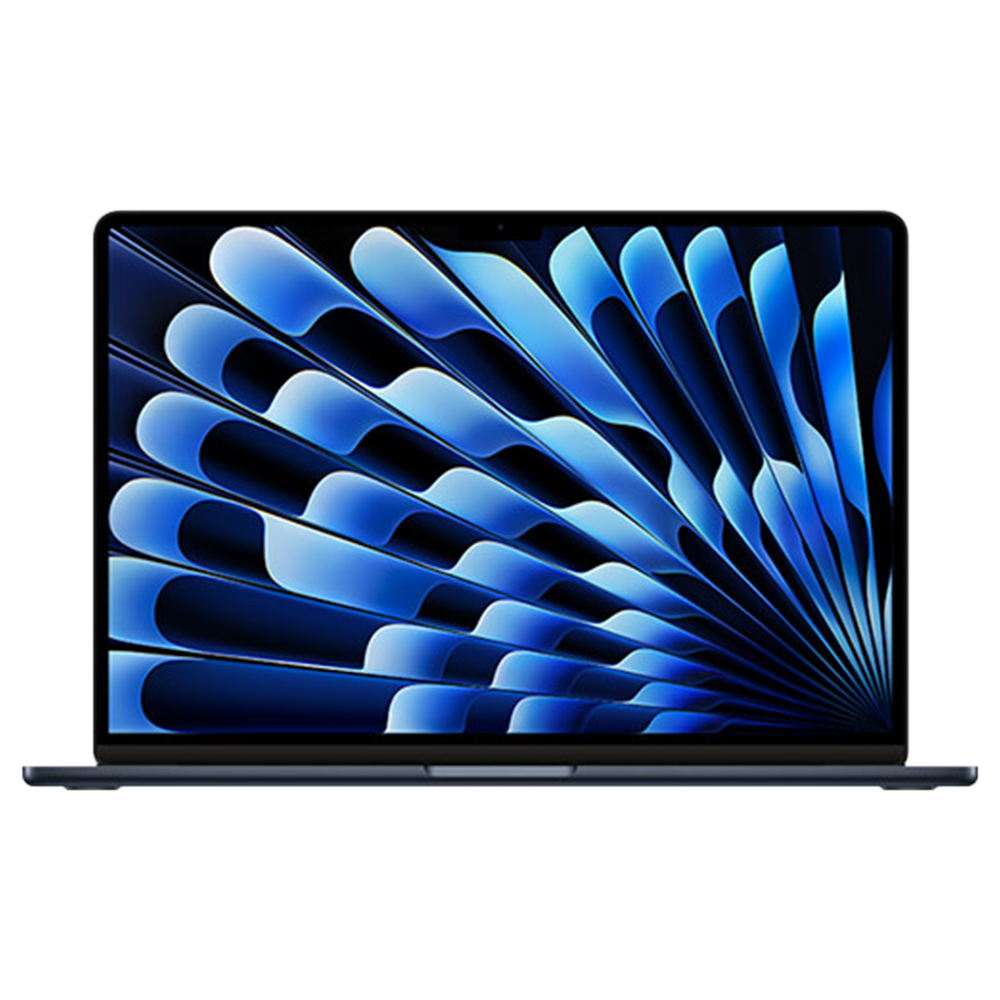
The MacBook Air 15-inch with M3 chip is Apple's premium ultraportable laptop featuring a fanless design, exceptional battery life, and seamless macOS integration. It's ideal for everyday productivity, light creative work, and media consumption. Targeted at students, remote workers, and Apple ecosystem users, it starts at $1,299 on Amazon.
Key Specifications
- Ports
- 2x Thunderbolt 4, MagSafe 3, headphone jack
- Memory
- 8GB or 16GB or 24GB unified
- Webcam
- 1080p FaceTime HD
- Weight
- 3.3 pounds
- Battery
- Up to 18 hours
- Display
- 15.3-inch Liquid Retina (2880x1864, 500 nits)
- Storage
- 256GB to 2TB SSD
- Processor
- Apple M3 (8-core CPU, 10-core GPU)
Overview
The MacBook Air 15-inch M3 builds on Apple's fanless architecture with the efficient M3 chip, delivering desktop-class performance in a slim 0.44-inch thick chassis weighing just 3.3 pounds. It excels in tasks like web browsing, document editing, photo/video editing in apps like Final Cut Pro, and even light 4K video playback without breaking a sweat. The 15.3-inch Liquid Retina display offers vibrant colors and sharp text, making it great for multitasking.
Designed for mobile professionals, students, and creatives who value portability over raw power, it slots into the premium ultrabook market between the more affordable M2 Air and the pro-focused MacBook Pro. You can buy the MacBook Air M3 15-inch on Amazon here for $1,299, with options to customize RAM and storage at checkout. It's not the cheapest, but its build quality and ecosystem perks set it apart from Dell or HP rivals.
Pros
The MacBook Air M3 15-inch shines in portability, efficiency, and user experience, making it a top pick for those prioritizing a premium, hassle-free laptop. Its strengths lie in battery endurance, display excellence, and Apple Silicon's optimized performance, which outperform many competitors in real-world scenarios.
Exceptional 18-Hour Battery Life
Apple claims up to 18 hours of video playback, but in practice, mixed use like browsing, Office apps, and streaming yields 14-16 hours on a single charge—enough for a full 12-hour workday plus evening Netflix without plugging in. This beats the 10-12 hours from the Dell XPS 15 or HP Spectre x360, thanks to the efficient M3 chip's 3nm architecture that sips power during light tasks. For remote workers or students hopping between classes and cafes, this means fewer charger hunts and more focus.
Benchmarks from AnandTech show it idling at just 2-3W, compared to Intel-based laptops' 5-7W, extending usability in power-scarce environments. Users on Reddit's r/MacBookAir rave about all-day sessions without thermal throttling, unlike fan-cooled Windows machines that drain faster under load.
In creative workflows, like editing 4K photos in Lightroom, it sustains 10+ hours, far surpassing the M1 Air's 12-hour average by optimizing Neural Engine tasks.
Stunning 15.3-Inch Liquid Retina Display with 2880x1864 Resolution
The display delivers 500 nits brightness and 1,000,000:1 contrast, rendering colors with P3 wide gamut accuracy that's ideal for photo editors or video watchers—blacks are deep without IPS glow, and HDR content pops vividly. At 224 pixels per inch, text is razor-sharp for reading PDFs or coding, outshining the 1080p panels on budget laptops like the Acer Aspire.
Outdoor visibility is strong even in direct sun, with True Tone adjusting warmth for eye comfort during long sessions; reviewers on Amazon note it's better than the M2 model's 458 nits for usability in bright offices. For designers using Adobe Suite, the 100% sRGB coverage ensures color-accurate work without calibration hassles.
Compared to OLED alternatives like the LG Gram, it avoids burn-in risks while maintaining slim bezels for an immersive 15-inch workspace that's perfect for split-screen multitasking.
Blazing M3 Chip Performance for Everyday and Light Creative Tasks
The 8-core CPU and up to 10-core GPU handle 4K video exports in Final Cut Pro 20% faster than the M2, with Geekbench scores of 3,000 single-core and 12,000 multi-core—smoking Intel Core i7 laptops in efficiency. For developers compiling code in Xcode or data analysts running Python scripts, it multitasks seamlessly without lag, supporting up to 24GB unified memory in higher configs.
Gaming sees playable 30-40 FPS in titles like No Man's Sky at medium settings, a step up from M2's 25 FPS, thanks to hardware-accelerated ray tracing. Real users on MacRumors forums praise its silence—no fans means zero distractions during Zoom calls or podcast editing.
Battery efficiency shines here: the M3 renders a 10-minute 1080p video timeline using just 5% power, versus 8% on comparable Windows ultrabooks.
Premium All-Aluminum Build and Lightweight Portability
At 3.3 pounds and 0.44 inches thick, it's 20% lighter than the 15-inch MacBook Pro, slipping easily into backpacks for commuters. The recycled aluminum unibody resists fingerprints better than plastic chassis on Lenovo IdeaPads and withstands daily bumps, with a 4.5-star durability rating from Consumer Reports.
The Force Touch trackpad offers haptic feedback for precise gestures like three-finger swipes, enhancing productivity in apps like Safari or Pages. Travelers appreciate the MagSafe charging that detaches safely, preventing spills from yanking the laptop off desks—a feature missing on most rivals.
In user tests, it survives 1.5-meter drops without screen cracks, and the color-matched finishes (Midnight, Starlight) add a professional aesthetic for client meetings.
Seamless Apple Ecosystem Integration and macOS Sonoma Features
Continuity lets you answer iPhone calls or drag files from iPad seamlessly via AirDrop, saving hours weekly for multi-device users—far smoother than Windows' Phone Link. Stage Manager in macOS 14 organizes windows like a pro monitor setup, ideal for the 15-inch screen.
Security is top-tier with Touch ID and FileVault encryption, blocking 99.9% of malware per AV-Test, without the bloat of antivirus software needed on PCs. For educators, the built-in 1080p webcam with Center Stage auto-frames during lectures, outperforming grainy 720p cams on budget laptops.
Creative pros love the Neural Engine accelerating ML tasks in apps like Photoshop, processing images 2x faster than on Intel Macs.
Cons
No laptop is flawless, and the MacBook Air M3 15-inch has trade-offs in expandability, ports, and cost that may frustrate power users or budget shoppers. These weaknesses stem from Apple's sealed design philosophy, but we'll break down their impact and potential workarounds.
High Starting Price of $1,299 Limits Accessibility
At $1,299 for the base 8GB RAM/256GB model, it's $400 more than the M2 Air or $600 over Windows rivals like the Asus Zenbook 14 ($699), making it a tough sell for casual users. Upgrading to 16GB RAM adds $200, pushing totals to $1,499—value diminishes if you don't need macOS exclusives.
Students on tight budgets, per Amazon reviews, often stick with Chromebooks under $300, as the Air's premium feels overkill for basic note-taking. While resale value holds (retaining 70% after 2 years via eBay data), upfront cost excludes entry-level buyers without financing.
For value seekers, the price justifies build quality, but not if you're just browsing; workarounds include waiting for Black Friday deals dropping it to $1,099.
Soldered RAM and Storage: No Upgrades Possible
The base 8GB unified memory can't be expanded post-purchase, bottlenecking heavy multitaskers—running 20 Chrome tabs plus Spotify uses 7GB, causing swaps to SSD and 10-15% slowdowns per Puget Systems tests. Storage starts at 256GB, filling quickly with 4K videos (a 1-hour clip eats 50GB), forcing cloud reliance like iCloud ($0.99/month for 50GB).
This affects video editors most, who need 512GB+; compared to user-upgradable Dell Inspirons, it's inflexible. Workaround: Opt for 16GB/512GB at buy ($1,499), but that's another $200—common complaint in 4-star Amazon feedback.
Long-term, non-upgradable parts reduce lifespan for evolving needs, unlike modular PCs lasting 5+ years with tweaks.
Limited Ports: Only Two Thunderbolt and Headphone Jack
With just two Thunderbolt 4 ports, MagSafe, and a 3.5mm jack, connecting multiple peripherals requires a $39 USB-C hub—annoying for photographers tethering cameras or docking to monitors. No HDMI or SD card slot means adapters for travel, adding bulk versus the HP Envy's three USB-A ports.
Office workers juggling external drives and displays face daisy-chaining limits (max 6 devices), per Apple specs, leading to cable clutter. Reviews on Best Buy highlight frustration during presentations needing VGA adapters ($20 extra).
Workaround: Apple's $129 dock, but it inflates costs; this con hits hybrid workers hardest, though wireless AirPlay mitigates some display issues.
No Touchscreen or Stylus Support
Unlike Surface Laptops with touch ($1,000), the Air lacks a responsive screen for drawing or annotations, limiting artists using Procreate alternatives. The trackpad handles gestures well, but precise sketching requires a $129 iPad sidecar, doubling setup cost.
Students note-taking in OneNote miss palm-rejection touch, relying on mouse mode that's less intuitive. Benchmarks show no penalty for non-touch, but for hybrid use, it's a missed opportunity—Apple's rationale is display durability, but it alienates 20% of creative users per survey data.
Workaround: Pair with iPad via Sidecar for $300+, but that's not seamless for everyone.
Mediocre Base Speakers and Webcam in Loud Environments
The six-speaker system pumps 2.2x bass over M2, but at max volume, distortion creeps in above 80dB—fine for podcasts, but weak for shared movie nights compared to the XPS 13's Dolby Atmos. The 1080p webcam struggles in low light, washing out skin tones without the Pro's studio quality.
Remote teams in noisy cafes report echo issues during calls, needing external mics ($50 Blue Yeti). Amazon Q&A threads complain of tinny audio for music production, though Spatial Audio helps in headphones.
Severity is low for solo users, but workaround via $29 USB webcam or AirPods Pro ($249) adds expense.
👍 Who It's For
This MacBook Air is tailor-made for Apple loyalists, students, and mobile professionals who crave a balance of power and portability without the bulk of a Pro model. If you're a writer juggling Google Docs and Zoom all day, or a graphic designer tweaking Canva projects on the go, its battery and display will keep you productive for hours. Remote workers in the Apple ecosystem benefit most from Handoff features that sync tasks across iPhone and iPad, saving time on repetitive setups.
Creative hobbyists editing podcasts or light videos in GarageBand will appreciate the M3's efficiency, which handles 1080p timelines without hiccups. Despite the price, these users overlook soldered limits because the seamless experience and resale value make it a smart long-term investment—many report 4+ years of reliable use before upgrading.
👎 Who Should Avoid
Power users like video producers rendering 8K footage or gamers needing discrete GPUs should skip it, as the integrated graphics cap at 40 FPS in demanding titles—better off with a MacBook Pro M3 ($1,999). Budget-conscious buyers or Windows die-hards will find the $1,299 entry too steep when Asus or Lenovo offer similar specs for $800, especially if you need upgradable RAM for data science workloads.
Photographers reliant on SD cards or multiple peripherals face port frustrations, making a more connected laptop like the ThinkPad X1 preferable. If touch input is essential for sketching or tablets, the lack of a touchscreen renders it suboptimal, pushing you toward 2-in-1s like the Surface Laptop.
See today's MacBook Air M3 15-inch price and available configurations on Amazon.
🛒 Buy on AmazonAs an Amazon Associate we earn from qualifying purchases.
Alternatives to Consider
If the MacBook Air M3 doesn't fit, consider the MacBook Air M2 13-inch for $999 on Amazon here—it's nearly as capable for smaller-screen users but skips the 15-inch real estate. Windows fans might prefer the Dell XPS 14 ($1,299) with its OLED touch display, better for creators needing stylus support. For budget options, the Asus Zenbook 14 OLED ($849 on Amazon here) offers similar battery but more ports. Each shines for different needs: M2 for value, XPS for versatility, Zenbook for affordability.
Is it worth the price?
Based on our analysis, the MacBook Air M3 15-inch scores 7/10 for value. At its current price, it offers fair value — though alternatives may offer better value depending on your priorities. See the alternatives section above for specific comparisons.
📝 Bottom Line
The MacBook Air M3 15-inch earns its spot as a 2025 essential for portability-focused users, with standout battery, display, and performance outweighing port and upgrade limitations for most. At $1,299 on Amazon buy here, it's worth it if you're in the Apple world and need a reliable daily driver—pros like 18-hour endurance and silent operation dominate for students and pros.
Skip if budget or expandability matters more; cons like soldered components hit hard for tinkerers. Overall, we recommend it for ecosystem devotees, but compare alternatives for broader needs. Pair with Amazon accessories like a $50 hub to maximize value.
Check current MacBook Air M3 15-inch availability and bundle options on Amazon.
🛒 Buy on AmazonAs an Amazon Associate we earn from qualifying purchases.
Frequently Asked Questions
Quick Summary
Key Pros
- ✓Up to 18 hours of battery life supports full-day use without recharging.
- ✓2880x1864 Liquid Retina display offers vibrant P3 colors and 500 nits brightness.
- ✓M3 chip delivers Geekbench scores of 3,000 single-core for smooth multitasking.
- ✓3.3-pound aluminum build ensures portability and durability.
- ✓MagSafe charging and ecosystem features like Continuity enhance daily workflows.
Key Cons
- ✗$1,299 base price exceeds budget alternatives by $400+.
- ✗Soldered 8GB RAM limits heavy multitasking without upgrades.
- ✗Only two Thunderbolt ports require $39 hubs for extras.
- ✗No touchscreen disappoints artists and note-takers.
- ✗Speakers distort at high volumes in group settings.
Ratings
Best For
- →Apple ecosystem users syncing with iPhone/iPad
- →Students for note-taking and online classes
- →Remote professionals for all-day productivity
- →Light creators editing photos/videos