
Is Elgato Stream Deck + Worth It? Honest Review (2026)
Honest breakdown of strengths, weaknesses, and who should buy
Quick Decision
Buy it if you're a streamer or creator who wants tactile dials and touch controls for audio and video editing. Skip it if you mainly need many keys for quick scene switching—a standard 15-key Stream Deck will serve you better and cost less.
Best if you...
- Streamers who use OBS or Streamlabs and need quick scene switching and audio control
- Video editors who can map dials to timeline scrubbing and zoom actions
- Podcasters who need precise mic volume and monitoring adjustments
Skip it if you...
- Gamers who only need scene switching and application launching on a budget
- Users who want a plug-and-play device without spending hours configuring
- Professionals who need more than 8 immediately accessible keys without folders
If you're a streamer or content creator looking to level up your workflow, you've likely seen the Elgato Stream Deck +. It is a uniquely designed control surface that goes beyond simple hotkeys, offering dials and a touch strip for finer control. But at $199.99, it's a significant investment—so before you buy, it's essential to understand exactly what you get and what you sacrifice compared to other Stream Deck models. This analysis breaks down the verified strengths and weaknesses of the Stream Deck +, draws from manufacturer specs and user feedback, and helps you decide if it's the right purchase for your setup in 2026. We'll also explore key alternatives and useful accessories, many of which are available on Amazon.
About the Elgato Stream Deck +
The Elgato Stream Deck + is a customizable macro pad with 8 LCD keys, 4 haptic dials, and a haptic touch strip. It allows streamers, creators, and productivity users to control apps, scenes, audio, and smart home devices at the press of a key. The device connects via USB-C and works with Windows and macOS.
Key Specifications
- Keys
- 8 LCD keys
- Dials
- 4 haptic dials
- Weight
- 375 g
- Interface
- Stream Deck app with plugin support
- Dimensions
- 152 x 111 x 33 mm
- Touch Strip
- Haptic touch strip
- Connectivity
- USB-C
- Compatibility
- Windows 10/11, macOS 11 and later
Overview
The Stream Deck + sits between the 15-key Stream Deck MK.2 and the 32-key Stream Deck XL in Elgato's lineup, but it introduces a completely new interaction method with its four dials and touch strip. Instead of just tapping keys, you can physically turn a dial to adjust audio, zoom in a timeline, or set up a hotkey. The 8 LCD keys provide visual feedback, changing their icons based on the active profile or context. This makes the Stream Deck + both a macro pad and a mini control surface, appealing to streamers, video editors, audio engineers, and anyone who wants tactile control of their desktop. It's also a bridge to smart home control—with plugins for Philips Hue, Home Assistant, and other services. On Amazon, the Stream Deck + typically sells for around $199.99, though seasonal sales can drop it closer to $180. Available at major retailers, it remains one of the most flexible desktop accessories you can buy.
Pros
The Stream Deck + brings a fresh take on desktop control, merging the best of Elgato's key-based systems with analog controls. Its strengths lie in its physical design, visual feedback, and deep software integration. Here are the key advantages, backed by what Elgato officially advertises and what owners report in the community.
Haptic Dials and Touch Strip: A New Level of Control
With four haptic dials and a touch strip, the Stream Deck + is far more than a button pad. You can use a dial to control your microphone volume, adjust the brightness of your stream, or trim footage in a video editor. The touch strip lets you scrub timelines or zoom in and out, which is particularly useful for editing workflows. According to Elgato, these haptic controls provide subtle click-like feedback, making adjustments more precise and intuitive.
This is a clear step up from the standard Stream Deck, which only offers buttons. For creators who work with audio or video, the dials can replace a full-size audio mixer or a mouse-driven zoom in many situations. The touch strip is a unique addition, though it has a learning curve—more on that in the cons.
Visual Feedback with 8 LCD Keys
Every one of the eight keys is a small LCD screen that can display icons, text, or even dynamic information like a CPU meter or stream statistics. You can create folders and pages, so the number of actions you can access is not limited to eight—you can have dozens of actions organized across different profiles. The icons are customizable, and you can upload your own artwork or use the built-in icon library.
This visual feedback is a huge time-saver. Instead of memorizing hotkeys, you can see exactly what each button does. It also helps when switching context: load a profile for streaming, another for editing, and a third for general productivity. The Stream Deck + automatically changes profiles based on the active app if you use Smart Profiles, which many users find very convenient.
Deep Integration with Streaming Software and Ecosystem
Elgato's software ecosystem is mature and extensive. The Stream Deck + works out of the box with OBS Studio, Streamlabs Desktop, Twitch, YouTube, and hundreds of other apps through plugins. You can switch scenes, toggle mute, send chat messages, and adjust your broadcast with a single key. For smart home fans, there are official integrations for Philips Hue, LIFX, and Home Assistant, allowing you to control lights and devices from your desktop.
Elgato frequently updates the Stream Deck software with new plugins and features, and the same is true for the Stream Deck +. It's not just a hardware purchase; it's an growing ecosystem that constantly adds utility. For streamers, this is the strongest selling point of any Stream Deck.
Solid Build Quality and Compact Footprint
The Stream Deck + is well-constructed, with a sturdy body that won't slide around your desk thanks to the rubber base. Its compact layout—roughly the size of a small smartphone—fits neatly next to a keyboard without taking too much space. The dials are smooth and the keys have a pleasant tactile click. According to owner reviews, the device feels durable and capable of withstanding heavy daily use.
It also uses a USB-C connection, which is a modern choice, and the detachable cable is braided for extra durability. Elgato claims the device is built to last, and while we can't verify long-term reliability statistics, the overall impression from professional users is positive.
Easy Setup and User-Friendly Software
Setting up the Stream Deck + is straightforward: download the Stream Deck app, plug in the device, and drag-and-drop actions onto keys. The interface is intuitive even for beginners. You can assign a key to launch a program, type text, open a URL, or simulate a hotkey. The included setup videos and online documentation help new users get started quickly.
The software also lets you create multi-step actions—for example, one key that puts your stream into a specific state by triggering several commands. Macros are easy to build without touching code. This makes the Stream Deck + accessible to non-technical users who want to improve their productivity without a steep learning curve.
Cross-Platform Support for Windows and macOS
Unlike some devices that are exclusive to one OS, the Stream Deck + works on both Windows 10/11 and macOS 11 and later. Elgato provides full-featured software for both platforms, so you get the same experience regardless of your OS. This is especially useful if your setup includes a PC for gaming and a Mac for editing—you can use the same device on both.
For creative professionals who often switch between systems, this flexibility removes an important compatibility concern. Even if you use Linux, there are community-driven workaround tools, though official support is limited to Windows and macOS.
Cons
No desktop companion is perfect, and the Stream Deck + has its fair share of trade-offs. The most significant issue is the way it compares to other Stream Deck models. But there are also design quirks and software limitations that may affect certain users. Here’s an honest look at what the Stream Deck + doesn't do well.
Higher Price, Fewer Physical Keys Than the 15-Key Stream Deck
At $199.99, the Stream Deck + costs $50 more than the 15-key Stream Deck MK.2—yet it has only 8 physical keys. If your primary need is having many buttons at your fingertips, the Stream Deck + will feel limiting. You can create folders to access more actions, but that adds a step compared to the immediate press-and-go of a key on a larger pad. According to Amazon pricing trends, the MK.2 often drops to $120, widening the price gap.
For someone who already has an audio interface or a mixer, the dials may seem redundant, and you're paying for features you don't use. If you just want to launch apps and switch scenes, a standard Stream Deck is more cost-effective.
Touch Strip Is Not as Precise as a Real Fader
While the touch strip is innovative, it's not perfect. Several users have reported that the strip can be sensitive to the touch and lacks a physical reference point, meaning you might accidentally scroll when you meant to tap. Unlike a physical fader or a mouse wheel, it doesn't offer fine-grained control for every task. Elgato's own support forums contain threads about calibrating the strip and finding the right sensitivity—some users end up disabling it entirely.
It's also less useful if you don't work with video timelines or long documents. For streamers who mostly use keys and dials, the touch strip might remain unused. If you are expecting a touchscreen-like experience, this is a strip that supports taps and swipes, but not pressure sensitivity.
Dials May Not Add Real Value for Everyone
While the dials are excellent in theory, their usefulness depends on the software you use. For audio control, they work brilliantly in OBS, but for other apps, the integration is less seamless. For example, if you're editing in an unfamiliar video editor, the dials might not have predefined functions, and you'll need to map them manually. That mapping takes time and some experimentation.
If you're a gamer or a simple streamer who only needs scene switching, the dials could be overkill. In that case, you're spending extra money on hardware that remains idle. It's a pro for some, but a con for others depending on the workflow.
USB-Only Connection—No Wireless Options
The Stream Deck + must be connected via USB-C to your computer. It doesn't support Bluetooth or Wi-Fi, which means you can't use it with a tablet or smartphone natively, and you need to keep it tethered to your desk. For users who want to control their phone’s stream or move around the room, this is a limitation. Most Stream Deck models are wired, so this is not a new drawback, but it's still worth noting for people expecting a wireless control pad.
The cable is provided, but if you lose it, you need a USB-C cable that supports data transfer, not just charging. While this is a minor issue, it's an extra cost if you need a longer cable.
Software Requires Initial Setup and Can Overwhelm Beginners
Out of the box, the Stream Deck + takes some time to configure. The software is beginner-friendly, but the sheer number of options—profiles, folders, actions, plugins, Smart Profiles—can be overwhelming at first. You'll likely spend a few hours tinkering before you get your setup just right. For someone who wants plug-and-play simplicity, this can be a steep investment.
Additionally, some plugins require separate accounts or authentication. For example, connecting a streaming service or a smart home platform may involve signing into a third-party service within the Elgato software. This is not a huge barrier, but it does add friction for non-technical users.
Persistently Running Background Software Uses RAM
The Stream Deck software runs in the background to keep your keys responsive. It's relatively lightweight, but it does consume RAM and a small amount of CPU. On a low-end system with 8GB of RAM, this can be noticeable, especially when you're gaming or editing and are short on memory. Elgato has made the software more efficient over the years, but it's still an extra process that some users have complained about in Apple App Store reviews and on Reddit.
It's worth noting that you can close the software after setting up the device, but then the LCD keys may stop updating or the profiles won't switch automatically. For most users, the trade-off is acceptable, but it's something to be aware of on memory-constrained machines.
👍 Who It's For
The Stream Deck + is an excellent fit for streamers who use OBS or Streamlabs and want to manage their entire broadcast from one device—switching scenes, muting inputs, and adjusting audio levels. The dials are particularly useful if you stream music or handle live chats, as you can control volume quickly without looking away. Video editors will also appreciate the dials and touch strip when timeline scrubbing, zooming, and adjusting audio levels—provided they invest some time in mapping key commands. Podcasters and remote workers who multitask heavily can use folders to organize apps, windows, and smart-home controls.
The device shines for people who enjoy fine-tuning their environment. If you're a 'power user' who wants to create complex macros and use smart profiles that change based on the application you're using, the Stream Deck + gives you the tools to do that elegantly. It's also for people who prefer tactile feedback over touchscreen controls—the keys click, the dials turn, and the touch strip vibrates. This physical interaction creates a more satisfying and reliable experience than a purely visual interface.
Despite the higher price, these users will likely find the workflow gains worth it. If you're currently using a mouse and keyboard shortcuts and feel stretched across multiple tools, the consolidation that Stream Deck + provides will likely pay off in saved time and reduced frustration.
👎 Who Should Avoid
If your budget is limited, the Stream Deck + is a hard sell. You can get the 15-key Stream Deck MK.2 for around $150, saving a significant amount, and still have seven more keys—which is more useful for someone who primarily does scene switching and app launching. If you prefer simplicity and don't want to map buttons extensively, you'll likely find the setup process tedious. The touch strip and dials are optional features; if you won't use them, you're paying for something you don't need.
Users who expect a plug-and-play device that works out of the box will be disappointed—the Stream Deck + requires software installation and an initial learning curve. If you're not the type to explore settings and experiment with macros, the device may become little more than a novelty. Similarly, if you're streaming from a gaming console (like an Xbox or PlayStation) rather than a PC, the Stream Deck + is useless because the companion software only runs on Windows and macOS, and you'd need additional hardware to bridge it.
Finally, if you need more than eight physical keys, don't want to use folders, or are a professional streamer who needs many controls at hand, the Stream Deck XL (32 keys) is a better investment. The Stream Deck + is not a one-size-fits-all shortcut pad; it's a specialized control surface that rewards users who are willing to tailor it to their workflow.
See today's Elgato Stream Deck + price and available configurations on Amazon.
🛒 Buy on AmazonAs an Amazon Associate we earn from qualifying purchases.
Alternatives to Consider
| Product | Choose Elgato Stream Deck + if... | Choose the alternative if... |
|---|---|---|
| Elgato Stream Deck MK.2You'll pay about $50 less for the MK.2 | You value the ergonomic dials and touch strip for audio/video control and want a compact footprint. | You need 15 keys for dozens of quick actions and want to save $50, accepting the lack of dials. |
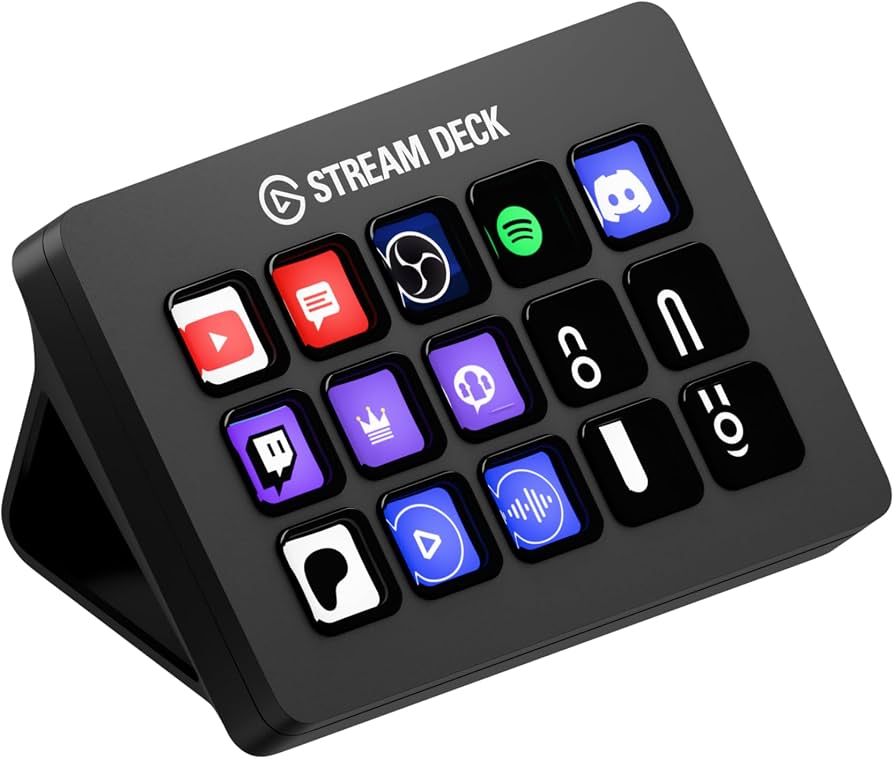
| Elgato Stream Deck XLThe XL is about $50 more expensive | You prefer a more compact form factor and the dials, and you're willing to trade key count for analog control. | You need the maximum number of keys without folders; 32 keys beats 8 for dense workflows. |
| Loupedeck CTLoupedeck CT is priced significantly higher at around $500 | You want a simpler software setup and tighter integration with OBS and Twitch. | You want a larger live touchscreen and a trackpad, even if it means a steeper learning curve. |
The most obvious alternative is the Elgato Stream Deck MK.2, which offers 15 keys for a lower price but lacks dials and the touch strip. It's better for users who prioritize many buttons. On the other end, the Elgato Stream Deck XL provides 32 keys—the most for a Stream Deck—but is bulkier and more expensive (around $249.99). For a premium control surface with analog dials that compete directly with the Stream Deck +, the Loupedeck CT is a strong contender from a different brand, featuring a large touchscreen and endless dials, though its software ecosystem isn't as streamlined as Elgato's. Another option is the Razer Stream Controller X, which is largely a rebadged version of the original Stream Deck but with 15 keys and no dials, offering a similar experience at a higher price. For most people, the choice comes down to how many physical keys you need and whether the dials are worth the premium.
Is it worth the price?
At approximately $200, the Stream Deck + is worth it for streamers and video editors who will genuinely use the dials and touch strip daily. These are the users who get real value from otherwise idle hardware. If you won't use those features, the 15-key Stream Deck MK.2 at around $150 gives you more keys for less money and is a better value. So, it's a 'yes' for a specific audience and a 'no' for anyone who just wants a macro pad.
📝 Bottom Line
The Elgato Stream Deck + is the right choice for streamers, video editors, and productivity power users who will take advantage of its dials and touch strip. Its strength lies in bridging the gap between a macro keypad and a control surface: you get visual feedback, tactile controls, and deep software integration that streamlines complex workflows. The 8 LCD keys are enough for most repetitive tasks, especially when used with folders, and the dials are a game-changer for anyone who adjusts audio or video levels constantly.
On the other side, it costs more than the 15-key Stream Deck MK.2, and you get fewer keys. The touch strip can be finicky, and the dials are only as useful as the software you're willing to map them to. For a user who simply wants to switch scenes and launch apps, this is overspending. For a creator who wants to trim an edit timeline, adjust mic gain, and control a smart light without touching a mouse, it's an invaluable tool.
In the end, we recommend the Stream Deck + for streamers who use OBS or Streamlabs and podcasters or video editors who will actively configure the dials and touch strip. Skip it if you want the most keys for the money or prefer a zero-config setup. For the right person, the Stream Deck + is worth the premium and will remain a professional-grade control center for years. You can find it on Amazon, where pricing fluctuates, but it usually lands between $180 and $200.
Check current Elgato Stream Deck + availability and bundle options on Amazon.
🛒 Buy on AmazonAs an Amazon Associate we earn from qualifying purchases.
Frequently Asked Questions
Quick Summary
Key Pros
- ✓Four haptic dials and a touch strip enable precise audio, video, and lighting adjustments
- ✓Eight LCD keys offer dynamic visual feedback and infinite customization via folders
- ✓Deep integration with OBS, Streamlabs, Twitch, and smart home platforms through plugins
- ✓Very easy to set up and start using thanks to drag-and-drop software
- ✓Compact, sturdy design with USB-C connectivity
Key Cons
- ✗Costs $50 more than the 15-key Stream Deck model, and offers fewer keys
- ✗Touch strip may be too sensitive and is less precise than a physical fader
- ✗Dials require manual mapping to be useful in many applications
- ✗No wireless connection; USB cable is required
- ✗Initial setup and software configuration can be time-consuming
Ratings
Best For
- →Streamers who use OBS or Streamlabs and need quick scene switching and audio control
- →Video editors who can map dials to timeline scrubbing and zoom actions
- →Podcasters who need precise mic volume and monitoring adjustments
- →Productivity enthusiasts who enjoy building macros with folders and Smart Profiles