
Is ASUS ROG Ally X Worth It? Honest Review (2026)
Honest breakdown of strengths, weaknesses, and who should buy this gaming handheld
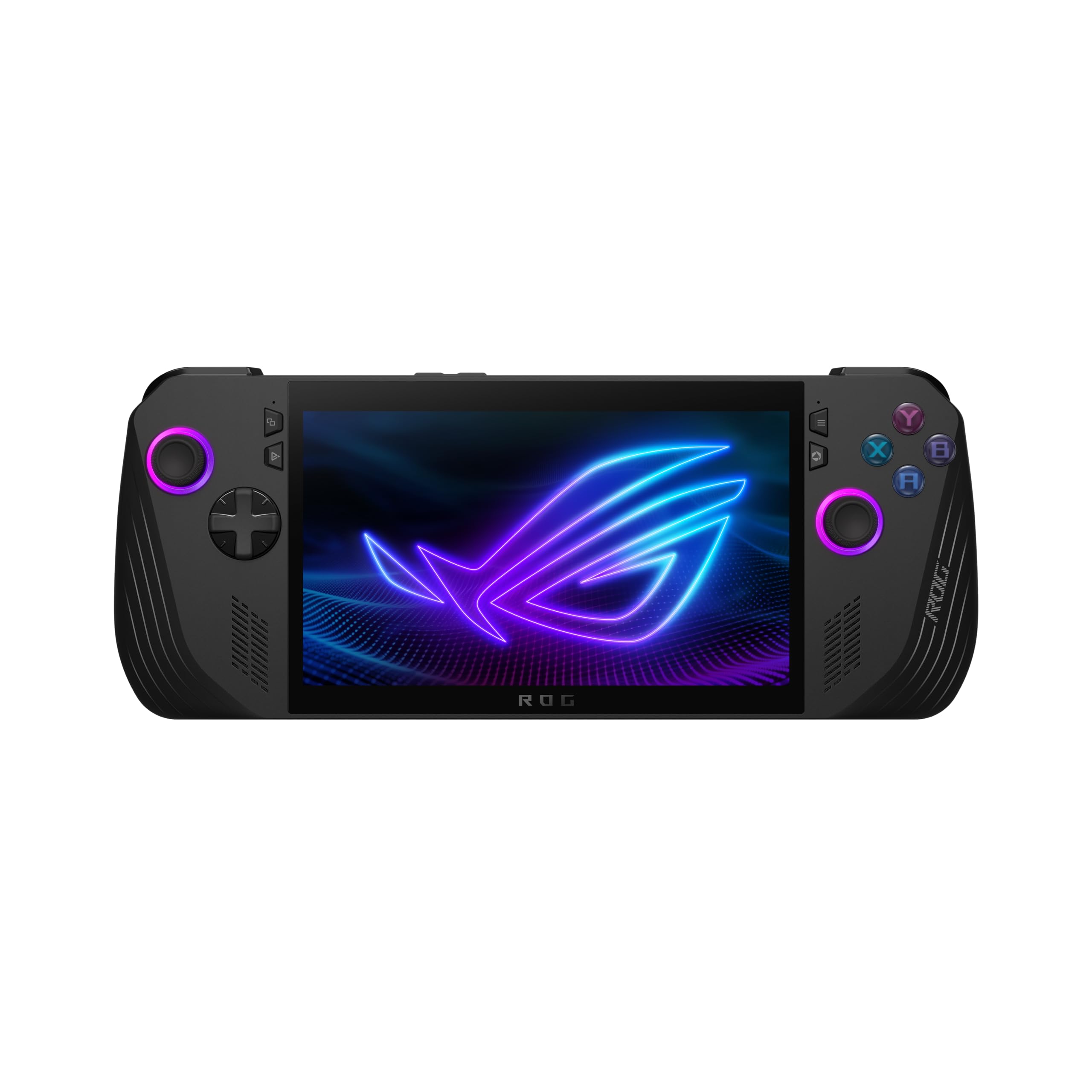
Quick Decision
Buy the ROG Ally X if you need the longest battery life in a Windows handheld and plan to use Game Pass or PC game stores extensively. Skip it if you prioritize display quality or want a more console-like experience for less money.
Best if you...
- Frequent travelers needing long battery life for handheld gaming
- Xbox Game Pass subscribers who want native access
- PC enthusiasts planning to connect an eGPU for docked gaming
Skip it if you...
- Budget-conscious buyers looking for value under $500
- Casual gamers who mainly want Nintendo exclusives
- Users who hate dealing with Windows quirks and updates
If you're shopping for a gaming handheld in 2026, you've likely seen the ASUS ROG Ally X touted as a battery-life champion among Windows portables. But with the Steam Deck OLED and Lenovo Legion Go also competing, it's worth digging into whether the Ally X's improvements justify its premium price. This analysis covers the Ally X's pros, cons, and real-world trade-offs to help you decide. We'll also compare it to key alternatives and suggest accessories that improve the experience.
About the ASUS ROG Ally X
The ASUS ROG Ally X is a Windows 11 gaming handheld powered by the AMD Ryzen Z1 Extreme processor. It targets PC gamers seeking a portable device to play AAA titles, indie games, and game pass titles on the go. Released in 2024, it remains a top contender in 2026, especially after price drops.
Key Specifications
- OS
- Windows 11 Home
- GPU
- AMD RDNA 3 (12 CU)
- RAM
- 24GB LPDDR5X (7500 MHz)
- Ports
- 1x USB-C (USB 3.2), 1x Thunderbolt 4, 3.5mm headphone jack, UHS-II microSD
- Weight
- 678g
- Battery
- 80Wh, supports 65W fast charging
- Display
- 7-inch 1080p IPS, 120Hz, 500 nits
- Storage
- 1TB M.2 2280 NVMe SSD
- Processor
- AMD Ryzen Z1 Extreme (8 cores, 16 threads)
Overview
The ASUS ROG Ally X is a refined version of the original ROG Ally, addressing its biggest weakness: battery life. With an 80Wh battery (double the original), 24GB of RAM, and improved ergonomics, it aims to be the go-to Windows handheld for serious gamers. It runs Windows 11, granting access to Steam, Xbox Game Pass, Epic Games, and more. The device is available on Amazon and other retailers, often priced around $800 in 2026. While the core specs remain the same (Ryzen Z1 Extreme, 7-inch 1080p 120Hz IPS display), the upgrades make it a more versatile option for long gaming sessions.
Pros
The ROG Ally X brings several meaningful upgrades over its predecessor and competitors, particularly in battery life, memory, and build quality. These strengths make it a strong contender for gamers who prioritize longevity and performance.
Superior Battery Life (80Wh)
The Ally X's 80Wh battery is a massive leap from the original's 40Wh and beats the Steam Deck OLED (50Wh) and Legion Go (49.2Wh). In real-world gaming, this translates to roughly 3–5 hours of AAA gaming (e.g., Cyberpunk 2077 at 15W TDP) and 8–12 hours of lighter indie titles or video playback. This is a game-changer for handheld gaming, allowing uninterrupted flights or commutes. According to Asus official specs, the battery supports 65W fast charging, reaching 50% in about 30 minutes.
24GB LPDDR5 RAM
With 24GB of unified memory, the Ally X has more RAM than any competitor (Steam Deck: 16GB, Legion Go: 16GB). This extra headroom helps in demanding games and multitasking, like running Discord in the background while gaming. It also future-proofs the device for upcoming titles that may require more system memory. The RAM is shared between CPU and GPU, so the extra capacity benefits both.
Improved Ergonomics and Build
Asus redesigned the grips to be deeper and more rounded, reducing hand fatigue during long sessions. The device is slightly heavier (678g vs 608g) but better balanced. The joysticks, D-pad, and buttons feel more premium, with Hall effect joysticks that resist drift. The overall build quality is solid, with minimal flex.
Dual USB-C Ports with Thunderbolt 4
The Ally X includes two USB-C ports: one standard and one Thunderbolt 4. This allows simultaneous charging and connection to an external GPU, monitor, or accessories. Thunderbolt 4 enables 40Gbps data transfer, useful for fast storage or eGPU setups. The original Ally had only one USB-C port, which was a limitation.
Faster Charging and Better Cooling
65W charging support means you can quickly top up the large battery. The cooling system now uses dual fans with a larger heatsink, keeping temperatures lower and noise reduced compared to the original Ally. Under load, the device stays comfortable to hold without excessive heat on the back.
M.2 2280 SSD Slot
The Ally X uses a standard M.2 2280 SSD (instead of the original's 2230), making storage upgrades simpler and cheaper. You can swap in a high-capacity NVMe drive without needing an adapter. This is a practical advantage for users who want 2TB or more storage without paying a premium.
Windows 11 Game Library
Windows 11 provides access to virtually every PC game store, including Steam, Xbox Game Pass, Epic Games, GOG, and Ubisoft Connect. This is a major advantage over the Steam Deck's Linux-based SteamOS, which requires compatibility layers for some titles. Game Pass integration is seamless, and anti-cheat software (like for Destiny 2) works natively.
Cons
Despite its upgrades, the ROG Ally X has notable drawbacks that may steer some buyers toward alternatives. The higher price, screen limitations, and Windows friction are the main pain points.
High Price Point
At ~$799, the Ally X costs significantly more than the Steam Deck LCD ($349–$449) and even the Steam Deck OLED ($549–$649). The Lenovo Legion Go often sells for ~$700. While the Ally X offers better battery life and RAM, the price gap may be hard to justify for budget-conscious gamers. You could buy a Steam Deck OLED plus a gaming SSD for the same price.
Display Falls Short of OLED Competitors
The Ally X retains the original's 7-inch 1080p 120Hz IPS panel. While responsive and sharp, it cannot match the deep blacks, contrast, and color saturation of OLED screens found on the Steam Deck OLED and Switch OLED. In dark game scenes or HDR content, the difference is noticeable. For a device costing $800, an OLED would have been expected.
Windows 11 Feels Unoptimized for Handhelds
Windows 11 is not designed for small touchscreens. Navigating the desktop, typing in text fields, and managing driver updates can be frustrating. Asus's Armoury Crate SE helps but is buggy and not as polished as SteamOS. You may encounter unexpected system hangs or driver conflicts that require a restart. This friction is a common complaint among owners.
Heavier and Bulkier Than Alternatives
At 678g, the Ally X is heavier than the Steam Deck OLED (640g) and significantly heavier than the Switch OLED (420g). While the ergonomics are better, the added weight can cause fatigue during long sessions, especially if you're playing in bed or on a bus. The device also lacks a built-in kickstand, so you'll need a case or stand for tabletop use.
Limited Game Performance at Higher TDPs
The Ryzen Z1 Extreme is powerful for a handheld, but at the 30W Turbo mode, the device gets hot and loud, and battery life plummets to under 1.5 hours. Most users stick to 15W or 20W for a balance of performance and battery, which still handles AAA games at medium settings 30–60fps. But for the price, you might expect a bit more raw power.
No OLED, No VRR, No HDR (Hardware Limitations)
While the 120Hz display is smooth, it lacks variable refresh rate (VRR) support, which can lead to screen tearing if frame rates dip below 60fps. HDR is also absent, limiting visual punch in supported content. The Steam Deck OLED offers VRR (40Hz–90Hz) and HDR, making it a better display overall.
Asus Armoury Crate SE Can Be Unreliable
The software layer for controlling TDP, fan curves, and game launchers has improved but still suffers from occasional crashes, unresponsive UI, and update issues. Users report having to restart the app or even the device to get it working again. This undermines the plug-and-play experience.
No MicroSD Slot Location Optimization
The microSD card slot is placed behind the kickstand (which is not included) or on the bottom edge, making it awkward to access if the device is in a case. It also runs slower than the internal SSD, so expanding storage via microSD is not ideal for fast-loading games.
👍 Who It's For
The ROG Ally X is best for PC gamers who want maximum game library compatibility and need long battery life for travel. It suits those who already own a gaming PC or use Xbox Game Pass, as the Windows ecosystem integrates seamlessly. Enthusiasts who plan to use an eGPU for docked gaming will appreciate the Thunderbolt 4 port. If you value RAM-heavy tasks like modding or running multiple apps, the 24GB is a clear advantage. This device is also good for tinkerers who don't mind occasional software tweaking to optimize performance.
👎 Who Should Avoid
If you're on a tight budget, the Steam Deck LCD or OLED offers better value for most games. Casual gamers who prefer Nintendo's exclusives should consider a Switch OLED or Switch 2. Users who hate software quirks and just want a console-like experience should skip the Ally X—the Steam Deck delivers a more polished handheld OS. If you prioritize screen quality above all, the Steam Deck OLED's display is superior. Also avoid if you need a lightweight device for quick pick-up-and-play; the Ally X is bulky and requires a bit of setup each time.
See today's ASUS ROG Ally X price and available configurations on Amazon.
🛒 Buy on AmazonAs an Amazon Associate we earn from qualifying purchases.
Alternatives to Consider
| Product | Choose ASUS ROG Ally X if... | Choose the alternative if... |
|---|---|---|
| Steam Deck OLED (512GB)$150 more expensive | You want the best battery life and RAM for demanding games and multitasking | You prefer a superb OLED display and a more seamless, console-like Linux OS |
| Lenovo Legion Go~$100 more expensive | You need longer battery life and dual USB-C ports for connectivity | You want a larger 8.8-inch screen and detachable controllers for tabletop play |
| Asus ROG Ally (Original) Z1 Extreme~$250–$300 more expensive | You need longer battery life and 24GB RAM for future-proofing | You are on a tighter budget and don't mind mediocre battery life (1.5 hours gaming) |
| Nintendo Switch OLED~$350 more expensive | You want to play AAA PC games and Game Pass titles in a handheld | You only play Nintendo exclusives and prefer a lighter, simpler device |
The Steam Deck OLED is the closest competitor, offering a better screen, a more refined OS, and lower price, but with slightly less performance and a smaller game library (no native Game Pass). The Lenovo Legion Go features a larger 8.8-inch screen and detachable controllers, but its battery life is worse and it's heavier. For those on a budget, the Asus ROG Ally (original) can often be found for ~$500, but its battery is weak. The Ayaneo 2S is another option with a nicer screen but higher price and less availability. Ultimately, the Ally X wins on battery and RAM, but the Steam Deck OLED wins on overall polish.
Is it worth the price?
At $799, the ROG Ally X is worth it primarily for frequent travelers or commuters who need 3+ hours of gaming without a charger. It's also a good investment for those who will use the Thunderbolt 4 port for docking or eGPU. For most other users, the Steam Deck OLED at $649 offers a better screen and a more polished experience, saving $150. If you can find the Ally X on sale around $700, it becomes a stronger buy.
📝 Bottom Line
The ASUS ROG Ally X is the right choice for PC gamers who prioritize battery life and RAM capacity in a Windows handheld. Its 80Wh battery, 24GB RAM, and Thunderbolt 4 port set it apart from the competition, making it ideal for long travel sessions and eGPU setups. However, the steep price, non-OLED display, and Windows friction mean it's not a universal recommendation. If you can afford the premium and value native Windows game compatibility, the Ally X delivers a powerful, long-lasting experience. But for most users, the Steam Deck OLED offers a better overall package at a lower price. Ultimately, we recommend the Ally X for dedicated PC gamers who will actively use its advantages; skip it if you want the best screen or a more console-like experience.
Check current ASUS ROG Ally X availability and bundle options on Amazon.
🛒 Buy on AmazonAs an Amazon Associate we earn from qualifying purchases.
Frequently Asked Questions
Quick Summary
Key Pros
- ✓Massive 80Wh battery delivers 3–5 hours of AAA gaming, 8–12 hours for lighter use
- ✓24GB LPDDR5 RAM provides more headroom for demanding games and multitasking
- ✓Improved ergonomics with deeper grips and Hall effect joysticks
- ✓Dual USB-C ports including Thunderbolt 4 for eGPU and accessories
- ✓65W fast charging and improved dual-fan cooling
Key Cons
- ✗Premium $799 price is $150–$450 more than Steam Deck alternatives
- ✗IPS display lacks the contrast and blacks of OLED screens
- ✗Windows 11 is not touch-friendly and requires constant tinkering
- ✗Heavier than Steam Deck OLED (678g vs 640g) and no built-in kickstand
- ✗Performance at high TDPs (30W) drains battery in under 1.5 hours
Ratings
Best For
- →Frequent travelers needing long battery life for handheld gaming
- →Xbox Game Pass subscribers who want native access
- →PC enthusiasts planning to connect an eGPU for docked gaming
- →Gamers who play RAM-heavy titles or multitask while gaming