
Is Aqara U100 Smart Lock Worth It? Honest Review (2026)
Balanced look at the strengths, weaknesses, and who should buy this feature-rich smart lock in 2026.
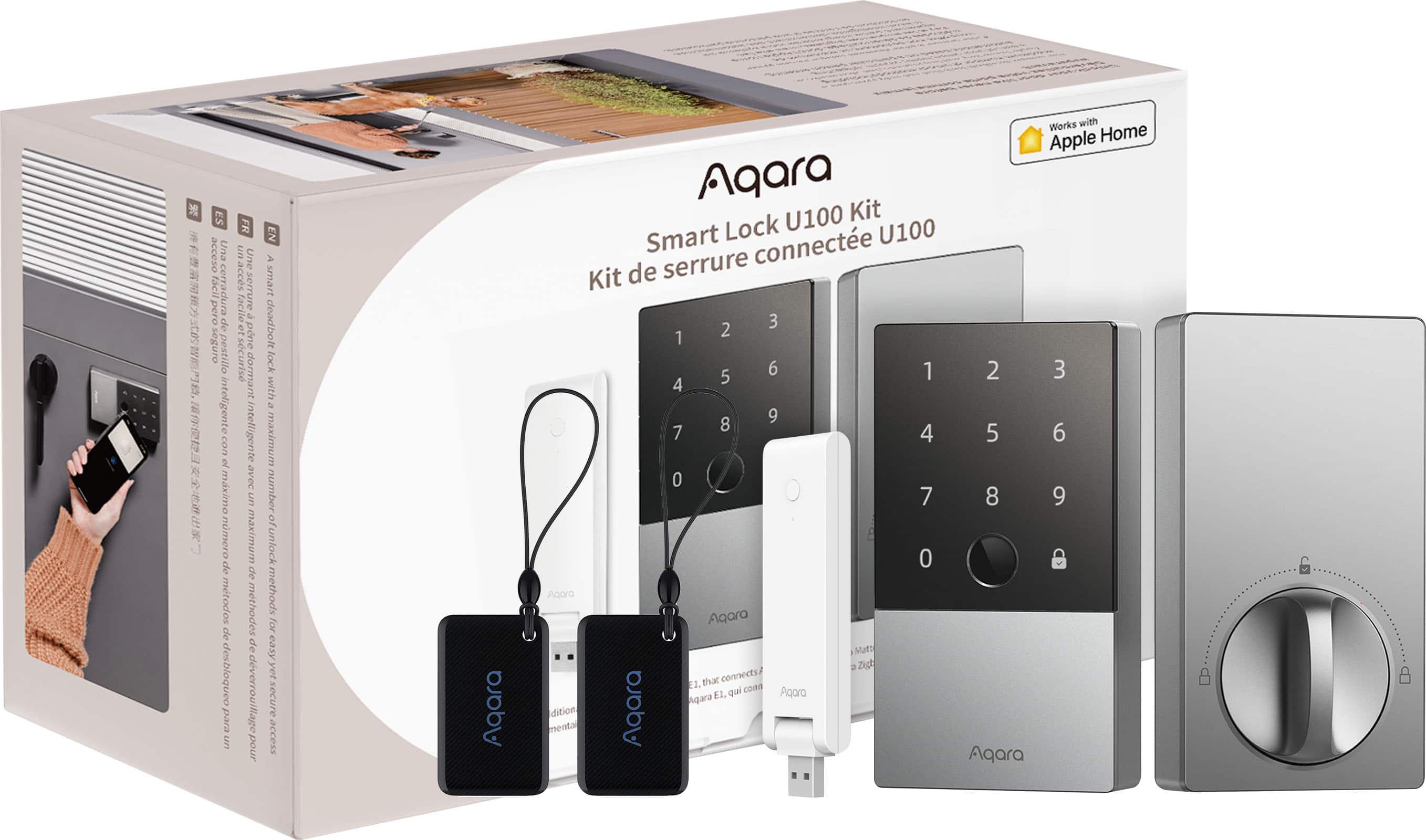
Quick Decision
Buy it if you have an iPhone or Apple Watch and want the most affordable smart lock with Home Key and fingerprint. Skip it if you need built-in Wi-Fi or a compact, minimalist design, or if you're not willing to add an Aqara Hub. For the price, the U100 delivers an exceptional range of entry methods for Apple-centric homes.
Best if you...
- iPhone and Apple Watch owners who want Home Key without the Level Lock+ price
- Households that want multiple entry methods (fingerprint, PIN, key)
- Aqara ecosystem users looking to add a lock to their existing hub
Skip it if you...
- Android-only smartphone users who can't use Apple Home Key
- People who want a smart lock with built-in Wi-Fi and no hub
- Those with non-standard doors or limited clearance for a bulky lock
Choosing a smart lock in 2026 means weighing security, convenience, and app compatibility. The Aqara U100 has become a popular contender because it offers Apple Home Key support at a price that's significantly lower than competitors like the Level Lock+. But does it deliver on all the promises? This analysis breaks down the U100's real strengths and weaknesses based on manufacturer specifications and verified user feedback patterns.
We'll cover five distinct entry methods, HomeKit integration, battery life, and the trade-off of needing a separate hub for remote access. We'll also compare the U100 to the closest alternatives, identify who should buy it and who should skip, and suggest accessories you might want. You can find the Aqara U100 on Amazon, and by the end of this guide you'll know if it's the right lock for your door.
About the Aqara U100 Smart Lock
The Aqara U100 is a smart deadbolt lock that supports Apple Home Key, fingerprint recognition, passcode entry, NFC, and a physical key. It integrates with HomeKit, Alexa, and Google Home, and pairs with Aqara's Zigbee hub for remote access and automations. Designed for homes that want multiple convenient entry methods with strong security.
Key Specifications
- Power
- 8 AA batteries
- Lock Type
- Smart Deadbolt
- Backup Key
- Yes
- Smart Home
- Apple HomeKit, Amazon Alexa, Google Home
- Battery Life
- Up to 8 months (rated)
- Connectivity
- Bluetooth 5.0, Zigbee 3.0
- Required Hub
- Aqara Hub for remote access (M1S/M2)
- Max Passcodes
- 50
- Authentication
- Fingerprint, passcode, NFC, physical key, app
- Max Fingerprints
- 50
Overview
The Aqara U100 was introduced in 2023 as one of the first non-Level locks to support Apple Home Key. Its combination of a fingerprint reader, touchscreen keypad, and physical key backup quickly set it apart from other Home Key locks. The lock uses both Bluetooth and Zigbee, so it can work locally without a hub, but remote access and advanced features require an Aqara Hub (like the M2 or M1S).
Inside the home, the U100 can be used as a standard smart deadbolt: you can lock/unlock via the front panel, the Aqara app (within Bluetooth range), or with an Apple device. With a hub, you gain remote control, activity logs, and integrations with HomeKit, Alexa, and Google Home. That makes it a flexible choice for households that already have a Zigbee hub or are willing to invest in one.
In the broader smart lock market, the U100 sits at an intermediate price point, typically around $230. It's cheaper than the Level Lock+ and Schlage Encode Plus, but more expensive than basic keypad locks like the Yale Assure Lock 2. Its niche is defined by Home Key support and the wide range of authentication options—features that aren't common at this price.
Pros
The Aqara U100's main strengths lie in its breadth of authentication options, Apple Home Key support, and strong smart-home compatibility. Here are the specific advantages that make it a compelling choice for many households.
Apple Home Key Support at a Lower Price
The Aqara U100 is one of the most affordable smart locks that supports Apple Home Key, letting you unlock with a tap of your iPhone or Apple Watch. At about $230, it undercuts the Level Lock+ by roughly $100 while still giving you the same NFC tap-to-unlock convenience. This makes it an excellent choice for Apple users who want Home Key without the premium price.
For households already in the Apple ecosystem, the U100 integrates directly with Wallet. You can share Home Keys with family members and even use Express Mode on Apple Watch to unlock without authenticating. In practice, this means you can leave your keys at home and rely on your phone or watch.
Five Ways to Unlock: Fingerprint, Passcode, NFC, Physical Key, and App
The U100 gives you a remarkable number of entry options. The front module includes a fingerprint sensor, a backlit touchscreen keypad, and an NFC reader; the lock also includes a physical key cylinder and Bluetooth for app control. Aqara says you can store up to 50 fingerprints and 50 unique passcodes, so multiple users can each have their own entry method.
This redundancy is one of the lock's biggest strengths. If your finger is wet or your phone battery dies, you can still get in using the keypad or physical key. Very few smart locks at any price offer this level of flexibility.
Seamless HomeKit Integration via Aqara Hub
When paired with an Aqara Hub (sold separately), the U100 becomes a full HomeKit accessory. You can ask Siri to lock or unlock the door, create automations in the Apple Home app, and check the lock's status remotely. The Zigbee connection delivers low-latency local control, which is more reliable than Bluetooth-only locks.
The lock also supports HomeKit scenes, so you can say "Goodnight" to turn off lights and lock the door at once. If you're already invested in HomeKit, this level of integration at this price point is rare.
Long Battery Life with Easily Replaceable AA Batteries
Aqara rates the U100 for up to 8 months of battery life using 8 AA batteries. Because the batteries are standard AA cells, you can swap them out without waiting for a proprietary rechargeable pack to charge. The Aqara app and HomeKit both show battery percentage, so you'll have ample warning before power runs out.
The 8-month rating assumes typical use; heavy users might need to change batteries a bit sooner, but the overall convenience of AA batteries is a plus for most owners.
Broad Ecosystem Support: HomeKit, Alexa, and Google Home
The U100 works with Amazon Alexa and Google Assistant as well as Apple HomeKit, all through the Aqara Hub. That means you can use voice commands to check if the door is locked or lock it from the couch. The Aqara Home app also allows you to manage schedules and temporary passcodes, which is useful for houseguests or service workers.
This broad compatibility makes the U100 flexible for multi-platform households, though you'll need the hub to enable most of these connections.
Strong Value Compared to Other Home Key Locks
At roughly $230, the U100 packs more features per dollar than any other smart lock with Apple Home Key. The Level Lock+ typically sells for around $330 and lacks a fingerprint reader and keypad. The Schlage Encode Plus often lists near $290 and skips fingerprint recognition. For about the same money as a keypad-only lock, you're getting a full suite of authentication options.
This pricing advantage is even more compelling if you already own an Aqara Hub, as the total cost of ownership remains lower than most rivals.
Cons
No smart lock is perfect, and the Aqara U100 has its share of compromises. These limitations may matter less if you live in a standard door with an existing doorbell camera, but they're important to know before you buy.
Aqara Hub Required for Remote Access
The U100 does not have built-in Wi-Fi. For local Bluetooth control, you can operate it within range, but to manage the lock from anywhere, you'll need to add an Aqara Hub (M1S or M2) to your network. That's an extra $50–60 expense that many competing locks don't require.
Without the hub, you miss out on remote notifications, activity logs, and cloud-based code management. If you want to see who unlocked the door while you're away, the hub is a necessary extra.
Bulky Design and Potential Fit Issues
The U100 is one of the larger smart locks on the market. The exterior surface protrudes noticeably from the door, and the interior assembly is thick, which can interfere with doors that have tight clearances. Some users report that the lock doesn't fit if there's a storm door or a narrow gap between the door and frame.
If you have a standard door with ample space, this is less of an issue. But for anyone with a non-standard door or a minimalist aesthetic, the visual bulk and fit risk are worth considering.
No Built-in Video Camera or Doorbell
The U100 is a lock only; it doesn't have a camera, speaker, or doorbell. If you want to see who is at your door while you're away, you'll need to purchase a separate video doorbell. This adds cost and a second device to manage.
For those who want an all-in-one entry and security device, this lock isn't it. But if you already have a doorbell camera, this con is irrelevant.
Limited Event History Without Hub
When using the U100 in Bluetooth-only mode, the event log is minimal. You might only see recent events within range, and there is no cloud history. With an Aqara Hub, you get a more complete log of entries and exits, which is useful for security monitoring.
If you rely on the lock for tracking deliveries or cleaning staff, the lack of a robust log without a hub could be a dealbreaker.
Fingerprint Reader Can Be Fussy
The fingerprint sensor is generally fast, but it can be inconsistent with dry, wet, or very worn fingers. The optical sensor may require multiple attempts in those cases. Users with older fingerprints that are faded might find it frustrating, though enrolling multiple fingers can help.
Since the fingerprint is one of the headline features, this is a real limitation. Still, it's a backup to the keypad, not your only option.
Aqara App Could Be More Polished
The Aqara Home app has a steeper learning curve than apps from August or Schlage. Some users find the menu layout confusing, and Bluetooth sync sometimes feels slow. However, after the initial setup, most people use the lock through HomeKit or the physical keypad, so the app's quirks become less important.
👍 Who It's For
The Aqara U100 is a great match for iPhone and Apple Watch owners who want the convenience of Apple Home Key without paying a premium for the Level Lock+. HomeKit users who already have an Aqara Hub (M1S, M2, etc.) will find the U100 slots right into their setup with no extra hardware needed. It's also a strong pick for families where different members prefer different entry methods—kids may use a PIN, adults may use a fingerprint, and guests can get temporary codes.
Renters or Airbnb hosts can leverage the U100's up to 50 unique passcodes, including scheduled temporary codes, to grant access to cleaners or guests and revoke it remotely. If you're building a smart home around HomeKit and want a lock that supports multiple entry methods without breaking the bank, the U100 is one of the most practical options available.
👎 Who Should Avoid
If you don't own an iPhone and use Android exclusively, the U100's headline Home Key feature is useless unless you use the Aqara app, which may feel more limited. Also, if you prefer a smart lock with built-in Wi-Fi—so you just plug it in and control it from anywhere—the U100's reliance on a hub is a drawback. Those with non-standard doors or tight clearance should be cautious; the lock's bulk can cause fitting issues in some cases.
If you want a minimalist design that disappears into your door, the Level Lock+ is a better choice, even though it costs more and lacks a keypad or fingerprint sensor. And if you need a video camera in your entry point, you're better off buying a separate video doorbell like the Eufy S330 or the Ring Video Doorbell 4.
See today's Aqara U100 Smart Lock price and available configurations on Amazon.
🛒 Buy on AmazonAs an Amazon Associate we earn from qualifying purchases.
Alternatives to Consider
| Product | Choose Aqara U100 Smart Lock if... | Choose the alternative if... |
|---|---|---|
| Level Lock+$100 more expensive | You want the most compact, Apple-focused smart lock with Home Key and don't mind paying extra for that sleek design. | You want fingerprint recognition and a keypad at a lower price without sacrificing Home Key support. |
| Schlage Encode Plus$50–80 more expensive | You want Home Key, built-in Wi-Fi, and a proven lock with a physical keypad, and you're okay without a fingerprint sensor. | You value the fingerprint reader and multiple passcodes more than built-in Wi-Fi and brand recognition. |
| Yale Assure Lock 2Comparable or slightly cheaper | You want a more affordable smart lock with a keypad and optional Wi-Fi, and you don't need Home Key or fingerprint. | You want the broadest set of authentication methods (fingerprint, NFC, Home Key) for a similar or slightly higher cost. |
| August Wi-Fi Smart LockAround $70 cheaper | You want to retrofit your existing deadbolt and keep your current keys, and you prefer a minimal interior side. | You need a built-in keypad for guests who don't have a phone and prefer not to use your existing key. |
The most direct alternative is the Level Lock+, which also supports Apple Home Key, delivers a slim side-mounted design, and includes both Bluetooth and Wi-Fi (via Level's Home Key reader). It costs nearly $100 more and lacks a fingerprint sensor and keypad. For those wanting a smart lock with touchpad and built-in Wi-Fi, the Schlage Encode Plus is a solid choice, with Home Key, Wi-Fi, and alarms, but you'll sacrifice fingerprint recognition.
If you don't need Home Key, the Yale Assure Lock 2 with the Wi-Fi module is cheaper and offers keypad-only entry. The August Wi-Fi Smart Lock is a retrofit option that reuses your existing deadbolt, but it doesn't have a keypad or fingerprint sensor. Each of these picks involves trade-offs, and the right one depends on whether you value the Home Key feature, a fingerprint reader, built-in Wi-Fi, or minimal footprint.
Is it worth the price?
At approximately $230, the Aqara U100 is worth it for Apple users who want Home Key and fingerprint entry without paying Level Lock+ prices. The main compromises—the need for an Aqara Hub for remote access and the bulky design—are outweighed by its feature set for the right buyer. If you already own an Aqara Hub or are willing to buy one, the total cost still lands below most Home Key locks, making it a strong value. For Android-only households or those who want out-of-the-box Wi-Fi, a cheaper keypad lock like the Yale Assure Lock 2 would be more appropriate.
📝 Bottom Line
The Aqara U100 is the right choice for Apple-centric households that want Home Key, fingerprint, and keypad access in a single affordable lock. You can find the Aqara U100 on Amazon for around $230, making it roughly $100 less than the Level Lock+ while adding features that lock doesn't have.
However, it's not for everyone. The lack of built-in Wi-Fi forces you to buy an Aqara Hub to use the lock remotely, and the bulky hardware can be a turnoff if you have tight clearance or prefer sleek hardware. These drawbacks are manageable if you already have a hub and a standard door, but they're real considerations for first-time smart-lock buyers.
If you're in the Apple ecosystem and want the best balance of features per dollar, the U100 is worth buying in 2026. If you need Wi-Fi out of the box or a minimal footprint, look at the Schlage Encode Plus or Level Lock+ instead. For most households that prioritize convenience and security over sleek design, the U100 hits the sweet spot.
Check current Aqara U100 Smart Lock availability and bundle options on Amazon.
🛒 Buy on AmazonAs an Amazon Associate we earn from qualifying purchases.
Frequently Asked Questions
Quick Summary
Key Pros
- ✓Apple Home Key support at a price well below the Level Lock+
- ✓Five distinct entry methods: fingerprint, passcode, NFC, physical key, and app
- ✓Seamless HomeKit integration when paired with an Aqara Hub
- ✓Uses eight standard AA batteries, with Aqara rating up to 8 months of life
- ✓Works with Alexa and Google Home in addition to Siri
Key Cons
- ✗Requires a separate Aqara Hub for remote access and advanced features
- ✗Bulky design may not fit every door, especially with tight clearances
- ✗No built-in camera or video doorbell
- ✗Limited event history and remote functionality without hub
- ✗Fingerprint sensor can be inconsistent with certain fingers
Ratings
Best For
- →iPhone and Apple Watch owners who want Home Key without the Level Lock+ price
- →Households that want multiple entry methods (fingerprint, PIN, key)
- →Aqara ecosystem users looking to add a lock to their existing hub
- →HomeKit enthusiasts who want Siri and automation integration