
Is Amazon Echo Show 10 Worth It? Honest Review (2026)
Is the Echo Show 10 still worth buying in 2026? We pull apart the motorized display's strengths, weaknesses, and best alternatives.
Quick Decision
Buy the Echo Show 10 if you'll actually use the motorized tracking camera for video calls or hands-free cooking. Skip it if you're in the Google ecosystem or you just want a basic smart display — the Echo Show 8 handles the same daily jobs for $100 less.
Best if you...
- Alexa-first households
- Kitchen multitaskers who follow video recipes
- Video-call users who move around while talking
Skip it if you...
- Google ecosystem users
- Budget shoppers
- Privacy-sensitive households
The Echo Show 10 has long been one of the most distinctive smart displays you can buy. Instead of a static screen, it tilts, swivels, and follows you around the kitchen or living room, trying to keep the camera on you during video calls and the display in your line of sight. That motorized trick still doesn't exist on most rivals, which is why it's still getting attention in 2026.
This guide breaks down the Echo Show 10's real pros and cons, with specifics pulled from its public spec sheet and how it fits into today's smart home market. You'll see where it genuinely shines, where it falls short, who should buy it, who should skip it, and what alternatives are worth considering before you hit the checkout button.
About the Amazon Echo Show 10
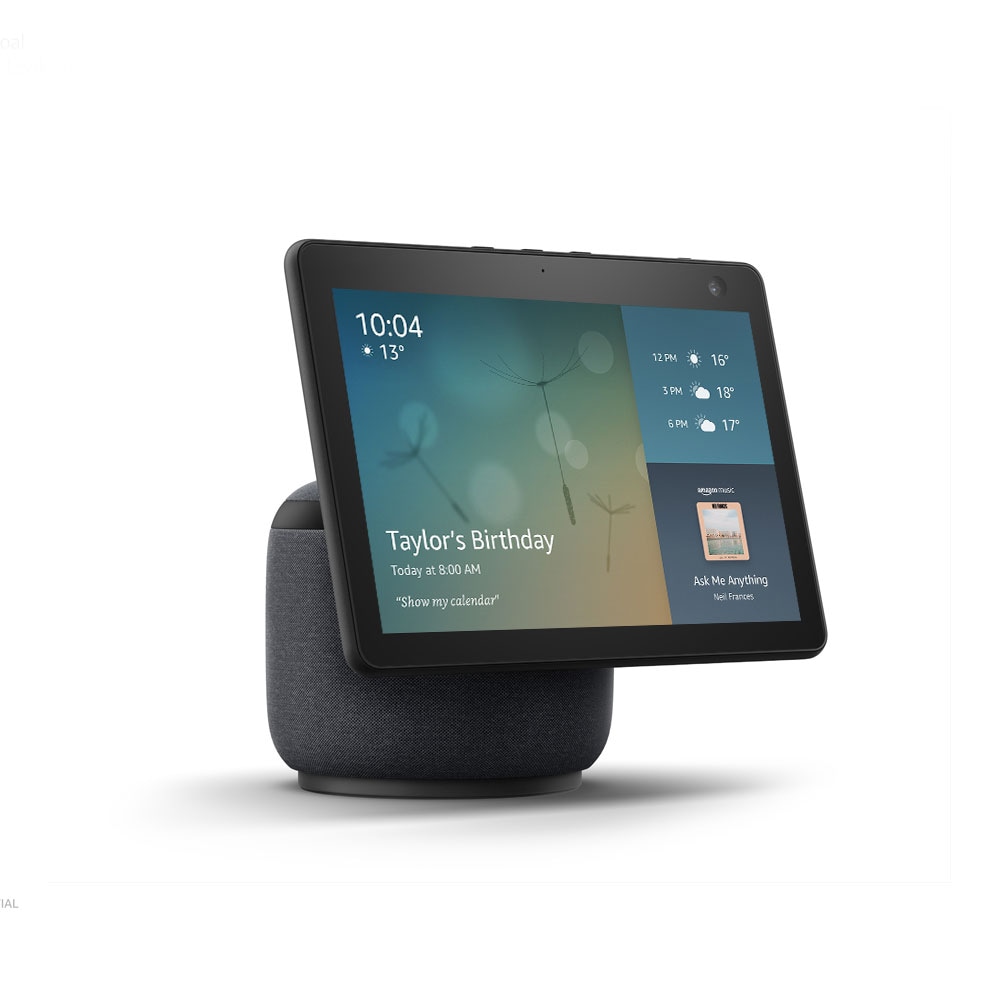
The Echo Show 10 is Amazon's 10.1-inch Alexa smart display with a motorized base that rotates the screen and camera to follow you. It's built for hands-free video calls, kitchen recipes, and controlling smart home devices without lifting a finger.
Key Specifications
- Audio
- 2× 1-inch tweeters + 1× 3-inch woofer
- Power
- AC adapter only
- Camera
- 13MP with auto-framing
- Display
- 10.1-inch 1280×800 HD touchscreen
- Rotation
- Up to 350 degrees
- Smart home
- Zigbee and Matter
- Connectivity
- Wi-Fi 5, Bluetooth 5.0
Overview
The Echo Show 10 sits near the top of Amazon's smart display lineup, above the smaller Echo Show 8 and Echo Show 5, but below the wall-mountable Echo Show 15. Its core physics are simple: a 10.1-inch HD touchscreen sits on a motorized stand that rotates up to 350 degrees, and a 13MP camera with auto-framing works alongside Alexa to keep the screen and lens pointed at you. That makes it feel less like a static speaker with a screen and more like a tiny home robot that knows where you are.
In daily use, that motor creates a genuinely useful experience. You can be chopping vegetables, step to the sink, and the screen turns to keep the recipe visible. Video calls can follow you around a room instead of cutting you out of frame. It also includes a built-in Zigbee radio and supports Matter, so it can act as a smart home hub for many brands without requiring a separate bridge. The trade-offs are the higher price, the no-battery design, and the fact that the display resolution and app catalog aren't anywhere near tablet-level.
Pros
The Echo Show 10's best features go beyond basic smart display convenience. Take a look at the places where it genuinely stands out.
Motorized Screen That Actually Follows You
The signature feature is the motorized base. Amazon rates it to rotate up to 350 degrees, and the Echo Show 10 uses motion sensors and Alexa's built-in computer-vision to keep the screen pointed at you as you move around a room. That means a recipe stays visible while you cross the kitchen, and a face remains in the middle of a video call without you standing still.
It's the kind of hardware you don't know you need until you try it. If you cook for a while, or if you often talk to family members while pacing, the motorized tracking is what makes this smart display much more than a screen on a stand. You can also disable the motor if you want a fixed display.
13MP Camera With Auto-Framing
The Echo Show 10 has a 13MP camera, which is noticeably better than the low-res sensors on most smart displays. It uses auto-framing to zoom, crop, and pan so that a single speaker or a group stays in frame during Alexa video calls, Zoom sessions, and other compatible apps.
Combined with the motorized stand, it feels like a mini video-conference camera built into a smart display. The camera itself is sharp enough for a face-to-face catch-up, and it works surprisingly well during a busy cooking session.
Solid Audio For Its Size
Audio isn't an afterthought. The Echo Show 10 packs two 1-inch tweeters and one 3-inch woofer, so it plays significantly louder and fuller than the Echo Show 8 or 5. It also uses directional audio that adjusts output based on the screen's position, so the sound aims where you are.
For a kitchen or living room, it's plenty for music, podcasts, and the dialogue in a Netflix show. What it's not, though, is a replacement for a dedicated speaker like the Echo Studio, which has more powerful bass and a larger sound stage.
Zigbee and Matter Make It a Smart Home Hub
This isn't just another Alexa speaker. The Echo Show 10 includes a built-in Zigbee radio, which lets it directly control compatible lights, locks, plugs, and sensors without needing a separate bridge. With additional Matter support added via software updates, it works as the central on-ramp for most mainstream smart home gear.
That makes it genuinely useful for someone building a connected home. You can set up a routine like "evening" that turns off Zigbee lights and starts locking your locks, and the Show 10 handles the commands locally rather than depending on a cloud-based vendor hub.
Useful Privacy Hardware
The Echo Show 10 takes privacy seriously. A physical shutter slides over the camera, and a dedicated switch can power down the microphone and camera entirely. That means you can block the lens without losing the display, something many smart displays still don't offer. The microphone array is still always-listening by default, but the shutter and off button give you a straightforward way to cut off the eyes and ears when you want to.
Cons
Despite the clever hardware, the Echo Show 10 has some significant limitations that might change your decision depending on your household setup and budget.
High Price for a Niche Feature
At $249.99 MSRP, the Echo Show 10 costs about $100 more than the Echo Show 8, which also has a 13MP camera and a smart home hub. The extra money goes to the motorized base, but if you don't need the screen to follow you, you're paying a premium for hardware that adds little to your routine. It does get discounted often to $199.99, but it's still the most expensive non-wall-mounted Echo display.
Display Resolution Is Only 'HD' (1280×800)
For a 10.1-inch screen, 1280×800 is sharp enough for glanceable info but lacks the crispness of a modern tablet or even some other smart displays. Text can look slightly soft if you lean in, and video won't be as detailed as a tablet. It's a utility display, not a media screen.
App Ecosystem Is Amazon-Centric
YouTube isn't available as a native app. You'll have to open the built-in Silk browser for YouTube, which is clunkier. Many other niche apps aren't ported to Alexa, so your experience is largely limited to what Amazon's app store offers. If you already live in Google's ecosystem, the lack of YouTube and Google Assistant is a real drawback.
Motion Motor Gets Old Fast
The same motor that makes the Echo Show 10 unique can also make it annoying. The screen moves whenever it senses you nearby, which can be distracting when you're trying to read or focus. It's not a quiet, instant movement either; there's a little mechanical noise. And if you place it somewhere without enough clearance, like a cramped shelf, it can bump into things or force you to disable the motor entirely.
No Battery Means It's Always Tethered
Unlike a tablet, the Echo Show 10 needs to be plugged into AC power at all times. That's normal for an Echo device, but it conflicts with the idea of a "follow-you" screen — you can't carry it around the house. It also needs roughly six inches of open space around it, so it won't fit on every side table.
Privacy Concerns Still Exist
The physical shutter is helpful, but the camera and motion sensor are still active by default when plugged in. People who are uneasy about a camera that tracks them may find the auto-framing behavior more unsettling than convenient. You can disable it, but at that point you're paying extra for a feature you won't use.
👍 Who It's For
The Echo Show 10 is for people who cook, follow video recipes, and video call frequently — and who do all of this inside an Alexa-first smart home. It's also a strong choice for households that own a lot of Zigbee or Matter-compatible gadgets, because it replaces the need for a separate smart home hub. If you already use Alexa for announcements, Drop In, and routines, the motorized screen makes those tools feel more natural.
👎 Who Should Avoid
This isn't a great fit if you've built your home around Google or Apple. Google Assistant users will miss YouTube, Google Calendar, and Assistant routines; Apple users get none of those either. Budget shoppers should strongly consider the Echo Show 8, and privacy-focused people might not want a motorized camera tracking them around the house. It's also a poor fit for small spaces—the motor needs room to swing.
See today's Amazon Echo Show 10 price and available configurations on Amazon.
🛒 Buy on AmazonAs an Amazon Associate we earn from qualifying purchases.
Alternatives to Consider
| Product | Choose Amazon Echo Show 10 if... | Choose the alternative if... |
|---|---|---|
| Echo Show 8 (3rd Gen)roughly $100 less | You want the same 13MP camera and smart home hub in a smaller, more affordable package that stays put. | You need the motor to keep the screen and camera facing you as you move around the kitchen. |
| Google Nest Hub (2nd Gen)about $150 less | You're invested in Google's ecosystem and want to watch YouTube natively. | You want a camera for video calls and don't mind Alexa. |
| Echo Show 15about $30 more | You prefer a bigger, wall-mounted family dashboard with widgets and a full-screen calendar. | You want the camera and free-standing screen that follows you. |
The Echo Show 8 is the natural alternative if you want much of the same video-calling and smart home hub functionality in a smaller, cheaper design. If you're in the Google layer, the Google Nest Hub (2nd Gen) costs far less and offers native YouTube, but it has no camera and a smaller visual footprint. If you want a huge family calendar, the Echo Show 15 wall-mounted display is worth a look, but it sacrifices the built-in camera and the follow-you feature.
Is it worth the price?
At around $249.99 (often $199.99 on sale), the Echo Show 10 is worth it if you'll use the motor to keep the screen facing you while you cook, talk, or work. It's harder to justify for casual users; the Echo Show 8 at roughly $149.99 still has a solid camera and a smart home hub, and it costs dramatically less. In short: worth it for the niche of auto-follow screen use, not worth it for everyone else.
📝 Bottom Line
The Echo Show 10 is the right choice for Alexa-first families and anyone who relies on hands-free video calls or multitasking in the kitchen. Its motorized screen and 13MP camera deliver a genuinely unique experience you won't find in other mainstream smart displays, and its Zigbee/Matter hub makes it a practical smart home console.
That said, the Show 10's weaknesses — the premium price, modest screen resolution, and Amazon-centric app store — make it a tougher sell for Google households, budget buyers, or anyone who mostly wants a stationary picture frame or a casual news screen.
Buy it if the auto-tracking screen will simplify your daily life. Skip it and step down to the Echo Show 8 if you're only looking for a small kitchen screen.
Check current Amazon Echo Show 10 availability and bundle options on Amazon.
🛒 Buy on AmazonAs an Amazon Associate we earn from qualifying purchases.
Frequently Asked Questions
Quick Summary
Key Pros
- ✓Motorized display rotates up to 350 degrees to keep you in frame
- ✓Sharp 13MP camera with auto-framing
- ✓Full, loud sound for a smart display
- ✓Built-in Zigbee hub with Matter support
- ✓Physical camera shutter and mic/camera control
Key Cons
- ✗Costs about $100 more than the Echo Show 8
- ✗Screen resolution is only 1280×800
- ✗YouTube is limited to the Silk browser
- ✗Motorized swivel can be annoying and noisy
- ✗No rechargeable battery; must stay plugged in
Ratings
Best For
- →Alexa-first households
- →Kitchen multitaskers who follow video recipes
- →Video-call users who move around while talking
- →Smart home hobbyists with Zigbee or Matter devices