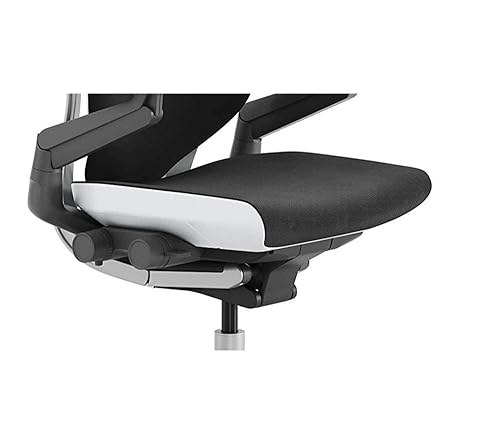
Sitting for long hours can wreak havoc on your back, leading to chronic pain, stiffness, and long-term spinal issues. The right ergonomic office chair is not just a luxury—it's a tool that actively supports your posture, reduces pressure on your spine, and helps you stay comfortable and productive. But with so many options claiming to be "ergonomic," it's easy to get overwhelmed. This guide breaks down what truly makes a chair effective for back pain, what features to prioritize, and which chairs offer the best value for your health and budget. Whether you're suffering from lower back pain or trying to prevent it, you'll leave with a clear understanding of how to choose a chair that works for your body.
▸What You'll Need
- •Understanding of your body measurements (height, weight, inseam, and weight distribution)
- •Knowledge of your primary pain points (lower back, mid-back, neck, or sciatica)
- •A clear budget range (from $200 to over $1,500)
- •Time to test or research chairs (at least a few hours reading reviews or sitting in showroom models)
- •Basic understanding of ergonomic terms: lumbar support, seat depth, armrest adjustability, tilt tension, etc.
Estimated Time: 30-60 minutes to read and understand; additional time for research and trying chairs
Difficulty: intermediate
▸Step-by-Step Instructions
Step 1: Understand How Ergonomic Chairs Relieve Back Pain
An ergonomic office chair is designed to support the natural curves of your spine, particularly the lumbar region (lower back), which bears most of the weight when sitting. Unlike standard chairs that force a slouched posture, ergonomic chairs promote a neutral spine alignment: ears over shoulders, shoulders over hips, and hips at a 90- to 110-degree angle. This reduces stress on spinal discs, encourages core muscle engagement, and prevents the forward leaning that strains the lower back. Key mechanisms include adjustable lumbar support that fills the gap between your lower back and the chair back, and a seat pan that allows your feet to rest flat while keeping your knees at hip level or slightly below.
💡 Tips:
- •Look for chairs with independent lumbar height and depth adjustment for a custom fit.
- •A waterfall seat edge reduces pressure on the backs of your thighs.
⚠️ Warnings:
- •Chairs with fixed lumbar support may not align with your specific spine curvature.
Step 2: Identify the Key Ergonomic Features to Look For
Not all ergonomic chairs are created equal. For back pain relief, these features are critical: 1) Lumbar support that is adjustable in height and depth. 2) Seat height adjustment (pneumatic lift) so your thighs are parallel to the ground and feet flat. 3) Seat depth adjustment (sliding seat pan) to ensure a 2-4 inch gap between the back of your knees and the seat edge. 4) Armrests that are adjustable in height, width, and pivot to let your shoulders relax. 5) Backrest angle and tilt tension that allows you to recline slightly without losing lumbar contact. 6) A headrest (optional) for upper back and neck relief when reclining. Prioritize chairs that offer independent adjustments rather than synced mechanisms.
💡 Tips:
- •If you're taller than 6'0" or over 250 lbs, seek chairs with extended height ranges and reinforced frames.
- •Mesh backrests provide breathability and conform to your shape, while foam offers plush support.
⚠️ Warnings:
- •Avoid chairs with fixed armrests that force you to hunch your shoulders.
Step 3: Match Chair Dimensions to Your Body Type
The best ergonomic chair for back pain is the one that fits you personally. Most chairs are designed for average body types (5'3" to 5'11", up to 250 lbs). If you are outside this range, look for chairs with specific sizing options. For seat width, you should be able to comfortably sit without your hips pressing against the armrest bases. Seat depth: when sitting against the backrest, there should be 2-4 inches (about 2-3 finger widths) between the back of your knee and the seat edge. Backrest height should support your shoulder blades if you don't have a headrest. Many premium chairs (like the Steelcase Gesture or Herman Miller Aeron) come in multiple sizes (A, B, C for Aeron). Use manufacturer sizing guides based on your height and weight.
💡 Tips:
- •If you're tall, look for chairs with a seat height range up to 21 inches or more.
- •For small users, chairs with a seat depth of less than 16 inches are better.
⚠️ Warnings:
- •Don't assume one size fits all; an ill-fitting chair can worsen back pain.
Step 4: Assess Cushioning and Material for Comfort and Support
The seat and backrest material directly affect pressure distribution and temperature. Mesh chairs (e.g., Herman Miller Aeron) breathe well, distribute weight evenly, and maintain shape over time, making them ideal for long hours. High-density foam seats provide a plush feel but can break down faster and trap heat. Hybrid options combine foam with mesh or use a mesh back with a cushioned seat. For back pain, a slightly firmer seat is often better because it prevents the hips from sinking too deep, which can misalign the spine. Look for seat cushions made of cold-cure foam or gel-infused foam that resist sagging. The backrest should have enough tension to support your lumbar curve without feeling rigid.
💡 Tips:
- •If you have tailbone pain, look for chairs with a cutout or gel coccyx cushion.
- •Mesh backs are easier to clean and more durable than fabric.
⚠️ Warnings:
- •Memory foam seats may feel comfortable initially but can lack long-term support for heavy users.
Step 5: Evaluate Adjustability Mechanisms and Ease of Use
An ergonomic chair is only effective if you can easily adjust it to meet your changing needs throughout the day. Look for: 1) Pneumatic seat height lever (standard under the seat). 2) Seat depth slider (a lever or paddle that moves the seat pan forward/backward). 3) Lumbar height and depth adjustments (knobs or levers on the backrest). 4) Armrests: 4D adjustable (height, width, depth, angle) are best. 5) Recline tension knob to control how much force is needed to lean back. 6) Backrest lock to keep you in upright or reclined positions. 7) Forward tilt option (tilts the seat slightly forward) to reduce pressure on the thighs when leaning forward to work. Test the chair's adjustments to ensure they are within easy reach and don't require excessive force.
💡 Tips:
- •Chairs with 'air lumbar' or 'dynamic lumbar support' automatically adjust to your movement.
- •Make sure recline tension is adjustable for your weight; a too-loose chair can strain your back.
⚠️ Warnings:
- •Some chairs use a single lever for multiple adjustments, which can be confusing—avoid if you want simplicity.
Step 6: Consider Budget and Value: From Budget to Premium
Prices for ergonomic chairs range from under $200 to over $1,500. Budget chairs ($200–$500) can provide decent lumbar support and basic adjustability, but often lack the durability and advanced features of higher-end models. Mid-range ($500–$800) offers good quality with more adjustments and better materials. Premium ($800–$1,500+) chairs like Steelcase Gesture, Herman Miller Aeron, or Humanscale Freedom are built to last 10–15 years and come with extensive ergonomic features and warranties. However, a high price doesn't guarantee a perfect fit for your back. The best value is a chair that fits your body well and has the features you need—sometimes a well-adjusted mid-range chair outperforms a premium one that's too big or small. Consider buying used or refurbished premium chairs to save money.
💡 Tips:
- •Many premium brands offer 30-day home trials to test the chair risk-free.
- •Check for sales around holidays (Black Friday, New Year) for discounts on popular models.
⚠️ Warnings:
- •Avoid ultra-cheap chairs (<$150) labeled 'ergonomic'; they rarely have proper lumbar support and may break quickly.
Step 7: Read Reviews and Expert Opinions to Validate Your Choice
Before purchasing, invest time reading verified customer reviews, especially from people with similar back issues (e.g., herniated discs, sciatica, scoliosis). Look for patterns in complaints about durability, comfort over time, and support for larger or smaller users. Expert reviews from sources like Wirecutter, Consumer Reports, or ergonomic office furniture blogs often conduct long-term tests and compare features side-by-side. Check for awards like the BIFMA level certification, which indicates compliance with standards for ergonomics, sustainability, and safety. Also, browse forums like Reddit (r/officechairs) where real users share their experiences. If possible, visit a showroom to test the chair for 15–30 minutes, or take advantage of return policies.
💡 Tips:
- •Search for specific keywords like 'lower back pain' or 'tall user' in reviews.
- •Pay attention to negative reviews about seat cushion hardness or armrest wobbling.
⚠️ Warnings:
- •Be wary of overly positive reviews with few details; they may be incentivized.
Step 8: Properly Set Up and Adjust Your New Chair
Once you receive your chair, take the time to fine-tune it for your body. Start by setting the seat height so your knees are at a 90° angle and feet flat on the floor. Adjust seat depth so there's a 2-4 inch gap behind your knees. Set lumbar support height to align with the curve of your lower back (usually at belt level). Adjust the backrest tilt tension so you can lean back without using excessive force, and lock the recline at your preferred angle (usually 100–110°). Next, set armrests so your elbows rest at a 90° angle with shoulders relaxed. If you have a headrest, adjust it so it supports the back of your head without pushing your neck forward. Finally, sit for a few minutes and fine-tune any settings until you feel evenly supported. Revisit adjustments after a few days.
💡 Tips:
- •Use a footrest if your feet don't touch the floor after lowering the seat completely.
- •Set your monitor height so your eyes are level with the top of the screen to maintain neutral posture.
⚠️ Warnings:
- •Avoid sitting too far from your desk; keep your arms close to your body to prevent shoulder strain.
▸Pro Tips
- •Combine your chair with a standing desk to alternate between sitting and standing every 30–60 minutes.
- •Use a lumbar roll (like LumbAir) if your chair lacks adjustable lumbar support.
- •Consider chairs with a 'back stop' or lumbar pommel for extra lower back support.
- •Keep your chair manual handy to understand all adjustment controls—many chairs have hidden features.
- •Regularly clean mesh or fabric to maintain air circulation and support.
- •If you suffer from tailbone pain, a coccyx cushion or chair with a cutout can make a huge difference.
- •Set a timer to remind yourself to adjust your posture and recline periodically.
▸Common Mistakes to Avoid
- •Choosing a chair solely based on looks rather than ergonomic features.
- •Not adjusting the chair correctly after purchase; assuming it's perfect out of the box.
- •Buying a chair without considering body size; e.g., a small person in a large chair loses lumbar support.
- •Overlooking the importance of armrest adjustability—fixed armrests can force you to hunch.
- •Ignoring the return policy and warranty; a good ergonomic chair should have at least 5-year warranty.
▸Troubleshooting
Problem: Lumbar support feels too high or low.
Solution: Check if the chair has adjustable lumbar height. If not, use an external lumbar cushion to fill the gap.
Problem: Seat cushion bottoms out after a few months.
Solution: Look for chairs with high-density foam or replaceable seat cushions. Contact the manufacturer for warranty repair.
Problem: Armrests loosen over time and wobble.
Solution: Tighten any visible screws. If the armrest is integrated into the backrest frame, contact support for replacement parts.
Problem: Chair tilts too easily or too hard.
Solution: Adjust the recline tension knob (usually under the seat). Turn clockwise to increase tension, counterclockwise to decrease.
Problem: Back pain persists after using ergonomic chair.
Solution: Reassess your overall workstation setup: monitor height, desk height, foot position. Consider a sit-stand desk or more frequent breaks. Consult a physical therapist.
Herman Miller Aeron
Industry-standard ergonomic chair with excellent lumbar support and breathable mesh. Highly adjustable and comes in three sizes to fit different body types.
Best for: Best for long hours at a desk, especially in warm environments; ideal for those with lower back pain due to its PostureFit SL support.
Price Range: $1,200 - $1,500
Steelcase Gesture
Superior armrest adjustability (360-degree) and a flexible back that adapts to any sitting position. Great for people who change postures frequently.
Best for: Best for multi-tasking and dynamic sitting; excellent for upper back and shoulder pain as it supports movement.
Price Range: $1,000 - $1,400
ErgoChair Pro by Autonomous
Budget-friendly option with full adjustability (lumbar, seat depth, armrests, headrest) and a high weight capacity. Offers great value for its price.
Best for: Ideal for home office users on a budget who need robust ergonomic features; good for lower back support.
Price Range: $400 - $500
Herman Miller Sayl
Unique suspension back design that provides excellent lumbar support without a separate cushion. Lightweight and highly adjustable.
Best for: Best for lighter users (under 200 lbs) who want a sleek, modern chair with great back support and airflow.
Price Range: $800 - $1,000
Hbada Office Chair Ergonomic
One of the best low-cost ergonomic chairs, offering adjustable lumbar support, headrest, and armrests. High customer satisfaction for the price.
Best for: Perfect for budget-conscious shoppers or guest use; provides basic ergonomic features to help with mild back pain.
Price Range: $200 - $300