

Anker 735 Nano II 65W GaN Charger
Multi-device charging (laptops/phones) without heat worries.
$45-55
Anker 735 Nano II 65W GaN Charger GaN tech runs up to 50% cooler, with 12 safety protections against overheat.
Get the App
Better experience on mobile
Understand causes, signs, and simple prevention tips to keep your chargers cool and your devices safe from harm.
Have you ever noticed your phone charger getting uncomfortably hot, or worse, smelling like burning plastic? Overheating in AC adapters is a common issue that can damage your devices, pose fire risks, and shorten adapter lifespan. It's especially scary for beginners who might not know the signs or fixes.
In this guide, you'll learn what overheating is, why it happens, how to spot it early, and proven prevention strategies. No technical expertise needed – we'll use simple analogies like comparing it to a car's engine overheating. Expect to gain practical knowledge in just 10-15 minutes.
By the end, you'll confidently maintain your adapters and avoid costly replacements or hazards.
Estimated Time: 10-15 minutes Difficulty: beginner
An AC adapter, also called a power brick or charger, converts wall outlet AC power (high voltage alternating current) to DC power (low voltage direct current) for devices like laptops, phones, and routers. Think of it as a translator between your wall socket and gadget.
Without it, your devices couldn't run safely. Overheating happens when this conversion process generates excess heat that's not dissipated properly. You'll see why this matters as we go.
💡 Tips:
Overheating occurs when an AC adapter's internal temperature exceeds safe limits, typically above 60-70°C (140-158°F) on the surface. Internally, components like transformers and capacitors can hit 100°C+.
Analogy: It's like a toaster left on too long – the coils glow red-hot. Normal operation feels warm (like a cup of coffee), but overheating is hot to touch for 10+ seconds or smells burnt.
⚠️ Warnings:
Key culprits: Mismatch (using wrong voltage/amperage), poor ventilation (covered by blankets), damage (frayed cords), dust buildup, and cheap build quality lacking heat sinks.
Overloaded outlets or extension cords add resistance, forcing the adapter to work harder. High ambient heat (near radiators) worsens it.
💡 Tips:
Look for: Excessive warmth after 5-10 mins use, buzzing/humming, flickering lights, melted plastic, or discoloration. Devices may charge slower or shut off.
Smell test: Burning insulation is a red flag – unplug immediately. Touch test: Can't hold for 5 seconds? Overheating.
⚠️ Warnings:
Overheating degrades components, leading to failure, data loss, or battery swelling in devices. Worst case: Fires from short circuits (UL reports thousands yearly).
It shortens life from years to months, wasting money.
Step 1 of prevention: Match specs. Read device manual/label for required V/A/W. Use adapters rated equal or higher (e.g., 5V/2A device ok with 5V/3A adapter).
💡 Tips:
Place on hard, flat surfaces away from fabrics/carpets. Avoid coiling cables while plugged in (traps heat). Keep 2-3 inches clearance around.
Clean dust monthly with compressed air.
⚠️ Warnings:
Monthly: Check for frays, bends, or bulges. Replace if damaged. Use surge protectors. Opt for adapters with built-in protections (OVP, SCP).
💡 Tips:
Problem: Adapter hot but device charges fine?
Solution: Improve ventilation or replace – early wear sign. Test temp (<60°C safe).
Problem: Intermittent overheating?
Solution: Check outlet voltage with multimeter; try different socket. Clean dust.
Problem: Burnt smell or melting?
Solution: Unplug, discard immediately, inspect outlet. Seek electrician if damaged.
Problem: Slow charging with heat?
Solution: Wrong adapter – match specs. Clean ports.
GaN tech runs up to 50% cooler, with 12 safety protections against overheat.
Best for: Multi-device charging (laptops/phones) without heat worries.
Price Range: $45-55
Compact design with excellent heat dissipation; UL-certified safe.
Best for: Travel-friendly for beginners prone to placement issues.
Price Range: $25-35
Built-in thermal sensors auto-shutoff if overheating detected.
Best for: High-power needs like laptops; premium safety.
Price Range: $50-60
Affordable with overheat/overvoltage protection; great for phones.
Best for: Budget daily use without skimping on safety.
Price Range: $15-25
Multi-device charging (laptops/phones) without heat worries.
Anker 735 Nano II 65W GaN Charger GaN tech runs up to 50% cooler, with 12 safety protections against overheat.
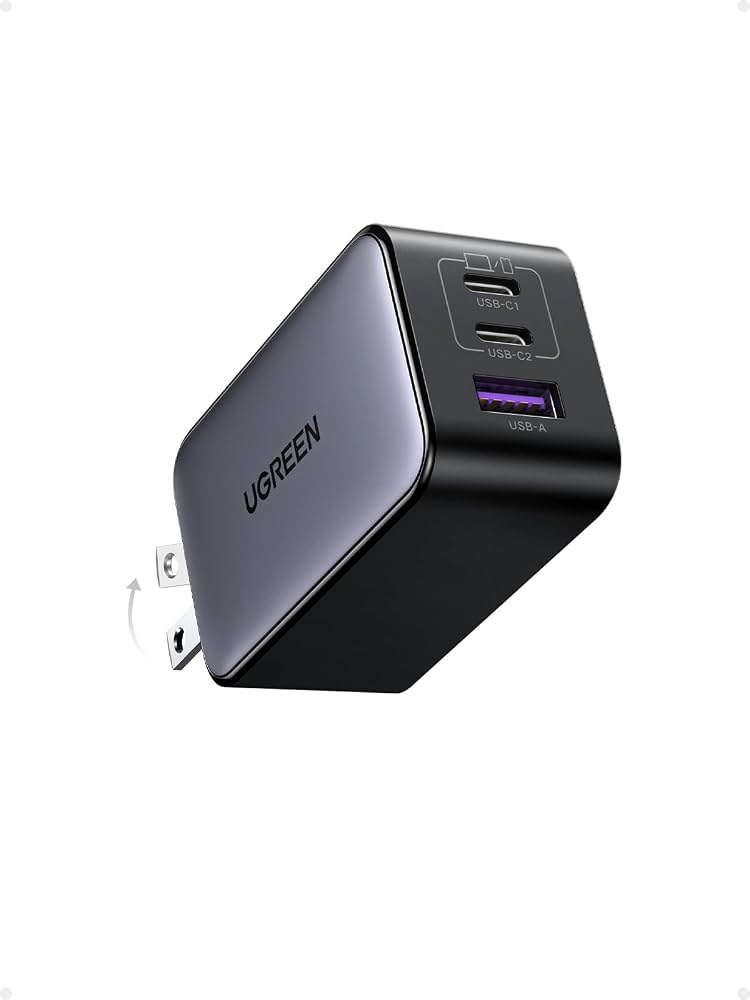
Travel-friendly for beginners prone to placement issues.
UGREEN 65W GaN Charger Compact design with excellent heat dissipation; UL-certified safe.
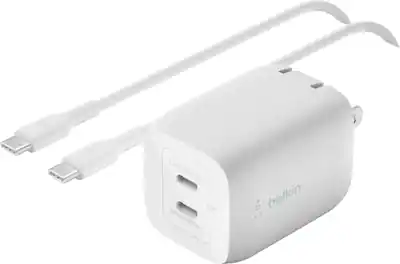
High-power needs like laptops; premium safety.
Belkin BoostCharge Pro 65W GaN Built-in thermal sensors auto-shutoff if overheating detected.
Budget daily use without skimping on safety.
RAVPower 30W PD Pioneer Charger Affordable with overheat/overvoltage protection; great for phones.