▸Why Shift Workers Need Specialized Sleep Tracking
Shift work disrupts natural circadian rhythms, leading to fragmented sleep, naps, and chronic fatigue that affects health and performance. Standard trackers often assume fixed bedtimes, giving inaccurate scores for rotating schedules. This guide breaks down the best options.
You'll discover how sleep tracking works, key features for irregular hours, and top recommendations. By the end, you'll know how to choose and use a tracker tailored to your shifts—no tech expertise required.
Expect a straightforward read in 15 minutes, with real-world tips for beginners.
▸What You'll Need
- •Smartphone (iOS 14+ or Android 9+ for app compatibility)
- •Budget of $150-$500 for a tracker
- •Comfort wearing a device 24/7 (wrist, finger, or arm)
Estimated Time: 15-20 minutes
Difficulty: beginner
▸Step-by-Step Instructions
Step 1: Understand Shift Work Sleep Challenges
Shift workers face unique issues like rotating schedules, short naps, and light exposure at odd hours, which fragment sleep into multiple phases.
Why it matters: Traditional trackers score sleep based on 'nighttime' windows (e.g., 10 PM-6 AM), missing daytime sleeps or split shifts. Look for devices that auto-detect any sleep period.
Expect poor recovery without tracking—studies show shift workers lose 1-2 hours of quality sleep nightly.
💡 Tips:
- •Track your shifts in a journal first to baseline your patterns.
Step 2: Learn How Sleep Trackers Work
Activity trackers use accelerometers, heart rate monitors (optical PPG), and sometimes SpO2 to detect movement, HRV (heart rate variability), and breathing.
They classify stages: light, deep, REM, awake. Algorithms score quality based on duration, efficiency, and disturbances.
For shift workers, auto-detection (no manual bedtime input) is key, unlike phone apps needing setup.
💡 Tips:
- •Analogy: Like a motion-detecting security camera for your body's rest state.
⚠️ Warnings:
- •Avoid cheap trackers (<$100)—they lack HRV for accurate staging.
Step 3: Prioritize Key Features for Irregular Schedules
Seek multi-sleep detection (naps + main sleep), recovery scores (not just hours), and HRV tracking for stress/recovery insights.
Bonus: Vibration alarms for circadian-friendly wake-ups, app insights on shift impacts.
Why essential: Fixed-clock trackers undervalue daytime sleep; these adapt dynamically.
Step 4: Evaluate Tracker Accuracy
Top trackers validate against PSG (polysomnography) labs: Oura/Fitbit ~79-85% stage accuracy, Whoop excels in HRV.
Check reviews from shift workers on Reddit/forums for real irregular-schedule tests.
Expect 80-90% reliability—perfect match to EEG is impossible without clinical gear.
💡 Tips:
- •Use validation studies from sites like SleepScore or DC Rainmaker.
Step 5: Compare Top Trackers Head-to-Head
| Tracker | Sleep Strengths | Shift Fit |
|---|
| Oura Ring | Auto naps, stages, readiness | Excellent |
| WHOOP | Strain/recovery, no clock | Best recovery |
| Fitbit Charge 6 | Score + naps | Affordable |
| Garmin Venu 3 | Coach + HRV | Multisport |
Focus on battery (5-14 days) and comfort for all-night wear.
Step 6: Choose Based on Your Needs
Budget? Fitbit. Recovery focus? WHOOP/Oura. Wrist-free? Rings.
Test trials: Most offer 30-day returns.
Pro tip: Prioritize subscription-free base tracking (e.g., Fitbit basic vs. Premium).
⚠️ Warnings:
- •Skip Apple Watch—battery drains fast, less sleep-optimized.
Step 7: Set Up and Track Your First Shift
Download app, wear snugly, enable sleep mode. Log shifts manually if needed.
Review morning data: Focus on efficiency (>85% good), deep/REM balance.
Iterate: Adjust wear position for accuracy.
💡 Tips:
- •Charge during peak awake hours.
▸Pro Tips
- •Wear on non-dominant wrist for less disruption.
- •Combine with light therapy apps for circadian hacks.
- •Log caffeine/alcohol—apps factor it in.
- •Use recovery scores to nap strategically.
- •Update firmware monthly for algorithm improvements.
- •Pair with free apps like Sleep Cycle for validation.
- •Track 2 weeks minimum before judging.
▸Common Mistakes to Avoid
- •Assuming all trackers handle naps—test auto-detect.
- •Ignoring subscriptions (e.g., WHOOP $30/mo).
- •Loose fit causing 20% inaccurate HR data.
- •Over-relying on scores without lifestyle changes.
- •Buying screen-heavy watches that buzz during sleep.
▸Troubleshooting
Problem: Inaccurate sleep stages
Solution: Tighten band, clean sensors, avoid tattoos on wrist. Recalibrate in app.
Problem: Missed naps
Solution: Enable 24/7 tracking; manual log if <30min.
Problem: Battery dies mid-shift
Solution: Charge 20min daily; choose 7+ day models.
Problem: App crashes
Solution: Update OS/app; clear cache. Contact support.
Oura Ring Generation 3
Best-in-class auto-detection of multiple sleep sessions and naps, detailed stages/HRV without assuming night sleep—perfect for shifts.
Best for: All-night finger wear for discreet, accurate tracking during day shifts.
Price Range: $299-$549
WHOOP 5.0 Strap
Focuses on strain/recovery scores tailored to activity, ignores clock for true sleep need—ideal for high-stress shifts.
Best for: Athletic shift workers needing performance insights.
Price Range: $199 (plus $30/mo membership)
Fitbit Charge 6
Affordable with smart nap detection, sleep score, and Google integration; handles irregular patterns well for beginners.
Best for: Budget-conscious entry-level tracking.
Price Range: $159.95
Garmin Venu 3
Advanced HRV, sleep coach, and Body Battery for shift recovery; tracks naps automatically.
Best for: Multisport shift workers.
Price Range: $449.99
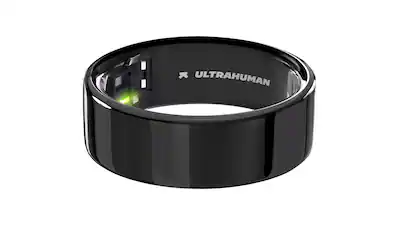
Ultrahuman Ring Air
Subscription-free, excellent movement-compensated sleep staging for any schedule.
Best for: Screen-free ring alternative to Oura.
Price Range: $349