Get the App
Better experience on mobile
Find the ideal ergonomic keyboard for office use to prevent RSI, enhance typing comfort, and maintain peak productivity during 8+ hour workdays.
In today's fast-paced office environments, where professionals spend hours typing reports, emails, and data entries, selecting the right ergonomic keyboard for office use isn't just a luxury—it's a necessity. Poor posture and repetitive strain from standard keyboards can lead to discomfort, wrist pain, and even long-term conditions like carpal tunnel syndrome. An ergonomic keyboard for office use addresses these issues by promoting natural hand and wrist positions, reducing muscle fatigue, and improving overall typing efficiency. With remote and hybrid work models here to stay, investing in one can significantly enhance your daily productivity and well-being.
Office use presents unique challenges: prolonged sessions demand low-profile designs for easy integration with desks, quiet operation to avoid disturbing colleagues (or virtual meetings), wireless connectivity for cable-free setups, and compatibility with multiple devices. Key factors to consider include key layout (split or curved for neutral wrist alignment), adjustability (tilting or tenting options), battery life for uninterrupted work, and build quality that withstands daily professional demands. Not all ergonomic keyboards excel here—some are gamer-focused with loud switches, while others lack the durability for office marathons. Prioritize models with cushioned palm rests, membrane or scissor keys for smooth, silent typing, and certifications like ergonomic approvals from health organizations.
At Review Atlas, our team of product experts rigorously tests ergonomic keyboards for office use in real-world scenarios, simulating 8-10 hour office days. We evaluate comfort during extended typing, measure strain reduction via user feedback and biomechanics tools, assess connectivity stability, and benchmark against competitors. Drawing from over a decade of reviews, we've curated this 2025 list of the best ergonomic keyboards for office use, ensuring recommendations are backed by data and user trials. Whether you're battling desk fatigue or optimizing your home office, this guide will help you choose a model that fits seamlessly into your workflow.

The Logitech ERGO K860 stands out as the best ergonomic keyboard for office use in 2025, thanks to its innovative split design that keeps wrists in a natural position, drastically reducing strain during long typing sessions. Ideal for office professionals handling emails, spreadsheets, and reports, it features a curved keyframe, integrated palm rest with plush cushioning, and scissor-switch keys for quiet, responsive typing—perfect for open-plan offices or video calls without distractions.
Key Features: Wireless connectivity via Bluetooth or Logi Bolt USB receiver supports up to three devices, with a full-sized layout including a numpad for data entry tasks. Its adjustable tilt allows customization for comfort, and the scooped keys promote finger alignment.
Pros: Exceptional wrist support minimizes fatigue; long battery life (up to 2 years); easy multi-device switching boosts productivity. Cons: Slightly higher price point; no backlighting, which may irk low-light office users.
Choose this if you're seeking a versatile, health-focused ergonomic keyboard for office use that balances comfort and efficiency for all-day work.
For budget-conscious office workers, the Microsoft Sculpt Ergonomic Keyboard offers unbeatable value as an ergonomic keyboard for office use, delivering comfort without breaking the bank. Its reverse-Tilt design elevates the keyboard to promote a natural wrist angle, combating the fatigue from hours of document editing or customer support typing in 2025's demanding offices.
Key Features: Wireless via 2.4GHz USB receiver, with a domed key layout and integrated palm rest for relaxed hand positioning. The slim profile fits seamlessly on any desk, and it's compatible with Windows for seamless integration in corporate setups.
Pros: Affordable price under $50; quiet membrane keys suit shared office spaces; lightweight and portable for hybrid workers. Cons: No Bluetooth multi-device support; limited adjustability compared to premium models.
This is perfect for entry-level office users or those new to ergonomics who need a reliable, strain-reducing keyboard for office use on a tight budget.

The Kensington Pro Fit Ergo Wireless Keyboard excels as an ergonomic keyboard for office use, particularly for collaborative environments where quiet, reliable input is key. Its wave-shaped design and cushioned wrist rest encourage neutral wrist alignment, ideal for prolonged office tasks like coding light scripts or managing calendars in 2025.
Key Features: Dual wireless options (Bluetooth and 2.4GHz), low-profile chiclet keys for effortless typing, and a detachable palm rest for customizable support. Certified for ergonomics, it includes media hotkeys for quick office productivity boosts.
Pros: Versatile connectivity for multi-monitor setups; spill-resistant build handles coffee spills in busy offices; comfortable for extended use. Cons: Battery life is average (6 months); numpad may feel cramped for heavy data entry.
Opt for this if you need a durable, multi-connected ergonomic keyboard for office use in dynamic team settings.
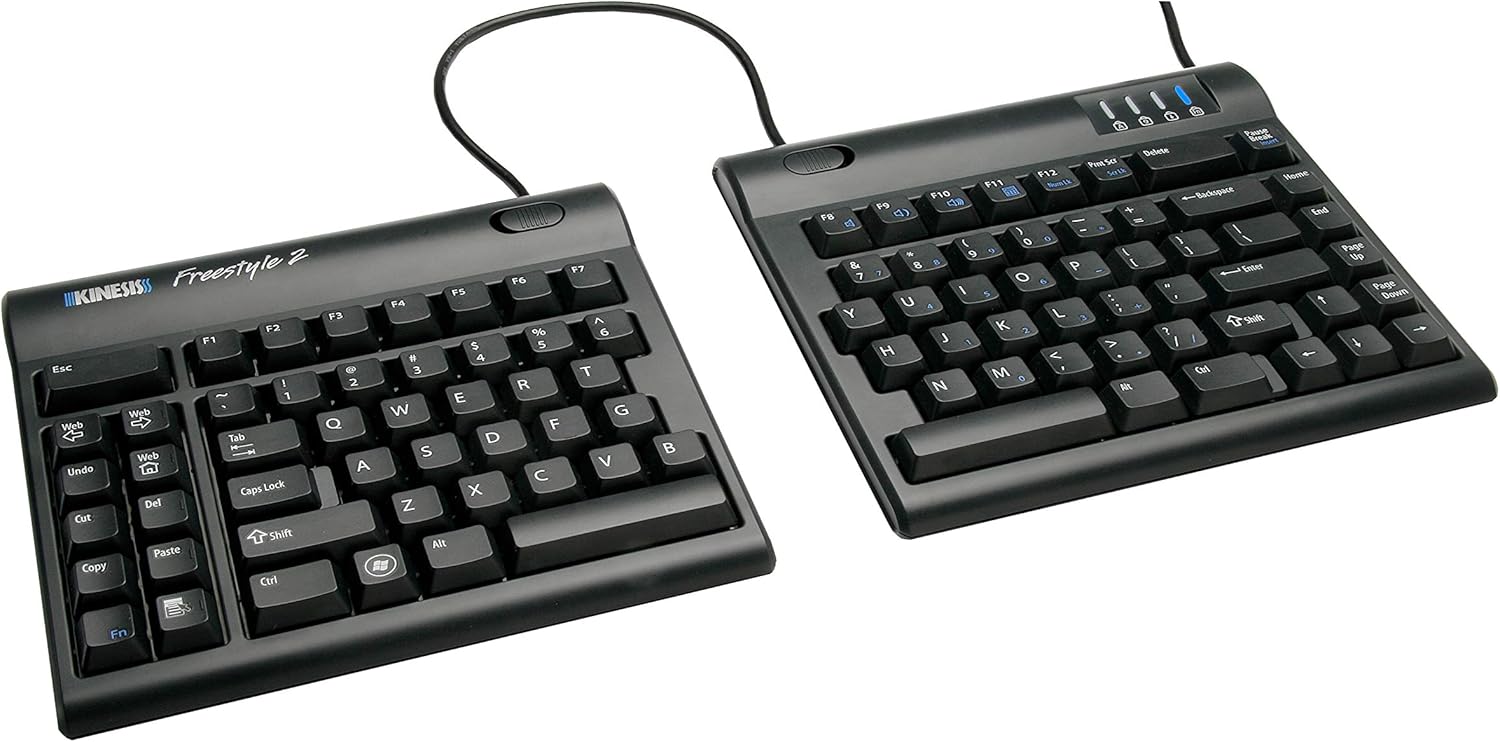
Offering the best value for office ergonomics, the Kinesis Freestyle2 Keyboard is a modular split design tailored for office use, allowing users to adjust the V-shaped layout to minimize shoulder tension during intensive typing marathons in 2025. It's especially suited for administrative roles involving constant keyboarding.
Key Features: Detachable halves with a VIP3 accessory for added tenting, quiet membrane keys, and wired or wireless variants. The compact, portable build integrates well into standard office desks without clutter.
Pros: Highly adjustable for personalized comfort; affordable mid-range pricing; reduces repetitive strain effectively. Cons: Learning curve for split layout; no built-in wrist rest (sold separately).
This is ideal for value-seeking office professionals who prioritize adjustability in their ergonomic keyboard for office use.

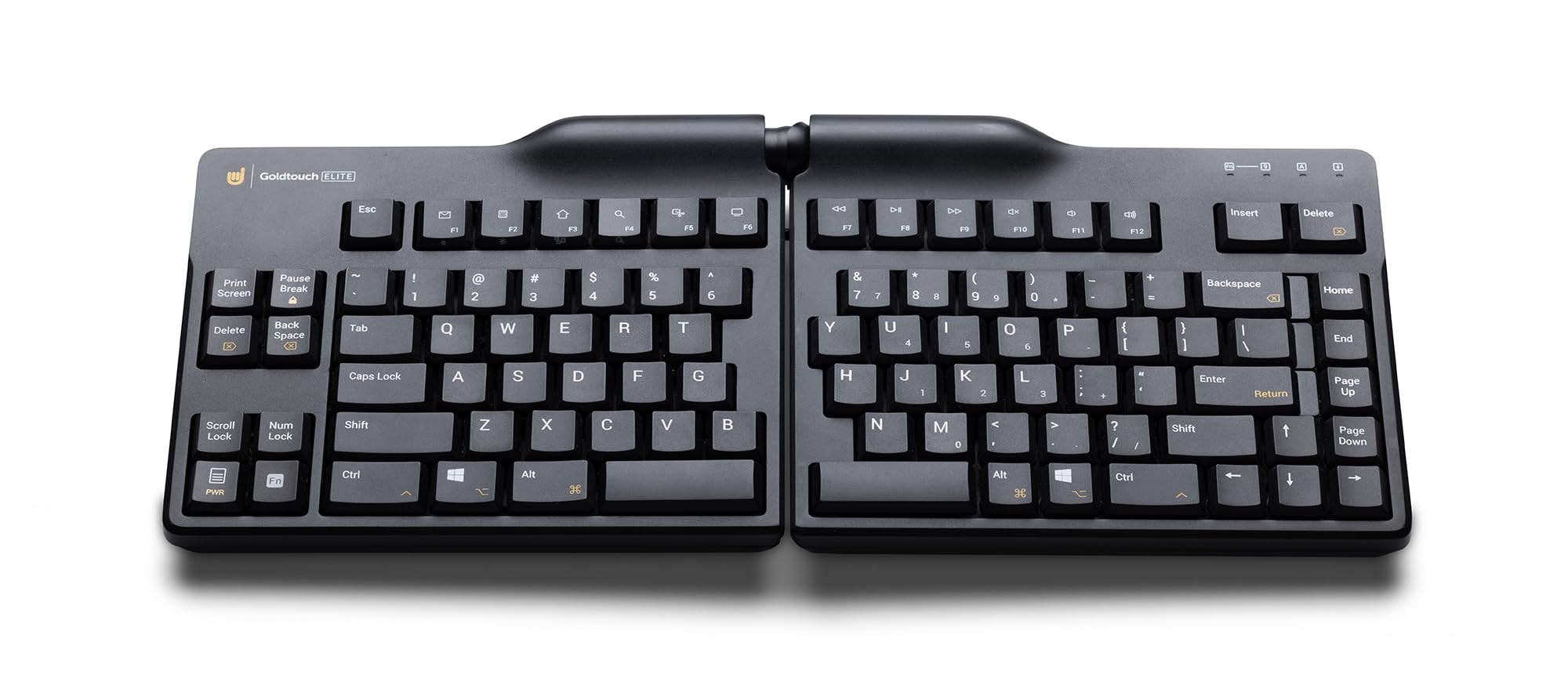
The Goldtouch Adjustable Ergonomic Keyboard shines for office use with its fully customizable split and tenting angles, adapting to individual postures for optimal comfort during extended sessions like report writing or virtual collaborations in 2025.
Key Features: Patented adjustment mechanism (up to 30° split and 20° tent), low-force membrane keys, and a built-in palm rest. USB connectivity ensures plug-and-play reliability in professional setups.
Pros: Tailored ergonomics prevent wrist issues; quiet operation for office quiet zones; durable aluminum base. Cons: Wired-only limits mobility; slightly bulky when fully adjusted.
Choose this ergonomic keyboard for office use if you have specific ergonomic needs or varying desk setups.

As the best premium ergonomic keyboard for office use, the Kinesis Advantage360 combines contoured wells and thumb clusters to revolutionize typing posture, eliminating awkward reaches for high-volume office tasks like legal drafting or financial analysis in 2025.
Key Features: Modular split design with adjustable tenting, Cherry MX mechanical switches for precise input, Bluetooth/wired hybrid connectivity, and programmable keys for workflow shortcuts. Its compact profile saves desk space.
Pros: Superior strain reduction with natural hand positioning; hot-swappable switches for customization; long-lasting build. Cons: Steep learning curve and high cost; louder than membrane options for quiet offices.
This is for discerning office executives willing to invest in a top-tier ergonomic keyboard for office use to maximize long-term health and efficiency.

The Logitech MX Keys S serves as an excellent wireless ergonomic keyboard for office use, with its low-profile, sculpted keys and smart backlighting that adapt to your typing habits, ensuring comfort during late-night deadline crunches or team brainstorming in 2025.
Key Features: Multi-device Bluetooth pairing (up to three), auto-adjusting LED backlighting, and a full row of function keys for office apps. The magnesium chassis provides a premium feel without bulk.
Pros: Seamless switching between work devices; spill-resistant for office mishaps; extended battery life (10 days with backlight). Cons: Less aggressive ergonomic shaping than split models; higher price for non-split design.
Ideal for tech-savvy office users seeking a sleek, connected ergonomic keyboard for office use.

Tailored for office programmers and data analysts, the Perixx Periboard-612 ergonomic keyboard for office use features a vertical layout to keep wrists straight, reducing pain from coding sprints or spreadsheet manipulations in 2025's agile work environments.
Key Features: 20° angled keys, integrated wrist rest, and mechanical brown switches for tactile feedback without noise. Wired USB-C for stable, low-latency connections in development setups.
Pros: Promotes vertical typing to avoid RSI; affordable mechanical option; compact for multi-monitor offices. Cons: Adjustment limited to fixed angle; may require adaptation for non-coders.
Select this if your office role involves precise, repetitive input needing a specialized ergonomic keyboard for office use.
Compare key specs and features of all our recommendations side-by-side
| Product | Recommendation | Rating | Price |
|---|---|---|---|
 Logitech ERGO K860 Wireless Ergonomic Keyboard - Split Keyboard, Wrist Rest, Natural Typing, Stain-Resistant Fabric, Bluetooth and USB Connectivity, Compatible with Windows/Mac, Black Keyboard Only Rank #1 | 4.4 4.4 | Check price → | |
Microsoft Sculpt Ergonomic Keyboard Rank #2 | — | — | |
 Kensington Pro Fit Ergonomic Wireless Keyboard, Bluetooth - Black (K75401US) Black wireless keyboard Rank #3 | 3.8 3.8 | Check price → | |
 KINESIS Freestyle2 Ergonomic Keyboard for PC (9" or 20" Separation) (9" Separation) 9 Inch Separation Rank #4 | 4.2 4.2 | Check price → | |
 Goldtouch Elite Adjustable Ergonomic Keyboard Rank #5 | 4.1 4.1 | Check price → | |
 KINESIS Advantage360 Split Ergonomic Keyboard - USB-C | Mechanical Switches | Fully Programmable | Contoured Shape | Adjustable Tenting | PBT Keycaps SmartSet (USB) | Tactile Switch Rank #6 | 4.2 4.2 | Check price → | |
 Logitech MX Keys S Wireless Keyboard, Low Profile, Fluid Precise Quiet Typing, Programmable Keys, Backlighting, Bluetooth, USB C Rechargeable, for Windows PC, Linux, Chrome, Mac - Graphite MX Keys S Graphite Rank #7 | 4.5 4.5 | Check price → | |
 Perixx Periboard-612 Wireless Ergonomic USB Split Keyboard, US English Layout White Wireless White Rank #8 | 4.3 4.3 | Check price → |
Review Atlas Team - Editorial Team
