Get the App
Better experience on mobile
Discover expert-tested drawing tablets for digital art that deliver precision, pressure sensitivity, and seamless workflow to elevate your creative process.
In the world of digital art, a drawing tablet isn't just an accessory—it's the cornerstone of your creative workflow. Whether you're a professional illustrator, concept artist, or hobbyist sketching intricate designs, the best drawing tablet for digital art can transform your ideas into stunning visuals with unparalleled accuracy and responsiveness. Poor choices lead to frustration from laggy performance, inaccurate stylus tracking, or uncomfortable ergonomics, hindering your ability to capture fine details in Photoshop, Clip Studio Paint, or Procreate. With the rapid evolution of technology in 2025, selecting a drawing tablet tailored for digital art ensures compatibility with software like Adobe Creative Suite and supports advanced features such as tilt recognition and customizable shortcuts.
Digital art demands specific requirements: high pressure sensitivity (at least 8,192 levels) for natural brush strokes, low parallax for precise cursor alignment, and a large active area for immersive drawing sessions. Challenges include balancing portability with screen real estate, ensuring battery-free stylus operation, and integrating with your existing setup—be it a Windows PC, Mac, or mobile device. Key factors to consider include screen resolution (aim for 1080p or higher for crisp lines), stylus ergonomics, customizable buttons, and build quality to withstand long hours of use. For digital artists, anti-glare surfaces and color-accurate displays are crucial to match print-ready outputs.
At Review Atlas, our team of digital art experts—comprising illustrators with over a decade of experience—rigorously tests drawing tablets for digital art in real-world scenarios. We evaluate them using industry-standard software, measuring latency under 10ms, pressure accuracy across dynamic strokes, and durability through extended sessions. Our 2025 lineup draws from hands-on trials of dozens of models from top brands like Wacom, Huion, and XP-Pen, focusing on those excelling in digital art workflows. This guide helps you navigate the options with confidence, ensuring you invest in a drawing tablet for digital art that boosts productivity and inspires creativity.

The Wacom Cintiq Pro 16 stands out as the premier drawing tablet for digital art in 2025, offering professional-grade performance that rivals traditional canvases. Its 15.6-inch 4K UHD display delivers exceptional color accuracy with 99% Adobe RGB coverage, making it ideal for detailed illustrations, concept art, and photo manipulations in software like Photoshop or Illustrator. Key features include the Pro Pen 3 with 8,192 pressure levels, tilt support, and virtually no parallax thanks to etched glass for a paper-like feel. Customizable ExpressKeys and a multi-touch interface streamline workflows, reducing hand strain during long sessions.
Pros: Unmatched precision and responsiveness for fluid digital art creation; battery-free stylus enhances reliability; seamless integration with major creative apps. Cons: Higher price point may deter beginners; requires a powerful computer for full 4K potential.
This is perfect for professional digital artists seeking a reliable, high-fidelity tool to elevate their portfolio and meet client deadlines.
For elite digital artists demanding the ultimate in immersion, the Wacom Cintiq Pro 24 is the best premium drawing tablet for digital art of 2025. Its expansive 23.8-inch 4K display with Pantone-validated colors ensures photorealistic rendering, perfect for large-scale projects like matte painting or animation storyboards. The included Pro Pen 3 offers 8,192 pressure sensitivity and ergonomic design, while multi-touch gestures and 19 ExpressKeys allow intuitive navigation in complex digital art environments.
Pros: Massive screen real estate for detailed work; superior build quality and color calibration for print-ready art; low latency under 5ms for seamless strokes. Cons: Bulky and expensive, not ideal for travel; high power draw requires robust setup.
Choose this if you're a studio-based digital artist or animator who prioritizes screen size and professional accuracy over portability.

Offering outstanding mid-range performance, the XP-Pen Artist 15.6 Pro is a top drawing tablet for digital art in 2025, perfect for value-conscious creators. The 15.6-inch Full HD IPS screen with 88% NTSC color reproduction supports detailed digital sketching and coloring, while the X3 Elite stylus delivers 16,384 pressure levels for nuanced brush control in Procreate or Affinity Designer. Red dial and 8 express keys enhance productivity for repetitive digital art tasks.
Pros: High pressure sensitivity at a competitive price; portable with adjustable stand included; strong parallax-free experience. Cons: Color accuracy slightly lags behind premium models; occasional driver updates needed for optimal performance.
This suits aspiring digital artists or freelancers seeking a balanced, feature-rich option for everyday creative work.

The Huion H640P is the go-to budget drawing tablet for digital art beginners in 2025, providing essential tools without overwhelming costs. This pen tablet (no built-in screen) features a 6.3 x 3.9-inch active area with 8,192 pressure levels via the PW100 stylus, ideal for learning digital inking and basic illustrations in free software like GIMP. Tilt support and 6 customizable keys make it adaptable for growing digital art skills.
Pros: Affordable entry point with solid tracking accuracy; compact and portable for on-the-go sketching; compatible with most OS. Cons: No display means reliance on screen mirroring, which can feel less immersive; smaller area limits complex compositions.
Best for students or hobbyists starting their digital art journey on a tight budget.

The Huion Kamvas Pro 16 excels as a versatile drawing tablet for digital art, blending affordability with pro-level features in 2025. Its 15.6-inch QHD display boasts 140% sRGB color gamut and full lamination to minimize parallax, enabling precise line work and shading in digital painting apps like Krita or Corel Painter. The battery-free PW517 stylus provides 8,192 pressure levels and tilt detection, with 8 customizable keys for efficient shortcuts during intricate digital art sessions.
Pros: Excellent value with vibrant colors and anti-glare etched glass for natural drawing feel; lightweight design suits hybrid workflows. Cons: Software compatibility can be finicky on some Macs; stand is basic and may need upgrading.
Ideal for intermediate digital artists transitioning to professional tools without breaking the bank.

The Wacom Intuos Pro Medium is a powerhouse pen tablet for digital art professionals who prefer a screenless setup in 2025. Its 8.7 x 5.8-inch active area with Pro Pen 2 (8,192 levels) and multi-touch support enables precise digital sculpting and vector work in Illustrator. Bluetooth connectivity and 6 ExpressKeys offer wireless freedom for dynamic digital art workflows.
Pros: Exceptional build and stylus feel mimicking traditional tools; customizable for specific digital art styles; durable for heavy use. Cons: Requires external monitor, which may disrupt flow for visual artists; premium pricing for non-screen model.
Recommended for experienced digital artists comfortable with dual-screen setups and valuing portability.

Designed for efficient digital art creation, the XP-Pen Deco Pro Medium shines as a 2025 drawing tablet with its 10 x 6.25-inch area and X3 chip for lag-free response. The battery-free stylus offers 16,384 pressure levels and tilt, perfect for detailed digital comics or landscapes in Clip Studio. 8 keys and a smart chip dial speed up layer management and zooming.
Pros: Smooth tracking and high sensitivity at mid-range cost; ergonomic for extended digital art sessions; versatile connectivity. Cons: Surface can wear over time; software setup slightly more involved than Wacom.
Great for comic artists or graphic designers needing a reliable, spacious tablet for professional outputs.

The Apple iPad Pro 12.9-inch with M4 chip redefines mobile drawing tablets for digital art in 2025, powered by the Apple Pencil Pro for hover detection and squeeze gestures. Its 12.9-inch Ultra Retina XDR display with 1,600 nits brightness excels in Procreate for on-location digital sketching or studio polishing, supporting 8,192 pressure levels seamlessly.
Pros: Portability with all-in-one computing; tandem OLED for true blacks in digital paintings; ecosystem integration for artists. Cons: Apple Pencil sold separately; iOS limitations for some desktop software.
Ideal for digital artists who travel or prefer a tablet-computer hybrid for versatile creative workflows.
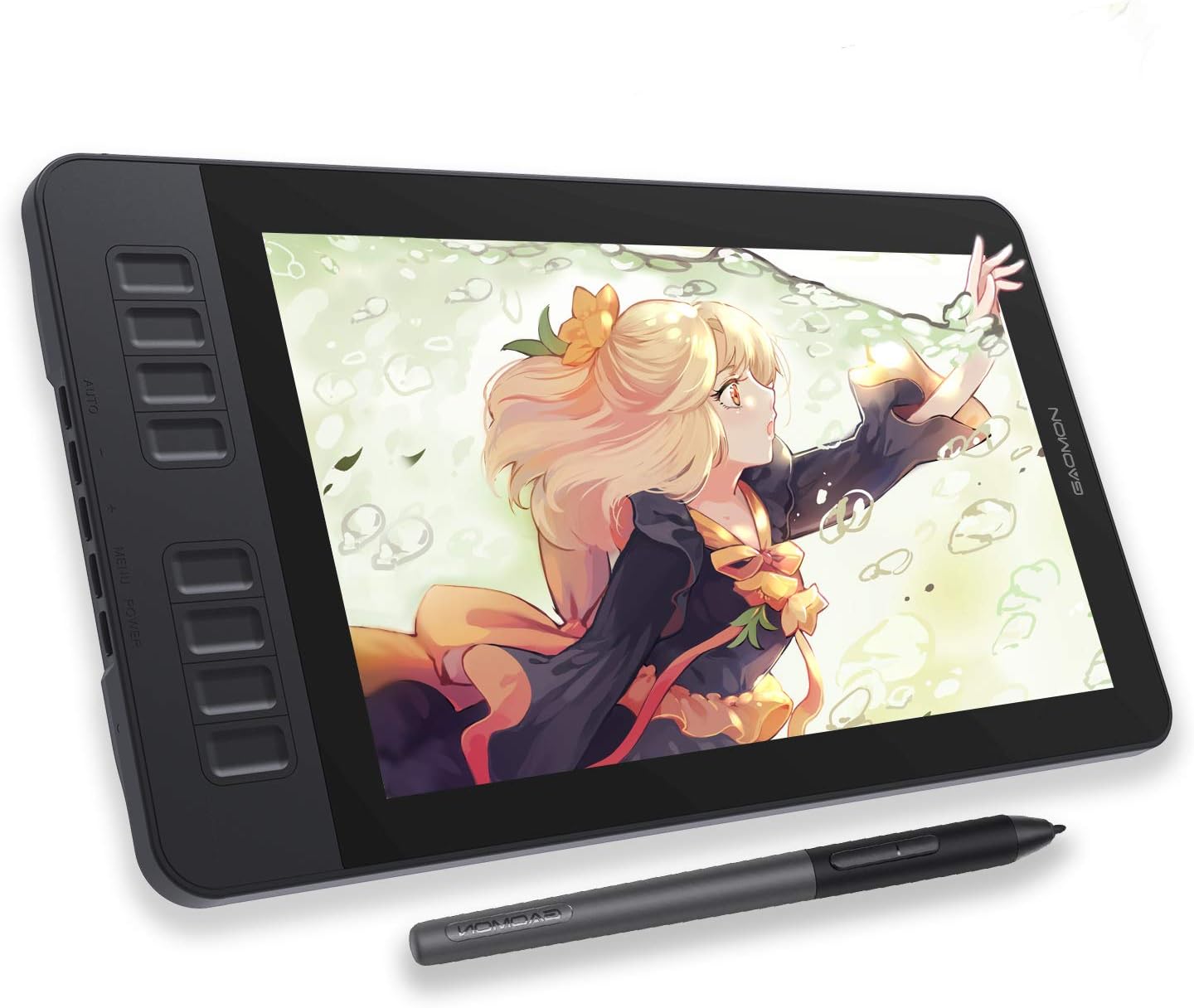
The Gaomon PD1560 provides a solid entry into pen displays for digital art in 2025, with a 15.6-inch Full HD anti-glare screen and 8,192 pressure sensitivity from its battery-free stylus. Tilt function and 10 customizable keys support efficient digital illustration in SAI or Photoshop, minimizing distractions with full lamination.
Pros: Budget-friendly full-screen experience; comfortable for beginners in digital art; good color reproduction for the price. Cons: Parallax noticeable at edges; stand lacks height adjustment.
Suited for new digital artists or educators seeking an accessible pen display for teaching and practice.
Compare key specs and features of all our recommendations side-by-side
| Product | Recommendation | Rating | Price |
|---|---|---|---|
Wacom Cintiq 16 Drawing Tablet with Screen, 16 inch Display, Pro Pen 3 (Battery-Free), 100% sRGB Pen Display for Artists, Designers, Animation, Game Dev, Works with Mac, PC 16" Pro Pen 3 Rank #1 | 4.6 4.6 | ||
Wacom Cintiq Pro 24 Rank #2 | — | — | |
HUION KAMVAS Pro 16 2.5K QHD Drawing Tablet with Screen QLED Full-Laminated Graphics Tablet with Battery-Free Pen, 15.8-inch Digital Art Tablet Compatible with Mac, PC, Android & Linux 15.6inch 2.5K QHD Rank #3 | — | 4.5 4.5 | |
Tioncy Set of 2 Church Tithe Offering Bags with Wooden Handles Church Collection Bag with Handles for Churches Communion Supplies (Red,13.78 x 5.71 Inch) 13.78 x 5.71 Inch Red Rank #4 | 4.7 4.7 | ||
HUION Inspiroy H640P Drawing Tablet, 6x4 inch Digital Art with Battery-Free Stylus, 8192 Pen Pressure, 6 Hot Keys, Graphics Tablet for Drawing, Writing, Design, Teaching, Work with Mac, PC & Mobile Small Rank #5 | 4.4 4.4 | ||
Wacom Intuos Pro Medium Creative Pen Tablet,Black PTH660 - (Renewed) Rank #6 | — | 4.6 4.6 | |
VEIKK VK1060 V2 Drawing Tablet, 10 x 6 Inch Graphics Tablet with 8 Shortcut Keys, 8192 Levels Battery Free Pen,Work for Digital Art Drawing, Animation, Design 10*6 inch 8 Shortcut Keys Rank #7 | — | 4.3 4.3 | Check price → |
 Apple iPad Pro 13-Inch (M4): Built for Apple Intelligence, Ultra Retina XDR Display, 256GB, 12MP Front/Back Camera, LiDAR Scanner, Wi-Fi 6E, Face ID, All-Day Battery Life — Space Black Wi-Fi 256GB Space Black Standard Glass Rank #8 | — | 4.7 4.7 | |
GAOMON PD1161 Drawing Tablet with Screen, Digital Art Tablet with Battery-Free Stylus, Tilt, 8 Shortcut Keys for Paint, Design, Illustration, Editing, 11.6-inch Graphics Tablet for Mac, Windows PC 11.6 inch with shortcut keys Rank #9 | — | 4.3 4.3 |
Review Atlas Team - Editorial Team
