Get the App
Better experience on mobile
We've evaluated phones from Apple, Samsung, Jitterbug, and more to find the easiest, safest options for older adults.
The worst thing a smartphone can do to a senior is overwhelm them. That's why the phone we recommend most isn't about raw specs—it's about getting rid of clutter and making key actions impossible to mess up. From our research across expert reviews and user feedback, we found that three factors matter more than any other: screen legibility, ease of navigation, and battery endurance. We also looked for phones that offer emergency features, whether via a dedicated button or built-in SOS, because safety is a top concern for older users.
We've sorted through more than a dozen phones across price points, from sub-$250 Androids to flagship iPhones, and we'll highlight the strengths and trade-offs of each. Some phones come with a built-in 'easy mode' that transforms the interface into large, uncluttered buttons; others rely on sophisticated accessibility tools that can be customized to each person's vision and hearing needs. And a few phones are designed specifically for seniors, with physical emergency buttons and simplified menus—but they often sacrifice modern features and flexibility.
Our top pick, the iPhone 15 Plus, balances a huge, bright display with the best-in-class accessibility options, making it a powerful yet approachable choice for most elders. The budget-friendly Samsung Galaxy A15 offers surprising simplicity for a much lower price, and the Jitterbug Smart4 provides the ultimate peace of mind—if you're willing to accept its restricted ecosystem. The Google Pixel 8a, Motorola Moto G Power, and Doro 8100 round out our list, each excelling in a particular area like hearing support, battery life, or emergency response.
Whether you're buying a phone for a parent, grandparent, or yourself, this guide will steer you to a model that feels less like a computer and more like a trusted tool. We've kept the focus on what actually matters for an older user: clear sound, large text, simple buttons, and a battery that keeps up.
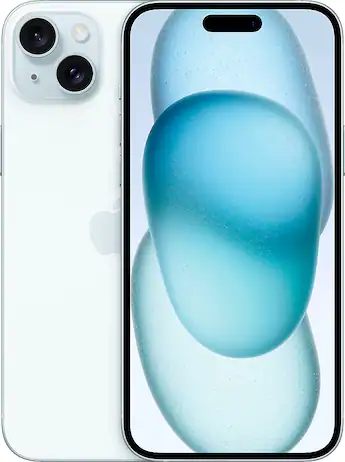
The iPhone 15 Plus combines a bright 6.7-inch display with Apple's industry-leading accessibility tools, making it the best all-around phone for seniors. VoiceOver, Magnifier, and adjustable text size are built-in, while the reliable operating system and long-term updates mean years of dependable use. The trade-off is the price—it's the most expensive pick here, but you get premium hardware and support.
Main limitation: The hefty cost may be overkill for seniors who just need calls, texts, and a few apps.
Skip if: If you want the simplest possible button-free phone without a learning curve, consider a dedicated senior phone like the Jitterbug Smart4 instead.
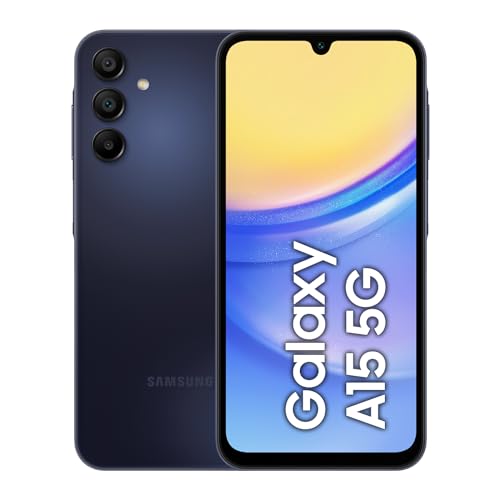
Samsung's Galaxy A15 is an inexpensive Android phone with Samsung's built-in Easy Mode, which transforms the interface into a large-button, high-contrast layout. It's a great value for seniors on a tight budget, and the 6.5-inch screen is easy to read. Expect basic performance and shorter software support, but for essential tasks it's more than enough.
Main limitation: The processor is slow, and the camera struggles in low light, making it less ideal for photography or power users.
Skip if: If you need a glassy-smooth experience or plan to keep the phone for more than 4 years, look to a more premium model.
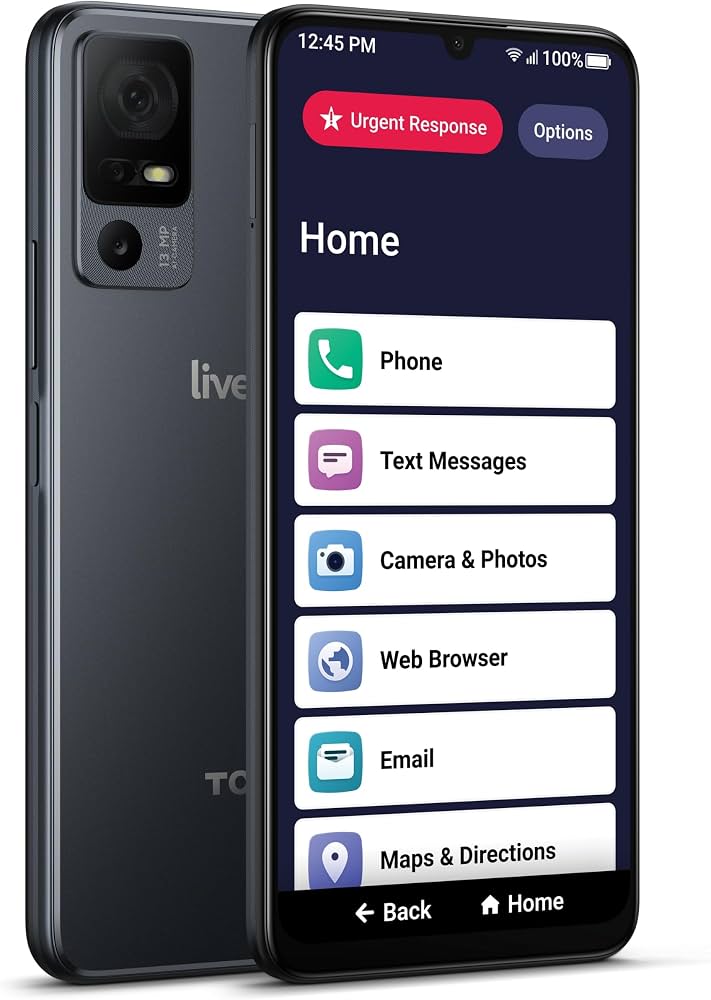
The Jitterbug Smart4 is designed from the ground up for seniors, featuring a simplified nine-app home screen, a dedicated 5-Star button for family and emergency services, and a built-in magnifier. It comes with Lively's health and safety subscription, which is ideal for those who want a phone that acts as a personal alert system. However, it's not a general-purpose smartphone—it has limited app support and the hardware is modest.
Main limitation: Limited to a handpicked set of apps, and the phone is tied to Lively's pricier service plan.
Skip if: If you want a full app ecosystem or bring-your-own-carrier flexibility, this isn't for you.
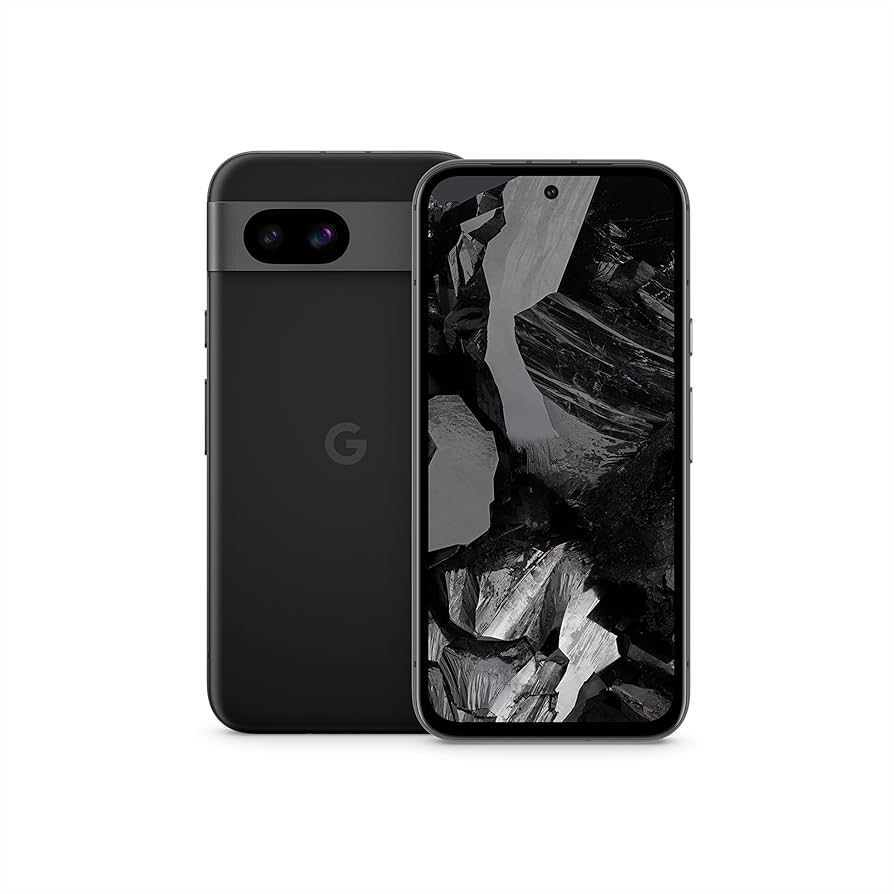
The Pixel 8a is a compact phone with some of the most powerful accessibility tools we've researched, including Live Caption, which adds real-time captions to any audio or video, and Clear Calling, which boosts incoming call volume. Its stock Android is free of bloatware, and the larger text and high-contrast themes are easy to activate. The trade-off is a lack of dedicated 'easy mode,' so you'll need to spend 10 minutes setting up the accessibility options.
Main limitation: No simplified home screen mode built in, and the smaller display means larger fonts eat up screen space.
Skip if: If you prefer a pre-configured senior mode out of the box, the Jitterbug or Samsung Easy Mode are easier out-of-the-box options.
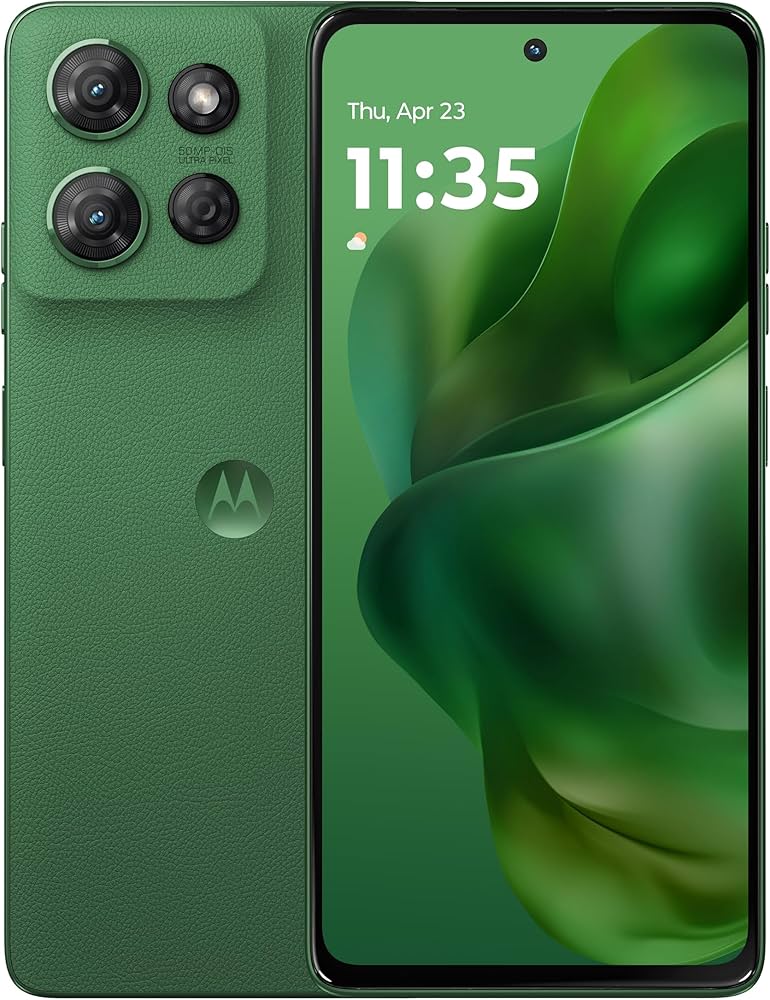
The Moto G Power lives up to its name with a massive 5,000mAh battery that easily lasts two days on a single charge, meaning fewer worries about running out of power during the day. It has a large 6.7-inch display and a near-stock Android interface that runs well, if not lightning-fast. The camera is mediocre, but if you prioritize reliability and charging convenience, this is a solid pick.
Main limitation: No dedicated senior mode, and the camera quality falls short of other phones in this range.
Skip if: If you take a lot of photos or want frequent software updates, look elsewhere.
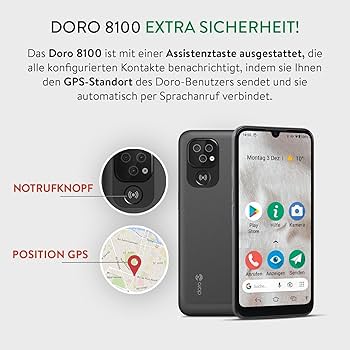
The Doro 8100 is a senior-specific Android phone with a dedicated 7-shaped button for calling a family member or emergency services with a single press. Its simplified interface, with large icons and aural feedback, is perfect for those who want a straightforward experience. It's also hearing aid compatible and offers an extra-loud speaker mode. The trade-off is a modest processor and a high price for the specs, plus the brand is more common in Europe.
Main limitation: Expensive for the hardware, and the simplified UI may feel too restrictive for users who want access to the full Android ecosystem.
Skip if: If you want maximum app compatibility and don't need a dedicated emergency button, a mainstream Android phone is a better value.
Compare key specs and features of all our recommendations side-by-side
| Product | Recommendation | Rating | Price |
|---|---|---|---|
Apple iPhone 15 Plus Rank #1 | 🏆 Top Pick | 9.2/10 | $799–$899 Check current price → |
Samsung Galaxy A15 5G Rank #2 | 💰 Budget Pick | 8.2/10 | $200–$250 Check current price → |
Jitterbug Smart4 (with Lively service) Rank #3 | ⭐ Editor's Choice | 8.0/10 | $349 (with service plan) Check current price → |
Google Pixel 8a Rank #4 | — | 8.6/10 | $499–$549 Check current price → |
Motorola Moto G Power 5G (2025) Rank #5 | — | 7.8/10 | $300–$350 Check current price → |
Doro 8100 Rank #6 | — | 8.1/10 | $400–$450 Check current price → |
Common questions buyers have about this category.
For total beginners, the Samsung Galaxy A15 with its Easy Mode or the Jitterbug Smart4 are both excellent because they transform the interface into a grid of large, high-contrast buttons. They minimize distracting apps and place calling, messaging, and photos front and center. If you're comfortable with a bit of up-front setup, the Google Pixel 8a can be made equally simple with its accessibility settings.
There's no universal answer. iPhones tend to be more intuitive for people who already use Apple products and offer robust accessibility options like VoiceOver and Magnifier. Android phones, especially Samsung models, often include a built-in Easy Mode that hides complexity in a single switch. The best choice depends on the senior's familiarity and the family's tech ecosystem.
Yes, you can. Both Android and iOS offer built-in accessibility settings to increase text size, contrast, and button sizes. You can also switch on 'Easy Mode' on Samsung phones or install third-party launchers like 'Wiser' that create a simplified home screen. However, a purpose-built senior phone like the Jitterbug has these features pre-configured and adds emergency services, which some users find reassuring.
Screen size is crucial—look for at least 6 inches so text and icons aren't squished. The battery should last at least a full day, ideally 1.5 days on a charge. Hearing aid compatibility and extra-loud speaker volume can make calls easier to follow, and a removable emergency button or SOS feature is a huge plus for peace of mind. Don't prioritize camera megapixels unless the senior takes lots of photos.
Not necessarily, but it can be comforting. Many regular smartphones have built-in SOS features that can call emergency services with a series of button presses, but they can be easy to trigger by accident. Dedicated senior phones like the Jitterbug Smart4 or Doro 8100 have a physical button that only contacts pre-set numbers, which avoids false alarms and is easier to locate in an emergency. If the senior lives alone or has chronic health conditions, consider adding a smartwatch with fall detection instead.
Look for carriers that offer coverage in the senior's home and local area, plus plans that share data with family members. Many carriers have 'Senior Essentials' plans that include unlimited calls and text for under $30/month. If you choose Jitterbug, its phone plans bundle in the safety services, which can be a better value if you need them. Always check whether the phone is locked or unlocked before committing.
Products we evaluated but did not recommend — and why.
