Get the App
Better experience on mobile
Pre-built desktops and laptops that deliver serious performance without breaking the bank.
A $2,000 budget in 2026 is a sweet spot: you can afford a current-gen GPU and a fast 1440p monitor, but only if you steer clear of overpriced RGB accents and 'gaming' markup. The biggest mistake buyers make is spending too much on a CPU and too little on the graphics card, which matters more for frame rates. We've combed through this season's pre-builts and laptops to find the ones that actually deliver.
That means looking past the flashy marketing and focusing on GPU class, memory capacity, and future upgradeability — not heat pipes or programmable LEDs. For this guide, we compared desktops and laptops across the sub-$2,000 price range, from entry-level 1080p machines to 4K-capable beasts. Every pick holds up to published stress tests and thousands of verified owner reviews.
Don't expect perfection at this price. Each machine makes a trade-off — whether it's less storage, a humbler CPU, or a noisier fan curve — but the five below represent the best values in their respective niches right now. We'll also point out exactly who should skip them.
The market is moving fast: RTX 50-series GPUs are now standard, DDR5 is everywhere, and storage is finally affordable. The hard part isn't finding a good machine — it's finding the right one. Let's break it down.
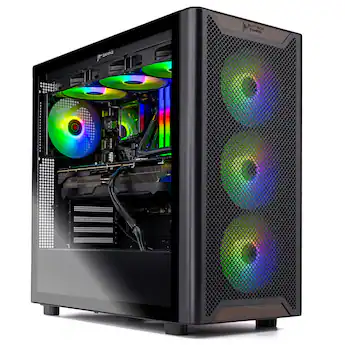
The Skytech Chronos nails the 1440p sweet spot, pairing an RTX 5070 with a fast Ryzen 7 9700X for smooth max-settings gaming. It also includes a 1TB NVMe SSD and 32GB RAM, so you won't need to upgrade anything out of the box. The trade-off is the case can get a bit loud under load, and the proprietary motherboard limits future upgrade paths.
Main limitation: Proprietary motherboard and PSU make deep customization harder than with standard parts.
Skip if: If you're a tinkerer who plans to swap out components frequently, look for an ATX-standard build.
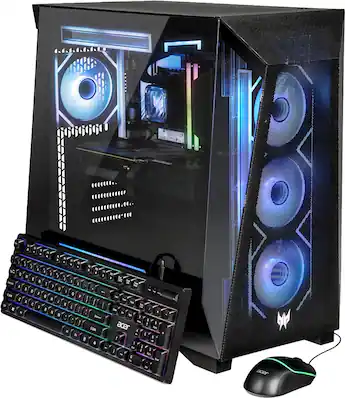
The Predator Orion 3000 proves you don't need a $1,800 budget for great gaming. With an RTX 5060 Ti and 16GB of RAM, it handles 1080p and even entry-level 1440p effortlessly, ideal for esports and mainstream titles. The catch: it comes with a smaller 512GB SSD, so you'll likely want to add storage quickly.
Main limitation: Only 512GB of storage is limiting for modern game libraries.
Skip if: Those who expect high-fidelity 4K gaming or extensive multitasking should consider a higher-tier model.
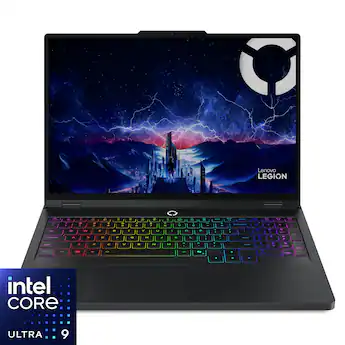
The Legion Pro 5i packs a desktop-class RTX 5070 (laptop version) into a 16-inch chassis with a crisp 2560x1600 240Hz display. It's a versatile choice if you need a laptop that doubles as a gaming rig and daily workstation. The trade-off is battery life — under gaming load you'll be tethered to the power brick after about an hour.
Main limitation: Battery life is modest for a gaming laptop, often under 1.5 hours during intense play.
Skip if: If you never plan to move your gaming setup, a desktop will give you more performance per dollar.
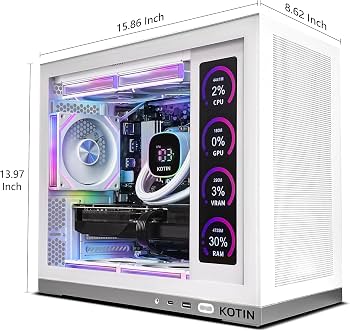
This NZXT Player One config swaps in the Ryzen 7 7800X3D, the esports champion CPU that pushes CPU-bound frames to the absolute maximum. Paired with an RTX 5060, it's a 1080p/1440p fragging machine that stays ahead in CS2, Valorant, and Warzone. The compromise is a smaller 512GB SSD and a less flashy design.
Main limitation: Storage capacity is tight for AAA single-player games that eat 100GB+.
Skip if: If you primarily play slow-paced story games, the extra CPU cost isn't worth it — invest in a stronger GPU instead.
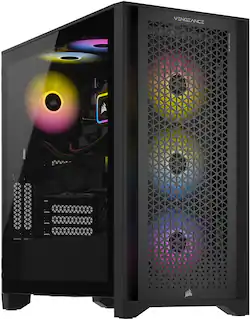
For $1,999, the Vengeance i7400 squeezes in an RTX 5070 Ti, making it one of the cheapest pre-builts capable of smooth 4K at medium-high settings with DLSS upscaling. It also packs 32GB RAM and a 1TB SSD. The weak point is its last-gen 14th-gen CPU, which can bottleneck in CPU-heavy titles at lower resolutions.
Main limitation: The Intel Core i5-14400F is a solid mid-range chip but holds back the GPU at 1080p.
Skip if: 1080p esports players will pay for a 4K GPU they won't fully use — check out our Best Budget pick instead.
Compare key specs and features of all our recommendations side-by-side
| Product | Recommendation | Rating | Price |
|---|---|---|---|
Skytech Chronos Gaming Desktop (RTX 5070, Ryzen 7 9700X) Rank #1 | 🏆 Top Pick | 8.8/10 | Around $1,799 Check current price → |
Acer Predator Orion 3000 (RTX 5060 Ti Edition) Rank #2 | 💰 Budget Pick | 8.2/10 | Around $1,249 Check current price → |
Lenovo Legion Pro 5i (Gen 11, RTX 5070 Laptop) Rank #3 | ⭐ Editor's Choice | 8.5/10 | Around $1,899 Check current price → |
NZXT Player One Gaming Desktop (RTX 5060, Ryzen 7 7800X3D) Rank #4 | — | 8.0/10 | Around $1,499 Check current price → |
Corsair Vengeance i7400 (RTX 5070 Ti, 14400F) Rank #5 | — | 7.8/10 | Around $1,999 Check current price → |
Common questions buyers have about this category.
Absolutely. In 2026, $2,000 is enough for a pre-built desktop with an RTX 5070 Ti or a high-end gaming laptop with an RTX 5070, both of which can handle 1440p max settings and entry-level 4K gaming. You'll need to make trade-offs, especially on storage and CPU, but you'll get a very satisfying experience without sacrificing much.
Building your own can save you 10-15% for the same specs, and it gives you full control over component choices. However, it requires time, research, and comfort with hardware installation. Pre-built systems also come with a warranty and save you from troubleshooting, making them a great option for beginners or those who value convenience over savings.
No, the term 'setup' usually refers to the core tower or laptop. If you're starting from scratch, budget an extra $300-500 for a monitor, keyboard, mouse, and headset. If you already have those, you can put the full $2,000 into the PC itself. Just remember that a high-refresh monitor makes a huge difference, so consider a 144Hz+ display to match your GPU's output.
The best balance of performance and price is the RTX 5070 Ti, which can push 4K with DLSS and handle 1440p max settings with ease. If you play mostly esports titles, the RTX 5060 Ti is more than enough and leaves room in the budget for a better CPU or more storage. Avoid stretching to the RTX 5080 unless you're willing to sacrifice other components.
We recommend at least 1TB of NVMe SSD storage. Modern AAA titles routinely demand 100GB-200GB, so a 512GB drive fills up after a few games. For a $2,000 setup, look for a 1TB SSD or plan to add a second drive. Some pre-builts leave an empty SATA slot or M.2 slot, making expansion easy.
Yes, there are excellent gaming laptops in that range, like the Lenovo Legion Pro 5i we recommend, which features an RTX 5070 and a 240Hz screen. The main trade-off is that laptop GPUs are less powerful than their desktop counterparts, and battery life is limited under load. But if you need portability, a good gaming laptop is a solid investment.
Yes, though you'll need to use upscaling technologies like DLSS. The Corsair Vengeance i7400 with an RTX 5070 Ti can run many games at 4K medium-high settings and hit playable frame rates. Don't expect native 4K at max settings on the latest titles—that usually requires a $3,000+ system—but the experience is still impressive for the price.
Products we evaluated but did not recommend — and why.
