Get the App
Better experience on mobile
Explore top-rated keyboards with superior features and value for every budget.
People often seek alternatives to the Logitech MX Keys for various reasons, including price, additional features, or to better integrate with their existing tech ecosystem. When choosing an alternative, it's important to consider factors like ergonomics, battery life, connectivity options, and software compatibility. In this guide, we highlight some of the top alternatives to the Logitech MX Keys, each offering unique advantages and catering to different user needs. From budget-friendly options to premium picks, these keyboards provide excellent value and performance.

The Keychron K2 is a versatile and highly customizable mechanical keyboard that offers a great balance of performance and price. It features hot-swappable switches, allowing users to easily change the feel and sound of their typing experience. With both wired and wireless connectivity options, the K2 is compatible with Windows, macOS, and iOS. Its compact 75% layout saves desk space while maintaining essential keys. The battery life lasts up to 72 hours, making it suitable for long work sessions. At around $80-$100, the Keychron K2 is an excellent choice for users looking for customization and versatility without breaking the bank.
Key Difference: Offers hot-swappable switches for easy customization.
Price: The Keychron K2 is significantly cheaper than the Logitech MX Keys, which typically costs around $100-$120.
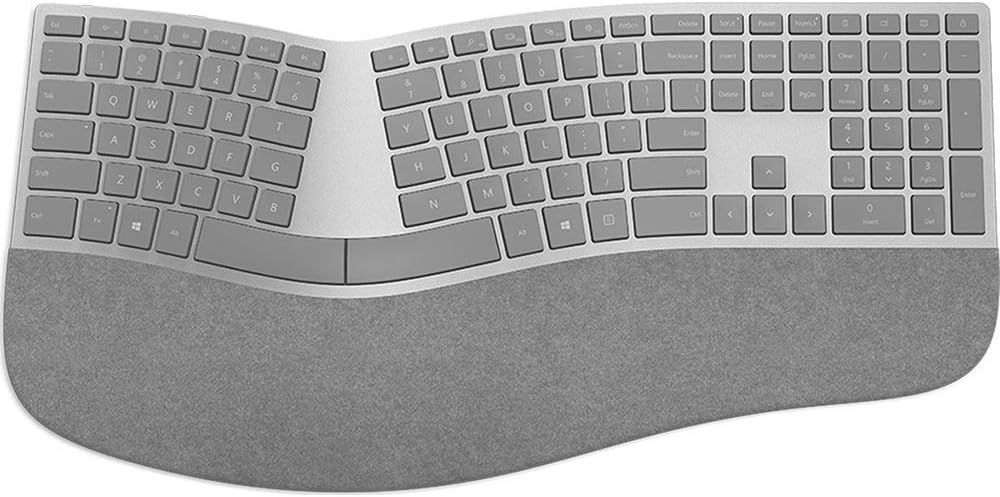
The Microsoft Surface Keyboard is designed for seamless integration with Microsoft products, offering a sleek and minimalist design. It features a full-sized layout with dedicated shortcut keys for Windows users. The keyboard uses scissor-switch keys for a comfortable typing experience and connects via Bluetooth, ensuring a clutter-free workspace. Its battery life can last up to a year, making it ideal for users who need reliability without frequent recharges. Priced at around $100-$120, the Surface Keyboard is perfect for those deeply embedded in the Microsoft ecosystem looking for a high-quality alternative to the Logitech MX Keys.
Key Difference: Optimized for the Microsoft ecosystem with dedicated Windows shortcut keys.
Price: The Microsoft Surface Keyboard is similarly priced to the Logitech MX Keys, typically ranging from $100-$120.

The Apple Magic Keyboard is the go-to choice for users within the Apple ecosystem. It features a sleek, low-profile design with a comfortable scissor mechanism for quiet and responsive typing. The keyboard connects seamlessly via Bluetooth and includes a rechargeable battery that lasts about a month on a single charge. Its minimalist design and integration with macOS make it an ideal choice for Apple users. Priced at around $99-$129, the Magic Keyboard offers a premium experience for those who prioritize design and Apple compatibility over additional features.
Key Difference: Designed specifically for macOS with seamless Apple integration.
Price: The Apple Magic Keyboard is slightly more expensive than the Logitech MX Keys, typically costing $99-$129.

The Logitech ERGO K860 is designed for users who prioritize ergonomics and comfort during long typing sessions. Its split-key design and curved layout help reduce strain on the wrists and forearms. The keyboard connects wirelessly via a USB receiver or Bluetooth and offers up to two years of battery life. The ERGO K860 is compatible with Windows, macOS, and Chrome OS, making it versatile for various setups. Priced at around $120-$140, the ERGO K860 is an excellent choice for users seeking a more comfortable typing experience compared to the Logitech MX Keys.
Key Difference: Features a split-key design for improved ergonomics.
Price: The Logitech ERGO K860 is slightly more expensive than the Logitech MX Keys, typically ranging from $120-$140.

The Dell Premier Multi-Device Wireless Keyboard is designed for users who need to switch between multiple devices seamlessly. It can connect to up to three devices simultaneously via Bluetooth or a USB receiver. The keyboard features a full-sized layout with a number pad and dedicated shortcut keys for Windows and Dell applications. Its scissor-switch keys offer a comfortable and quiet typing experience, and the battery life lasts up to 36 months. Priced at around $80-$100, the Dell Premier Keyboard is an excellent option for users who frequently switch between devices and need a reliable, multi-device solution.
Key Difference: Allows connection to up to three devices simultaneously.
Price: The Dell Premier Multi-Device Wireless Keyboard is slightly cheaper than the Logitech MX Keys, typically costing $80-$100.

The Razer BlackWidow V3 Mini is a compact gaming keyboard that offers a high-performance typing experience. It features Razer's mechanical switches, which are durable and provide tactile feedback. The keyboard includes customizable RGB lighting and can be programmed with macros for gaming. It connects via USB-C and offers a detachable cable for portability. Priced at around $120-$150, the BlackWidow V3 Mini is ideal for gamers and power users who need a responsive and customizable keyboard that's different from the Logitech MX Keys.
Key Difference: Features mechanical switches and customizable RGB lighting for gamers.
Price: The Razer BlackWidow V3 Mini is more expensive than the Logitech MX Keys, typically ranging from $120-$150.

The Logitech K380 is a budget-friendly option that doesn't compromise on quality. It's a compact and portable keyboard that can connect to up to three devices via Bluetooth. The K380 features a comfortable typing experience with scissor-switch keys and offers a battery life of up to two years. Its compatibility with Windows, macOS, iOS, and Android makes it versatile for different devices. Priced at around $30-$40, the Logitech K380 is an excellent choice for users looking for an affordable alternative to the Logitech MX Keys.
Key Difference: Offers multi-device connectivity at a budget-friendly price.
Price: The Logitech K380 is significantly cheaper than the Logitech MX Keys, typically costing $30-$40.
Compare key specs and features of all our recommendations side-by-side
| Product | Recommendation | Rating | Price |
|---|---|---|---|
 Keychron K2 75% Layout Bluetooth Wireless Mechanical Keyboard K Pro Brown Switch/White LED Backlit/USB C/Anti Ghosting/N-Key Rollover, 84 Keys Gaming Keyboard for Mac Windows-Version 2 Rank #1 | 4.4 4.4 | Check price → | |
Microsoft 3RA-00022 Surface Ergonomic Wireless Keyboard,Gray Rank #2 | 4.2 4.2 | ||
Apple Magic Keyboard - US English USB-C Rank #3 | 4.6 4.6 | ||
 Logitech ERGO K860 Wireless Ergonomic Keyboard - Split Keyboard, Wrist Rest, Natural Typing, Stain-Resistant Fabric, Bluetooth and USB Connectivity, Compatible with Windows/Mac, Black Keyboard Only Rank #4 | 4.4 4.4 | Check price → | |
Dell Premier Multi-Device Wireless Bluetooth Keyboard and Mouse - KM7321W Rank #5 | 4.3 4.3 | Check price → | |
Razer BlackWidow V3 Mini HyperSpeed 65% Wireless Mechanical Gaming Keyboard: Yellow Mechanical Switches Linear & Silent - Phantom Pudding Keycaps - Chroma RGB - Up to 200 Hr Battery - Snap Tap Yellow Switches - Linear & Silent BlackWidow V3 Mini - Phantom Edition Keyboard Rank #6 | 4.2 4.2 | ||
Logitech Pebble Keys 2 K380s, Multi-Device Bluetooth Wireless Keyboard with Customizable Shortcuts, Slim and Portable, Easy-Switch for Windows, macOS, iPadOS, Android, Chrome OS - Tonal Graphite PC Keyboard Graphite Rank #7 | 4.5 4.5 |
