
Quick Verdict
For browser-based online classes, the Lenovo Chromebook Flex 5 is a solid, affordable fit — especially the 8GB Core i3 version — with a versatile convertible design, strong battery life, and stylus support for note-taking. It falls down on webcam quality, 4GB configuration stutter, and the hard incompatibility with Windows-only exam proctoring software, so it's a poor choice for courses that depend on those tools.

Lenovo Chromebook Flex 5
$349.99

✓ Key Strengths
- •360-degree hinge plus a 1080p touchscreen lets you switch to stand or tablet mode for lectures, reading, and handwritten notes — rare at this price.
- •USI stylus support turns the Flex 5 into a serviceable digital notebook for annotating PDFs and writing equations, without iPad-level spending.
- •Chrome OS boots in seconds and updates in the background, so class starts don't get eaten by update prompts and restarts.
- •51Wh battery with a low-power Intel chip typically delivers 7–9 hours of mixed class use, enough for a full day of lectures.
- •USB-C charging at ~45W means you can top it up from a power bank or a compact GaN charger instead of a proprietary brick.
- •The 1920x1080 IPS display is noticeably sharper than the 1366x768 panels common on budget laptops, which matters for reading PDFs and slides.
- •At 2.97 pounds with a backlit keyboard (on i3 models), it's comfortable to carry all day and to type on for long sessions.
- •Google Meet runs natively well, and Zoom and Teams work through their browser/PWA versions — no Windows license required for the basics.
✗ Key Weaknesses
- •The 720p webcam produces soft, grainy video in low light, and the built-in dual microphones pick up room echo — an external headset or webcam is close to mandatory.
- •The 4GB RAM configuration stutters when a video call competes with a dozen browser tabs; only the 8GB version is comfortable for class use.
- •Chrome OS cannot run Windows/macOS-only exam proctoring software such as Respondus LockDown Browser, which is a hard blocker for some courses.
- •No support for desktop Adobe Creative Cloud, AutoCAD, SolidWorks, or full-featured Excel with macros, ruling it out for several majors.
- •64GB of eMMC storage fills quickly and is slower than an SSD; a microSD card is effectively required for downloaded lecture videos.
- •The ~250-nit display is dim near bright windows and outdoors, and the stereo speakers are modest for anything beyond speech.
What is Lenovo Chromebook Flex 5?
What is online classes?
Detailed Analysis
👍 Perfect For
- ✓K-12 and college students in Google Workspace/Google Classroom schools who live in Docs, Meet, and Drive.
- ✓Students who take handwritten notes or annotate lecture PDFs and want stylus support without buying an iPad.
- ✓Budget-conscious families who need one durable, low-maintenance device for classes, homework, and light browsing.
- ✓Commuters and students who move between rooms and buildings all day and need a sub-3-pound laptop with all-day battery.
- ✓Adult learners and certificate students taking webinar-style courses with browser-based coursework.
👎 Not Ideal For
- ✗Students whose courses require Windows/macOS-only proctoring software (LockDown Browser, ProctorU, Honorlock) for exams — look at a budget Windows laptop instead.
- ✗Engineering, architecture, video production, or design majors who need Adobe Creative Cloud, CAD, or other desktop-grade applications.
- ✗Anyone who presents on camera regularly and wants strong video quality out of the box without buying an external webcam.
- ✗Heavy multitaskers who plan to buy the 4GB configuration — spend a little more for 8GB or choose a different machine.
Use Case Scenarios
K-12 Student on Google Classroom and Google Meet
A middle or high school student attending daily Google Meet classes, submitting assignments through Google Classroom, and using Docs and Slides for projects. The school issues a Google account and everything runs in the browser.
✓ Strengths
- Google Meet and Classroom are native to Chrome OS and run without workarounds.
- Convertible hinge lets students watch lessons in tent mode and do worksheets in tablet mode.
- All-day battery covers a full schedule of live classes without hunting for an outlet.
- Fast boot and silent background updates mean fewer interruptions at the start of class.
✗ Weaknesses
- 720p webcam looks poor in low light compared with newer laptops.
- Built-in microphones pick up household noise during live sessions.
💡 Workarounds
- Add a USB headset with a noise-canceling boom mic to fix audio and echo issues.
- Pair an external 1080p webcam with a privacy shutter for better video on presentations.
- Use a microSD card if the school distributes large video or project files.
- Keep the 8GB configuration if the student routinely has Meet open alongside several tabs.
Every core tool in this scenario is a Google product that runs natively on Chrome OS, the convertible form factor genuinely helps with lessons, and battery life covers the school day. The only real compromises — webcam and mic quality — are cheap to fix.
College Student Taking Zoom Lectures and Handwritten Notes
An undergraduate in humanities or social sciences attending Zoom lectures, reading PDFs, and taking handwritten notes in a note app or annotating slides directly with a stylus.
✓ Strengths
- 1080p IPS display makes PDFs and slide decks noticeably easier to read than budget 768p panels.
- USI stylus support enables genuine handwritten notes and PDF annotation at a low total cost.
- Stand and tablet modes are useful for reading and note-taking on a desk.
- Zoom's PWA and browser client run smoothly on the 8GB Core i3 configuration.
✗ Weaknesses
- The 4GB configuration stutters with a video call plus many tabs open.
- Palm rejection depends on the note app and isn't as refined as on premium tablets.
💡 Workarounds
- Buy the 8GB Core i3 model rather than the 4GB version.
- Add a USI-certified stylus for handwriting and annotation.
- Use a laptop stand to bring the screen to eye level for long lectures.
- Store recorded lectures on a microSD card instead of the internal drive.
The Flex 5 covers Zoom lectures competently and its stylus support is a real advantage for note-taking, but the 720p webcam and the gap between 4GB and 8GB configurations keep it out of 'excellent' territory for a student who's on camera and multitasking daily.
Adult Learner Taking Webinar-Style Certification Courses
A working adult taking evening certificate courses or professional development webinars — mostly watching presentations, reading materials, and submitting written assignments in a browser.
✓ Strengths
- Low-maintenance Chrome OS suits people who don't want to administer a laptop.
- Light and easy to move between home, office, and travel, with USB-C charging.
- Comfortable backlit keyboard for evening writing and assignments.
- Handles Teams web and Zoom webinars without Windows.
✗ Weaknesses
- Certification exams that require a downloadable Windows/macOS client won't run.
- Web versions of Excel and PowerPoint lack advanced desktop features.
💡 Workarounds
- Confirm the exam platform with the certifying body before buying; use a work or loaner Windows PC for proctored exams if needed.
- Use Microsoft 365 web apps for straightforward documents and Google Sheets for anything heavy.
- Add an external webcam if the course requires presenting on camera.
The day-to-day webinar workflow is a comfortable fit, but professional certification often drags in proctoring clients or desktop-only tools that Chrome OS can't handle, which caps the score despite the hardware being perfectly adequate.
Student Whose Exams Require LockDown Browser or Remote Proctoring
A student enrolled in courses that mandate Respondus LockDown Browser, ProctorU, Honorlock, or similar proctoring tools for graded exams, alongside normal lectures and assignments.
✓ Strengths
- Handles the non-exam 90% of coursework — lectures, readings, writing, group work — well.
- Cheap enough that pairing it with a second machine stays within a tight budget.
- Fast boot and reliable browser make last-minute study sessions frictionless.
✗ Weaknesses
- No Chrome OS client for Respondus LockDown Browser or major proctoring services.
- Cannot install the monitoring agents these platforms require.
- No reliable workaround exists within Chrome OS.
💡 Workarounds
- Confirm exam platform requirements with your instructor or IT help desk before purchasing.
- Ask whether the school provides loaner Windows laptops for proctored exams.
- Keep access to a Windows or macOS machine — family PC, campus lab, or refurbished laptop — for exam days.
- Use the Flex 5 as a secondary device and reserve the Windows machine for proctored assessments.
A laptop that can't run required exam software can't be your primary machine for a course that uses it. The hardware is fine; the platform incompatibility is absolute and unfixable with accessories.
Budget Family Sharing One Device Across Siblings
A household buying one affordable laptop that multiple children use for classes, homework, and light entertainment, with separate school Google accounts.
✓ Strengths
- Fast multi-user profile switching makes a shared device practical.
- Fanless design and plastic build hold up to typical student handling.
- Low price means one household can afford a capable class machine without stretching.
- Light enough for younger students to carry.
✗ Weaknesses
- The 4GB configuration struggles when multiple profiles and tabs are active.
- Touchscreen is an extra failure point on a shared, carried-around device.
- Built-in mic picks up background noise when several kids are in the same room.
💡 Workarounds
- Choose the 8GB Core i3 model for shared use.
- Add a protective sleeve or case for backpack transport.
- Get one good USB headset with a boom mic for calls.
- Use a microSD card to expand storage across multiple profiles.
Chrome OS's profile switching and low maintenance make the Flex 5 a sensible shared family machine, and the price is right. The score is held back by the 4GB configuration's limits and the audio compromises of multiple users in one room.
Related Products You Should Consider

Logitech C920x HD Pro Webcam
$59.99
Why recommend: The single biggest hardware weakness of the Flex 5 for online classes is its 720p webcam, and this is the most cost-effective fix.
Best for: Students who present on camera, attend office hours, or record video assignments.
Logitech H390 Wired USB Headset
$29.99
Why recommend: Audio quality and echo control are the top complaints about laptop-based classes, and this solves both for under $30.
Best for: Any student attending live classes regularly, especially in shared or noisy spaces.
Lenovo USI Pen for Chromebooks
$39.99
Why recommend: Stylus support is the Flex 5's standout feature for online classes, and it's useless without a pen.
Best for: Students taking handwritten notes or annotating readings and slides.
Samsung EVO Select 128GB microSDXC Card
$15.99
Why recommend: Turns the Flex 5's tight 64GB of eMMC into something workable for a few dollars.
Best for: Students who download lecture videos, large PDFs, or offline media.
Logitech M510 Wireless Mouse
$24.99
Why recommend: An inexpensive quality-of-life upgrade for anyone reading long PDFs or writing papers on the Flex 5 all day.
Best for: Students who do heavy reading, writing, or spreadsheet work on the laptop.
Lamicall Adjustable Laptop Stand
$25.99
Why recommend: Cheap ergonomic fix that improves both posture and webcam framing during long lectures.
Best for: Students attending multi-hour lecture days or who experience neck strain from laptop use.
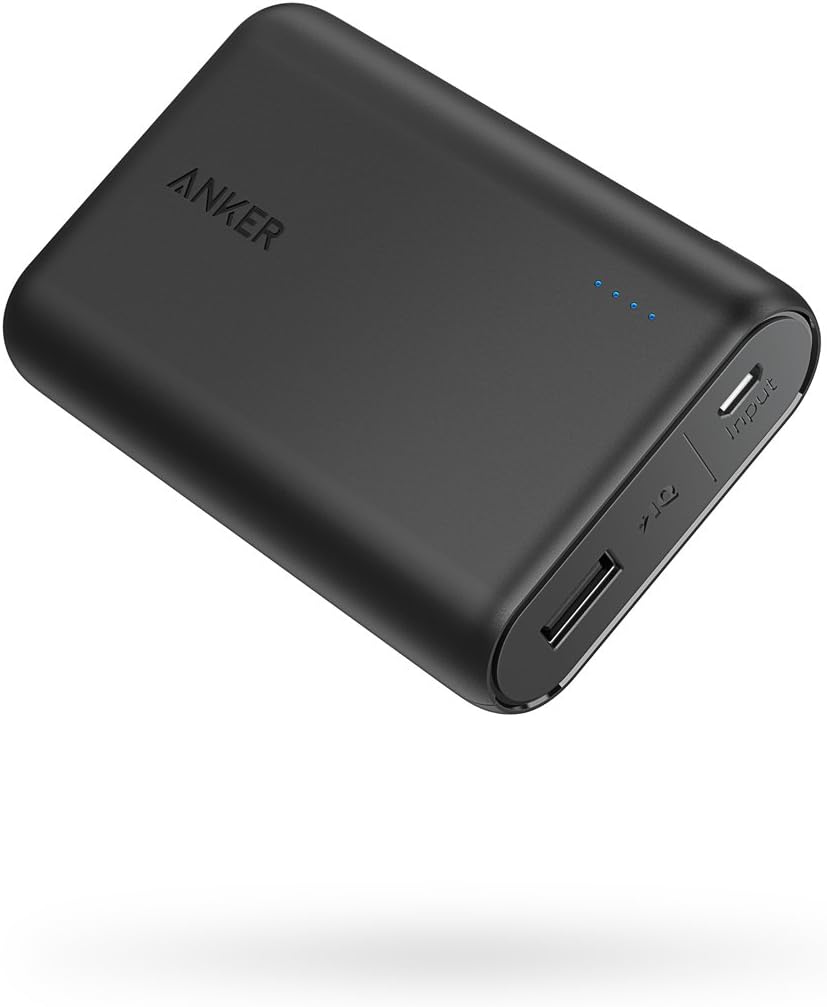
Anker PowerCore 10000 Portable Charger
$25.99
Why recommend: Extends the Flex 5's already-decent battery through back-to-back campus days when outlets are scarce.
Best for: Students with long campus days or unreliable access to power outlets.
Bottom Line
Ready to get the Lenovo Chromebook Flex 5? Check the latest price on Amazon.
🛒 Buy on AmazonAs an Amazon Associate we earn from qualifying purchases.
Frequently Asked Questions
Is the Lenovo Chromebook Flex 5 good for online classes?
Yes, for the majority of browser-based online classes. Google Meet, Google Classroom, Docs, and the web/PWA versions of Zoom and Teams all work, the 1080p touchscreen is sharper than most budget laptops, battery life covers a full day of lectures, and the convertible hinge plus USI stylus support make it genuinely good for handwritten notes. It's a poor fit only if your courses require Windows-only proctoring software or desktop applications like Adobe Creative Cloud or AutoCAD.
Can you use a Lenovo Chromebook Flex 5 for Zoom classes?
Yes. Zoom works on Chrome OS through its progressive web app and the browser client, including video, audio, screen sharing, and breakout rooms. The experience is close to the desktop app but not identical — some advanced features and settings live in different places. On the 8GB Core i3 configuration, a 1080p Zoom call runs smoothly alongside a document and several tabs; the 4GB version can stutter under that load.
Does the Lenovo Chromebook Flex 5 work with Respondus LockDown Browser?
No. Respondus LockDown Browser does not offer a Chrome OS client, and the same is generally true of major remote-proctoring services that require installing a monitoring agent. There is no workaround within Chrome OS itself. If your course requires proctored exams through these tools, you'll need access to a Windows or macOS machine for exam days, or confirmation from your school that a Chromebook is acceptable.
Which configuration of the Lenovo Chromebook Flex 5 should I buy for classes?
The 8GB RAM Core i3 configuration. The 4GB model is fine for a single video call and a few tabs but struggles once you add a PDF viewer and a dozen browser tabs, which is a normal online-class workload. Storage of 64GB is workable for cloud-first coursework; add a microSD card if you download lecture recordings or large files.
Is the Lenovo Chromebook Flex 5 good for taking notes with a stylus?
Yes, provided you buy a USI-certified stylus, which is sold separately. The touchscreen supports the USI standard, and with a pen you can handwrite in apps like Squid or Google Canvas and annotate PDFs in Kami or Xodo. Palm rejection is handled by the note app rather than the hardware, so it varies — good apps reject palms reliably, simple browser canvases less so.
What's better than the Lenovo Chromebook Flex 5 for online classes?
It depends on what's holding you back. If webcam quality bothers you, a laptop with a 1080p camera plus a headset may suit you better. If proctoring software is the issue, a budget Windows laptop is the correct answer, not a better Chromebook. If you want more performance and a newer long-term update window, newer Chromebook Plus models (including later Lenovo Flex 5i generations) offer faster chips, more RAM, and better cameras at a higher price.
How long will the Lenovo Chromebook Flex 5 keep getting updates?
Chrome OS devices receive automatic updates until a fixed Auto Update Expiration date tied to the model. Most Lenovo Chromebook Flex 5 units from 2020–2021 are supported into roughly 2029–2030. Check your exact model number against Google's Auto Update Expiration list before buying, especially if you're considering a used unit — this is the single most important spec for long-term value.
Do I need to buy accessories for the Lenovo Chromebook Flex 5 for online classes?
Not strictly, but three are high value: a USB headset (better audio and no echo), a microSD card (64GB fills quickly), and a USI stylus if you take handwritten notes. An external 1080p webcam is worth adding if you present on camera regularly, since the built-in 720p camera is the weakest part of the hardware.
Is the Lenovo Chromebook Flex 5 fast enough for Microsoft Teams and Office?
Teams runs through its web app on Chrome OS with minor feature limitations, and Word, Excel, and PowerPoint work through Microsoft 365 on the web. For essays, simple spreadsheets, and slide decks, that's fine. Advanced Excel features like macros, Power Query, and complex data models aren't available in the web version, which matters for finance and accounting coursework.
Can you install Windows apps on the Lenovo Chromebook Flex 5?
No. Chrome OS cannot install or run Windows or macOS applications. It supports Android apps from the Play Store and Linux applications through the built-in Crostini container, which covers some gaps (developers can install Linux tools, for example) but not Windows-only programs.
Is the Lenovo Chromebook Flex 5 good for coding classes?
For intro-level web development, yes — the Linux container supports Python, Node.js, and common editors, and Chrome OS is a reasonable development environment for browser-based work. It becomes limiting for courses that require Visual Studio, .NET, native iOS development, or heavy IDEs with large local toolchains.
How does the Lenovo Chromebook Flex 5 compare to a budget Windows laptop for online classes?
The Flex 5 wins on boot speed, maintenance, battery life, touchscreen and stylus support at its price, and it's generally more pleasant as a pure browser-and-notes machine. A budget Windows laptop wins on software compatibility — proctoring tools, desktop Office, Adobe apps, and major-specific software all work. The deciding question is almost always which software your courses require, not which hardware is faster.