Everything beginners need to choose their first gaming keyboard with confidence, no jargon or overwhelm.
Choosing your first gaming keyboard can feel scary with all the lights, switches, and tech terms thrown around. Beginners often worry about wasting money on something too complicated or not 'gamer-y' enough. But don't stress - a good starter keyboard is plug-and-play simple and fun right away.
Gaming keyboards look intimidating with RGB lights and 'mechanical switches,' but most beginners just need reliable keys that feel good for long sessions without a steep setup. This guide cuts through the noise, focusing on easy-to-use options that forgive mistakes like fat-finger presses.
We'll cover what matters, top Amazon picks across budgets, must-have add-ons, and pitfalls to skip. By the end, you'll confidently hit 'buy' and start gaming better tomorrow.
📋 In This Guide
• Why Beginners Struggle with Gaming Keyboards
• What to Look For (Key Features)
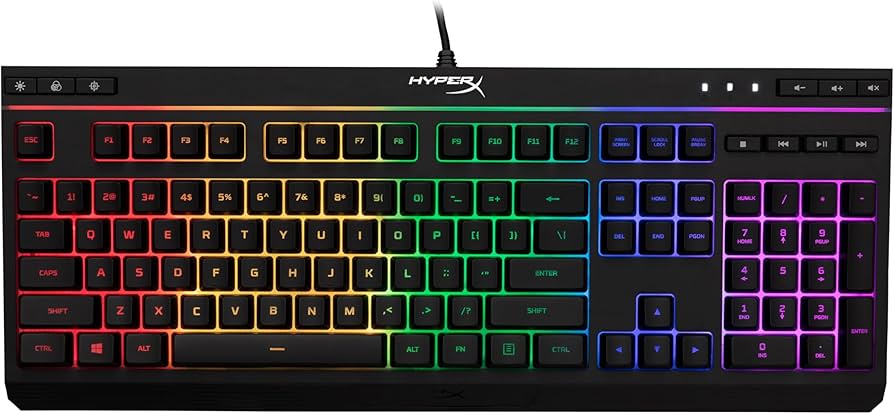
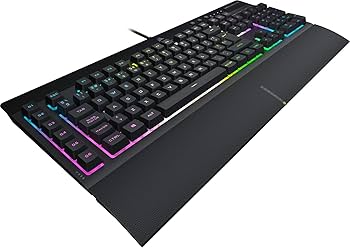
• Top 4 Beginner-Friendly Gaming Keyboards
• Essential Accessories for Beginners
• Common Beginner Mistakes to Avoid
• Your Progression Path
• FAQ & Learning Resources
😰 Why Beginners Struggle with Gaming Keyboards
Beginners dive into gaming keyboards overwhelmed by options: full-size vs compact, membrane vs mechanical, red vs blue switches. Forums like Reddit's r/MechanicalKeyboards are full of newbies frustrated by loud clacky boards or tiny layouts missing keys they need.
Fear of buyer's remorse is huge - 'Will it break? Is RGB worth it? Do I need 100 macros?' Many grab the cheapest Amazon option, then hate the mushy feel or ghosting (keys not registering in combos). Without guidance, they ignore basics like wrist comfort or easy software.
Real reviews show new gamers quit setups fast if keys feel off or setup takes hours. You don't need pro gear day one; this guide fixes that.
🔍 What to Look For: Key Beginner-Friendly Features
Focus on plug-and-play ease: keyboards that work out-of-box with Windows/Mac, no fiddly software required. Look for 'anti-ghosting' (all keys register together) and spill resistance - forgiving for sweaty sessions or soda spills.
Nice-to-haves: Soft RGB lighting (customizable, not blinding), quiet switches (linear 'reds' or membrane), and dedicated media keys. Skip hot-swappable or wireless for now - wired is reliable, cheaper.
Beginner-friendly means full-size layout (numpad included unless you hate it), comfy key feel that improves typing/gaming without practice, and good build that lasts 1-2 years before upgrading.
✅ Essential Features for Beginners
•Anti-ghosting/N-key rollover: All key combos work, no missed moves in games
•Spill-resistant: Survives accidents, key for clumsy beginners
•Plug-and-play USB: No drivers needed, starts instantly
•Adjustable RGB: Fun lights you can dim/turn off easily
•Media controls: Quick volume/mute without leaving game
Gaming keyboards are like regular ones but tougher for fast inputs, with lights and extras for immersion. Two main types: 'membrane' (rubbery, quiet, cheap - great starters) vs 'mechanical' (individual switches, clicky/tactile - better feel but louder/pricier).
Beginners do best with membrane or entry mechanical (linear red switches - smooth, no click). Full-size (104 keys) for spreadsheets/gaming; TKL (87 keys, no numpad) if desk space tight. Avoid 60% (super compact) until you know layouts.
Expect reliable 60WPM typing and precise inputs day one - no pro speeds needed. 'Beginner-friendly' = intuitive software (if any), durable plastic/metal frame, and features like onboard memory (saves settings). Marketing like 'optical switches' = overkill; stick to proven basics.
Test in-store if possible, or check Amazon reviews for 'easy setup.' Realistic: You'll game better immediately vs laptop keys.
🔧 Essential Accessories for Beginners
HyperX Wrist Rest for Alloy Series
⚠️ Essential
$19.99
When to buy:
Day one
Prevents wrist strain during marathon sessions - beginners fatigue fast without it. Matches gaming keyboards perfectly.
Ask: Desk space? (Full-size yes, compact no). Noise okay? (Membrane quiet). Budget? Game types (FPS needs fast keys). Start here: Under $50 membrane for tryout; $50-100 mechanical sweet spot.
Budget framework: Entry for dipping toes (may upgrade fast); sweet spot lasts 1+ year with growth (custom lights/macros). Premium if serious (better software). Future: Pick with software for remapping keys as skills grow.
Red flags: No reviews on gaming, heavy (hard to move), wireless (lag/battery hassle for newbies). Match your games - MOBAs love media keys; shooters want responsive.
💰 Budget Guide for Beginners
150+
Advanced entry: Customizable/hot-swap, for committed newbies planning mods.
50 - $100
Sweet spot: Best for most beginners - entry mechanical or pro membrane, great feel/value, room to grow.
100 - $150
Premium beginner: Top switches/software, durable, won't outgrow for 2 years.
Under $ - $50
Entry level: Basic membrane keyboards to test gaming without commitment, may feel basic after months.
⚠️ Common Beginner Mistakes to Avoid
Newbies chase 'mechanical' hype, buy loud clicky boards, then get complaints. Or snag $20 no-name that ghosts in CS:GO. Avoid by sticking to reviewed brands.
Many skip accessories like mats, leading to wobbly setups/missed shots. Instead, budget 20% extra for rest/mat. Experienced gamers say: 'Start simple, upgrade happy.'
Don't mod day one - clean first, remap basics. Real fix: Read 50+ reviews for 'beginner' keywords.
×Buying too cheap (<$30) - mushy keys frustrate fast
×Grabbing 60% layout without numpad experience
×Ignoring switch type - loud blues annoy everyone
×Skipping wrist rest - hand pain kills fun
×Overbuying wireless - battery/delay issues
×No anti-ghosting - game combos fail
×Forgetting software compatibility
📈 Your Progression Path: Beginner to Intermediate
Week 1: Plug in, play default - learn WASD binds. Month 1: Install software, set macros for abilities. Practice aim trainers.
Outgrow when: Macros feel limited, want custom feel, compact layout. Upgrade to hotswap (~6 months) for switch swaps.
Intermediate: TKL/hotswap boards, 90%+ accuracy. Stay beginner 3-12 months; build via free tools like Aim Lab.
📚 Learning Resources for Beginners
📖Build Your Own Mechanical Keyboard (ASIN: B08D5V7W8X) - Step-by-step basics to advanced